# Quickstart (/docs/getting-started/quickstart)
In this quickstart you make a paid test order with five API calls from your terminal. You need a Comecero account ([sign up](https://signin.comecero.com/register) if you have none) and `curl`. Everything happens in test mode, so no money moves.
## Get a secret test token [#get-a-secret-test-token]
1. Sign in to the dashboard and turn on **Test** with the Live/Test switch in the header.
2. Go to **Developer > API Tokens** and click **Create Token**.
3. Choose **Secret**, tick **Full Access** under Permissions, and create the token.
4. Copy the token. It starts with `secret.test.` and is shown only once.
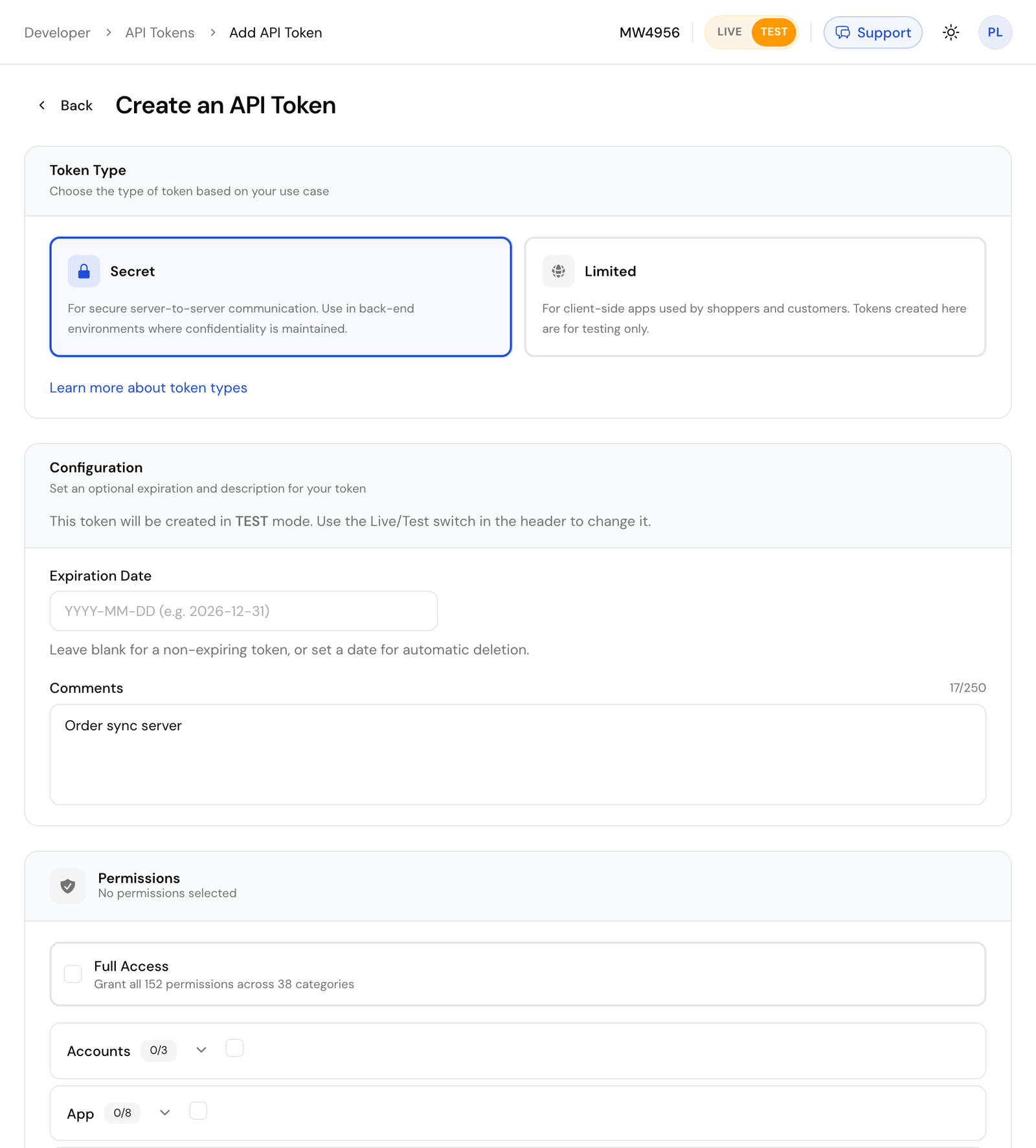
Save it in your shell so the next commands can use it:
```bash
export COMECERO_TEST_TOKEN="secret.test.your-token-here"
```
A secret token belongs on your server. Never put one in a web page or an app.
## Create a product [#create-a-product]
A cart can only hold products, so start with one. `name`, `type` and at least one price in `prices` are required. A new product is inactive, so send `active: true` to put it on sale.
```bash title="Request"
curl https://api.comecero.com/api/v1/products \
-H "Authorization: Bearer $COMECERO_TEST_TOKEN" \
-H "Content-Type: application/json" \
-d '{
"product_id": "hello-ebook",
"name": "Hello e-book",
"type": "digital",
"active": true,
"prices": [{ "price": 9.99, "currency": "USD" }]
}'
```
The response is the new product (trimmed here). In test mode, `.test` is added to the id you chose. A `product_id` can be used only once, so pick another one, or leave it out, if you run this again.
```json
{
"object": "product",
"product_id": "hello-ebook.test",
"test": true,
"name": "Hello e-book",
"type": "digital",
"price": 9.99,
"currency": "USD",
"active": true
}
```
All fields: [Create a product](/api/products/create-product).
## Create a cart [#create-a-cart]
Put the product in a cart with a customer. Use the `product_id` from the last response.
```bash title="Request"
curl https://api.comecero.com/api/v1/carts \
-H "Authorization: Bearer $COMECERO_TEST_TOKEN" \
-H "Content-Type: application/json" \
-d '{
"currency": "USD",
"items": [{ "product_id": "hello-ebook.test", "quantity": 1 }],
"customer": {
"name": "John Doe",
"email": "john@example.com",
"billing_address": { "country": "US", "postal_code": "94101" }
}
}'
```
Comecero works out the subtotal, tax and total. Note the `cart_id` and the `order_id` the cart will get when it is paid:
```json
{
"object": "cart",
"cart_id": "0091307952465CafhFSTa1",
"order_id": "8352-CSGYX-348",
"test": true,
"open": true,
"currency": "USD",
"subtotal": 9.99,
"tax": 0,
"total": 9.99
}
```
Your tax may differ, depending on your tax settings. All fields: [Create a cart](/api/carts/create-cart).
## Pay for the cart [#pay-for-the-cart]
Send a card to the cart's payments. The amount and currency come from the cart, so you send only the payment method. `4444555566661111` is a test card that always succeeds.
```bash title="Request"
curl https://api.comecero.com/api/v1/carts/0091307952465CafhFSTa1/payments \
-H "Authorization: Bearer $COMECERO_TEST_TOKEN" \
-H "Content-Type: application/json" \
-d '{
"payment_method": {
"type": "credit_card",
"data": {
"number": "4444555566661111",
"exp_month": 12,
"exp_year": 2030,
"cvv": "123"
}
}
}'
```
The payment comes back with status `201`. The cart is now closed and the order exists:
```json
{
"object": "payment",
"payment_id": "0090460891496PyrYzd9DC",
"success": true,
"status": "completed",
"test": true,
"currency": "USD",
"total": 9.99,
"order": "https://api.comecero.com/api/v1/orders/8352-CSGYX-348"
}
```
`status` is `pending` instead of `completed` when your fulfillment settings only authorize payments. A declined card returns `402` with the failed payment in `error.meta.payment`. All fields: [Pay for a cart](/api/carts/create-cart-payment).
## Fetch the order [#fetch-the-order]
Read the order with the `order_id` from the cart:
```bash title="Request"
curl https://api.comecero.com/api/v1/orders/8352-CSGYX-348 \
-H "Authorization: Bearer $COMECERO_TEST_TOKEN"
```
```json title="Response"
{
"object": "order",
"order_id": "8352-CSGYX-348",
"test": true,
"payment_status": "completed",
"currency": "USD",
"total": 9.99,
"items": [
{
"object": "order_item",
"product_id": "hello-ebook.test",
"name": "Hello e-book",
"quantity": 1
}
]
}
```
All fields: [Get an order](/api/orders/get-order). You can also see the order in the dashboard under **Sales > Orders**, with test mode on.
## What happened [#what-happened]
- The cart turned into an order when the payment succeeded. There is no call that creates an order directly.
- Comecero sent a receipt email to the customer and fired events such as [`order:created`](/api/webhooks/order-created). Subscribe to them with [webhooks](/api/webhooks) to update your own systems.
- Everything you made is test data. A live token cannot see it, and it never reaches a real bank.
## Next steps [#next-steps]
More test cards, including declines, and the steps to go live.
Take the same payment from a browser with a limited token.
Send an empty body to refund the order in full.
Secret, trusted and limited tokens, and when to use each.