# Webhooks (/docs/guides/webhooks)
This guide shows you how to have Comecero tell your server when something happens, such as a new order or a completed payment. You create a webhook subscription, check that each delivery really comes from Comecero, answer it fast, and resend any delivery your server missed.
In the API a webhook subscription is called an **event subscription**, and each delivery is an **event**.
## Create a webhook subscription [#create-a-webhook-subscription]
A subscription sends one event type to one destination. Make one subscription for each event type you need.
### In the dashboard [#in-the-dashboard]
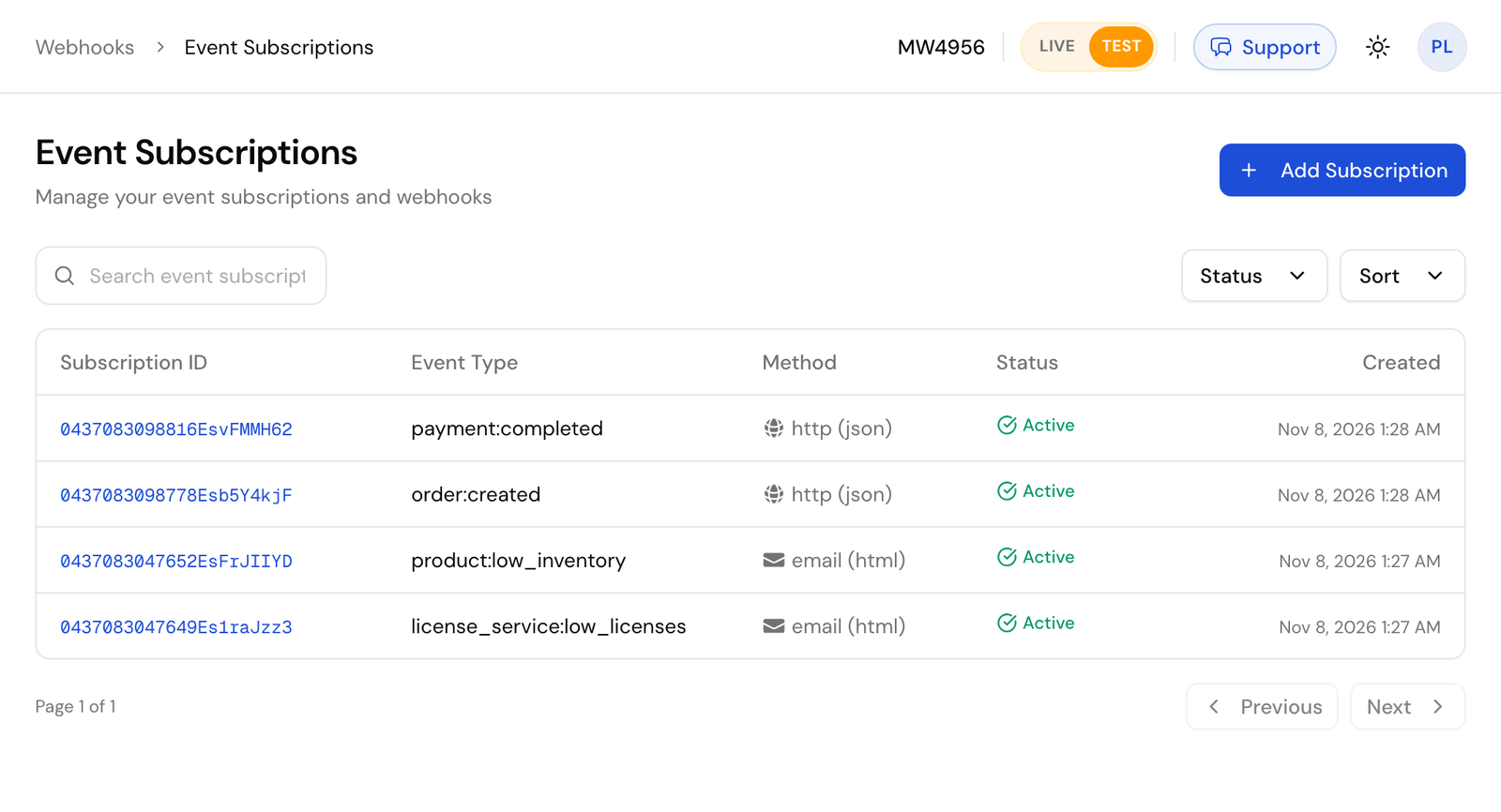
Go to **Webhooks > Event Subscriptions** and click **Add Subscription**.
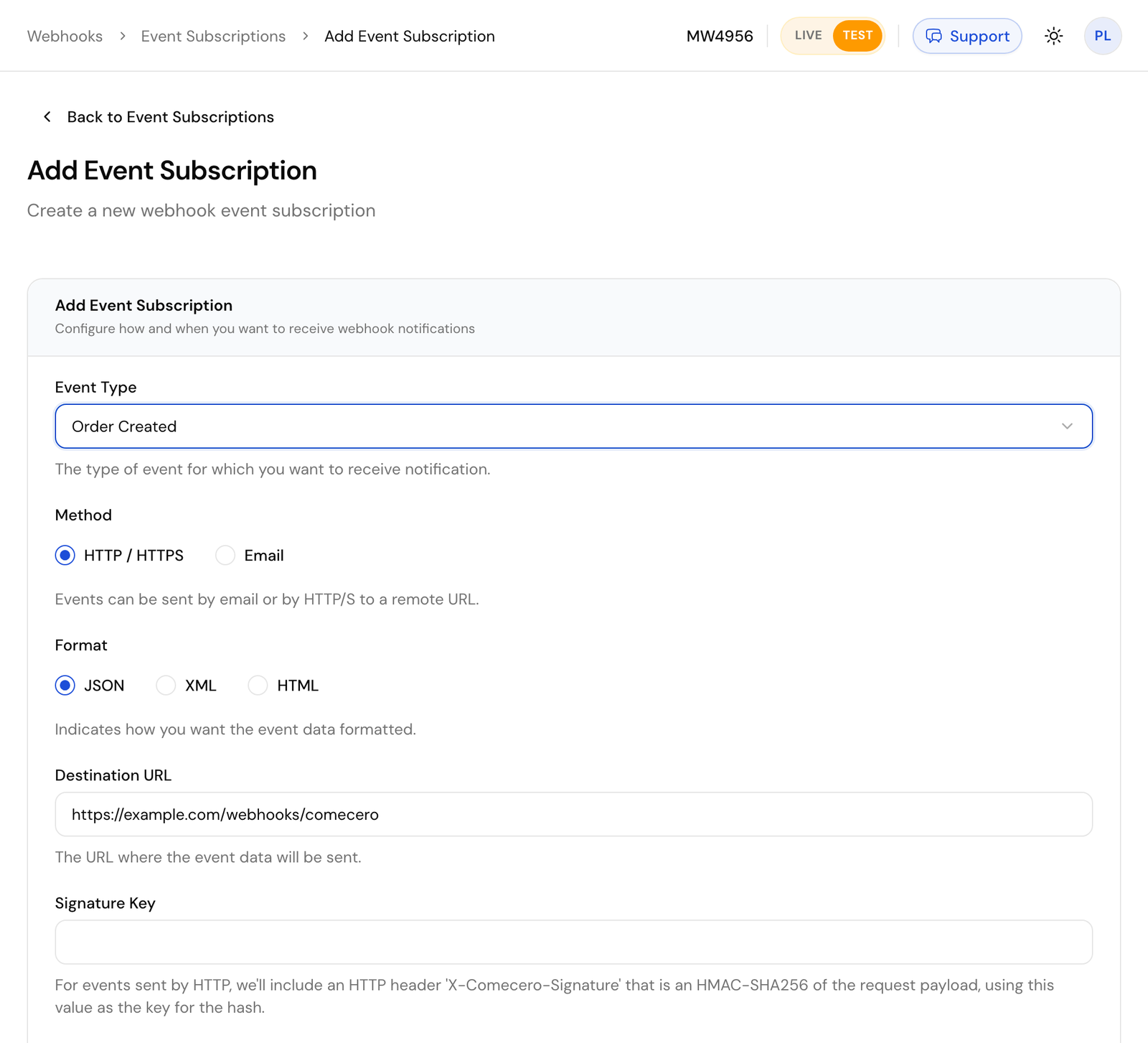
Pick the **Event Type**, choose **HTTP / HTTPS** and **JSON**, enter your **Destination URL** and set **Set Active?** to **Yes**. Leave **Signature Key** empty to sign with your account's key.
### With the API [#with-the-api]
Call [Create an event subscription](/api/event-subscriptions/create-event-subscription) with a secret or trusted token.
```bash title="Request"
curl https://api.comecero.com/api/v1/event_subscriptions \
-H "Authorization: Bearer $COMECERO_TEST_TOKEN" \
-H "Content-Type: application/json" \
-d '{
"event_type": "order:created",
"active": true,
"method": "http",
"format": "json",
"destination": "https://example.com/webhooks/comecero",
"expand": "customer"
}'
```
Send `"active": true`. A new subscription is inactive by default and sends nothing until you turn it on.
A few rules:
- The destination must be a public URL. Comecero does not send to `localhost` or a private network, so use a tunnel while you develop.
- A subscription receives only events of its own mode. Test subscriptions get test events. Create your subscriptions again in live mode when you go live.
- `expand`, `show` and `hide` shape the object in `data`, the same way they shape a GET. For example `expand: "customer"` sends the full customer inside the order instead of its URL. See [Expanding objects](/docs/basic-concepts/expanding-objects).
- `environment_variables` are name and value pairs that come back in every event, for example to tell your endpoint which store the event is for.
- You can also send email (`method: email`), to up to 6 addresses. The `html` format sends `data` as a readable table.
## What a delivery looks like [#what-a-delivery-looks-like]
Comecero sends an HTTP `POST` with `Content-Type: application/json` and the user agent `Comecero-Event (+https://comecero.com)`. The body is an [event](/api/events/get-event) with the object in `data`, shaped like a GET of that object at the time of the event.
```json
{
"object": "event",
"url": "https://api.comecero.com/api/v1/events/1102611073847EVt7Kq2Za",
"event_id": "1102611073847EVt7Kq2Za",
"test": true,
"account_id": "AB1234",
"type": "order:created",
"event_subscription": "https://api.comecero.com/api/v1/event_subscriptions/1102610913420ES4f9QmLp",
"fingerprint": "k2P9wQ7xR4vT1nY8",
"status": "queued",
"date_created": "2026-11-07T14:32:10Z",
"date_modified": "2026-11-07T14:32:10Z",
"environment_variables": { "store": "main" },
"data": {
"object": "order",
"order_id": "7393-GMRFY-954",
"payment_status": "completed",
"currency": "USD",
"total": 49.95
}
}
```
- `event_id` is the id of this delivery. It stays the same when the delivery is retried.
- `fingerprint` is the id of the thing that happened. Two subscriptions to the same event get different `event_id`s and the same `fingerprint`.
- Dates use the subscription's `timezone`, or your account's time zone.
[Download a full sample `order:created` delivery](/resources/event-notification-sample.json).
## Check the signature [#check-the-signature]
Every delivery carries an `X-Comecero-Signature` header: the HMAC-SHA256 of the raw request body, keyed with the signature key, as 64 lowercase hex characters. The key is the subscription's `signature_key`, or your account's key under **Settings > Technical** when the subscription has none. Every account gets one when it is made.
To check it:
1. Read the body as raw bytes, before any JSON parsing.
2. Compute the HMAC-SHA256 of those bytes with your signature key.
3. Compare it with the header in constant time. Reject the delivery when they differ.
```js
// npm install express
import crypto from 'node:crypto';
import express from 'express';
const app = express();
const signatureKey = process.env.COMECERO_SIGNATURE_KEY;
function isFromComecero(rawBody, signature) {
const expected = crypto.createHmac('sha256', signatureKey).update(rawBody).digest('hex');
const received = Buffer.from(signature ?? '', 'utf8');
return received.length === expected.length && crypto.timingSafeEqual(received, Buffer.from(expected, 'utf8'));
}
// express.raw keeps the body as a Buffer, exactly as it was sent.
app.post('/webhooks/comecero', express.raw({ type: '*/*' }), (req, res) => {
if (!isFromComecero(req.body, req.get('x-comecero-signature'))) {
return res.sendStatus(401);
}
const event = JSON.parse(req.body.toString('utf8'));
res.sendStatus(200); // answer first, then do the work
handleEvent(event).catch(console.error);
});
async function handleEvent(event) {
// Skip repeats, then act on event.type and event.data.
}
app.listen(3000);
```
```python
# pip install flask
import hashlib
import hmac
import json
import os
from flask import Flask, request
app = Flask(__name__)
SIGNATURE_KEY = os.environ["COMECERO_SIGNATURE_KEY"].encode("utf-8")
def is_from_comecero(raw_body: bytes, signature: str) -> bool:
expected = hmac.new(SIGNATURE_KEY, raw_body, hashlib.sha256).hexdigest()
return hmac.compare_digest(expected, signature or "")
@app.post("/webhooks/comecero")
def comecero_webhook():
raw_body = request.get_data() # the raw bytes, before parsing
if not is_from_comecero(raw_body, request.headers.get("X-Comecero-Signature")):
return "", 401
event = json.loads(raw_body)
queue_event(event) # hand the work to a queue and answer at once
return "", 200
def queue_event(event):
# Skip repeats, then act on event["type"] and event["data"].
pass
```
Do not compute the signature over JSON you parsed and wrote back out: the bytes change and the signature no longer matches.
The signature has no timestamp, so a recorded delivery could be sent again. Skipping `event_id`s you already handled (below) guards against that. If you cannot check signatures at all, treat each event only as a hint: get the object by its id from the API before you act on it.
You can also add HTTP Basic authorization (`http_authorization_username` and `http_authorization_password`) or a custom header (`custom_header_name` and `custom_header_value`) to each delivery, as a second check.
## Answer fast [#answer-fast]
Answer with any `2xx` status within 60 seconds. The body of your answer is ignored. Anything else counts as a failure: another status (redirects are not followed), a timeout or no connection.
Do the slow work after you answer: put the event on a queue, answer `200`, then process it.
## Retries and the events log [#retries-and-the-events-log]
After a failure Comecero retries on a growing schedule: three times 2 minutes apart, then every 15 minutes, every hour, every 2 hours, every 4 hours and every 8 hours. That is 23 attempts over about 56 hours. Then the event is `failed` and is not tried again by itself.
To find deliveries that did not get through, go to **Webhooks > Events** in the dashboard, or [list events](/api/events/list-events) with `status=retry` or `status=failed`. With no `status`, the list shows only delivered events. Add `debug=true` to see why the last attempt failed.
To send an event again now, open it in the dashboard and click **Retry Delivery** (or **Resend Event** for one that was delivered) or call [Retry an event](/api/events/retry-event). It goes to the subscription's current destination with the same `event_id` and `data`. Events are kept for 30 days after their last change, and for 7 days once delivered or in test mode.
## Skip repeats [#skip-repeats]
A delivery can arrive more than once, and events can arrive out of order. Store each `event_id` you handle and skip one you have seen. Before you overwrite your own data, compare `date_created`, or get the object fresh from the API, so an older event does not undo a newer one.
## Send a test event [#send-a-test-event]
Open a subscription in the dashboard and click **Send Test**. Pick a test template and Comecero sends one sample event to the destination at once and shows whether it got through. Templates are under **Webhooks > Event Test Templates**.
With the API, call [Send a test event](/api/event-subscriptions/test-event-subscription) with the subscription id and a template id. The answer says whether the attempt worked:
```json
{
"success": false,
"error": "There was a problem contacting the remote server: HTTP Status Code: 404, Response Content (preview of first 500 characters): Not Found",
"event_id": "1102611204410EVn3Rk8Wd",
"event_type": "order:created"
}
```
The test event is signed and shaped like a real one, and it is sent even when the subscription is inactive. It is not saved, so it is not in the events log and is never retried.
## The events [#the-events]
Each event has its own page with the exact `data` it sends.
**Orders and carts**
- [`order:created`](/api/webhooks/order-created): a cart or invoice was paid and its order made. The usual event for starting fulfillment. Check `payment_status`: an authorized payment also makes an order.
- [`order:payment_completed`](/api/webhooks/order-payment-completed): no payment on the order is pending any more, so the money is taken.
- [`order:fulfilled`](/api/webhooks/order-fulfilled): every item on the order is fulfilled.
- [`order:licenses_assigned`](/api/webhooks/order-licenses-assigned): every item that needs a license key has one.
- [`cart:payment_completed`](/api/webhooks/cart-payment-completed): the completed payments on the order made from a cart cover its total and none is pending.
**Payments and refunds**
- [`payment:created_success`](/api/webhooks/payment-created-success) and [`payment:created_failure`](/api/webhooks/payment-created-failure): a payment attempt succeeded or failed.
- [`payment:completed`](/api/webhooks/payment-completed): a payment was captured, at once or later.
- [`payment:captured_success`](/api/webhooks/payment-captured-success), [`payment:captured_failure`](/api/webhooks/payment-captured-failure) and [`payment:voided`](/api/webhooks/payment-voided): an authorization was captured, failed to capture, or was voided.
- [`refund:created_success`](/api/webhooks/refund-created-success), [`refund:created_failure`](/api/webhooks/refund-created-failure) and [`refund:deleted`](/api/webhooks/refund-deleted).
**Invoices**
- [`invoice:created`](/api/webhooks/invoice-created), [`invoice:published`](/api/webhooks/invoice-published), [`invoice:paid`](/api/webhooks/invoice-paid) and [`invoice:payment_completed`](/api/webhooks/invoice-payment-completed).
**Subscriptions**
- [`subscription:created`](/api/webhooks/subscription-created), [`subscription:modified`](/api/webhooks/subscription-modified), [`subscription:converted`](/api/webhooks/subscription-converted) and [`subscription:completed`](/api/webhooks/subscription-completed).
- [`subscription:renewal_success`](/api/webhooks/subscription-renewal-success) and [`subscription:renewal_failure`](/api/webhooks/subscription-renewal-failure).
- [`subscription:cancellation_scheduled`](/api/webhooks/subscription-cancellation-scheduled), [`subscription:cancellation_unscheduled`](/api/webhooks/subscription-cancellation-unscheduled) and [`subscription:cancelled`](/api/webhooks/subscription-cancelled).
- [`subscription_item:added`](/api/webhooks/subscription-item-added), [`subscription_item:modified`](/api/webhooks/subscription-item-modified), [`subscription_item:cancellation_scheduled`](/api/webhooks/subscription-item-cancellation-scheduled), [`subscription_item:cancellation_unscheduled`](/api/webhooks/subscription-item-cancellation-unscheduled) and [`subscription_item:cancelled`](/api/webhooks/subscription-item-cancelled).
**Shipments**
- [`shipment:created`](/api/webhooks/shipment-created), [`shipment:modified`](/api/webhooks/shipment-modified) and [`shipment:deleted`](/api/webhooks/shipment-deleted).
**Catalog and account**
- [`product:created`](/api/webhooks/product-created), [`product:modified`](/api/webhooks/product-modified), [`product:deleted`](/api/webhooks/product-deleted) and [`product:low_inventory`](/api/webhooks/product-low-inventory).
- [`license_service:low_licenses`](/api/webhooks/license-service-low-licenses).
- [`gateway:created`](/api/webhooks/gateway-created) and [`gateway:modified`](/api/webhooks/gateway-modified).
- [`event_subscription:created`](/api/webhooks/event-subscription-created), [`event_subscription:modified`](/api/webhooks/event-subscription-modified) and [`event_subscription:deleted`](/api/webhooks/event-subscription-deleted). The first two carry the signature key, so treat them as secret.
- [`account:modified`](/api/webhooks/account-modified) (live mode only), [`user:created`](/api/webhooks/user-created) and [`user:modified`](/api/webhooks/user-modified).