# API endpoint and requests (/docs/basic-concepts/api-endpoint)
Every call to the Comecero API goes to one base URL, over HTTPS, with JSON in and JSON out. This page shows what a request looks like and what the API expects from it.
## Base URL [#base-url]
```text
https://api.comecero.com/api/v1
```
Add the resource path to it, for example `https://api.comecero.com/api/v1/products`. There is one base URL for test and live. The token you send decides which data you see (see [Authentication](/docs/basic-concepts/authentication)).
## HTTPS only [#https-only]
The API only answers over HTTPS. A call over plain `http://` is refused with `403` (code `tls_required`). The API does not redirect you to HTTPS, so fix the URL in your code.
```json
{
"error": {
"type": "forbidden",
"code": "tls_required",
"message": "The connection requires SSL/TLS. Try your request again using https:// as the protocol in the URL.",
"reference": "Vx4OVmb",
"status": 403,
"meta": null
}
}
```
## A request [#a-request]
Each request has a token in the `Authorization` header. A request with a body also sends `Content-Type: application/json`.
```bash
curl https://api.comecero.com/api/v1/customers \
-H "Authorization: Bearer $COMECERO_TEST_TOKEN" \
-H "Content-Type: application/json" \
-d '{ "name": "John Doe", "email": "john@example.com" }'
```
```js
const response = await fetch('https://api.comecero.com/api/v1/customers', {
method: 'POST',
headers: {
Authorization: `Bearer ${process.env.COMECERO_TEST_TOKEN}`,
'Content-Type': 'application/json',
},
body: JSON.stringify({ name: 'John Doe', email: 'john@example.com' }),
});
const customer = await response.json();
```
See [Create a customer](/api/customers/create-customer) for every field.
## Methods [#methods]
| Method | What it does |
| --- | --- |
| `GET` | Reads an object or a list. |
| `POST` | Creates an object, or updates one. Updates send only the fields you change (see [Partial updates](/docs/basic-concepts/partial-updates)). |
| `DELETE` | Deletes an object. |
| `PUT` | Used only to replace a role, see [Replace a role](/api/roles/update-role). |
## JSON in, JSON out [#json-in-json-out]
- Request bodies are JSON. Send `Content-Type: application/json`.
- The two upload endpoints are the only exception: [Create a file](/api/files/create-file) and [Create an image](/api/images/create-image) take `multipart/form-data`.
- Every response body is JSON, errors included (see [Errors](/docs/basic-concepts/error-handling)).
- A body that is not valid JSON is refused with `400` (code `invalid_syntax`).
## Objects and URLs [#objects-and-urls]
Every object in a response has an `object` field that names its type (`cart`, `order`, `payment`) and a `url` field with its full address in the API. Links to related objects are URLs too, which you can follow or [expand](/docs/basic-concepts/expanding-objects).
```json
{
"object": "order",
"url": "https://api.comecero.com/api/v1/orders/6622-NXKHE-858",
"order_id": "6622-NXKHE-858",
"customer": "https://api.comecero.com/api/v1/customers/0142130616328Cu6Vsk6M4"
}
```
A call that creates an object answers `201 Created` with the new object in the body.
## Next steps [#next-steps]
# API versioning (/docs/basic-concepts/api-versioning)
The API version is part of the URL, and version 1 is the only one. This page explains what may change inside version 1 and how to write code that is not surprised by it.
## The version in the URL [#the-version-in-the-url]
```text
https://api.comecero.com/api/v1
```
`v1` is the major version. There are no minor version numbers in the URL or in headers: every call to `v1` uses the latest release of version 1.
## Changes that can happen at any time [#changes-that-can-happen-at-any-time]
These changes keep old code working, so they can ship without notice:
- New endpoints and new resources.
- New fields on existing objects, including inside child objects such as `formatted`.
- New optional query parameters and filters.
- New values for fields that list types or statuses, and new error codes.
- Fields appearing in a different order in a response.
- A change in the length or format of the IDs Comecero creates.
- Bug fixes, where the API did not behave as documented.
## Changes that need a new version [#changes-that-need-a-new-version]
These would break existing code, so they only come in a new major version, such as `v2`:
- Removing an endpoint or a resource.
- Removing or renaming a field.
- Changing the format of key values such as dates and times.
- Changing what an endpoint does in a way that conflicts with how it worked before.
## Write code that keeps working [#write-code-that-keeps-working]
- **Ignore fields you do not know.** Read the fields you need and skip the rest. Do not fail on extra fields.
- **Keep a fallback for every enum.** A `status` or `type` can gain a new value. Treat an unknown value as "other" rather than crashing.
- **Keep a fallback for every error code.** Branch on the HTTP status first, then on `code` (see [Errors](/docs/basic-concepts/error-handling)).
- **Treat IDs as opaque strings.** Do not check their length or pattern, and store them in a text column with room to grow.
- **Do not depend on field order** in JSON.
## Next steps [#next-steps]
# Authentication (/docs/basic-concepts/authentication)
Every API call carries a token. After reading this page you can create a secret token for your server, get a limited token for a shopper's browser, give a token only the permissions it needs and switch between test and live data.
## Send the token [#send-the-token]
Put the token in the `Authorization` header with the word `Bearer` in front of it.
```bash title="Request"
curl https://api.comecero.com/api/v1/products \
-H "Authorization: Bearer $COMECERO_TEST_TOKEN"
```
A missing, expired or unknown token gets `401` (code `invalid_token`). A valid token that may not do what you asked gets `403` (code `insufficient_permissions`).
## The three token types [#the-three-token-types]
| Type | Where it runs | Who gets it | Lifetime |
| --- | --- | --- | --- |
| Secret | Your server only | You, from the dashboard or the API | Until you delete it, or until the expiry date you set |
| Trusted | A browser, in a tool for signed-in staff | A dashboard user when they sign in | 2 hours from its last use |
| Limited | A shopper's browser | Anyone, without a token | 2 hours at first, longer as it is used |
A token starts with its type and its mode, for example `secret.live.` or `limited.test.`, so you can tell them apart at a glance. There is no "public" or "private" key: these three are the only tokens you use.
### Secret tokens [#secret-tokens]
A secret token is for your server. It can do anything its permissions allow, across your whole account. Keep it in an environment variable or a secrets store.
Never put a secret token in a browser, a mobile app or a public repository. Anyone who has it can act as your server. If one leaks, delete it at once and make a new one.
A secret token never expires unless you give it an `expires` date. Secret tokens may also send `user_ip_address` and `user_agent` in the query string, to pass on the shopper's details when your server calls the API for them.
### Trusted tokens [#trusted-tokens]
A trusted token belongs to a dashboard user. The user gets one when they sign in at the Comecero sign-in page, and the dashboard uses it in the browser. It has the same permissions as that user, so to change what a trusted token can do, change the user's roles ([Update a user](/api/users/update-user)).
You cannot create a trusted token with the API. A trusted token lasts 2 hours from its last use, so it stays alive while the user keeps working. It may set prices on carts and invoices, which a limited token may not.
If you build your own tool for your staff, it signs users in through OAuth 2.0 (implicit grant) and receives the trusted token in the URL fragment as `access_token`. List the addresses your tool may be sent back to in `oauth_redirect_uris` ([Update technical settings](/api/settings/update-technical-settings)).
### Limited tokens [#limited-tokens]
A limited token is for one shopper's browser. It works like a session: it can read your public catalog, and it can change only the carts, payments and other objects it created itself. When the shopper pays, the token can also read the order, invoices and subscriptions that came from that payment.
A limited token may not send prices (`reference_price` and `reference_currency` on a cart item get `403`). Prices come from your products.
Give each shopper their own limited token. Do not share one token between shoppers: a token tied to too many carts and customers is refused with `422` (code `binding_limit_exceeded`).
## Create a secret token in the dashboard [#create-a-secret-token-in-the-dashboard]
### Open API Tokens [#open-api-tokens]
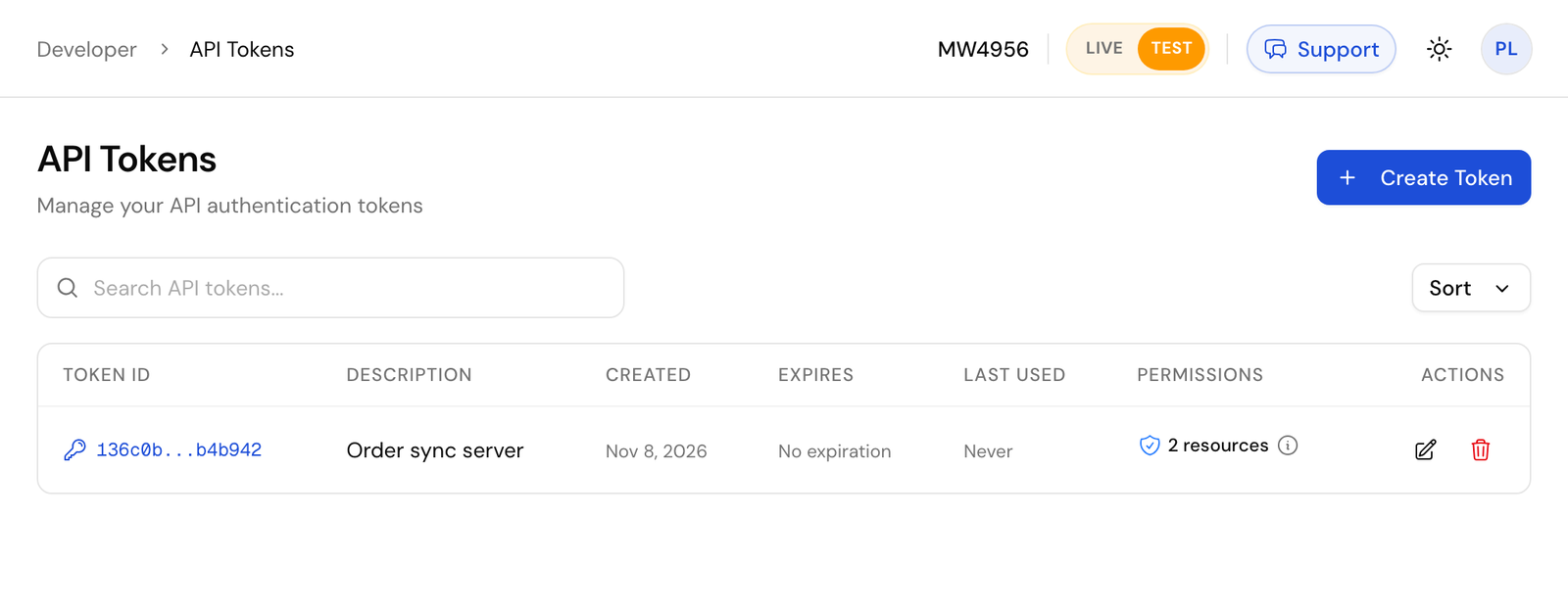
In the dashboard, go to **Developer > API Tokens** and click **Create Token**.
### Choose the mode [#choose-the-mode]
The token is made in the mode the dashboard is in. Use the **Live/Test** switch in the header to pick test before you start. Make test tokens while you build.
### Fill in the form [#fill-in-the-form]
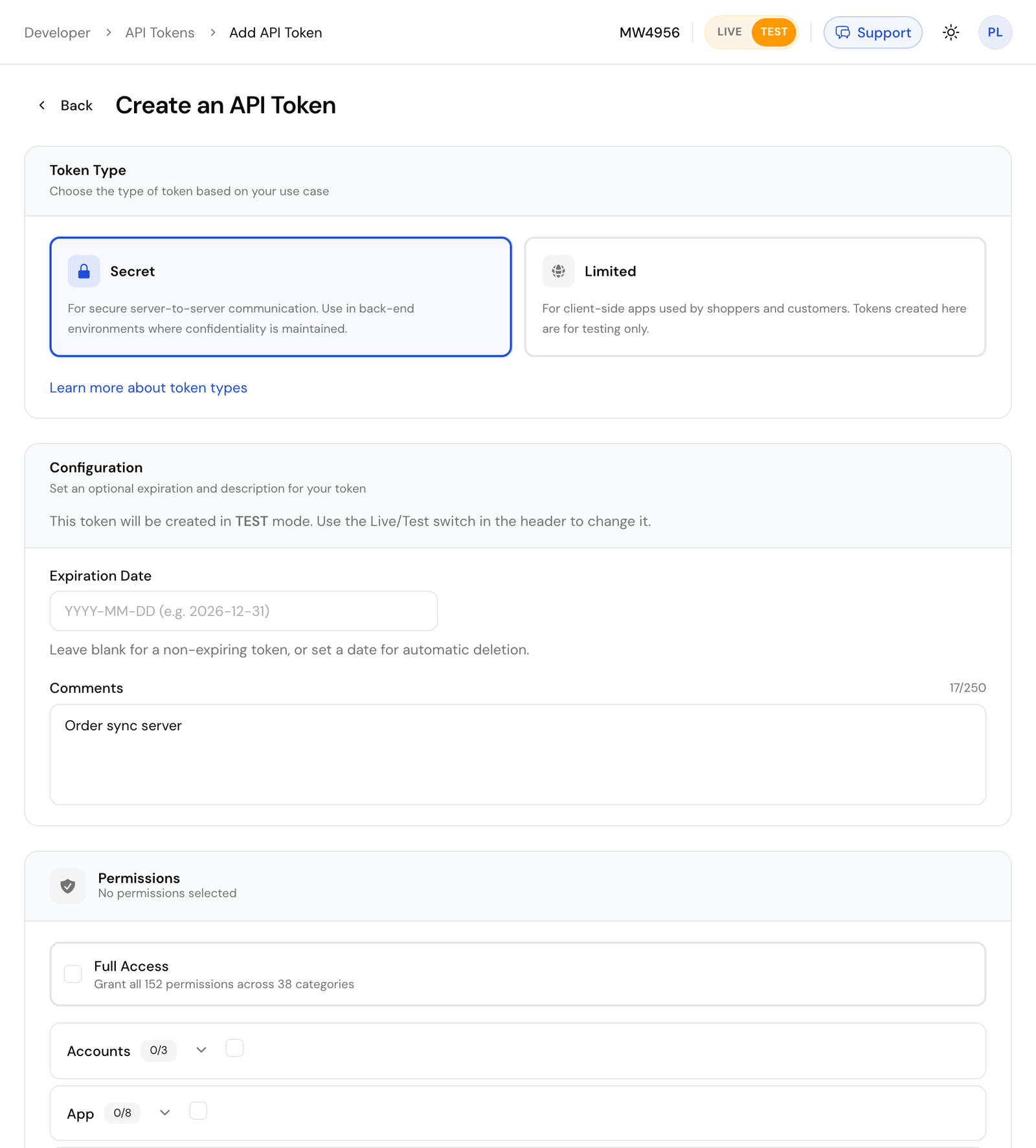
Choose **Secret** as the token type. Under **Configuration**, set an optional **Expiration Date** and a **Comments** note that says what the token is for. Under **Permissions**, tick only what your server needs, or **Full Access** for every permission.
### Copy the token [#copy-the-token]
Click **Create Token**. The full token is shown once, on the **API Token Created** screen. Copy it into your server's secrets now. After this page you only see a masked copy, such as `secret.test.Hq7...4c1e`.
You can also create one with the API: [Create a secret token](/api/auths/create-secret-auth). The token you call with must hold every permission you give the new one.
```bash title="Request"
curl -X POST "https://api.comecero.com/api/v1/auths/secret?test=true" \
-H "Authorization: Bearer $COMECERO_TEST_TOKEN" \
-H "Content-Type: application/json" \
-d '{
"comments": "Order sync server",
"permissions": [
{ "resource": "orders", "methods": ["read"], "allow": true }
]
}'
```
```json title="Response"
{
"object": "auth",
"type": "secret",
"test": true,
"token": "secret.test.Hq7Zp2LkQ8rT1vWm3XyB6nCd9FgJ0sAe5uIo4hKl7Ec.1793887012.4b9e2d1c4e",
"expires": null,
"comments": "Order sync server"
}
```
## Get a limited token in the browser [#get-a-limited-token-in-the-browser]
A shopper's browser asks for its own limited token. Call [Create a limited token](/api/auths/create-limited-auth) with your account ID in the query string and no `Authorization` header.
```js
async function getLimitedToken() {
const saved = localStorage.getItem('comecero_token');
if (saved) return saved;
const response = await fetch(
'https://api.comecero.com/api/v1/auths/limited?account_id=AB1234',
{ method: 'POST' },
);
const auth = await response.json();
localStorage.setItem('comecero_token', auth.token);
return auth.token;
}
```
Keep the token for the shopper's visit (in a cookie or `localStorage`) and send it on every call. Ask for a new one only when a call answers `401`.
The page must run on an origin your account allows, or the API answers `403` (code `invalid_origin`). See [CORS](/docs/basic-concepts/cors).
### How long a limited token lasts [#how-long-a-limited-token-lasts]
A new limited token lasts 2 hours. Each use moves the expiry forward, and a token that keeps being used lasts longer:
| Uses so far | Expiry after each use |
| --- | --- |
| 1 to 5 | 12 hours |
| 6 to 10 | 24 hours |
| More than 10 | 15 days |
So a bot that loads one page leaves a token that dies in 2 hours, while a real shopper can come back to their cart days later. A limited token your server makes for one customer (with `customer_id`, see below) always lasts 2 hours from its last use.
Every response to a call made with an expiring token has an `X-Token-Expires-In-Seconds` header, which browsers can read.
### A limited token for a known customer [#a-limited-token-for-a-known-customer]
Your server can make a limited token for one existing customer, so their browser can read and update that customer (for example a "my account" page). Call [Create a limited token](/api/auths/create-limited-auth) with a secret token and send the customer:
```bash title="Request"
curl -X POST "https://api.comecero.com/api/v1/auths/limited" \
-H "Authorization: Bearer $COMECERO_TEST_TOKEN" \
-H "Content-Type: application/json" \
-d '{ "customer_id": "0106784119870CueWmZ9P7" }'
```
The secret token needs permission to create tokens and to update customers. The new token has the mode of your secret token. Hand it to the customer's browser only after you have signed the customer in yourself.
## Give a token only what it needs [#give-a-token-only-what-it-needs]
Each secret token holds a list of permissions, or roles that hold them. A permission names a resource and the methods allowed on it:
```json
{ "resource": "orders", "methods": ["read"], "allow": true }
```
Methods are `create`, `read`, `update` and `delete`. `*` means all of them, and a resource of `*` means every resource the token type may use. To see the resources a token type may be given, call [List token permission options](/api/auths/get-auth-options) with `type=secret`.
Make one token per server or job, each with the smallest set of permissions it needs. A token that syncs orders to your accounting system needs `orders` `read`, not full access. Change a token's permissions with [Update a token](/api/auths/update-auth), and see what a token can do in its `effective_permissions`.
To check your own token, call [Get a token](/api/auths/get-auth) with `me` as the id. To revoke one, call [Delete a token](/api/auths/delete-auth), or delete it under **Developer > API Tokens**.
## Test and live [#test-and-live]
Test and live data are kept apart by the token. A test token reads and writes only test data; a live token only live data. There is no test header and no separate test URL.
- When you create a token, `test=true` in the query string picks a test token. [Create a secret token](/api/auths/create-secret-auth) makes a live token unless you send `test=true`, and only a live token may create a live token.
- A browser gets a live limited token by default. It can get a test one with `test=true` only when your account turns on `allow_public_limited_test_tokens` ([Update technical settings](/api/settings/update-technical-settings)); otherwise the answer is `403`.
- A dashboard tool can swap a live trusted token for a test one with [Create a test trusted token](/api/auths/create-trusted-auth).
Build and test with test tokens. Test payments run on the test gateway every new account has; the test card numbers are in [Create an account](/docs/getting-started/create-an-account). Switch to live tokens only when you go live.
## Next steps [#next-steps]
# CORS (/docs/basic-concepts/cors)
A page in a browser can call the API directly, for example to build a cart with a limited token. For that to work, the page's origin must be on your account's list of allowed origins. This page shows how to add yours.
## Why it is needed [#why-it-is-needed]
Browsers block a page on one site from reading responses from another site unless that site agrees. This is called cross-origin resource sharing (CORS). The API agrees only for origins you list, so a page on someone else's site cannot use your shoppers' tokens.
A call from a page whose origin is not allowed is refused with `403`:
```json
{
"error": {
"type": "forbidden",
"code": "invalid_origin",
"message": "Invalid Origin. The request has been sent from an origin that is not approved for CORS requests. Allowed origins for cross-origin requests can be configured through account settings.",
"reference": "c8kTbVL",
"status": 403,
"meta": null
}
}
```
## Add your origins [#add-your-origins]
Add each site that calls the API from the browser under **Settings > Technical** in the dashboard, or with [Update technical settings](/api/settings/update-technical-settings):
```bash title="Request"
curl -X POST "https://api.comecero.com/api/v1/settings/technical" \
-H "Authorization: Bearer $COMECERO_TEST_TOKEN" \
-H "Content-Type: application/json" \
-d '{ "cors_allowed_origins": ["https://www.example.com", "https://shop.example.com"] }'
```
- An origin is the scheme and host only, such as `https://www.example.com`, with no path and no trailing slash. A port is not part of the match.
- Live mode needs `https`. Test mode also allows `http`.
- You can list up to 15 origins. The list replaces the one you had, so send all of them.
- Test and live settings are separate. An origin listed in either one is allowed.
## Allowed without setup [#allowed-without-setup]
- `localhost` and `127.0.0.1`, on any port, so you can build on your own machine.
- Your shop's own host names (`app_hosts` in the technical settings), such as `example.apps.comecero.com`.
- The Comecero dashboard.
Calls from a server or a tool like curl send no browser origin, so CORS does not apply to them.
## What the API allows [#what-the-api-allows]
For an allowed origin, the API answers the browser's preflight request and allows:
- Methods `GET`, `POST`, `PUT`, `PATCH`, `DELETE` and `OPTIONS`.
- Headers `Authorization`, `Content-Type`, `Accept`, `Origin`, `X-Requested-With` and `Cache-Control`.
- Reading the `X-Token-Expires-In-Seconds` response header, which tells the page how long its token has left.
Browsers keep the preflight answer for up to 24 hours, so most calls do not pay for an extra round trip.
CORS is for limited tokens and for trusted tokens in staff tools. Never send a secret token from a browser, even from an allowed origin. See [Authentication](/docs/basic-concepts/authentication).
Some accounts may not create payments or save payment methods from a browser on another origin. If a payment call from your page gets `403` with code `invalid_origin` while other calls work, contact support.
## Next steps [#next-steps]
# Customizing output (/docs/basic-concepts/customizing-output)
Most objects have many fields, and you often need only a few. With `show` or `hide` you choose which fields come back, which makes responses smaller and faster, most of all for lists.
## Show only some fields [#show-only-some-fields]
`show` takes a comma-separated list of fields. Only those fields come back, plus the object's `url`, which is always kept.
```bash title="Request"
curl "https://api.comecero.com/api/v1/carts/0091307952465CafhFSTa1?show=subtotal,tax,total" \
-H "Authorization: Bearer $COMECERO_TEST_TOKEN"
```
```json title="Response"
{
"url": "https://api.comecero.com/api/v1/carts/0091307952465CafhFSTa1",
"subtotal": 119.9,
"tax": 9.38,
"total": 129.28
}
```
## Hide some fields [#hide-some-fields]
`hide` does the opposite: every field comes back except the ones you name.
```bash title="Request"
curl "https://api.comecero.com/api/v1/carts/0091307952465CafhFSTa1?hide=items,customer" \
-H "Authorization: Bearer $COMECERO_TEST_TOKEN"
```
You cannot send `show` and `hide` in the same request. The API answers `400`.
## Fields inside child objects [#fields-inside-child-objects]
Use dot notation for a field inside a child object. For an array such as `items`, the path applies to every item.
```bash
# Only the total and each item's name and price
curl "https://api.comecero.com/api/v1/carts/0091307952465CafhFSTa1?show=total,items.name,items.price" \
-H "Authorization: Bearer $COMECERO_TEST_TOKEN"
```
- With `show`, naming a child field keeps its parent, so `show=customer.email` returns `customer` with only `email` in it.
- With `show`, naming a child object without any of its fields (`show=customer`) returns the whole child object.
- With `hide`, `hide=items.date_created` removes `date_created` from every item and keeps the rest.
## With expand [#with-expand]
`show` and `hide` also reach into [expanded objects](/docs/basic-concepts/expanding-objects). This returns each item's product, without its images:
```bash title="Request"
curl "https://api.comecero.com/api/v1/carts/0091307952465CafhFSTa1?expand=items.product&hide=items.product.images" \
-H "Authorization: Bearer $COMECERO_TEST_TOKEN"
```
## In lists [#in-lists]
On a list, the fields you name apply to each item in `data`. The paging fields such as `next_page_url` are kept.
```bash title="Request"
curl "https://api.comecero.com/api/v1/orders?show=order_id,total,currency" \
-H "Authorization: Bearer $COMECERO_TEST_TOKEN"
```
When you also send `formatted=true`, the `formatted` object follows the same choice: it holds only the formatted versions of the fields you show (see [Localized formatting](/docs/basic-concepts/localized-formatting)).
A field name that does not exist is ignored, not refused, so check the spelling if a field is missing.
## Next steps [#next-steps]
# Dates and times (/docs/basic-concepts/dates-and-times)
The API writes every date in ISO 8601 and reads dates in ISO 8601 or a short form such as `2026-11` or `yesterday`. This page shows both, and how time zones affect them.
## Dates in responses [#dates-in-responses]
A date in a response looks like one of these:
```text
2026-11-07T14:36:52Z
2026-11-07T09:36:52-05
2026-11-07T20:06:52+05:30
```
The date comes first, then `T`, then the time on a 24-hour clock, then the offset from UTC. `Z` means UTC. An offset is written in whole hours (`-05`) or hours and minutes (`+05:30`).
Dates are written in your account's time zone, which you set under **Settings > Technical** (`timezone` in [Update technical settings](/api/settings/update-technical-settings)). An account with no time zone uses UTC.
### Choose the time zone of a response [#choose-the-time-zone-of-a-response]
Add `timezone` to any request to get its dates in that time zone. Use a name from the [IANA time zone list](https://en.wikipedia.org/wiki/List_of_tz_database_time_zones), such as `America/New_York`, `Europe/Paris` or `UTC`. Daylight saving time is handled for you.
```bash title="Request"
curl "https://api.comecero.com/api/v1/orders/6622-NXKHE-858?timezone=Asia/Kolkata" \
-H "Authorization: Bearer $COMECERO_TEST_TOKEN"
```
```json title="Response"
{
"order_id": "6622-NXKHE-858",
"date_created": "2026-11-07T20:06:52+05:30"
}
```
A time zone name that is not known is a `400`.
Parse dates with a date library or `new Date()` rather than by hand. The same moment can be written with different offsets, so compare dates as moments, not as strings.
## Dates in requests [#dates-in-requests]
You can send a date in full ISO 8601 or in a shorthand. Both work in query parameters such as `date_start` and `date_end` and in body fields such as a token's `expires`.
### Full ISO 8601 [#full-iso-8601]
```text
2026-11-01T00:00:00Z
2026-11-01T00:00:00-05:00
```
A date with an offset is read with that offset. A date without one is read in the request's `timezone`, or in the account's time zone when you send none.
### Shorthand dates [#shorthand-dates]
A shorthand date means a whole period. In `date_start` it means the first moment of that period. Everywhere else, `date_end` and body fields included, it means the last moment.
| You send | As `date_start` | As `date_end` |
| --- | --- | --- |
| `2026` | 1 January 2026, 00:00:00 | 31 December 2026, 23:59:59 |
| `2026-11` | 1 November 2026, 00:00:00 | 30 November 2026, 23:59:59 |
| `2026-11-07` | 7 November, 00:00:00 | 7 November, 23:59:59 |
| `2026-11-07T14` | 14:00:00 | 14:59:59 |
| `2026-11-07T14:30` | 14:30:00 | 14:30:59 |
| `today` or `0` | Start of today | End of today |
| `yesterday` | Start of yesterday | End of yesterday |
| `this_week`, `last_week` | Start of the week | End of the week |
| `this_month`, `last_month` | Start of the month | End of the month |
| `this_year`, `last_year` | Start of the year | End of the year |
| `-7` | Start of the day 7 days ago | End of the day 7 days ago |
| `+30` | Start of the day 30 days from now | End of the day 30 days from now |
Weeks start on Monday. Months and leap years are handled for you. Words such as `today` are worked out in the request's time zone.
### Examples [#examples]
Carts created yesterday:
```bash title="Request"
curl "https://api.comecero.com/api/v1/carts?date_start=yesterday&date_end=yesterday" \
-H "Authorization: Bearer $COMECERO_TEST_TOKEN"
```
Sales for the last 7 full days, and for the last 7 days including today:
```bash title="Request"
curl "https://api.comecero.com/api/v1/reports/sales?date_start=-7&date_end=-1" \
-H "Authorization: Bearer $COMECERO_TEST_TOKEN"
curl "https://api.comecero.com/api/v1/reports/sales?date_start=-6&date_end=0" \
-H "Authorization: Bearer $COMECERO_TEST_TOKEN"
```
Sales for all of 2025, Paris time:
```bash title="Request"
curl "https://api.comecero.com/api/v1/reports/sales?date_start=2025&date_end=2025&timezone=Europe/Paris" \
-H "Authorization: Bearer $COMECERO_TEST_TOKEN"
```
A shorthand in a body field means the end of the period. A secret token sent with `"expires": "+30"` stops working at the end of the day 30 days from now.
A date that cannot be read is a `400`, and so is a `date_start` that is after `date_end`.
## Next steps [#next-steps]
# Errors (/docs/basic-concepts/error-handling)
When a call fails, the API answers with an HTTP status code and the same error object every time. This page shows how to read that object and what to do for each status, so your code can tell a typo from a declined card.
## The error object [#the-error-object]
```json
{
"error": {
"type": "not_found",
"code": "resource_not_found",
"message": "Product not found: widget-pro does not exist.",
"reference": "qh81SPw",
"status": 404,
"meta": null
}
}
```
| Field | What it holds |
| --- | --- |
| `type` | The broad category. It always matches `status`, for example `not_found` for `404`. |
| `code` | The exact error within its type, for example `invalid_input` or `payment_declined`. New codes may be added, so always keep a fallback for each status. |
| `message` | What went wrong and often how to fix it, written for a person and in the shopper's language where a translation exists. Show it, but do not parse it: the wording can change. |
| `reference` | A short code that names the exact check that refused the request. The same check always gives the same reference, so it is not unique to your call. Quote it when you contact support. |
| `status` | The HTTP status code of the response. |
| `meta` | More detail when there is any, such as the failed payment after a decline. Usually `null`. |
Branch on `status` and `code`. Never branch on `message`.
## Status codes [#status-codes]
Codes in the `2xx` range mean success. Everything else is an error with the object above.
| Status | Type | What it means | What to do |
| --- | --- | --- | --- |
| `200` | | The call worked. | |
| `201` | | An object was created. It is in the body. | |
| `204` | | The call worked and there is no body, usually after a delete. | |
| `400` | `bad_request` | The request is wrong: a missing or invalid field or query parameter (`invalid_input`), JSON that does not parse (`invalid_syntax`), a promotion code that does not apply (`invalid_promotion_code`). | Fix the request. The message names the field. Sending it again unchanged gets the same answer. |
| `401` | `unauthorized` | The token is missing, expired or not valid (`invalid_token`). | Get a new token. A shopper's browser asks for a new limited token; a staff tool signs the user in again. |
| `402` | `transaction_error` | The payment gateway refused a payment, refund, capture or void (`payment_declined`, `invalid_cvv`, `invalid_avs`, `transaction_failure`). | Show the message and let the shopper try another card or method. Do not retry on your own. |
| `403` | `forbidden` | The token is valid but may not do this (`insufficient_permissions`), the browser's origin is not allowed (`invalid_origin`), or the call used `http://` (`tls_required`). | Give the token the permission, use another token type, add the origin, or use `https://`. |
| `404` | `not_found` | The object does not exist (`resource_not_found`). An object of the other mode, such as a live order read with a test token, is usually not found either. | Check the id and that the token's mode matches the object. |
| `409` | `conflict` | The request clashes with something: a value already in use (`in_use`), an exact repeat of a payment that just succeeded (`duplicate`), a feature not turned on (`feature_not_enabled`), or another payment on the same cart or invoice that is still running or could not be confirmed (`payment_in_progress`, `payment_unconfirmed`). | For a payment, do not pay again. Read the cart's or invoice's payments first (see below). |
| `422` | `unprocessable` | The request is valid but cannot be done now, for example a refund on a payment already refunded (`invalid_state`) or an account limit (`account_limit_exceeded`). | Read the object to see its state. The message says why. |
| `429` | `too_many_requests` | Too many calls in a short time (`request_limit_exceeded`). | Wait, then slow down. Never resend a payment because of a `429`; read its state instead. |
| `500` | `internal_server_error` | Something failed inside Comecero (`unspecified_error`). | A read can be tried again later. For anything that writes, read the object first to see if it changed. If it keeps happening, contact support with the `reference`. |
| `502` | `external_server_error` | The payment gateway or another outside service answered with an error (`bank_network_error`, `remote_server_error`). The payment, when there is one, is in `error.meta.payment`. | Show the shopper a message. Do not retry the payment on your own. |
| `504` | `external_server_timeout` | The payment gateway or another outside service did not answer in time (`bank_network_timeout`, `remote_server_timeout`). | The payment may have gone through. Read it before you do anything else. |
## Payment errors [#payment-errors]
Calls that take money ([Pay for a cart](/api/carts/create-cart-payment), [Pay an invoice](/api/invoices/create-invoice-payment), [Create a payment](/api/payments/create-payment)) can fail in ways other calls cannot.
Never retry a payment automatically. Not after a `402`, a `409`, a `429`, a `5xx` or a network error. A payment that looks failed may have charged the card, and a second try can charge the shopper twice. Only the shopper should start a new payment, after your page has shown them what happened.
A declined payment answers `402`. This is the answer from [Pay for a cart](/api/carts/create-cart-payment); the failed payment (trimmed here) is in `error.meta.payment`, so you can show the reason and keep a record of it.
```json
{
"error": {
"type": "transaction_error",
"code": "payment_declined",
"message": "The payment was declined or could not be processed. Please try another payment method, or contact your bank for assistance and try again.",
"reference": "YrpsaAx",
"status": 402,
"meta": {
"payment": {
"object": "payment",
"payment_id": "0142130709984PyZwyr0YD",
"status": "failed",
"success": false
}
}
}
}
```
In test mode, the card `4444555566669999` always declines, so you can try this response. The full list of test cards is in [Create an account](/docs/getting-started/create-an-account).
When you get a `504`, a `500` or no answer at all, find out what happened before you show anything:
1. List the payments for the cart with [List cart payments](/api/carts/list-cart-payments), or for the invoice with [List invoice payments](/api/invoices/list-invoice-payments).
2. If one is `completed` or `pending`, the shopper has paid. Show the receipt and do not take another payment.
3. If the last one is `failed`, show the error and let the shopper choose to try again.
A `409` with code `payment_in_progress` or `payment_unconfirmed` means Comecero stopped a second payment to protect the shopper. Show the message and check the payments in the same way.
## Handle errors in code [#handle-errors-in-code]
```js
async function comecero(path, options = {}) {
const response = await fetch(`https://api.comecero.com/api/v1${path}`, {
...options,
headers: {
Authorization: `Bearer ${process.env.COMECERO_TEST_TOKEN}`,
'Content-Type': 'application/json',
...options.headers,
},
});
if (response.status === 204) return null;
const body = await response.json();
if (response.ok) return body;
const { status, code, message, reference } = body.error;
const error = new Error(message);
Object.assign(error, { status, code, reference });
throw error;
}
try {
await comecero('/products/widget-pro');
} catch (error) {
if (error.status === 404) {
// The product does not exist in this mode.
} else if (error.status === 401) {
// Get a new token.
} else {
console.error(`${error.status} ${error.code} (${error.reference}): ${error.message}`);
}
}
```
Each endpoint page in the [API reference](/api) lists the status codes that endpoint can return.
## Next steps [#next-steps]
# Expanding objects (/docs/basic-concepts/expanding-objects)
Many fields in a response are links to other objects. With `expand` you get those objects in full in the same response, so one call can replace several.
## Links and expanded objects [#links-and-expanded-objects]
By default a related object comes back as its URL:
```bash title="Request"
curl "https://api.comecero.com/api/v1/orders/6622-NXKHE-858" \
-H "Authorization: Bearer $COMECERO_TEST_TOKEN"
```
```json title="Response"
{
"object": "order",
"order_id": "6622-NXKHE-858",
"customer": "https://api.comecero.com/api/v1/customers/0142130616328Cu6Vsk6M4",
"payments": "https://api.comecero.com/api/v1/orders/6622-NXKHE-858/payments"
}
```
Name the fields to expand, separated by commas, and they come back as objects:
```bash title="Request"
curl "https://api.comecero.com/api/v1/orders/6622-NXKHE-858?expand=customer,payments" \
-H "Authorization: Bearer $COMECERO_TEST_TOKEN"
```
```json title="Response"
{
"object": "order",
"order_id": "6622-NXKHE-858",
"customer": {
"object": "customer",
"customer_id": "0142130616328Cu6Vsk6M4",
"name": "John Doe",
"email": "john@example.com"
},
"payments": {
"total_items": 1,
"data": [
{ "object": "payment", "payment_id": "0142130709984PyZwyr0YD", "status": "completed" }
]
}
}
```
Each object's page in the [API reference](/api) says which of its fields can be expanded.
## Nested objects [#nested-objects]
Use dot notation to expand an object inside an expanded object. The objects along the path are expanded too, so `expand=payments.payment_method` also expands `payments`.
```bash
# The payment method of each payment on the order
curl "https://api.comecero.com/api/v1/orders/6622-NXKHE-858?expand=payments.payment_method" \
-H "Authorization: Bearer $COMECERO_TEST_TOKEN"
# The product of each item in a cart
curl "https://api.comecero.com/api/v1/carts/0091307952465CafhFSTa1?expand=items.product" \
-H "Authorization: Bearer $COMECERO_TEST_TOKEN"
```
For an array such as `items`, the path applies to every element. For an expanded list such as `payments`, you name the field of each item directly (`payments.payment_method`), without `data`.
## Expanding in lists [#expanding-in-lists]
`expand` works on lists too. It applies to every item on the page:
```bash title="Request"
curl "https://api.comecero.com/api/v1/orders?expand=customer" \
-H "Authorization: Bearer $COMECERO_TEST_TOKEN"
```
A list cannot be expanded inside another list. In a list of orders, `payments` stays a URL even if you ask to expand it. Get one order to expand its payments.
## Limits [#limits]
| Limit | Value |
| --- | --- |
| Paths on a single object | 12 |
| Paths on a list | 2 |
| Depth | 4 levels (`payments.payment_method` is 2) |
The API does not answer with an error when you go past a limit or misspell a field:
- Paths past the maximum are dropped, keeping the first ones you sent.
- Paths more than 4 levels deep are dropped.
- A field that does not exist or cannot be expanded is ignored.
So if a field still comes back as a URL, check its spelling and the limits.
## Next steps [#next-steps]
# Concepts (/docs/basic-concepts)
Read these once. Every endpoint in the API reference follows them.
The base URL of the Comecero API, why every call must use HTTPS, and the headers and JSON body format that every request and response uses.
The three Comecero API token types, how long each one lasts, how to create a secret token in the dashboard and how a browser gets a limited token.
The error object every failed Comecero API call returns, what each HTTP status code means, and what your code should do next, such as after a declined card.
How Comecero API lists return pages of up to 100 items, the difference between offset and cursor lists, and how to sort them and filter them by date.
Use the expand query parameter to get related Comecero objects, such as an order's customer and payments, in the same API response instead of as URLs.
Use the show and hide query parameters to return only the fields you need from the Comecero API, which keeps responses small, especially for long lists.
How to update a Comecero object with a POST that holds only the fields you want to change, how null clears a field and which fields are replaced whole.
Store your own data on Comecero carts, orders, customers, products and more with the meta field, and carry it from a cart or invoice to the order.
How the Comecero API writes dates in ISO 8601, how the timezone parameter changes them, and the full and shorthand date formats you can send in requests.
Add formatted=true to a Comecero API call to get money amounts and dates as display text in the shopper's language, and choose the locale with user_locale.
How the Comecero API is versioned, which changes can arrive without notice in version 1, and how to write code that keeps working as the API grows.
Call the Comecero API straight from a browser by adding your site's origin to the allowed CORS origins, and learn which origins are allowed without setup.
Give buyers a license key after each sale, either from a list of keys you upload or from your own license server that Comecero calls with the order.
# License services (/docs/basic-concepts/license-services)
A license service hands a license key to the buyer of a product after they pay. The key is saved on the order item and shown on the receipt page and in the order email. This page shows how to set one up, how to build your own license server and how to deal with failed requests.
## Two kinds of license service [#two-kinds-of-license-service]
| `type` | Where keys come from | Use it when |
| --- | --- | --- |
| `list` | A list of keys you upload. Comecero hands them out one at a time. | You have keys made in advance. |
| `remote_url` | Your own license server. Comecero calls it after each sale and saves what it answers. | Each key is made for the buyer, for example from their name or email. |
One license service can serve many products.
## Set up a license service [#set-up-a-license-service]
### Create the service [#create-the-service]
In the dashboard, go to **Store > License Services** and click to add one, or call [Create a license service](/api/license-services/create-license-service). A list service with two keys:
```bash title="Request"
curl -X POST "https://api.comecero.com/api/v1/license_services" \
-H "Authorization: Bearer $COMECERO_TEST_TOKEN" \
-H "Content-Type: application/json" \
-d '{
"name": "Widget Pro keys",
"label": "License Code",
"type": "list",
"instructions": "Open Widget Pro, choose Help, then Enter License, and paste the code.",
"configuration": {
"licenses": ["AAAA-BBBB-CCCC-0001", "AAAA-BBBB-CCCC-0002"]
}
}'
```
`label` is what the buyer sees the key called, such as `License Code` or `Registration Code`. `instructions` are shown to the buyer with the key.
### Link it to a product [#link-it-to-a-product]
Set the product's `license_service_id` to the new service's `license_service_id` with [Update a product](/api/products/update-product), or add the license service on the product's page in the dashboard.
### Test it [#test-it]
Buy the product in test mode. The order item gets its key, and the [order licenses assigned](/api/webhooks/order-licenses-assigned) webhook fires once every item that needs a key has one.
### List services [#list-services]
A list service hands out the keys in order. With `remove_after_use` a key is removed once used (new services start with it on). With `per_quantity`, a buyer of 3 units gets 3 keys; otherwise they get one per order item. When the keys left fall to `notify_at_count` (100 by default), the [low licenses](/api/webhooks/license-service-low-licenses) webhook fires so you can upload more. Updating `licenses` replaces the whole list.
## Build a license server [#build-a-license-server]
For a `remote_url` service, Comecero sends an HTTP `POST` to your server after each sale and saves the response body as the key.
```bash title="Request"
curl -X POST "https://api.comecero.com/api/v1/license_services" \
-H "Authorization: Bearer $COMECERO_TEST_TOKEN" \
-H "Content-Type: application/json" \
-d '{
"name": "Widget Pro key server",
"label": "License Code",
"type": "remote_url",
"configuration": {
"url": "https://licenses.example.com/issue",
"format": "json"
}
}'
```
The `url` must be a public address, not `localhost` or a private network. `format` is `json` or `xml` and sets the format of the request body.
### What Comecero sends [#what-comecero-sends]
The body is a [license request](/api/license-requests) object. It holds the `product_id` the key is for and the whole `order`, with the customer expanded. Trimmed:
```json
{
"object": "license_request",
"license_request_id": "0142130710483Lruow24Z6",
"test": true,
"product_id": "widget-pro.test",
"order": {
"object": "order",
"order_id": "6622-NXKHE-858",
"items": [
{ "item_id": "widget-pro.test", "product_id": "widget-pro.test", "name": "Widget Pro", "quantity": 1 }
],
"customer": {
"object": "customer",
"name": "John Doe",
"email": "john@example.com"
}
}
}
```
The request has these headers:
| Header | Value |
| --- | --- |
| `Content-Type` | `application/json` or `application/xml` |
| `User-Agent` | `Comecero-LicenseRequest (+http://www.comecero.com)` |
| `X-Comecero-Signature` | The HMAC-SHA256 of the raw body, keyed with your account's signature key |
| `Authorization` | HTTP basic authentication, when you set `http_authorization_username` and `http_authorization_password` |
| Your own header | When you set `custom_header_name` and `custom_header_value` |
To send less of the order, set `show` or `hide` on the service; to add child objects, set its `expand`. They work like the [query parameters](/docs/basic-concepts/customizing-output) of the same name.
### What your server answers [#what-your-server-answers]
Answer with a status from 200 to 299 and the key as the body, as plain text:
```text
Name: John Doe
License Code: IUB2-PQYU-HAZM-UJE4
```
- Line breaks are kept. You can use a few HTML tags: `
`, ``, ``, ``, `` and ``. Other HTML is removed.
- Only the first 4,096 characters are kept.
- An empty body counts as a failure.
A small server in Node.js:
```js
import http from 'node:http';
import crypto from 'node:crypto';
const signatureKey = process.env.COMECERO_SIGNATURE_KEY;
http.createServer((req, res) => {
const chunks = [];
req.on('data', (chunk) => chunks.push(chunk));
req.on('end', () => {
const raw = Buffer.concat(chunks); // the raw bytes, before parsing
const expected = Buffer.from(crypto.createHmac('sha256', signatureKey).update(raw).digest('hex'), 'utf8');
const received = Buffer.from(req.headers['x-comecero-signature'] ?? '', 'utf8');
const valid = received.length === expected.length && crypto.timingSafeEqual(received, expected);
if (!valid) {
res.writeHead(401).end();
return;
}
const request = JSON.parse(raw.toString('utf8'));
const key = makeKey(request.product_id, request.order.customer.email); // your own key logic
res.writeHead(200, { 'Content-Type': 'text/plain' }).end(`License Code: ${key}`);
});
}).listen(3000);
```
### Secure your server [#secure-your-server]
- **Check the signature.** Compute the HMAC-SHA256 of the raw body, before you parse it, with your account's signature key from **Settings > Technical** (`signature_key`), and compare it with `X-Comecero-Signature` in constant time.
- **Use basic authentication or a custom header** as a second check, if you like.
- **Do not trust IP addresses.** Requests come from many addresses that change.
- **Make the same key for the same request.** A request can be sent more than once (see below), so the same `license_request_id` should give the same key, not a new one.
## When a request fails [#when-a-request-fails]
A request fails when your server cannot be reached, answers with a status outside 200 to 299, or answers with an empty body. Comecero then tries again on its own: every 2 minutes at first, then less often (up to every 8 hours), 22 more times over about 56 hours. After that the request is `failed`.
While a key is missing, the order confirmation email waits. It goes out as soon as every key on the order has been issued. So fix a failing license server quickly, or buyers do not get their order email.
To see and fix failed requests:
- In the dashboard, go to **Developer > License Requests**.
- With the API, call [List license requests](/api/license-requests/list-license-requests). Add `debug=true` to [Get a license request](/api/license-requests/get-license-request) to see `last_failure_meta`, with the first 500 characters of your server's answer.
- To try one again now, call [Retry a license request](/api/license-requests/retry-license-request). It answers `200` even when the attempt fails, so check `status` in the response. A success stops the automatic retries.
## Next steps [#next-steps]
# Lists and pagination (/docs/basic-concepts/lists-and-pagination)
Any endpoint that returns many objects returns them one page at a time. This page shows how to read a page, move to the next one, sort the list and filter it by date.
## Page size [#page-size]
Send `limit` to choose how many items come back on one page, from 1 to 100. The default is 100. A `limit` outside 1 to 100, or one that is not a whole number, is a `400`.
```bash title="Request"
curl "https://api.comecero.com/api/v1/products?limit=20" \
-H "Authorization: Bearer $COMECERO_TEST_TOKEN"
```
## Two kinds of list [#two-kinds-of-list]
Some lists are offset based and some are cursor based. Each list endpoint in the [API reference](/api) says which one it is.
| | Offset lists | Cursor lists |
| --- | --- | --- |
| Used for | Lists that stay small, such as products, promotions, roles, and the items, payments or refunds of one order or customer | Lists that keep growing: orders, payments, refunds, carts, invoices, customers, subscriptions, events and more |
| Move between pages | `offset`, or follow `next_page_url` | `after_item` and `before_item`, or follow `next_page_url` |
| Total count | `total_items` and `total_pages` | None |
| Sorting | `sort_by` and `desc` | By date (`date_type`) and `desc` |
| Date filters | No | `date_start`, `date_end`, `date_type`, `timezone` |
The same kind of object can be in both. For example, [List payments](/api/payments/list-payments) for the whole account is a cursor list, while [List customer payments](/api/customers/list-customer-payments) is an offset list.
## Offset lists [#offset-lists]
An offset list tells you where you are: how many items match and which page this is.
```bash title="Request"
curl "https://api.comecero.com/api/v1/products?limit=100&offset=100" \
-H "Authorization: Bearer $COMECERO_TEST_TOKEN"
```
```json title="Response"
{
"total_items": 227,
"total_pages": 3,
"current_page": 2,
"next_page_url": "https://api.comecero.com/api/v1/products?limit=100&offset=200",
"next_page_offset": 200,
"previous_page_url": "https://api.comecero.com/api/v1/products?limit=100&offset=0",
"previous_page_offset": 0,
"current_page_url": "https://api.comecero.com/api/v1/products?limit=100&offset=100",
"data": [
{ "object": "product", "product_id": "widget-pro", "name": "Widget Pro" }
]
}
```
`offset` is how many items to skip before the page starts. Use `next_page_offset` and `previous_page_offset` from the page you have. On the last page `next_page_url` and `next_page_offset` are `null`.
### Sorting an offset list [#sorting-an-offset-list]
Send `sort_by` with one of the fields the endpoint lists, and `desc=true` to reverse the order. For example, [List products](/api/products/list-products) sorts by `name` by default and also takes `date_created`, `date_modified` and more:
```bash title="Request"
curl "https://api.comecero.com/api/v1/products?sort_by=date_created&desc=true" \
-H "Authorization: Bearer $COMECERO_TEST_TOKEN"
```
## Cursor lists [#cursor-lists]
A cursor list has no total. It points to the pages next to this one by the id of an item.
```bash title="Request"
curl "https://api.comecero.com/api/v1/orders?limit=2&desc=true" \
-H "Authorization: Bearer $COMECERO_TEST_TOKEN"
```
```json title="Response"
{
"next_page_url": "https://api.comecero.com/api/v1/orders?limit=2&desc=true&after_item=6622-NXKHE-858",
"next_page_after_item": "6622-NXKHE-858",
"previous_page_url": null,
"previous_page_before_item": null,
"data": [
{ "object": "order", "order_id": "7731-PQRST-112" },
{ "object": "order", "order_id": "6622-NXKHE-858" }
]
}
```
- `after_item` returns the items after the item with that id. Use `next_page_after_item` from the page you have.
- `before_item` returns the items before it. Use `previous_page_before_item`.
- You cannot send both (`400`). An id that does not exist is a `404`.
- On the last page `next_page_url` and `next_page_after_item` are `null`. `current_page_url` is only there when you sent `after_item` or `before_item`.
A cursor list is ordered by date, oldest first. `desc=true` puts the newest first. `sort_by` does not apply.
## Get every page [#get-every-page]
`next_page_url` keeps the query parameters you sent, so the simplest loop follows it until it is `null`. This works for both kinds of list.
```js
async function listAll(url) {
const items = [];
let next = url;
while (next) {
const response = await fetch(next, {
headers: { Authorization: `Bearer ${process.env.COMECERO_TEST_TOKEN}` },
});
const page = await response.json();
if (!response.ok) throw new Error(page.error.message);
items.push(...page.data);
next = page.next_page_url;
}
return items;
}
const orders = await listAll(
'https://api.comecero.com/api/v1/orders?date_start=2026-11-01&date_end=2026-11-30',
);
```
## Filter by date [#filter-by-date]
Cursor lists and reports take a date range:
| Parameter | What it does |
| --- | --- |
| `date_start` | Only items on or after this date. |
| `date_end` | Only items on or before this date. |
| `date_type` | Which date the range applies to. The default is `date_created`. Each list names the values it supports, such as `date_modified` or `date_completed`. |
| `timezone` | The time zone a date without an offset is read in, for example `America/New_York`. The default is your account's time zone. |
All orders changed in November 2026, New York time:
```bash title="Request"
curl "https://api.comecero.com/api/v1/orders?date_start=2026-11&date_end=2026-11&date_type=date_modified&timezone=America/New_York" \
-H "Authorization: Bearer $COMECERO_TEST_TOKEN"
```
A short date such as `2026-11` means the start of November in `date_start` and the end of November in `date_end`. `date_start` must not be after `date_end` (`400`). Every date format you can send, including words like `yesterday`, is in [Dates and times](/docs/basic-concepts/dates-and-times).
## Other list options [#other-list-options]
Most lists also take their own filters, such as `status` or `q` for a search. These are listed on each endpoint's page. Lists also take [`expand`](/docs/basic-concepts/expanding-objects) (up to 2 paths, applied to every item) and [`show` and `hide`](/docs/basic-concepts/customizing-output).
## Next steps [#next-steps]
# Localized formatting (/docs/basic-concepts/localized-formatting)
Add `formatted=true` to a request and each object also carries a `formatted` child with its money amounts and dates written for people, in the shopper's language and format. You can show these values as they are, without formatting them yourself.
## Ask for formatted values [#ask-for-formatted-values]
```bash title="Request"
curl "https://api.comecero.com/api/v1/carts/0091307952465CafhFSTa1?formatted=true" \
-H "Authorization: Bearer $COMECERO_TEST_TOKEN"
```
```json title="Response"
{
"object": "cart",
"cart_id": "0091307952465CafhFSTa1",
"date_created": "2026-11-07T23:16:38Z",
"currency": "USD",
"subtotal": 119.9,
"shipping": 5,
"tax": 9.38,
"total": 134.28,
"formatted": {
"subtotal": "$119.90",
"shipping": "$5.00",
"tax": "$9.38",
"total": "$134.28",
"date_created": "11/7/2026 11:16 PM"
}
}
```
The raw values stay where they are. Use them for sums and logic, and the `formatted` ones for display:
```js
const cart = await response.json();
totalElement.textContent = cart.formatted.total; // "$134.28"
```
The default is `false`. A value other than `true` or `false` is a `400`. Each object's page in the [API reference](/api) lists what its `formatted` child holds.
## What is formatted [#what-is-formatted]
- **Money amounts**, with the currency's symbol and the locale's way of writing numbers. The same amount can read `$134.28` in English and `134,28 $` in French.
- **Dates and times**, as a short date and time in the locale, in the request's time zone (see [Dates and times](/docs/basic-concepts/dates-and-times)).
- Some other fields with a display form, such as a country name. The object's page says which.
`formatted` follows [`show` and `hide`](/docs/basic-concepts/customizing-output): with `show=total&formatted=true` it holds only `total`.
## Which locale is used [#which-locale-is-used]
The API picks the locale in this order and uses the first it finds:
1. The `user_locale` query parameter, if you send one.
2. For limited and trusted tokens, the browser's `Accept-Language` header.
3. The default locale of the shopper's country, found from their IP address.
4. Your account's default locale.
A request from a shopper's browser needs nothing extra: the browser's language is used. Send `user_locale` to override it.
### From your server [#from-your-server]
A server request with a secret token has no browser, so the `Accept-Language` header is not read. Pass the shopper's locale yourself as a language code, or a language and country:
```text
user_locale=fr
user_locale=fr-CA
user_locale=de-AT
user_locale=en-US
```
You can also pass the browser's whole `Accept-Language` value in `user_locale`, for example `fr-CA,fr;q=0.9,en;q=0.8`. The API picks the best language it supports.
```js
const locale = encodeURIComponent(request.headers['accept-language'] ?? 'en-US');
const response = await fetch(
`https://api.comecero.com/api/v1/orders/6622-NXKHE-858?formatted=true&user_locale=${locale}`,
{ headers: { Authorization: `Bearer ${process.env.COMECERO_TEST_TOKEN}` } },
);
```
To format for the shopper's country too, a secret token can send the shopper's IP address in `user_ip_address`.
## Next steps [#next-steps]
# Meta data (/docs/basic-concepts/meta-data)
Most objects have a `meta` field where you can keep your own data, such as an ID from your own system or how a shopper found you. Comecero stores it and gives it back, but never acts on it.
## Set meta [#set-meta]
Send `meta` when you create or update an object. It can be a string or a JSON object.
```bash title="Request"
curl -X POST "https://api.comecero.com/api/v1/customers" \
-H "Authorization: Bearer $COMECERO_TEST_TOKEN" \
-H "Content-Type: application/json" \
-d '{
"name": "John Doe",
"email": "john@example.com",
"meta": { "crm_id": "C-10442", "source": "spring-campaign" }
}'
```
An object is the better choice, even for one value, because you can add more keys later. Objects can hold numbers, strings, arrays and other objects:
```json
{
"meta": {
"crm_id": "C-10442",
"visits": 12,
"tags": ["wholesale", "newsletter"]
}
}
```
## Rules [#rules]
- `meta` can be up to 2,048 characters, counted as JSON.
- On invoices and invoice items, `meta` must be an object, not a string.
- An update replaces `meta` as a whole. To change one key, read the object, change its `meta` and send all of it back. Send `"meta": null` to clear it.
- Do not store card numbers, passwords or other secrets in `meta`. It comes back to every token that can read the object, and a limited token can read the objects it is tied to.
## Where you can use it [#where-you-can-use-it]
Objects you create or update through the API take `meta`, among them carts and cart items, invoices and invoice items, customers, products, payments, refunds, subscriptions, subscription plans, shipments and addresses. Each endpoint page shows whether `meta` is accepted.
## From cart or invoice to order [#from-cart-or-invoice-to-order]
When a cart or an invoice is paid, its `meta` is copied to the new order, and each item's `meta` is copied to the matching order item. This lets you collect data during checkout and find it on the order.
```bash
# Tag the cart during checkout
curl -X POST "https://api.comecero.com/api/v1/carts/0091307952465CafhFSTa1" \
-H "Authorization: Bearer $COMECERO_TEST_TOKEN" \
-H "Content-Type: application/json" \
-d '{ "meta": { "campaign": "spring-sale" } }'
```
After payment, the order has the same value:
```json
{
"object": "order",
"order_id": "6622-NXKHE-858",
"meta": { "campaign": "spring-sale" }
}
```
The order's `meta` arrives with the [order created](/api/webhooks/order-created) webhook, so your server can act on it without another call.
## Next steps [#next-steps]
# Partial updates (/docs/basic-concepts/partial-updates)
To change an object you send a `POST` to its URL with only the fields you want to change. Everything you leave out stays as it is. This page shows how that works and the few rules to keep in mind.
## Send only what changes [#send-only-what-changes]
To change a customer's email address, send just the email:
```bash
curl -X POST "https://api.comecero.com/api/v1/customers/0106784119870CueWmZ9P7" \
-H "Authorization: Bearer $COMECERO_TEST_TOKEN" \
-H "Content-Type: application/json" \
-d '{ "email": "john@example.com" }'
```
```js
const response = await fetch(
'https://api.comecero.com/api/v1/customers/0106784119870CueWmZ9P7',
{
method: 'POST',
headers: {
Authorization: `Bearer ${process.env.COMECERO_TEST_TOKEN}`,
'Content-Type': 'application/json',
},
body: JSON.stringify({ email: 'john@example.com' }),
},
);
const customer = await response.json();
```
The name, addresses and every other field stay the same. The response is the whole customer after the change. See [Update a customer](/api/customers/update-customer) for the fields you can send.
## Leaving a field out is not the same as null [#leaving-a-field-out-is-not-the-same-as-null]
- Leave a field out to keep its value.
- Send it as `null` to clear it.
```json
{ "phone": null }
```
This removes the customer's phone number. Check the endpoint page before you clear a field: a required field cannot be cleared.
## Child objects [#child-objects]
Some child objects are updated the same way as the object itself. On a customer, sending part of `billing_address` changes only those fields of the address:
```json
{ "billing_address": { "postal_code": "10023" } }
```
Sending `"billing_address": null` resets the whole address.
`meta` is different: the value you send replaces the old one completely. To add one key to `meta`, read the object, change its `meta`, and send all of it back (see [Meta data](/docs/basic-concepts/meta-data)). Lists of values, such as a list service's `licenses`, are also replaced whole.
## Fields the endpoint does not know [#fields-the-endpoint-does-not-know]
A field that is not part of the object is usually ignored rather than refused. So a misspelled field name fails quietly: check the response to make sure the change happened. Fields that are read only, such as `date_created`, cannot be changed.
## The one exception [#the-one-exception]
Roles are replaced, not updated: [Replace a role](/api/roles/update-role) is a `PUT` that needs the whole role, and fields you leave out are cleared. Every other update in the API is a `POST` that changes only the fields you send.
## Next steps [#next-steps]
# Build with AI (/docs/getting-started/build-with-ai)
Your AI coding assistant can read these docs while it writes your integration. Connect it to the docs MCP server, and it can search the guides, read any page, and look up the exact fields of every endpoint.
The server only reads the docs. It never calls the Comecero API and needs no token.
## Connect the MCP server [#connect-the-mcp-server]
The server address is `https://docs.comecero.com/mcp` (streamable HTTP, no sign-in).
```bash
claude mcp add --transport http comecero-docs https://docs.comecero.com/mcp
```
Add this to `.cursor/mcp.json` in your project, or to `~/.cursor/mcp.json` for every project:
```json
{
"mcpServers": {
"comecero-docs": { "url": "https://docs.comecero.com/mcp" }
}
}
```
Add this to `.vscode/mcp.json` in your project:
```json
{
"servers": {
"comecero-docs": { "type": "http", "url": "https://docs.comecero.com/mcp" }
}
}
```
In Claude, ChatGPT or any app that takes a remote MCP server, add a custom connector with the URL `https://docs.comecero.com/mcp`.
Then ask, for example: "Using the Comecero docs, create a cart and pay for it with a test card in Node.js."
### Tools [#tools]
| Tool | What it does |
|------|--------------|
| `search_docs` | Searches the guides and the API reference. |
| `list_pages` | Lists every page with its URL and a one-line summary. |
| `get_page` | Returns a page as Markdown, by its URL. |
| `list_endpoints` | Lists every endpoint as `METHOD /path`, optionally for one resource such as `carts`. |
| `get_endpoint` | Returns one endpoint in full: a ready test-mode curl call, an example response, and the request and response schemas. Look it up by operation id (`create_cart`) or `POST /carts`. |
## Markdown [#markdown]
Every page is also plain Markdown, which uses fewer tokens than HTML:
- Add `.md` to the URL: [/docs/guides/webhooks.md](/docs/guides/webhooks.md).
- Or send `Accept: text/markdown` to the normal URL.
- Or use **Copy page** at the top of any page, and paste it into a chat. The **Open** menu next to it sends the page to ChatGPT, Claude or Cursor.
```bash title="Request"
curl https://docs.comecero.com/docs/guides/webhooks -H "Accept: text/markdown"
```
## llms.txt and OpenAPI [#llmstxt-and-openapi]
- [/llms.txt](/llms.txt): a map of every page, following [llmstxt.org](https://llmstxt.org).
- [/llms-full.txt](/llms-full.txt): every page in one file.
- [/openapi.json](/openapi.json): the whole API as OpenAPI 3.1, for code generators, Postman, Insomnia and agents that call APIs.
## Tips for good results [#tips-for-good-results]
- Tell the assistant to use **test mode**: a test token (`secret.test.…`), product ids that end in `.test`, and the test card `4444555566661111`.
- Ask it to check each call against `get_endpoint` before it writes code. Updates use `POST`, not `PATCH`, and there is no `POST /orders`.
- Keep your secret token out of the chat. Put it in an environment variable such as `COMECERO_TEST_TOKEN`.
# Account and test mode (/docs/getting-started/create-an-account)
This page shows you how to open an account, work safely in test mode, test every payment result with test cards, and switch to live when your integration works.
## Sign up [#sign-up]
[Create an account](https://signin.comecero.com/register) with your name, email and a password. No contract or card is needed to start. Your account comes with both modes ready:
- **Test mode** works at once, with a built-in test gateway for card payments.
- **Live mode** takes real payments once your account is set up to get paid (see [Go live](#go-live)).
## Test and live mode [#test-and-live-mode]
Every account holds two separate sets of data. The token you call with decides which one you use:
| | Test | Live |
|---|---|---|
| Token starts with | `secret.test.`, `trusted.test.`, `limited.test.` | `secret.live.`, `trusted.live.`, `limited.live.` |
| Sees | Only test data | Only live data |
| Payments | Go to a test gateway. No money moves. | Go to your real gateway |
| Ids | Test products get `.test` added to their id | Plain ids |
There is no test header and no separate test URL. Both modes use `https://api.comecero.com/api/v1`. Settings, products, customers, gateways and webhook subscriptions are kept per mode, so you set them up once in test and again in live.
In the dashboard, the Live/Test switch in the header picks the mode you see and edit.

### Get a test token [#get-a-test-token]
- **Secret token** (for your server): with **Test** on, go to **Developer > API Tokens**, click **Create Token** and choose **Secret**. The token takes the mode of the switch. You can also call [Create a secret token](/api/auths/create-secret-auth) with `test=true`.
- **Limited token** (for a shopper's browser): call [Create a limited token](/api/auths/create-limited-auth) with your `account_id` and `test=true`, and no `Authorization` header. The [Hello World tutorial](/docs/tutorials/hello-world) does this from a web page.

A limited test token without a token in the request works only while **Allow Public Test Orders** is on, under **Settings > Technical** (edit it in live mode). New accounts have it on. When it is off, the call returns `403`, and only signed-in users of your account can place test orders.
## Test cards [#test-cards]
The built-in test gateway accepts only the card numbers below. Any other number, including real cards and other providers' test numbers such as `4111111111111111`, returns `400`. Use any future expiry date and any security code, such as `123`.
### Successful payments [#successful-payments]
| Card number | Brand |
|---|---|
| `4444555566661111` | Visa |
| `5555666677771111` | Mastercard |
| `6011222233331119` | Discover |
| `372566667777114` | American Express |
### Declines and errors [#declines-and-errors]
| Card number | Result |
|---|---|
| `4444555566669999` | Declined: `402`, code `payment_declined` |
| `5555666677779999` | Declined (Mastercard): `402`, code `payment_declined` |
| `6011222233339997` | Declined (Discover): `402`, code `payment_declined` |
| `372566667777999` | Declined (American Express): `402`, code `payment_declined` |
| `4444555566669916` | Address check fails: `402`, code `invalid_avs` |
| `4444555566669932` | Security code check fails: `402`, code `invalid_cvv` |
| `4444555566669957` | The bank does not answer in time: `504`, code `bank_network_timeout` |
| `4444555566669965` | The bank network has an error: `502`, code `bank_network_error` |
| `4444555566669973` | Blocked by fraud screening, when fraud screening is on: `402`, code `payment_declined` |
A declined payment returns the failed payment in `error.meta.payment`, so you can show the reason and let the shopper try another card. The address and security code cards fail only on a shopper's payment, not on a subscription renewal.
### Cards for later steps [#cards-for-later-steps]
These cards pay at first and fail at a later step, so you can test what your code does then:
| Card number | Result |
|---|---|
| `4444555566661129` | Authorizes, then the capture fails |
| `4444555566661137` | The first payment succeeds. Later payments with the saved card, such as subscription renewals, are declined |
| `4444555566661145` | Pays, then a void fails |
| `4444555566661152` | Pays, then a refund fails |
These cards work with the built-in test gateway. If you add a test gateway of your own payment provider, use that provider's test cards instead.
## Go live [#go-live]
Work through this list before you switch your code to live tokens:
1. **Choose how you get paid.** In the dashboard, finish the "How do you want to get paid?" step: set up Comecero Express Payments, connect and turn on your own gateway (and run a test payment through it), or apply to sell through Comecero. Then review your fees and sign. Live payments work once your account is live.
2. **Recreate your setup in live mode.** Switch the dashboard to **Live** and add your products, shipping methods, tax settings and gateway again. Test data never moves to live, and a test product cannot go in a live cart.
3. **Create live tokens.** Make a live secret token for your server. Create live limited tokens for shoppers without `test=true`.
4. **Add live webhooks.** Webhook subscriptions are kept per mode. Create them again in live mode and set `active: true`. See [webhooks](/api/webhooks).
5. **Allow your site's origin.** If your browser code runs on your own domain, add it under **Settings > Technical > CORS Allowed Origins**. See [CORS](/docs/basic-concepts/cors).
6. **Keep secrets on the server.** Make sure no secret token is in your web pages, apps or code repository.
7. **Run one real payment.** Buy one of your products with a real card, check the order and the webhooks, then refund it.
# Overview (/docs/getting-started)
Comecero is one REST API for selling online: carts, payments, subscriptions, invoices, refunds, customers and webhooks. This page explains how the parts fit, so you know where your code goes before you write any.
## What you build with [#what-you-build-with]
| Part | What it is for |
|------|----------------|
| REST API | Everything. Your server or your browser code calls `https://api.comecero.com/api/v1` with JSON over HTTPS. |
| Dashboard | Where you and your team set up the account: products, payment gateways, tax, tokens, webhooks and settings. It runs on the same API you call. |
| Hosted storefront | A ready shop, cart, checkout, payment page, invoice page and customer account for merchants who do not build their own. Every hosted shop runs on the API too. |
Because the dashboard and the hosted storefront use the public API, your own code can do anything they do. You can use the hosted storefront for checkout and the API for the rest, or build everything yourself.
## How a sale works [#how-a-sale-works]
1. You create **products** in the dashboard or with the API.
2. A shopper fills a **cart** with those products. Comecero works out prices, tax, shipping and promotions.
3. You take a **payment** on the cart. The cart closes and becomes an **order**.
4. Comecero sends the receipt email and **webhooks** so your systems hear about the sale.
There is no call that creates an order directly. Orders come from paid carts and paid invoices. Refunds, subscriptions, invoices, license keys and downloads all build on the same objects.
## Tokens decide who can do what [#tokens-decide-who-can-do-what]
Every request sends a token in the `Authorization: Bearer ` header. There are three kinds:
- **Secret**: for your server only. Never put one in a browser or an app.
- **Trusted**: for a browser tool used by a signed-in merchant. It may set prices.
- **Limited**: for one shopper's browser. It can read your public catalog and change only the carts and payments it created. It may not set prices.
The API allows calls from browsers (CORS), so a checkout page can call it directly with a limited token. [Authentication](/docs/basic-concepts/authentication) explains each token in full.
## Test and live mode [#test-and-live-mode]
Each account has two separate sets of data: test and live. The token decides which one a request uses. A test token sees only test data and a live token sees only live data. There is no test header or test URL: the base URL is the same for both.
In test mode, card payments go to a built-in test gateway and no money moves. Use test mode until your integration works end to end, then switch to live tokens. [Account and test mode](/docs/getting-started/create-an-account) lists the test cards and the steps to go live.
## The API in short [#the-api-in-short]
- Resources have plain URLs, such as `/carts/{cart_id}` and `/orders/{order_id}/refunds`, and use the usual HTTP methods and status codes.
- Related objects come back as URLs. Add `expand` to get them in full in the same response.
- Lists return up to 100 items per page and say how to get the next page.
- Errors come back as JSON with a type, a code and a message. See [Error handling](/docs/basic-concepts/error-handling).
## Next steps [#next-steps]
Create a product, a cart and a paid test order with curl in about 5 minutes.
Sign up, get test and live tokens, and find the test card numbers.
Build a browser checkout in one HTML page with a limited token.
Every endpoint, with its fields and examples.
# Quickstart (/docs/getting-started/quickstart)
In this quickstart you make a paid test order with five API calls from your terminal. You need a Comecero account ([sign up](https://signin.comecero.com/register) if you have none) and `curl`. Everything happens in test mode, so no money moves.
## Get a secret test token [#get-a-secret-test-token]
1. Sign in to the dashboard and turn on **Test** with the Live/Test switch in the header.
2. Go to **Developer > API Tokens** and click **Create Token**.
3. Choose **Secret**, tick **Full Access** under Permissions, and create the token.
4. Copy the token. It starts with `secret.test.` and is shown only once.

Save it in your shell so the next commands can use it:
```bash
export COMECERO_TEST_TOKEN="secret.test.your-token-here"
```
A secret token belongs on your server. Never put one in a web page or an app.
## Create a product [#create-a-product]
A cart can only hold products, so start with one. `name`, `type` and at least one price in `prices` are required. A new product is inactive, so send `active: true` to put it on sale.
```bash title="Request"
curl https://api.comecero.com/api/v1/products \
-H "Authorization: Bearer $COMECERO_TEST_TOKEN" \
-H "Content-Type: application/json" \
-d '{
"product_id": "hello-ebook",
"name": "Hello e-book",
"type": "digital",
"active": true,
"prices": [{ "price": 9.99, "currency": "USD" }]
}'
```
The response is the new product (trimmed here). In test mode, `.test` is added to the id you chose. A `product_id` can be used only once, so pick another one, or leave it out, if you run this again.
```json
{
"object": "product",
"product_id": "hello-ebook.test",
"test": true,
"name": "Hello e-book",
"type": "digital",
"price": 9.99,
"currency": "USD",
"active": true
}
```
All fields: [Create a product](/api/products/create-product).
## Create a cart [#create-a-cart]
Put the product in a cart with a customer. Use the `product_id` from the last response.
```bash title="Request"
curl https://api.comecero.com/api/v1/carts \
-H "Authorization: Bearer $COMECERO_TEST_TOKEN" \
-H "Content-Type: application/json" \
-d '{
"currency": "USD",
"items": [{ "product_id": "hello-ebook.test", "quantity": 1 }],
"customer": {
"name": "John Doe",
"email": "john@example.com",
"billing_address": { "country": "US", "postal_code": "94101" }
}
}'
```
Comecero works out the subtotal, tax and total. Note the `cart_id` and the `order_id` the cart will get when it is paid:
```json
{
"object": "cart",
"cart_id": "0091307952465CafhFSTa1",
"order_id": "8352-CSGYX-348",
"test": true,
"open": true,
"currency": "USD",
"subtotal": 9.99,
"tax": 0,
"total": 9.99
}
```
Your tax may differ, depending on your tax settings. All fields: [Create a cart](/api/carts/create-cart).
## Pay for the cart [#pay-for-the-cart]
Send a card to the cart's payments. The amount and currency come from the cart, so you send only the payment method. `4444555566661111` is a test card that always succeeds.
```bash title="Request"
curl https://api.comecero.com/api/v1/carts/0091307952465CafhFSTa1/payments \
-H "Authorization: Bearer $COMECERO_TEST_TOKEN" \
-H "Content-Type: application/json" \
-d '{
"payment_method": {
"type": "credit_card",
"data": {
"number": "4444555566661111",
"exp_month": 12,
"exp_year": 2030,
"cvv": "123"
}
}
}'
```
The payment comes back with status `201`. The cart is now closed and the order exists:
```json
{
"object": "payment",
"payment_id": "0090460891496PyrYzd9DC",
"success": true,
"status": "completed",
"test": true,
"currency": "USD",
"total": 9.99,
"order": "https://api.comecero.com/api/v1/orders/8352-CSGYX-348"
}
```
`status` is `pending` instead of `completed` when your fulfillment settings only authorize payments. A declined card returns `402` with the failed payment in `error.meta.payment`. All fields: [Pay for a cart](/api/carts/create-cart-payment).
## Fetch the order [#fetch-the-order]
Read the order with the `order_id` from the cart:
```bash title="Request"
curl https://api.comecero.com/api/v1/orders/8352-CSGYX-348 \
-H "Authorization: Bearer $COMECERO_TEST_TOKEN"
```
```json title="Response"
{
"object": "order",
"order_id": "8352-CSGYX-348",
"test": true,
"payment_status": "completed",
"currency": "USD",
"total": 9.99,
"items": [
{
"object": "order_item",
"product_id": "hello-ebook.test",
"name": "Hello e-book",
"quantity": 1
}
]
}
```
All fields: [Get an order](/api/orders/get-order). You can also see the order in the dashboard under **Sales > Orders**, with test mode on.
## What happened [#what-happened]
- The cart turned into an order when the payment succeeded. There is no call that creates an order directly.
- Comecero sent a receipt email to the customer and fired events such as [`order:created`](/api/webhooks/order-created). Subscribe to them with [webhooks](/api/webhooks) to update your own systems.
- Everything you made is test data. A live token cannot see it, and it never reaches a real bank.
## Next steps [#next-steps]
More test cards, including declines, and the steps to go live.
Take the same payment from a browser with a limited token.
Send an empty body to refund the order in full.
Secret, trusted and limited tokens, and when to use each.
# Accept payments (/docs/guides/accept-payments)
This guide shows you how to sell from your own server with the API. You create a cart, pay for it, handle every result the payment can come back with, and find the order that the payment makes. At the end you can also capture or void a payment you only authorized, and pay with a saved card, PayPal or Apple Pay.
The examples use a test secret token, `$COMECERO_TEST_TOKEN`, so no money moves. See [Account and test mode](/docs/getting-started/create-an-account) to get one and for the full list of test cards.
Card numbers that pass through your server bring your server into PCI DSS scope. If the shopper types the card in a browser, take the payment from the browser with a limited token instead, so the card goes from the browser to Comecero and never reaches your server. The calls are the same. See [Authentication](/docs/basic-concepts/authentication).
## How a checkout works [#how-a-checkout-works]
1. Create a **cart** with the items and the customer. Comecero works out tax, shipping and discounts.
2. Create a **payment** on the cart. The amount and currency come from the cart.
3. When the payment succeeds, the cart closes and becomes an **order** with the id in the cart's `order_id`.
There is no endpoint that creates an order directly. Orders come only from paid carts and paid invoices.
## Create a cart and pay for it [#create-a-cart-and-pay-for-it]
### Create the cart [#create-the-cart]
Send the items and the customer to [Create a cart](/api/carts/create-cart). Every item needs a `product_id` of a product in your catalog.
```bash title="Request"
curl https://api.comecero.com/api/v1/carts \
-H "Authorization: Bearer $COMECERO_TEST_TOKEN" \
-H "Content-Type: application/json" \
-d '{
"currency": "USD",
"items": [{ "product_id": "pdf-pro.test", "quantity": 1 }],
"customer": {
"name": "John Smith",
"email": "john@example.com",
"billing_address": { "country": "US", "postal_code": "27265" }
}
}'
```
```json title="Response"
{
"object": "cart",
"cart_id": "0091307952465CafhFSTa1",
"order_id": "8352-CSGYX-348",
"open": true,
"currency": "USD",
"subtotal": 99.95,
"tax": 7.5,
"total": 107.45
}
```
A secret or trusted token may set the price of an item with `reference_price` and `reference_currency`. A limited token may not (`403`).
### Check what the payment needs [#check-what-the-payment-needs]
[Get the cart options](/api/carts/get-cart-options) before you show the payment step. It lists the payment method types that can pay for this cart (`payment_methods`), the card brands your gateways take (`card_types`), the shipping methods the shopper can pick (`shipping_quotes`) and the customer fields that must be set before a payment (`customer_required_fields`, such as `billing_address.postal_code`). A payment on a cart that is missing a required field is refused with `400`.
### Pay for the cart [#pay-for-the-cart]
Send the payment method to [Pay for a cart](/api/carts/create-cart-payment). Do not send `total` or `currency`: they come from the cart.
```bash
curl https://api.comecero.com/api/v1/carts/0091307952465CafhFSTa1/payments \
-H "Authorization: Bearer $COMECERO_TEST_TOKEN" \
-H "Content-Type: application/json" \
-d '{
"payment_method": {
"type": "credit_card",
"data": {
"number": "4444555566661111",
"exp_month": 12,
"exp_year": 2030,
"cvv": "123",
"cardholder_name": "John Smith"
}
}
}'
```
```js
const res = await fetch(`https://api.comecero.com/api/v1/carts/${cartId}/payments`, {
method: 'POST',
headers: {
Authorization: `Bearer ${process.env.COMECERO_TEST_TOKEN}`,
'Content-Type': 'application/json',
},
body: JSON.stringify({
payment_method: {
type: 'credit_card',
data: {
number: '4444555566661111',
exp_month: 12,
exp_year: 2030,
cvv: '123',
cardholder_name: 'John Smith',
},
},
}),
});
const body = await res.json();
```
```json title="Response"
{
"object": "payment",
"payment_id": "0090460891496PyrYzd9DC",
"success": true,
"status": "completed",
"currency": "USD",
"total": 107.45,
"order": "https://api.comecero.com/api/v1/orders/8352-CSGYX-348"
}
```
## Handle the result [#handle-the-result]
Look at the HTTP status first, then the payment's `status`.
| Response | `status` | What it means | What you do |
|---|---|---|---|
| `201` | `completed` | Paid and captured. The order exists. | Show the receipt. |
| `201` | `pending` | Authorized only, not captured. The order exists. | Capture or void it later (see below). |
| `201` | `processing` | The gateway answers later, for example ACH. | Wait for the `payment:completed` or `payment:created_failure` webhook. |
| `201` | `initiated` | The shopper must act first: approve at PayPal or pass a 3-D Secure check. The cart stays open. | Follow `response_data`. When the shopper is back, get the payment and commit it only while it is still `initiated`. |
| `402` | | Declined. | Show the message and let the shopper try another method. |
| `422` | | The payment cannot be made now, for example the shopper's location is blocked. | Show the message. |
| `409` | | The same payment was sent again soon after a success (code `duplicate`). | Read the cart: it is already paid. |
| `502`, `504` | | The gateway answered with an error, or did not answer in time. | Get the payment before you try again. It may have gone through. |
### Declines [#declines]
A declined payment comes back as `402` with type `transaction_error`. The failed payment is in `error.meta.payment`, with the gateway's reason in `response_message`. Try it with the decline test card `4444555566669999`.
```json
{
"error": {
"type": "transaction_error",
"code": "payment_declined",
"message": "The payment was declined or could not be processed. Please try another payment method, or contact your bank for assistance and try again.",
"reference": "YrpsaAx",
"status": 402,
"meta": {
"payment": { "payment_id": "0090460891496PyrYzd9DD", "status": "failed" }
}
}
}
```
Show `message` to the shopper and let them try again with another card. Do not parse `message`: use `code` and `status`. See [Error handling](/docs/basic-concepts/error-handling).
### Payments that wait for the shopper [#payments-that-wait-for-the-shopper]
When the shopper has to do something, the payment comes back `201` with `status: initiated`. The next step is in `response_data`. Add `expand=response_data` to the payment request, or [get the response data](/api/payments/get-payment-response-data) of the payment.
- **`response_data.redirect_url`**: send the shopper's browser there. For PayPal it is the page where they approve. For a card it is a 3-D Secure check page.
- **`response_data.next_action`** (cards on Comecero Express Payments only): run the 3-D Secure check on your own page instead of redirecting. It carries `client_secret`, `publishable_key` and `stripe_account`: the values the payment provider's browser library needs to show the check (`handleNextAction`).
When the shopper is back, [get the payment](/api/payments/get-payment). The Comecero 3-D Secure page commits the payment itself when the check ends, so it may already be `completed` or `pending`. While it is still `initiated` (always the case after PayPal or the PayPal card check page), call [Commit a payment](/api/payments/commit-payment). The amounts are worked out again from the cart first, so a change to shipping or tax is charged. On success the cart closes and the order is made, exactly as for a payment that succeeded at once.
```bash title="Request"
curl -X POST https://api.comecero.com/api/v1/payments/0090460891496PyrYzd9DC/commit \
-H "Authorization: Bearer $COMECERO_TEST_TOKEN"
```
The commit answers with the payment, usually `completed` or `pending`. A payment that is already `completed` or `cancelled` answers `422`, which is why you commit only while it is `initiated`. Two commits at the same time are safe: the second gets the first one's result.
## After the payment: the order [#after-the-payment-the-order]
A successful payment closes the cart and makes the order. The order id is the cart's `order_id`, and the payment's `order` field links to it. [Get the order](/api/orders/get-order) to show the receipt, or listen for the [`order:created`](/api/webhooks/order-created) webhook to start fulfillment.
- `payment_status` is `completed` once the money is captured, or `pending` while it is only authorized.
- `fulfilled` is `true` when every item is fulfilled. Digital items and services are fulfilled at once. Physical items wait for a shipment, or for automatic fulfillment (see [Auto fulfill and capture delay](/docs/reference/fulfillment-delay)).
- The customer gets the receipt email, and the payment and order events fire. See [Webhooks](/docs/guides/webhooks).
## Authorize now, capture later [#authorize-now-capture-later]
Send `capture: false` on the payment to only authorize it. The payment and the order are then `pending`: the shopper's money is held but not taken. Left out, `capture` follows your fulfillment settings (by default, payments are captured at once). A limited token cannot set it.
To take the money, call [Capture a payment](/api/payments/capture-payment) with no body to capture it all, or with a `total` to capture less. The part you do not capture is recorded as a refund.
To capture it all, send no body at all. A JSON body without a `total`, even `{}`, captures nothing and records a refund of the whole payment. The same goes for [Capture an order](/api/orders/capture-order).
```bash title="Request"
curl -X POST https://api.comecero.com/api/v1/payments/0090460891496PyrYzd9DC/capture \
-H "Authorization: Bearer $COMECERO_TEST_TOKEN"
```
To cancel the hold instead, call [Void a payment](/api/payments/void-payment). The payment becomes `cancelled` and no money is taken. Both calls only work while the payment is `pending` (`422` otherwise) and need a secret or trusted token.
[Capture an order](/api/orders/capture-order) and [Void an order](/api/orders/void-order) do the same for every pending payment of an order. Money that was captured is given back with a refund, not a void. See [Refunds](/docs/guides/refunds).
## Other ways to pay [#other-ways-to-pay]
### A saved payment method [#a-saved-payment-method]
Add `"save": true` to the `payment_method` to save the card on the customer once the payment succeeds. A payment for a subscription always saves it. You can also save one ahead with [Create a customer payment method](/api/customers/create-customer-payment-method). Cards (`credit_card`) and US bank accounts (`ach`) can be saved.
To pay with a saved method, send its id. With neither `payment_method` nor `payment_method_id`, the customer's default method is used.
```json
{
"customer_id": "0091307952401CUa8Hn2Lq",
"payment_method_id": "0091307952433PMk2Lw7Qx"
}
```
[List the customer's payment methods](/api/customers/list-customer-payment-methods) to find the ids. Card numbers are never returned, only the brand and the last four digits.
### PayPal [#paypal]
Send `type: paypal` with the pages PayPal sends the shopper back to.
```json
{
"payment_method": {
"type": "paypal",
"data": {
"success_url": "https://shop.example.com/checkout/paypal/return",
"cancel_url": "https://shop.example.com/checkout"
}
}
}
```
The payment comes back `initiated` with `response_data.redirect_url`. Send the shopper there. When PayPal sends them to `success_url`, commit the payment. If the cart total went up too much since they approved, the commit leaves the payment `initiated` with a new `redirect_url` for them to approve again. Send `use_billing_agreement: true` when later payments, such as subscription renewals, must be charged without the shopper.
### Apple Pay [#apple-pay]
Apple Pay runs in the browser with the Payment Request API. The cart builds the payment sheet for you.
1. [Get the browser payment request](/api/carts/get-cart-user-agent-payment-request) for the cart, with `apple_pay` as the payment method type. It returns `methodData`, `details` and `paymentOptions`, ready for `new PaymentRequest(methodData, details, paymentOptions)`, plus `payment_url` and `merchant_validation_url`.
2. In the `onmerchantvalidation` handler, send the validation URL Apple gives you to [Validate the Apple Pay merchant](/api/carts/validate-cart-user-agent-payment-request-merchant) and pass the returned `data` to `event.complete()`.
3. When the shopper changes the shipping address or option on the sheet, send the change to [Update a browser payment request](/api/carts/update-cart-user-agent-payment-request) and pass the result to `updateWith()`. Tax and shipping are worked out again.
4. When the shopper approves, post the payment to `payment_url` with `payment_method.type` set to `apple_pay` and the sheet's `details` in `payment_method.data.details`, then call `complete()` on the sheet with the result.
Google Pay uses the `wallet` payment method type instead, and so does Apple Pay when the cart options offer it under `wallet` rather than `apple_pay`: you send the token the wallet gives you (`wallet` and `token`). Its browser settings are on the `wallet` entry in the cart options. See the `payment_method` field of [Pay for a cart](/api/carts/create-cart-payment).
## Good practice [#good-practice]
- **Never retry a payment by itself.** After a `502`, a `504` or a lost connection, get the cart or the payment first. A blind retry can charge the shopper twice.
- **Set your own `payment_id`** when you can. An id can be used only once, so a request sent twice cannot make two payments.
- **Trust the webhook, not the browser.** A shopper can close the tab after paying. Use [`order:created`](/api/webhooks/order-created) and [`payment:completed`](/api/webhooks/payment-completed) to start fulfillment.
# Going live (/docs/guides/going-live)
This page is a checklist for the day you switch from test to live. Work through it in order. When every box is ticked, run one real payment and refund it.
Test and live are two separate sets of data in the same account, picked by the token you call with. Nothing you made in test mode moves to live. See [Account and test mode](/docs/getting-started/create-an-account) for how the two modes work.
## 1. Get paid: connect a live gateway [#1-get-paid-connect-a-live-gateway]
Live payments go through a live gateway. In the dashboard, switch to **Live** and finish the "How do you want to get paid?" step: set up Comecero Express Payments, or connect your own gateway.
Then open **Gateways** and check that each gateway you need is **Active** and takes the payment types and currencies you sell in.
- When more than one gateway can take a payment, the gateway **weight** decides how often each is picked. See [Gateway weight](/docs/reference/gateway-weight).
- A payment method type needs a gateway for it in the payment currency, or the cart options will not offer it. [Get the cart options](/api/carts/get-cart-options) of a live cart to check.
## 2. Make live tokens [#2-make-live-tokens]
- **Server**: create a live secret token under **Developer > API Tokens** with the switch on **Live**, or call [Create a secret token](/api/auths/create-secret-auth) without `test=true`. Give it only the permissions it needs.
- **Browser**: create limited tokens with [Create a limited token](/api/auths/create-limited-auth) without `test=true`.
Store the live secret token in your server's secret store, not in code. It must never reach a browser, an app or a repository.
## 3. Set up live mode again [#3-set-up-live-mode-again]
Settings and data are kept per mode. In live mode, create or check:
- Products, subscription plans, promotions and shipping methods. A test product cannot go in a live cart.
- Settings: payment, tax, fulfillment (see [Auto fulfill and capture delay](/docs/reference/fulfillment-delay)), subscription, and analytics (see [Analytics](/docs/reference/analytics)).
- **Settings > Technical**: the signature key for webhooks, and **CORS Allowed Origins** if your browser code runs on your own domain.
- Notification subscriptions for the emails you want customers to get, such as receipts and invoice links.
## 4. Turn on live webhooks [#4-turn-on-live-webhooks]
Webhook subscriptions are per mode too, so create them again in live mode.
- Send `"active": true`, or set **Set Active?** to **Yes** in the dashboard. A new subscription is inactive and sends nothing.
- Use the live signature key in your endpoint. Check `X-Comecero-Signature` on every delivery.
- Click **Send Test** on each subscription and check that your endpoint answers `2xx` within 60 seconds.
- Make sure your endpoint skips an `event_id` it has already handled.
See [Webhooks](/docs/guides/webhooks).
## 5. Remove test leftovers [#5-remove-test-leftovers]
Search your code and configuration for:
- Test tokens and `test=true` on token calls. A test token sees only test data.
- Test card numbers such as `4444555566661111`, and any shortcut that only works with the test gateway.
- Product ids, plan ids and other ids copied from test mode. Ids differ between modes.
- Subscription plans billed by the `hour`. That unit only works in test mode.
- Webhook URLs that point to a tunnel or a staging server.
## 6. Handle errors [#6-handle-errors]
- Read the HTTP status and the error `type` and `code`, not the `message` text. Show `message` to people. Keep a fallback for each status, because new codes can be added. See [Error handling](/docs/basic-concepts/error-handling).
- A declined payment is `402` with the failed payment in `error.meta.payment`. Let the shopper try another card or method.
- Handle `initiated` payments (PayPal and 3-D Secure): send the shopper to `response_data.redirect_url`, then get the payment and commit it only while it is still `initiated`. See [Accept payments](/docs/guides/accept-payments#payments-that-wait-for-the-shopper).
- Log the error `reference` and quote it when you contact support.
## 7. Never retry a payment automatically [#7-never-retry-a-payment-automatically]
A payment request that times out or fails at the network can still have gone through.
- Do not resend a payment, capture or refund by itself after a `502`, a `504` or a lost connection. Get the cart, payment or order first and act on what it says.
- Set your own `payment_id` on payments. An id can be used only once, so a request sent twice cannot charge twice.
- Do not build your own retry loop for failed subscription renewals. Comecero retries them on the schedule in your subscription settings. See [Subscriptions](/docs/guides/subscriptions#failed-renewals-and-the-grace-period).
- `429` means too many requests: wait and try again for reads, but apply the rule above to anything that moves money.
## 8. Run one real payment [#8-run-one-real-payment]
Buy one of your own products with a real card in live mode. Check the order in the dashboard, check that each webhook arrived and was verified, then [refund the order](/api/refunds/refund-order).
# Guides (/docs/guides)
Each guide walks through one job end to end, with requests you can run in test mode.
Build a checkout with the API. Create a cart, take a card, PayPal or Apple Pay payment, handle 3-D Secure and declines, and capture or void later.
Get events such as order created or payment completed sent to your server, check the signature, answer fast, skip repeats and resend failed events.
Sell a subscription with a plan and a cart, follow renewals with webhooks, change items with proration, cancel, retry failed payments and handle grace periods.
Bill a customer with an invoice. Add products or custom items, publish the draft, send a payment link, take payment by API and follow the invoice events.
Give money back with the API. Refund a whole order or part of it by amount or items, refund one payment, refund to store credit and follow the refund events.
A checklist for moving your Comecero integration from test to live mode. Tokens, gateways, webhooks, test leftovers, error handling and safe payment retries.
# Invoices (/docs/guides/invoices)
This guide shows you how to bill a customer for an agreed amount. You create an invoice with products or custom items, publish it, get it to the customer with a payment link, and take the payment yourself if you need to. When the invoice is paid in full it becomes an order.
## Draft and published [#draft-and-published]
A new invoice is a **draft** unless you send `draft: false`.
| | Draft | Published |
|---|---|---|
| Change items, customer, currency | Yes | Items and currency yes, until a payment is applied. Not the customer. |
| Customer can see and pay it | No | Yes |
| Back to the other state | Publish it with `draft: false` | Never back to draft |
Publishing fires [`invoice:published`](/api/webhooks/invoice-published) and emails the customer a payment link, unless you send `suppress_customer_notification: true`.
## Create an invoice [#create-an-invoice]
Call [Create an invoice](/api/invoices/create-invoice) with a secret or trusted token. Items can be products from your catalog (`product_id`) or **custom items**: a `name`, a `type` (`digital`, `physical` or `service`) and a `reference_price`. Custom items exist only on invoices and subscriptions, never in carts.
```bash title="Request"
curl https://api.comecero.com/api/v1/invoices \
-H "Authorization: Bearer $COMECERO_TEST_TOKEN" \
-H "Content-Type: application/json" \
-d '{
"currency": "USD",
"date_due": "2026-11-30",
"customer": {
"name": "John Doe",
"email": "john@example.com",
"billing_address": { "country": "US", "postal_code": "62701" }
},
"items": [
{ "name": "Website setup, 10 hours", "type": "service", "quantity": 10, "reference_price": 95 },
{ "product_id": "pdf-pro.test", "quantity": 1 }
]
}'
```
```json title="Response"
{
"object": "invoice",
"invoice_id": "8417-QZPLD-215",
"draft": true,
"open": true,
"payment_status": "unpaid",
"currency": "USD",
"total": 1049.95,
"total_remaining": 1049.95
}
```
Tax, shipping and promotions are worked out as on a cart. Physical items need a shipping address. To make a custom item a subscription, give it a `subscription_plan_id`: paying the invoice starts the subscription.
While the invoice is open and unpaid, change it with [Update an invoice](/api/invoices/update-invoice) (sending `items` replaces every item), or one item at a time with [Add an invoice item](/api/invoices/create-invoice-item) and [Update an invoice item](/api/invoices/update-invoice-item).
## Publish it [#publish-it]
Send `draft: false` with [Update an invoice](/api/invoices/update-invoice), or create the invoice with `draft: false` to publish it at once.
```bash title="Request"
curl https://api.comecero.com/api/v1/invoices/8417-QZPLD-215 \
-H "Authorization: Bearer $COMECERO_TEST_TOKEN" \
-H "Content-Type: application/json" \
-d '{ "draft": false }'
```
To charge the customer's saved payment method by itself on the due date, also send `autopay: true`. The customer must have a payment method on file, and `payment_status` becomes `scheduled`.
## Get it to the customer [#get-it-to-the-customer]
You have three ways:
- **Let Comecero email it.** Publishing emails the customer a payment link through your notification subscription for invoice links. Call [Send an invoice](/api/invoices/send-invoice) to email a new link later, for example as a reminder.
- **Send the link yourself.** Call [Create a payment link](/api/invoices/create-invoice-link) and put `link_url` in your own email or app. Each call makes a new link, and links expire after 30 days. Publish with `suppress_customer_notification: true` so the customer does not get two emails.
- **Attach a PDF.** [Get the invoice](/api/invoices/get-invoice) with `Accept: application/pdf`.
```json
{
"link_url": "https://shop.example.com/link?id=in-7f3c2a91b04e4d6c9a1e"
}
```
The link is built on the host of the app installed for invoice payments, or the first app host in your technical settings. Sending and links answer `422` when the invoice is closed or there is no host (and sending, when you have no notification subscription for invoice links).
## Take a payment by API [#take-a-payment-by-api]
Call [Pay an invoice](/api/invoices/create-invoice-payment) with a `payment_method` or a saved `payment_method_id`. Do not send `currency`: it comes from the invoice. Leave out `total` to pay what is left, or send a smaller `total` to pay part of it.
```bash title="Request"
curl https://api.comecero.com/api/v1/invoices/8417-QZPLD-215/payments \
-H "Authorization: Bearer $COMECERO_TEST_TOKEN" \
-H "Content-Type: application/json" \
-d '{
"payment_method": {
"type": "credit_card",
"data": { "number": "4444555566661111", "exp_month": 12, "exp_year": 2030, "cvv": "123" }
}
}'
```
The payment results are the same as for a cart: `completed`, `pending`, `initiated` (for example PayPal: commit it while it is still `initiated`), or a `402` decline. See [Accept payments](/docs/guides/accept-payments#handle-the-result).
When the invoice is paid in full it closes (`open: false`) and becomes an order with the same id as the invoice.
## What fires [#what-fires]
| When | Event |
|---|---|
| The invoice is created | [`invoice:created`](/api/webhooks/invoice-created) |
| It leaves draft | [`invoice:published`](/api/webhooks/invoice-published) |
| It is paid in full and the order is made (the payment may still be only authorized) | [`invoice:paid`](/api/webhooks/invoice-paid) and [`order:created`](/api/webhooks/order-created) |
| The completed payments on its order cover the total and none is pending, so the money is taken | [`invoice:payment_completed`](/api/webhooks/invoice-payment-completed) |
Each payment attempt also fires the payment events. See [Webhooks](/docs/guides/webhooks).
## Delete an invoice [#delete-an-invoice]
[Delete an invoice](/api/invoices/delete-invoice) removes an open invoice for good. You cannot delete a closed invoice, a subscription renewal invoice, or one with a completed or pending payment. No event fires.
# Refunds (/docs/guides/refunds)
This guide shows you how to give money back to a customer. You refund a whole order or part of it, refund a single payment, or give the money as store credit instead. Every refund moves money, so read the result before you tell the customer it is done.
Refunds need a secret or trusted token. Limited tokens get `403`.
## Refund an order or a payment [#refund-an-order-or-a-payment]
| You want to | Call | Answer |
|---|---|---|
| Refund an order, in full or in part | [Refund an order](/api/refunds/refund-order) | A `refund_list`, one refund per payment used |
| Refund one payment of an order | [Refund a payment](/api/payments/create-payment-refund) | One refund |
Use the order refund in most cases. An order can have more than one payment (for example store credit plus a card). The order refund spreads the amount over them, largest payment first and store credit last. Use the payment refund when you want to choose the payment yourself.
Money that was only authorized (`pending`) has not been taken yet: void the payment instead of refunding it. See [Accept payments](/docs/guides/accept-payments#authorize-now-capture-later).
## Full refund [#full-refund]
**Send an empty body to refund everything** that has not been refunded yet.
```bash title="Request"
curl -X POST https://api.comecero.com/api/v1/orders/8352-CSGYX-348/refunds \
-H "Authorization: Bearer $COMECERO_TEST_TOKEN"
```
```json title="Response"
{
"object": "refund_list",
"currency": "USD",
"refunds": [
{
"object": "refund",
"refund_id": "0091408123355RFp3Kd8Lw",
"success": true,
"status": "completed",
"total": 107.45
}
]
}
```
Once the whole amount is refunded, the order's `payment_status` becomes `refunded`.
## Partial refund [#partial-refund]
Send exactly one of these. The other amounts, such as the tax part, are worked out for you.
- **`total`**: an amount with tax, in the payment currency.
- **`items`**: items by `item_id` and `quantity`. An item's `item_id` is its product id, which is stored in lowercase and ends in `.test` in test mode. Works on an order, an invoice, or a payment that belongs to one; a payment with no order or invoice ignores `items` and is refunded in full. Leave out `quantity` to refund all of an item that is left. You may add **`shipping`** to the same request.
- **`shipping`**: shipping only, with tax.
- **`tax`**: tax only, for example when tax was charged by mistake.
```bash title="Request"
curl https://api.comecero.com/api/v1/orders/8352-CSGYX-348/refunds \
-H "Authorization: Bearer $COMECERO_TEST_TOKEN" \
-H "Content-Type: application/json" \
-d '{
"items": [{ "item_id": "pdf-pro.test", "quantity": 1 }],
"reason": "Customer request"
}'
```
A refund and the refunds before it can never be more than what was paid. Send a `reason` from [Get refund options](/api/refunds/get-refund-options) to keep your reports tidy, and `reference` or `meta` for your own data.
## Read the result [#read-the-result]
Each refund in the answer has its own `success` and `status`:
- `completed`: the money is back with the customer.
- `pending`: the payment provider is still working on it. It completes or fails later.
- `failed`: the provider refused it.
When every refund fails, the order refund answers with an error and puts the `refund_list` in `error.meta.refund_list`. A refund that is still `pending` is not a failure: wait for its event.
Do not send a failed or unclear refund again by itself. [Get the order's refunds](/api/orders/list-order-refunds) first, so you never give the money back twice.
## Refund to store credit [#refund-to-store-credit]
To give the money as store credit instead of back to the card or wallet, send the store credit payment method:
```json
{
"total": 20,
"payment_method": { "type": "customer_account_balance" }
}
```
The amount goes to the customer's balance. [Get the customer's balance](/api/customers/get-customer-balance) to see it, and [list its transactions](/api/customers/list-customer-balance-transactions) for the history. The customer spends it by paying with `payment_method.type` set to `customer_account_balance`, and renewals use it before the saved payment method.
Store credit can also be bought: a payment with no cart or invoice and `apply_to_balance: true` adds the captured amount to the balance. See [Add store credit by payment](/api/customers/create-customer-balance-payment).
## What fires [#what-fires]
For each refund in the answer:
- [`refund:created_success`](/api/webhooks/refund-created-success) when it completes (later, for a `pending` one). The customer gets the refund email.
- [`refund:created_failure`](/api/webhooks/refund-created-failure) when it fails, or when a completed refund is reversed later by the payment provider.
## Chargebacks and refunds made elsewhere [#chargebacks-and-refunds-made-elsewhere]
Two flags write down money that already went back, so no money moves:
- `is_chargeback: true` with a `total` records a chargeback the bank took. It sends no email and cancels the subscription the order belongs to.
- `record_only: true` with a `record_only_memo` records a refund you paid some other way.
Both work only on accounts on the agent model, for payments made through your own gateway. A payment made through a Comecero platform gateway, such as Comecero Express Payments, gets `400`. `record_only_memo` needs at least 5 characters. On an order with more than one successful payment, record a chargeback on the payment.
On an account that is not on the agent model, the API ignores both flags without an error, and the refund is real: the money goes back to the customer.
# Subscriptions (/docs/guides/subscriptions)
This guide shows you how to sell a product as a subscription and run it after the sale. You create a plan, sell it in a cart, follow each renewal, change what the customer pays for, and cancel. It also covers what happens when a renewal payment fails.
## How subscriptions work [#how-subscriptions-work]
- A **subscription plan** says how often to bill (`billing_interval` and `billing_interval_unit`), an optional free trial and an optional number of billings.
- A **product** with a `subscription_plan_id` starts a subscription each time it is bought.
- Paying for that product makes the **subscription**. Each period, Comecero makes a renewal **invoice** and charges the customer's saved payment method. Each paid renewal makes an **order**.
## Create a plan [#create-a-plan]
Call [Create a subscription plan](/api/subscription-plans/create-subscription-plan), or go to **Store > Subscription Plans** in the dashboard.
```bash title="Request"
curl https://api.comecero.com/api/v1/subscription_plans \
-H "Authorization: Bearer $COMECERO_TEST_TOKEN" \
-H "Content-Type: application/json" \
-d '{
"name": "Monthly, 14-day trial",
"billing_interval": 1,
"billing_interval_unit": "month",
"trial_interval": 14,
"trial_interval_unit": "day"
}'
```
Leave out `end_at_billing_count` to bill until the customer cancels. With a test token you can also use `hour` as the unit, so renewals come quickly while you test.
Then set the plan's `subscription_plan_id` on the product with [Update a product](/api/products/update-product). The product's price is the price per period.
## Sell a subscription in a cart [#sell-a-subscription-in-a-cart]
A subscription product goes in a cart like any other product. See [Accept payments](/docs/guides/accept-payments) for the whole checkout.
1. [Create a cart](/api/carts/create-cart) with the subscription product.
2. Show the shopper what they sign up for: [get the item's subscription terms](/api/carts/get-cart-item-subscription-terms) for the price per period, how often, and any trial or discount.
3. [Pay for the cart](/api/carts/create-cart-payment). The payment method is always saved on the customer when the cart holds a subscription, because renewals charge it later. For PayPal, send `use_billing_agreement: true`.
When the payment succeeds, the order is made and so is the subscription: [`subscription:created`](/api/webhooks/subscription-created) fires. During a trial its `status` is `trial`, then `active`.
You can also start a subscription without a cart for a customer who already has a saved payment method, with [Create a customer subscription](/api/customers/create-customer-subscription) and a secret token. A custom item on an invoice becomes a subscription when you give it a `subscription_plan_id` (see [Invoices](/docs/guides/invoices)).
## Renewals [#renewals]
At the end of each period, Comecero makes a renewal invoice and charges it. It uses the customer's store credit first, then their saved payment method. Your subscription settings (**Settings > Subscription Settings**, or [Update subscription settings](/api/settings/update-subscription-settings)) control the details:
- `subscription_renewal_notification_days`: how many days before a renewal the customer gets a reminder email (default 3, `0` for none).
- `subscription_invoice_payment_delay`: hours between making the renewal invoice and charging it, so you can change the invoice first (default 0).
- `receipt_on_renewal` and `digital_delivery_on_renewal`: send a receipt, and the downloads and license keys again, on each renewal.
On a renewal that succeeds, these events fire:
- [`invoice:created`](/api/webhooks/invoice-created) for the renewal invoice.
- [`invoice:paid`](/api/webhooks/invoice-paid) and [`order:created`](/api/webhooks/order-created) for the renewal order.
- [`subscription:renewal_success`](/api/webhooks/subscription-renewal-success). It does not fire for the first payment.
- [`subscription:converted`](/api/webhooks/subscription-converted) on the first paid renewal after a trial.
- [`subscription:completed`](/api/webhooks/subscription-completed) when the last billing set by `end_at_billing_count` is done.
To see the subscription's renewals, [list its invoices](/api/subscriptions/list-subscription-invoices) or [get its history](/api/subscriptions/get-subscription-history).
## Failed renewals and the grace period [#failed-renewals-and-the-grace-period]
When a renewal payment fails, [`subscription:renewal_failure`](/api/webhooks/subscription-renewal-failure) fires and the subscription enters its grace period: `in_grace_period` is `true` and the subscription stays active. The customer is emailed after the first failure. The renewal invoice's `payment_status` is `retry`.
Comecero then tries again on a schedule from your subscription settings:
- `payment_retry_delay`: days between tries (default 3).
- `max_payment_attempts`: the most automatic tries (default 4).
- `payment_retry_friday_bias`: move a try that falls a day either side of a Friday to the Friday.
When a try succeeds, the grace period ends. When the last try fails, the invoice is closed as `failed` and the subscription is cancelled.
To charge the customer now, for example after they update their card, call [Retry a subscription payment](/api/subscriptions/retry-subscription-payment). It pays the newest open invoice in `retry` status and does not change the automatic schedule. It is refused (`422`) when a manual retry was declined in the last 12 hours, or when another payment for the invoice ran in the last 10 minutes.
Do not build your own loop that retries failed renewals. Comecero already retries on the schedule above, and an extra charge attempt can bill the customer twice or get your account flagged by the card networks.
## Change what the customer pays for [#change-what-the-customer-pays-for]
You can add an item, swap one item for another (an upgrade or downgrade), or change an item's quantity or price.
- **Add or swap an item**: [Create a subscription item](/api/subscriptions/create-subscription-item). Send `remove_item_id` to replace an item. An item's `item_id` is its product id, which is stored in lowercase and ends in `.test` in test mode.
- **Change quantity, price or discount**: [Update a subscription item](/api/subscriptions/update-subscription-item).
A change applies now or at the end of the current period. Your `immediate_upgrade_product_types` and `immediate_downgrade_product_types` settings decide, unless you send `apply_immediately` when you add an item.
Money can move. A change that applies now is prorated: the customer pays for the rest of the current period at once (from store credit first, then the saved payment method), and an invoice is made. A cheaper item or lower quantity is refunded prorated. A scheduled change charges nothing now and shows in the subscription's `add_at_current_period_end` or the item's `change_at_current_period_end`.
### Preview first [#preview-first]
Always preview a change and show the customer the amount before you make it. [Preview a new item](/api/subscriptions/preview-subscription-item) takes the same body as adding one, and [Preview an item update](/api/subscriptions/preview-subscription-item-update) the same body as an update. Neither charges anything.
```bash title="Request"
curl "https://api.comecero.com/api/v1/subscriptions/0093799318129SuLByRPW8/items/preview?remove_item_id=basic.test" \
-H "Authorization: Bearer $COMECERO_TEST_TOKEN" \
-H "Content-Type: application/json" \
-d '{ "product_id": "pro.test", "quantity": 1 }'
```
```json title="Response"
{
"object": "subscription_change_summary",
"payment_total": 13.3,
"refund_total": 0,
"net_total": 13.3,
"currency": "USD",
"date_effective": "2026-11-12T10:00:00Z",
"apply_at_period_end": false
}
```
To make the change with exactly the previewed amounts, send the same body with `apply_immediately: true` and the preview's `date_effective`. On a live subscription, only one change that moves money is allowed every 10 minutes.
To drop a scheduled change, call [Delete an item's scheduled change](/api/subscriptions/delete-subscription-item-scheduled-change) or [Delete scheduled additions](/api/subscriptions/delete-subscription-scheduled-additions).
## Cancel [#cancel]
[Cancel a subscription](/api/subscriptions/cancel-subscription) has two modes. Neither refunds anything: use [Refunds](/docs/guides/refunds) for that.
| Body | What happens | Event |
|---|---|---|
| none, or `cancel_at_current_period_end: true` | The subscription keeps billing until the end of the current period, then ends. | [`subscription:cancellation_scheduled`](/api/webhooks/subscription-cancellation-scheduled) now |
| `cancel_at_current_period_end: false` | Cancelled now. Every item is cancelled, open invoices are closed, no more renewals are billed, and the customer is emailed. | [`subscription:cancelled`](/api/webhooks/subscription-cancelled) |
```bash title="Request"
curl https://api.comecero.com/api/v1/subscriptions/0093799318129SuLByRPW8/cancel \
-H "Authorization: Bearer $COMECERO_TEST_TOKEN" \
-H "Content-Type: application/json" \
-d '{ "cancel_at_current_period_end": false, "cancellation_reason": "Too expensive" }'
```
A scheduled cancellation can be taken back before the period ends with [Uncancel a subscription](/api/subscriptions/uncancel-subscription). A subscription that is already cancelled cannot be uncancelled.
To cancel one item, use [Cancel a subscription item](/api/subscriptions/cancel-subscription-item), with the same two modes. Cancelling the last active item now cancels the whole subscription.
A shopper signed in with a limited token can cancel, upgrade or downgrade their own subscription only when your subscription settings allow it (`allow_customer_subscription_cancel`, `allow_customer_subscription_upgrade`, `allow_customer_subscription_downgrade`).
# Webhooks (/docs/guides/webhooks)
This guide shows you how to have Comecero tell your server when something happens, such as a new order or a completed payment. You create a webhook subscription, check that each delivery really comes from Comecero, answer it fast, and resend any delivery your server missed.
In the API a webhook subscription is called an **event subscription**, and each delivery is an **event**.
## Create a webhook subscription [#create-a-webhook-subscription]
A subscription sends one event type to one destination. Make one subscription for each event type you need.
### In the dashboard [#in-the-dashboard]
Go to **Webhooks > Event Subscriptions** and click **Add Subscription**.
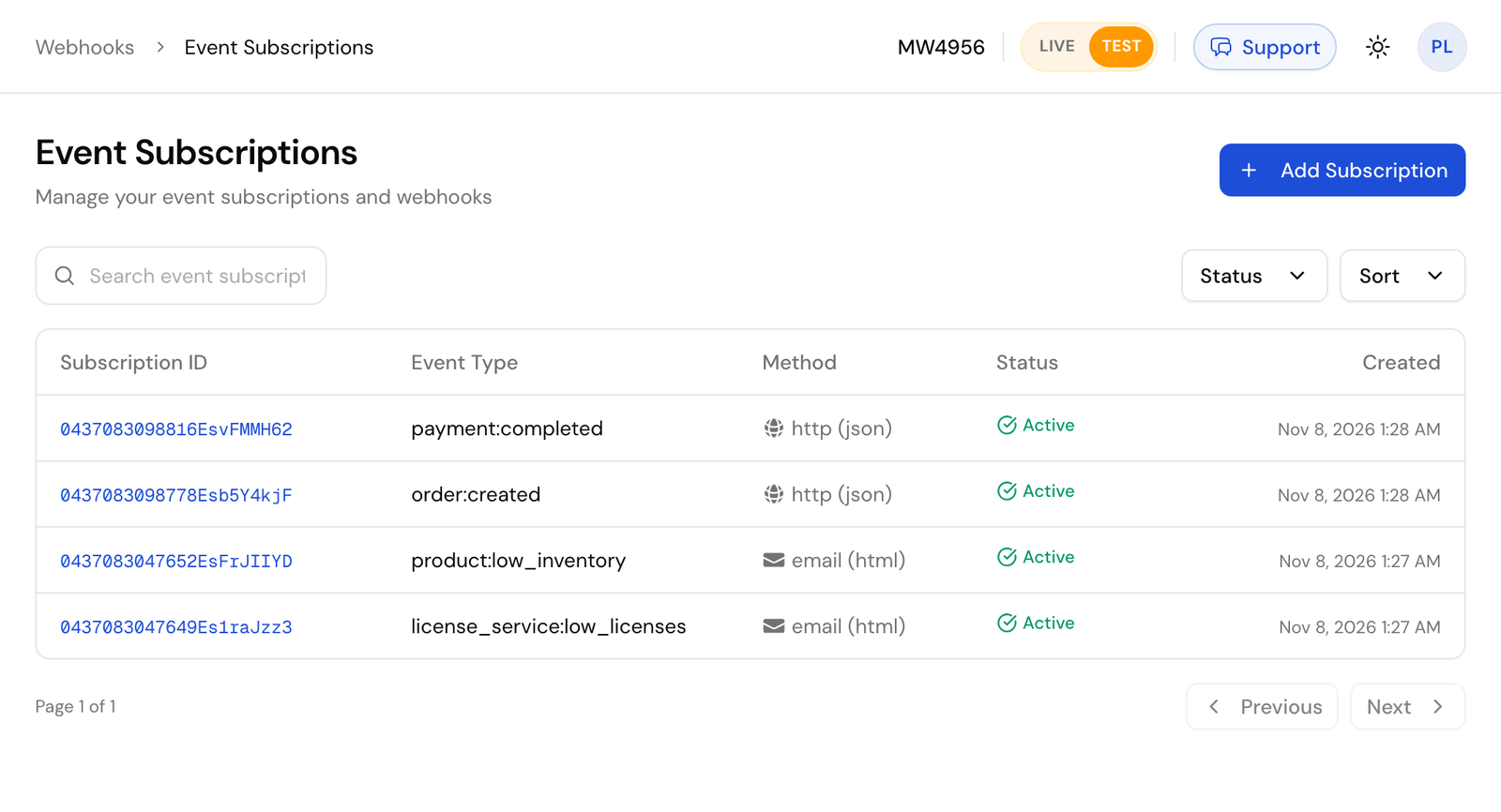
Pick the **Event Type**, choose **HTTP / HTTPS** and **JSON**, enter your **Destination URL** and set **Set Active?** to **Yes**. Leave **Signature Key** empty to sign with your account's key.
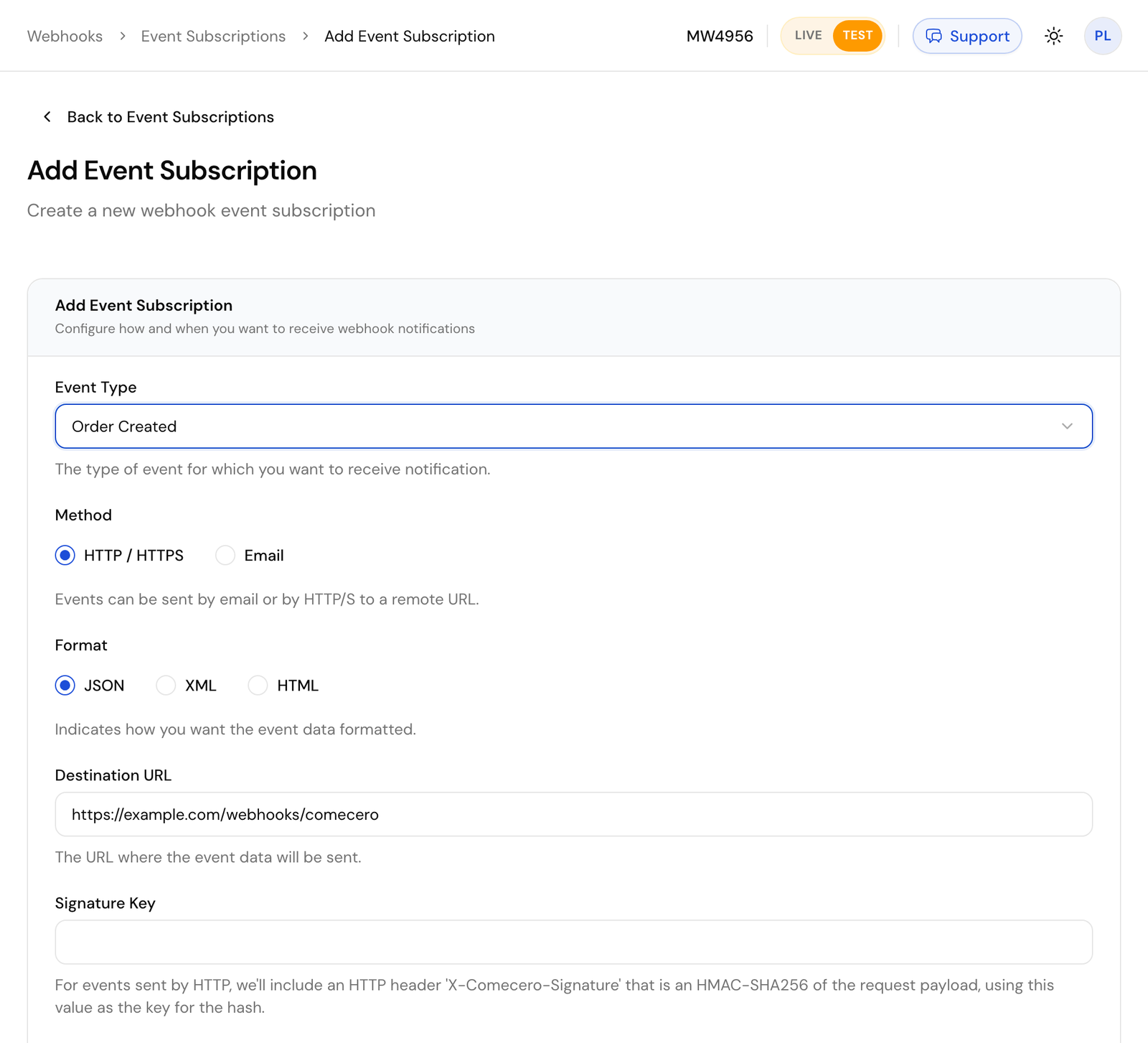
### With the API [#with-the-api]
Call [Create an event subscription](/api/event-subscriptions/create-event-subscription) with a secret or trusted token.
```bash title="Request"
curl https://api.comecero.com/api/v1/event_subscriptions \
-H "Authorization: Bearer $COMECERO_TEST_TOKEN" \
-H "Content-Type: application/json" \
-d '{
"event_type": "order:created",
"active": true,
"method": "http",
"format": "json",
"destination": "https://example.com/webhooks/comecero",
"expand": "customer"
}'
```
Send `"active": true`. A new subscription is inactive by default and sends nothing until you turn it on.
A few rules:
- The destination must be a public URL. Comecero does not send to `localhost` or a private network, so use a tunnel while you develop.
- A subscription receives only events of its own mode. Test subscriptions get test events. Create your subscriptions again in live mode when you go live.
- `expand`, `show` and `hide` shape the object in `data`, the same way they shape a GET. For example `expand: "customer"` sends the full customer inside the order instead of its URL. See [Expanding objects](/docs/basic-concepts/expanding-objects).
- `environment_variables` are name and value pairs that come back in every event, for example to tell your endpoint which store the event is for.
- You can also send email (`method: email`), to up to 6 addresses. The `html` format sends `data` as a readable table.
## What a delivery looks like [#what-a-delivery-looks-like]
Comecero sends an HTTP `POST` with `Content-Type: application/json` and the user agent `Comecero-Event (+https://comecero.com)`. The body is an [event](/api/events/get-event) with the object in `data`, shaped like a GET of that object at the time of the event.
```json
{
"object": "event",
"url": "https://api.comecero.com/api/v1/events/1102611073847EVt7Kq2Za",
"event_id": "1102611073847EVt7Kq2Za",
"test": true,
"account_id": "AB1234",
"type": "order:created",
"event_subscription": "https://api.comecero.com/api/v1/event_subscriptions/1102610913420ES4f9QmLp",
"fingerprint": "k2P9wQ7xR4vT1nY8",
"status": "queued",
"date_created": "2026-11-07T14:32:10Z",
"date_modified": "2026-11-07T14:32:10Z",
"environment_variables": { "store": "main" },
"data": {
"object": "order",
"order_id": "7393-GMRFY-954",
"payment_status": "completed",
"currency": "USD",
"total": 49.95
}
}
```
- `event_id` is the id of this delivery. It stays the same when the delivery is retried.
- `fingerprint` is the id of the thing that happened. Two subscriptions to the same event get different `event_id`s and the same `fingerprint`.
- Dates use the subscription's `timezone`, or your account's time zone.
[Download a full sample `order:created` delivery](/resources/event-notification-sample.json).
## Check the signature [#check-the-signature]
Every delivery carries an `X-Comecero-Signature` header: the HMAC-SHA256 of the raw request body, keyed with the signature key, as 64 lowercase hex characters. The key is the subscription's `signature_key`, or your account's key under **Settings > Technical** when the subscription has none. Every account gets one when it is made.
To check it:
1. Read the body as raw bytes, before any JSON parsing.
2. Compute the HMAC-SHA256 of those bytes with your signature key.
3. Compare it with the header in constant time. Reject the delivery when they differ.
```js
// npm install express
import crypto from 'node:crypto';
import express from 'express';
const app = express();
const signatureKey = process.env.COMECERO_SIGNATURE_KEY;
function isFromComecero(rawBody, signature) {
const expected = crypto.createHmac('sha256', signatureKey).update(rawBody).digest('hex');
const received = Buffer.from(signature ?? '', 'utf8');
return received.length === expected.length && crypto.timingSafeEqual(received, Buffer.from(expected, 'utf8'));
}
// express.raw keeps the body as a Buffer, exactly as it was sent.
app.post('/webhooks/comecero', express.raw({ type: '*/*' }), (req, res) => {
if (!isFromComecero(req.body, req.get('x-comecero-signature'))) {
return res.sendStatus(401);
}
const event = JSON.parse(req.body.toString('utf8'));
res.sendStatus(200); // answer first, then do the work
handleEvent(event).catch(console.error);
});
async function handleEvent(event) {
// Skip repeats, then act on event.type and event.data.
}
app.listen(3000);
```
```python
# pip install flask
import hashlib
import hmac
import json
import os
from flask import Flask, request
app = Flask(__name__)
SIGNATURE_KEY = os.environ["COMECERO_SIGNATURE_KEY"].encode("utf-8")
def is_from_comecero(raw_body: bytes, signature: str) -> bool:
expected = hmac.new(SIGNATURE_KEY, raw_body, hashlib.sha256).hexdigest()
return hmac.compare_digest(expected, signature or "")
@app.post("/webhooks/comecero")
def comecero_webhook():
raw_body = request.get_data() # the raw bytes, before parsing
if not is_from_comecero(raw_body, request.headers.get("X-Comecero-Signature")):
return "", 401
event = json.loads(raw_body)
queue_event(event) # hand the work to a queue and answer at once
return "", 200
def queue_event(event):
# Skip repeats, then act on event["type"] and event["data"].
pass
```
Do not compute the signature over JSON you parsed and wrote back out: the bytes change and the signature no longer matches.
The signature has no timestamp, so a recorded delivery could be sent again. Skipping `event_id`s you already handled (below) guards against that. If you cannot check signatures at all, treat each event only as a hint: get the object by its id from the API before you act on it.
You can also add HTTP Basic authorization (`http_authorization_username` and `http_authorization_password`) or a custom header (`custom_header_name` and `custom_header_value`) to each delivery, as a second check.
## Answer fast [#answer-fast]
Answer with any `2xx` status within 60 seconds. The body of your answer is ignored. Anything else counts as a failure: another status (redirects are not followed), a timeout or no connection.
Do the slow work after you answer: put the event on a queue, answer `200`, then process it.
## Retries and the events log [#retries-and-the-events-log]
After a failure Comecero retries on a growing schedule: three times 2 minutes apart, then every 15 minutes, every hour, every 2 hours, every 4 hours and every 8 hours. That is 23 attempts over about 56 hours. Then the event is `failed` and is not tried again by itself.
To find deliveries that did not get through, go to **Webhooks > Events** in the dashboard, or [list events](/api/events/list-events) with `status=retry` or `status=failed`. With no `status`, the list shows only delivered events. Add `debug=true` to see why the last attempt failed.
To send an event again now, open it in the dashboard and click **Retry Delivery** (or **Resend Event** for one that was delivered) or call [Retry an event](/api/events/retry-event). It goes to the subscription's current destination with the same `event_id` and `data`. Events are kept for 30 days after their last change, and for 7 days once delivered or in test mode.
## Skip repeats [#skip-repeats]
A delivery can arrive more than once, and events can arrive out of order. Store each `event_id` you handle and skip one you have seen. Before you overwrite your own data, compare `date_created`, or get the object fresh from the API, so an older event does not undo a newer one.
## Send a test event [#send-a-test-event]
Open a subscription in the dashboard and click **Send Test**. Pick a test template and Comecero sends one sample event to the destination at once and shows whether it got through. Templates are under **Webhooks > Event Test Templates**.
With the API, call [Send a test event](/api/event-subscriptions/test-event-subscription) with the subscription id and a template id. The answer says whether the attempt worked:
```json
{
"success": false,
"error": "There was a problem contacting the remote server: HTTP Status Code: 404, Response Content (preview of first 500 characters): Not Found",
"event_id": "1102611204410EVn3Rk8Wd",
"event_type": "order:created"
}
```
The test event is signed and shaped like a real one, and it is sent even when the subscription is inactive. It is not saved, so it is not in the events log and is never retried.
## The events [#the-events]
Each event has its own page with the exact `data` it sends.
**Orders and carts**
- [`order:created`](/api/webhooks/order-created): a cart or invoice was paid and its order made. The usual event for starting fulfillment. Check `payment_status`: an authorized payment also makes an order.
- [`order:payment_completed`](/api/webhooks/order-payment-completed): no payment on the order is pending any more, so the money is taken.
- [`order:fulfilled`](/api/webhooks/order-fulfilled): every item on the order is fulfilled.
- [`order:licenses_assigned`](/api/webhooks/order-licenses-assigned): every item that needs a license key has one.
- [`cart:payment_completed`](/api/webhooks/cart-payment-completed): the completed payments on the order made from a cart cover its total and none is pending.
**Payments and refunds**
- [`payment:created_success`](/api/webhooks/payment-created-success) and [`payment:created_failure`](/api/webhooks/payment-created-failure): a payment attempt succeeded or failed.
- [`payment:completed`](/api/webhooks/payment-completed): a payment was captured, at once or later.
- [`payment:captured_success`](/api/webhooks/payment-captured-success), [`payment:captured_failure`](/api/webhooks/payment-captured-failure) and [`payment:voided`](/api/webhooks/payment-voided): an authorization was captured, failed to capture, or was voided.
- [`refund:created_success`](/api/webhooks/refund-created-success), [`refund:created_failure`](/api/webhooks/refund-created-failure) and [`refund:deleted`](/api/webhooks/refund-deleted).
**Invoices**
- [`invoice:created`](/api/webhooks/invoice-created), [`invoice:published`](/api/webhooks/invoice-published), [`invoice:paid`](/api/webhooks/invoice-paid) and [`invoice:payment_completed`](/api/webhooks/invoice-payment-completed).
**Subscriptions**
- [`subscription:created`](/api/webhooks/subscription-created), [`subscription:modified`](/api/webhooks/subscription-modified), [`subscription:converted`](/api/webhooks/subscription-converted) and [`subscription:completed`](/api/webhooks/subscription-completed).
- [`subscription:renewal_success`](/api/webhooks/subscription-renewal-success) and [`subscription:renewal_failure`](/api/webhooks/subscription-renewal-failure).
- [`subscription:cancellation_scheduled`](/api/webhooks/subscription-cancellation-scheduled), [`subscription:cancellation_unscheduled`](/api/webhooks/subscription-cancellation-unscheduled) and [`subscription:cancelled`](/api/webhooks/subscription-cancelled).
- [`subscription_item:added`](/api/webhooks/subscription-item-added), [`subscription_item:modified`](/api/webhooks/subscription-item-modified), [`subscription_item:cancellation_scheduled`](/api/webhooks/subscription-item-cancellation-scheduled), [`subscription_item:cancellation_unscheduled`](/api/webhooks/subscription-item-cancellation-unscheduled) and [`subscription_item:cancelled`](/api/webhooks/subscription-item-cancelled).
**Shipments**
- [`shipment:created`](/api/webhooks/shipment-created), [`shipment:modified`](/api/webhooks/shipment-modified) and [`shipment:deleted`](/api/webhooks/shipment-deleted).
**Catalog and account**
- [`product:created`](/api/webhooks/product-created), [`product:modified`](/api/webhooks/product-modified), [`product:deleted`](/api/webhooks/product-deleted) and [`product:low_inventory`](/api/webhooks/product-low-inventory).
- [`license_service:low_licenses`](/api/webhooks/license-service-low-licenses).
- [`gateway:created`](/api/webhooks/gateway-created) and [`gateway:modified`](/api/webhooks/gateway-modified).
- [`event_subscription:created`](/api/webhooks/event-subscription-created), [`event_subscription:modified`](/api/webhooks/event-subscription-modified) and [`event_subscription:deleted`](/api/webhooks/event-subscription-deleted). The first two carry the signature key, so treat them as secret.
- [`account:modified`](/api/webhooks/account-modified) (live mode only), [`user:created`](/api/webhooks/user-created) and [`user:modified`](/api/webhooks/user-modified).
# Introduction (/docs)
Comecero is one REST API for selling online: carts and payments, subscriptions, invoices, refunds and the webhooks that tell your server what happened.
## Start here [#start-here]
} title="Quickstart" href="/docs/getting-started/quickstart">Create a test token, a product and a cart, and take your first test payment.
} title="Concepts" href="/docs/basic-concepts">Tokens, errors, lists, dates and the other rules every endpoint follows.
} title="API reference" href="/api">Every endpoint with its fields, examples and a panel to try it.
} title="Build with AI" href="/docs/getting-started/build-with-ai">Connect Claude, Cursor or VS Code to these docs with the MCP server.
## Popular guides [#popular-guides]
} title="Accept payments" href="/docs/guides/accept-payments">Build a checkout: cart, payment, 3-D Secure, declines, capture later.
} title="Webhooks" href="/docs/guides/webhooks">Get events on your server and check their signature.
} title="Subscriptions" href="/docs/guides/subscriptions">Sell plans, change items, and handle renewals that fail.
} title="Invoices" href="/docs/guides/invoices">Send an invoice with a payment link, and get paid.
} title="Refunds" href="/docs/guides/refunds">Give money back in full or in part, and record chargebacks.
} title="Going live" href="/docs/guides/going-live">The checklist for switching from test to live.
## Go deeper [#go-deeper]
} title="Tutorials" href="/docs/tutorials/hello-world">Build a working browser checkout in one HTML page.
} title="Settings reference" href="/docs/reference">Shipping, fulfillment and gateway settings explained.
} title="Changelog" href="/api/changelog">What changed in the API and these docs.
# Analytics (/docs/reference/analytics)
Your analytics settings add tracking to the hosted storefront: Google Analytics 4, Google Ads conversion tracking, Matomo and your own JavaScript. Comecero builds the tracking scripts from these settings and the storefront loads them, so you add no code.
Change them in the dashboard under **Settings > Analytics**, or with [Update analytics settings](/api/settings/update-analytics-settings). The change shows on the next page load. Settings are kept per mode, so set them again in live mode.
## The settings [#the-settings]
| Dashboard | API field | Format |
|---|---|---|
| GA4 Measurement ID | `ga4_measurement_id` | `G-XXXXXXXXXX`, from GA4 under Admin, Data Streams |
| Google Ads Conversion ID | `google_ads_id` | `AW-` and digits, such as `AW-123456789`, from Google Ads under Tools, Conversions |
| Conversion Label | `google_ads_label` | Letters, digits, `_` and `-`. In the Google Ads tag `AW-123456789/AbC_dEfGh-12`, it is the part after the slash |
| Custom Pageview Tracking Code | `pageview_tracking` | Your own JavaScript, run on every page view (up to 5,000 characters) |
| Custom Conversion Tracking Code | `conversion_tracking` | Your own JavaScript, run once when an order is completed (up to 5,000 characters) |
A value in the wrong format is refused with `400`. `google_tracking_id` (Universal Analytics, `UA-`) still exists but is deprecated, since Google retired Universal Analytics.
```bash title="Request"
curl https://api.comecero.com/api/v1/settings/analytics \
-H "Authorization: Bearer $COMECERO_TEST_TOKEN" \
-H "Content-Type: application/json" \
-d '{
"ga4_measurement_id": "G-4X7KQ2M9PL",
"google_ads_id": "AW-123456789",
"google_ads_label": "AbC_dEfGh-12"
}'
```
## What the storefront sends [#what-the-storefront-sends]
When either Google setting is set, the storefront loads Google's `gtag.js`.
**Google Analytics 4**, with `ga4_measurement_id` set:
- A page view on each storefront page, with the page path and title.
- A `purchase` event on the receipt page, with `transaction_id` (the order id), `value` (the order total), `currency`, `tax`, `shipping` and `items`. Each item has `item_id` (the product id), `item_name`, `price` and `quantity`.
**Google Ads**, with both `google_ads_id` and `google_ads_label` set:
- A `conversion` event on the receipt page, sent to `google_ads_id/google_ads_label`, with `value` (the order total), `currency` and `transaction_id` (the order id). With only one of the two set, nothing is sent to Google Ads.
**Your own code** runs on every page view (`pageview_tracking`) and once on the receipt page (`conversion_tracking`).
Tracking never loads on the card entry or customer account pages.
## Matomo [#matomo]
To send storefront data to your own Matomo, set `matomo_url` (the HTTPS address of your Matomo) and `matomo_site_id`. `send_events` sends shopper events, such as add to cart, and `send_transactions` sends completed orders as ecommerce transactions. These two only work with Matomo. A Matomo API token (`matomo_token_auth`) can be saved but is never returned: `has_matomo_token_auth` says whether one is set.
## Your own checkout [#your-own-checkout]
These settings only drive the hosted storefront. If you build your own checkout with the API, send page views and purchases from your own pages. The [`order:created`](/api/webhooks/order-created) webhook gives you the order id, total and items for a server-side purchase event.
# Auto fulfill and capture delay (/docs/reference/fulfillment-delay)
Some merchant agreements say you may take the money only once you ship. The payment is **authorized** at checkout (the money is held), and **captured** (taken) when the goods leave. Your fulfillment settings can do this for you, so a shipped order is never left uncaptured.
Change them in the dashboard under **Settings > Fulfillment**, or with [Update fulfillment settings](/api/settings/update-fulfillment-settings).
| Dashboard | API field | Default |
|---|---|---|
| Automatically Fulfill Items | `auto_fulfill_items` | `false` |
| Automatic Fulfillment Delay (hours) | `auto_fulfill_delay` (0 to 168) | `0` |
| Automatically Capture Payments | `auto_capture` | `true` |
| Automatic Capture Delay (hours) | `auto_capture_delay` (0 to 168) | `0` |
## When items are fulfilled [#when-items-are-fulfilled]
- **Digital items and services** are marked fulfilled as soon as the order is made.
- **Physical items** with `auto_fulfill_items` on are marked fulfilled when the order is made, or `auto_fulfill_delay` hours later when you set a delay.
- **Physical items** with `auto_fulfill_items` off are marked fulfilled when your shipments cover their whole quantity. See [Create a shipment](/api/shipments/create-order-shipment).
When every item is fulfilled, the order's `fulfilled` becomes `true` and [`order:fulfilled`](/api/webhooks/order-fulfilled) fires.
## When the payment is captured [#when-the-payment-is-captured]
1. A payment sent with `capture: true` or `capture: false` does what it says. This overrides the settings below (a limited token cannot send it).
2. An order with no physical items is captured at once.
3. With `auto_capture` on and no delay, the payment is captured at once.
4. With `auto_capture` on and a delay, the payment is only authorized and is captured `auto_capture_delay` hours later.
5. With `auto_capture` off, the payment is only authorized.
In every case, **when the order becomes fulfilled, each payment still authorized on it is captured.** You can also capture at any time with [Capture an order](/api/orders/capture-order).
## Capture when you ship [#capture-when-you-ship]
To take the money only once the goods ship, turn **Automatically Capture Payments** off. Orders with physical items are then authorized only, and captured when the order is fulfilled. Then pick how fulfillment happens:
- **You mark shipments.** Leave **Automatically Fulfill Items** off. The capture happens when your shipments cover every item.
- **Comecero marks them after a delay.** Turn **Automatically Fulfill Items** on and set **Automatic Fulfillment Delay** to the hours you usually need to ship, such as 24 or 48. When the delay passes, the items are marked fulfilled and the payment is captured a minute or two later. You never miss a capture because a shipment was not entered.
With **Automatically Fulfill Items** on and a delay of `0`, items are fulfilled when the order is made and the money is captured at once.
If you cannot ship an order, [void it](/api/orders/void-order) before the capture so the shopper's money is released. After the capture, refund it instead.
An authorization does not last forever: the card network and gateway release held money after some days. Keep your delays shorter than the time your gateway holds an authorization.
# Gateway weight (/docs/reference/gateway-weight)
When more than one active gateway can take a payment, Comecero picks one at random, weighted by each gateway's **weight**. A gateway can take a payment when it handles the payment method type, the currency and, for a card, the card brand.
Set the weight on the gateway in the dashboard under **Gateways**, or in the `weight` field of [Update a gateway](/api/gateways/update-gateway). The default is `1`.
## How the weight works [#how-the-weight-works]
The chance that a gateway is picked is its weight divided by the total weight of the gateways that can take the payment.
| Gateway | Weight | Share of payments |
|---|---|---|
| A | 100 | About half |
| B | 100 | About half |
| Gateway | Weight | Share of payments |
|---|---|---|
| A | 10 | About 1 in 11 |
| B | 100 | About 10 in 11 |
A gateway with weight `0` is a **backup**. It is picked only after every gateway with a weight above 0, for example when they declined the payment.
## Trying another gateway after a decline [#trying-another-gateway-after-a-decline]
When a card is declined and more than one gateway can take it, Comecero can try the next gateway in the weighted order. **Maximum Gateway Attempts** under **Settings > Payment** (`max_gateway_attempts` in [Update payment settings](/api/settings/update-payment-settings)) sets how many gateways to try in all. Set it to `1` to never try a second gateway. New accounts start at `2`.
## When the weight is not used [#when-the-weight-is-not-used]
- **A payment method locked to a gateway.** A saved card can be tied to the gateway that stored it, for example after that gateway updated the card number. That gateway goes first, even with weight `0`. A card saved on Comecero Express Payments can only be charged there.
- **Comecero Express Payments first.** When your account's own Comecero Express Payments gateways and Comecero's platform gateways can both take a payment, your Express gateways go first and the platform gateways are kept as backup.
- **A gateway you choose.** A secret or trusted token can send `gateway_id` on a payment to use that gateway instead of letting Comecero choose (not on accounts on the reseller model).
# Settings reference (/docs/reference)
These pages explain settings whose effect is not obvious from their fields alone. Each one says what the setting does, where to change it in the dashboard, and which API fields hold it. The fields themselves are described in the [API reference](/api/settings).
Settings are kept per mode. A test token reads and changes the test settings, a live token the live ones, so set each one up again when you go live.
# Shipping adjustments (/docs/reference/shipping-adjustments)
An adjustment changes a shipping method's price for some states or provinces. Use it when shipping to a place costs more, such as Alaska or Hawaii, or less, such as a state close to your warehouse. Adjustments work only for the United States and Canada.
Add them to the shipping method in the dashboard under **Store > Shipping Methods**, or with `adjustments` in [Create a shipping method](/api/shipping-methods/create-shipping-method) or [Update a shipping method](/api/shipping-methods/update-shipping-method).
## How an adjustment works [#how-an-adjustment-works]
Each adjustment has a `country` (`US` or `CA`, and one of the method's countries), the `regions` it covers (state or province codes such as `AK` and `HI`), and either a percentage or fixed amounts, not both.
- **`percentage`**: a fraction of the price. `0.15` adds 15%, `-0.2` takes off 20%. From `-1` (-100%) to `5` (500%).
- **`amounts`**: a fixed amount added to the price, one per currency. A negative amount lowers the price. When the shopper's currency is not listed, the first amount is converted.
```json
{
"adjustments": [
{ "country": "US", "regions": ["AK", "HI"], "percentage": 0.15 },
{ "country": "US", "regions": ["WA", "OR"], "amounts": [{ "price": -2, "currency": "USD" }] }
]
}
```
Here Alaska and Hawaii pay 15% more, and Washington and Oregon pay $2 less.
A region may appear in only one adjustment of a method. The adjustment is applied to the price that the method's [quantity](/docs/reference/shipping-quantity), [subtotal](/docs/reference/shipping-subtotal) or [weight](/docs/reference/shipping-weight) rules give, after it is converted to the shopper's currency. If the result is below 0, the price is 0.
# Shipping by quantity (/docs/reference/shipping-quantity)
A shipping method priced by quantity charges by the total number of physical items in the order. Set it up in the dashboard under **Store > Shipping Methods**, or with `quantity_config` in [Create a shipping method](/api/shipping-methods/create-shipping-method).
## How the price is worked out [#how-the-price-is-worked-out]
1. Comecero adds up the quantities of the **physical** items. Digital items and services do not count. It is the total quantity, not the number of lines: 1 of product A and 2 of product B is a quantity of 3.
2. If that quantity falls in one of your ranges (`rules`), the price is that range's flat price.
3. Otherwise the price is the **price per quantity** (`prices_per_quantity`) times the quantity.
With no ranges, the price is always the price per quantity times the quantity.
```json
{
"description": "Standard Shipping",
"countries": ["US"],
"quantity_config": {
"prices_per_quantity": [{ "price": 5, "currency": "USD" }],
"rules": [
{ "minimum": 1, "maximum": 5, "prices": [{ "price": 15, "currency": "USD" }] },
{ "minimum": 6, "maximum": 10, "prices": [{ "price": 25, "currency": "USD" }] }
]
}
}
```
| Total quantity | Price | Why |
|---|---|---|
| 3 | $15 | In the 1 to 5 range |
| 8 | $25 | In the 6 to 10 range |
| 11 | $55 | In no range: $5 x 11 |
## Ranges [#ranges]
- Ranges must not overlap. A range that starts where another ends, such as 1 to 5 and 5 to 10, is refused.
- List them from lowest to highest. When saved, the lowest range starts at 1 and a gap is closed by moving the next range's `minimum` to the previous `maximum` plus 1.
- Add as many ranges as you need.
## Currencies [#currencies]
Give the price per quantity, and each range's price, in one or more currencies. Each currency may appear once in a list. When the shopper pays in a currency you gave, that price is used. Otherwise the first price in the list is converted to the shopper's currency with your pricing settings' exchange rates and rounding.
After the price is found, any [adjustment](/docs/reference/shipping-adjustments) for the shopper's state or province is applied, then tax and shipping promotions.
# Shipping by subtotal (/docs/reference/shipping-subtotal)
A shipping method priced by subtotal charges by the order subtotal, for example free shipping over $50. Set it up in the dashboard under **Store > Shipping Methods**, or with `subtotal_config` in [Create a shipping method](/api/shipping-methods/create-shipping-method).
## How the price is worked out [#how-the-price-is-worked-out]
1. If the order subtotal falls in one of your ranges, the price is that range's flat price.
2. Otherwise, if you set a **percentage of the subtotal** (`percent_of_subtotal`), the price is the subtotal times that fraction. `0.1` is 10%, and the most is `3` (300%).
3. Otherwise the price of a nearby range is used, so the shopper always gets a quote.
With no ranges, the price is always the percentage of the subtotal. The subtotal is the whole order's items subtotal, digital items included, but shipping is only charged when the order has a physical item.
```json
{
"description": "Standard Shipping",
"countries": ["US", "CA"],
"subtotal_config": {
"percent_of_subtotal": 0.1,
"rules": [
{
"currency": "USD",
"ranges": [
{ "minimum": 0, "maximum": 50, "price": 15 },
{ "minimum": 50.01, "maximum": 100, "price": 10 }
]
}
]
}
}
```
| Order subtotal | Price | Why |
|---|---|---|
| $25 | $15 | In the $0 to $50 range |
| $75 | $10 | In the $50.01 to $100 range |
| $200 | $20 | In no range: 10% of $200 |
## Ranges [#ranges]
- Each entry in `rules` holds the ranges for one currency. Each currency may appear once.
- Ranges must not overlap. List them from lowest to highest. When saved, the lowest range starts at 0 and a gap is closed by moving the next range's `minimum` to the previous `maximum` plus 0.01.
- Add as many ranges as you need.
## Currencies [#currencies]
When the shopper pays in a currency you gave ranges for, those ranges are used. Otherwise the subtotal is converted into the currency of your first set of ranges to find the range, and the price is converted back into the shopper's currency with your pricing settings' exchange rates and rounding. A percentage of the subtotal is worked out in the shopper's currency.
After the price is found, any [adjustment](/docs/reference/shipping-adjustments) for the shopper's state or province is applied, then tax and shipping promotions.
# Shipping by weight (/docs/reference/shipping-weight)
A shipping method priced by weight charges by the total weight of the physical items in the order. Set it up in the dashboard under **Store > Shipping Methods**, or with `weight_config` in [Create a shipping method](/api/shipping-methods/create-shipping-method).
Each product needs a `weight` (an `amount` and a `unit`), set on the product in the dashboard or with [Update a product](/api/products/update-product). A product with no weight adds nothing.
## How the price is worked out [#how-the-price-is-worked-out]
1. Comecero adds up the weight of every **physical** item: its product weight times its quantity.
2. If that weight falls in one of your ranges (`rules`), the price is that range's flat price.
3. Otherwise the price is the **price per weight unit** (`prices_per_unit`) times the weight, in the method's `unit`.
With no ranges, the price is always the price per unit times the weight.
```json
{
"description": "Ground",
"countries": ["US"],
"weight_config": {
"unit": "lb",
"prices_per_unit": [{ "price": 2, "currency": "USD" }],
"rules": [
{ "minimum": 0, "maximum": 5, "unit": "lb", "prices": [{ "price": 10, "currency": "USD" }] },
{ "minimum": 5.01, "maximum": 10, "unit": "lb", "prices": [{ "price": 20, "currency": "USD" }] }
]
}
}
```
| Total weight | Price | Why |
|---|---|---|
| 3 lb | $10 | In the 0 to 5 lb range |
| 8 lb | $20 | In the 5.01 to 10 lb range |
| 11 lb | $22 | In no range: $2 x 11 |
## Units [#units]
Units are `oz`, `lb`, `g` and `kg`. Product weights, ranges and the price per unit do not need to use the same unit: Comecero converts them. Ranges are stored in grams, so they come back with `unit: g`.
## Ranges [#ranges]
- Ranges must not overlap. List them from lowest to highest. When saved, the lowest range starts at 0 and a gap is closed by moving the next range's `minimum` to the previous `maximum` plus 0.01.
- Add as many ranges as you need.
## Currencies [#currencies]
Give the price per unit, and each range's price, in one or more currencies. Each currency may appear once in a list. When the shopper pays in a currency you gave, that price is used. Otherwise the first price in the list is converted to the shopper's currency with your pricing settings' exchange rates and rounding.
After the price is found, any [adjustment](/docs/reference/shipping-adjustments) for the shopper's state or province is applied, then tax and shipping promotions.
# Hello World (/docs/tutorials/hello-world)
In this tutorial you build a checkout that runs in the browser: one HTML page that gets a limited token, creates a cart, pays for it with a test card and shows the result. There is no server code and no token in the page.
Want the finished page? [Download hello-world.html](/resources/hello-world.html) and read the comments.
## Before you start [#before-you-start]
- A Comecero account ([sign up](https://signin.comecero.com/register)). Your **account ID**, for example `AB1234`, is under **Administration > Account Info** in the dashboard.
- An active **test product**. Make one in the [Quickstart](/docs/getting-started/quickstart), or in the dashboard with **Test** on under **Store > Products**. Note its id, such as `hello-ebook.test`.
- A local web server, such as `npx serve` or `python3 -m http.server 8000`. The API allows browser calls from `localhost` and `127.0.0.1`. For any other host name, add it under **Settings > Technical > CORS Allowed Origins**. See [CORS](/docs/basic-concepts/cors).
This page uses a **limited** token, the only kind that belongs in a browser. It can read your public catalog and change only the carts and payments it created, and it may not set prices. Never put a secret token in a web page.
## Start the page [#start-the-page]
Create `index.html` with a small form and an empty log:
```html
Hello World checkout
```
## Add two helpers [#add-two-helpers]
`log` writes a line on the page. `api` sends a `POST` with JSON and throws when the API answers with an error. Errors come back as `{ "error": { "type", "code", "message" } }`.
```js
const API = 'https://api.comecero.com/api/v1';
function log(message) {
const line = document.createElement('p');
line.textContent = message;
document.getElementById('log').append(line);
}
async function api(path, { token, body } = {}) {
const headers = { 'Content-Type': 'application/json' };
if (token) headers.Authorization = `Bearer ${token}`;
const response = await fetch(`${API}${path}`, {
method: 'POST',
headers,
body: body ? JSON.stringify(body) : undefined,
});
const data = await response.json();
if (!response.ok) {
const error = new Error(data.error?.message ?? `HTTP ${response.status}`);
error.status = response.status;
error.code = data.error?.code;
throw error;
}
return data;
}
```
## Get a limited test token [#get-a-limited-test-token]
Call [Create a limited token](/api/auths/create-limited-auth) with no `Authorization` header. Send your `account_id`, and `test=true` for a test token. The response holds the token in `token`, starting with `limited.test.`.
```js
async function createLimitedToken(accountId) {
const params = new URLSearchParams({ account_id: accountId, test: 'true' });
const auth = await api(`/auths/limited?${params}`);
return auth.token;
}
```
The token lasts two hours and each use moves the expiry forward. In a real shop, keep it for the shopper's visit (for example in `sessionStorage`) instead of making a new one for every cart.
If this call returns `403`, your account does not allow public test tokens. Turn on **Allow Public Test Orders** under **Settings > Technical** in live mode. See [Account and test mode](/docs/getting-started/create-an-account#get-a-test-token).
## Create the cart [#create-the-cart]
Call [Create a cart](/api/carts/create-cart) with the token. Each item needs a `product_id`. Do not send `reference_price`: a limited token may not set prices (`403`). The cart is bound to this token, so only this token can change it.
```js
async function createCart(token, productId) {
return api('/carts', {
token,
body: {
currency: 'USD',
items: [{ product_id: productId, quantity: 1 }],
customer: {
name: 'John Doe',
email: 'john@example.com',
billing_address: { country: 'US', postal_code: '94101' },
},
},
});
}
```
The response is the cart, with `cart_id`, `total` and the `order_id` it gets when paid.
## Pay for the cart [#pay-for-the-cart]
Call [Pay for a cart](/api/carts/create-cart-payment). The amount comes from the cart, so you send only the payment method. `4444555566661111` succeeds in test mode and `4444555566669999` is declined.
```js
async function payCart(token, cartId, cardNumber) {
return api(`/carts/${cartId}/payments`, {
token,
body: {
payment_method: {
type: 'credit_card',
data: { number: cardNumber, exp_month: 12, exp_year: 2030, cvv: '123' },
},
},
});
}
```
A successful payment returns `201` with `status` `completed` (or `pending` when your settings only authorize). The cart closes and the order is made. A declined card returns `402` with code `payment_declined`.
## Run the steps and show the result [#run-the-steps-and-show-the-result]
Join the steps when the form is sent:
```js
async function checkout(event) {
event.preventDefault();
document.getElementById('log').replaceChildren();
const accountId = document.getElementById('account-id').value.trim();
const productId = document.getElementById('product-id').value.trim();
const cardNumber = document.getElementById('card-number').value.trim();
try {
log('Creating a limited test token...');
const token = await createLimitedToken(accountId);
log('Creating the cart...');
const cart = await createCart(token, productId);
log(`Cart ${cart.cart_id} created. Total: ${cart.total} ${cart.currency}.`);
log('Paying for the cart...');
const payment = await payCart(token, cart.cart_id, cardNumber);
log(`Paid! Payment ${payment.payment_id} is ${payment.status}. Order ${cart.order_id} is ready.`);
} catch (error) {
log(`Failed (${error.status} ${error.code ?? ''}): ${error.message}`);
}
}
document.getElementById('checkout').addEventListener('submit', checkout);
```
## Try it [#try-it]
Start your local server, open the page (for example `http://localhost:8000`), enter your account ID and product ID, and click **Pay**. You see each step, then the payment and order ids.
Change the card to `4444555566669999` and pay again to see a decline. More cards are in [Test cards](/docs/getting-started/create-an-account#test-cards).
Sign in to the dashboard with **Test** on and look under **Sales > Carts**, **Sales > Payments** and **Sales > Orders** to see what you made.
## Before you use this in a real shop [#before-you-use-this-in-a-real-shop]
- **Payments that need the shopper.** Some gateways answer with `status` `initiated` and a next step in `response_data`, such as a 3-D Secure check or a PayPal redirect. When the shopper is done, get the payment and call [Commit a payment](/api/payments/commit-payment) only while it is still `initiated`. The built-in test gateway never does this.
- **Live mode.** Leave out `test=true` to get a live limited token. Live payments work once your account is live.
- **Card data.** When shoppers type card numbers into your own page, your site handles card data and falls under the card industry's PCI rules. The hosted storefront and checkout take card details on Comecero's pages instead.
- **Your own domain.** Add it to **CORS Allowed Origins** before you go live.
Accounts that sell through Comecero as the reseller cannot create payments from a browser page: the API refuses the call. Take payments on your server with a secret token, or use the hosted checkout.
# Tutorials (/docs/tutorials)
Each tutorial builds one small thing that works from start to finish, in test mode.
A browser checkout in one HTML page: get a limited token, create a cart, pay with a test card and show the result.
New to the API? Run the [Quickstart](/docs/getting-started/quickstart) first. It makes the test product the Hello World page uses.
# Changelog (/api/changelog)
## 8 November 2026: one API reference [#8-november-2026-one-api-reference]
The guides and the API explorer are now one site, and the API reference is made from one OpenAPI 3.1
file that is checked against the API itself. Every public endpoint (286) and every webhook event (48) is
documented. Old explorer links redirect to the matching page here.
Download the whole API as [openapi.json](/openapi.json) to import into Postman, Insomnia or a code generator.
The API did not change. The old documentation was wrong in places. If you built from it, check these:
- **There is no `POST /orders`.** Orders are made when a cart or an invoice is paid. See [Create a cart](/api/carts/create-cart).
- **Updates use `POST`**, not `PATCH` or `PUT` (the one exception is [Replace a role](/api/roles/update-role)).
- **New invoices are drafts** unless you send `draft: false`. See [Invoices](/api/invoices).
- **New webhook subscriptions are off** until you send `active: true`. Every delivery is signed with the
`x-comecero-signature` header. See [Webhooks](/docs/guides/webhooks).
- **An empty refund body refunds the payment in full.** See [Refunds](/api/refunds).
- **Capture, void and commit answer `201`**, and capture with no body captures the full amount. Send no body, not `{}`: a body without a `total` captures nothing.
- **Only `credit_card` and `ach`** can be saved as a customer's payment method.
- **Token lifetimes:** a limited token starts at 2 hours and grows with use; a trusted token lasts 2 hours
from its last use. See [Authentication](/docs/basic-concepts/authentication).
- **`POST /customers/send_link`** reads its values from the query string and answers `204`.
- **Lists:** `limit` is 1 to 100 and defaults to 100. Each list page says whether it pages by offset or by cursor.
# API reference (/api)
All requests go to `https://api.comecero.com/api/v1` over HTTPS, with a token in the `Authorization` header:
```bash title="Request"
curl https://api.comecero.com/api/v1/products \
-H "Authorization: Bearer $COMECERO_TOKEN"
```
- **Test or live** is set by the token. A test token only sees test data.
- **Tokens**: secret (your server), trusted and limited (the browser). See [Authentication](/docs/basic-concepts/authentication).
- **Errors** come back as JSON with a `type`, a `message` and a short `reference` code. See [Error handling](/docs/basic-concepts/error-handling).
- **Lists** are paged. See [Lists and pagination](/docs/basic-concepts/lists-and-pagination).
- **Webhooks** are listed on the [Webhooks](/api/webhooks) page, with how to check each delivery's signature.
The whole API is also one file you can import into Postman, Insomnia or a code generator: [openapi.json](/openapi.json).
# List accounts (/api/accounts/list-accounts)
`GET https://api.comecero.com/api/v1/accounts`
Lists every Comecero account. This is for Comecero platform staff only: any other token, including your secret token, gets `403`. To read your own account, call `GET /accounts/me`. The list is cursor-based. Page with `after_item` and `before_item`.
## Parameters
- `limit` (query): How many items to return on one page, from 1 to 100. The default is 100. A value outside 1 to 100, or one that is not a whole number, is a `400`.
- `after_item` (query): For cursor-based lists, return the items after the item with this id. Use `next_page_after_item` (or follow `next_page_url`) from the page you have. You cannot send it together with `before_item` (`400`). An id that does not exist is a `404`.
- `before_item` (query): For cursor-based lists, return the items before the item with this id. Use `previous_page_before_item` (or follow `previous_page_url`) from the page you have. You cannot send it together with `after_item` (`400`). An id that does not exist is a `404`.
- `desc` (query): Sort in descending order (newest, largest or last first) when `true`. The default is `false`. A value other than `true` or `false` is a `400`.
- `date_start` (query): Only items on or after this date. Send ISO 8601 (`2026-11-01T00:00:00Z` or `2026-11-01T00:00:00-05:00`) or a shorthand: `2026` means the start of 2026, `2026-11` the start of November, `2026-11-01` the start of that day. A date with no offset is read in `timezone`, or in the account's time zone when you send none. It must not be after `date_end` (`400`).
- `date_end` (query): Only items on or before this date. Same formats as `date_start`, but a shorthand means the end of the period: `2026-11` is the last instant of November, `2026-11-30` the last instant of that day. A date with no offset is read in `timezone`, or in the account's time zone when you send none.
- `date_type` (query): Which date `date_start` and `date_end` filter on. The default is `date_created`. Each list names the values it supports. A value that is not one of the values below is a `400`.
- `q` (query): Finds accounts by ID, name, email or exact alias.
- `live` (query): `true` for live accounts only, `false` for accounts not yet live.
- `closed` (query): `true` for closed accounts only, `false` for open ones only.
- `formatted` (query): When `true`, the object also has a `formatted` child with amounts and dates as display text in the shopper's language and currency (for example `$19.99` or `November 7, 2026`). The default is `false`. See [Localized formatting](https://docs.comecero.com/docs/basic-concepts/localized-formatting).
- `show` (query): Comma-separated fields to return; all others are left out. Use dot notation for child fields (`customer.email`). You cannot send `show` and `hide` together (`400`). See [Customizing output](https://docs.comecero.com/docs/basic-concepts/customizing-output).
- `hide` (query): Comma-separated fields to leave out of the response. Use dot notation for child fields (`customer.email`). You cannot send `show` and `hide` together (`400`). See [Customizing output](https://docs.comecero.com/docs/basic-concepts/customizing-output).
- `timezone` (query): An IANA time zone name, such as `America/New_York` or `UTC`. It sets how `date_start` and `date_end` are read and the time zone of every date in the response. The default is the account's time zone (Settings, Technical), or UTC when it has none. A name that is not known is a `400`.
Responses: 200, 400, 401, 403, 404, 500.
Full schemas: operation `list_accounts` in /openapi.json.
# Sign up for an account (/api/accounts/create-account)
`POST https://api.comecero.com/api/v1/accounts`
Creates a new Comecero account with its first user, who becomes the account owner. This is how someone signs up, so it needs no token. The response has a live trusted `token` for the owner, so they are signed in at once. The new account is not live: it can take test payments right away, and Comecero sets `live` once the account is approved. Default settings, a test gateway and a shipping method for the account's country are created with it.
Request body: the `account_create_request` schema.
Responses: 201, 400, 409, 500.
Full schemas: operation `create_account` in /openapi.json.
# Get your account (/api/accounts/get-account)
`GET https://api.comecero.com/api/v1/accounts/{account_id}`
Gets your account. Use `me` so you do not need to know the account ID. You can only read the account your token belongs to (`403` for any other). The account is not split by mode, so this needs a live token. A test token gets `400` with the code `token_type_mismatch`. Live secret and trusted tokens may call this with the `accounts` read permission.
## Parameters
- `expand` (query): Comma-separated child objects to return in full instead of as a URL, for example `customer,payments`. Use dot notation for nested objects (`items.product`), up to four levels deep. A single object takes up to 12 paths; a list takes up to 2, applied to every item. Extra paths are dropped without an error. See [Expanding objects](https://docs.comecero.com/docs/basic-concepts/expanding-objects).
- `formatted` (query): When `true`, the object also has a `formatted` child with amounts and dates as display text in the shopper's language and currency (for example `$19.99` or `November 7, 2026`). The default is `false`. See [Localized formatting](https://docs.comecero.com/docs/basic-concepts/localized-formatting).
- `show` (query): Comma-separated fields to return; all others are left out. Use dot notation for child fields (`customer.email`). You cannot send `show` and `hide` together (`400`). See [Customizing output](https://docs.comecero.com/docs/basic-concepts/customizing-output).
- `hide` (query): Comma-separated fields to leave out of the response. Use dot notation for child fields (`customer.email`). You cannot send `show` and `hide` together (`400`). See [Customizing output](https://docs.comecero.com/docs/basic-concepts/customizing-output).
- `timezone` (query): An IANA time zone name, such as `America/New_York` or `UTC`. It sets how `date_start` and `date_end` are read and the time zone of every date in the response. The default is the account's time zone (Settings, Technical), or UTC when it has none. A name that is not known is a `400`.
Responses: 200, 400, 401, 403, 500.
Full schemas: operation `get_account` in /openapi.json.
# Update your account (/api/accounts/update-account)
`POST https://api.comecero.com/api/v1/accounts/{account_id}`
Changes your company and contact details or your alias. Only the fields you send change. `live` and `closed` are set by Comecero and are ignored here. Fires the `account:modified` event. This needs a live token: a test token gets `400` with the code `token_type_mismatch`. Live secret and trusted tokens may call this with the `accounts` update permission.
## Parameters
- `expand` (query): Comma-separated child objects to return in full instead of as a URL, for example `customer,payments`. Use dot notation for nested objects (`items.product`), up to four levels deep. A single object takes up to 12 paths; a list takes up to 2, applied to every item. Extra paths are dropped without an error. See [Expanding objects](https://docs.comecero.com/docs/basic-concepts/expanding-objects).
Request body: the `account_request` schema.
Responses: 200, 400, 401, 403, 500.
Full schemas: operation `update_account` in /openapi.json.
# List tokens (/api/auths/list-auths)
`GET https://api.comecero.com/api/v1/auths`
Lists the tokens of your account in the mode of the token you call with: a test token lists test tokens, a live token lists live tokens. The list is offset-based. Each token shows a masked `token`, never the full value. To find one token, send the full token in `q`. You get that token, or an empty list. Secret and trusted tokens may call this with the `auths` read permission.
## Parameters
- `limit` (query): How many items to return on one page, from 1 to 100. The default is 100. A value outside 1 to 100, or one that is not a whole number, is a `400`.
- `offset` (query): For offset-based lists, how many items to skip before the page starts. Use `next_page_offset` or `previous_page_offset` from the page you have. A value that is not a whole number is a `400`.
- `sort_by` (query): The field to sort by. The default is `date_created`.
- `desc` (query): Sort in descending order (newest, largest or last first) when `true`. The default is `false`. A value other than `true` or `false` is a `400`.
- `q` (query): A full token. Returns only that token.
- `expand` (query): Comma-separated child objects to return in full instead of as a URL, for example `customer,payments`. Use dot notation for nested objects (`items.product`), up to four levels deep. A single object takes up to 12 paths; a list takes up to 2, applied to every item. Extra paths are dropped without an error. See [Expanding objects](https://docs.comecero.com/docs/basic-concepts/expanding-objects).
- `formatted` (query): When `true`, the object also has a `formatted` child with amounts and dates as display text in the shopper's language and currency (for example `$19.99` or `November 7, 2026`). The default is `false`. See [Localized formatting](https://docs.comecero.com/docs/basic-concepts/localized-formatting).
- `show` (query): Comma-separated fields to return; all others are left out. Use dot notation for child fields (`customer.email`). You cannot send `show` and `hide` together (`400`). See [Customizing output](https://docs.comecero.com/docs/basic-concepts/customizing-output).
- `hide` (query): Comma-separated fields to leave out of the response. Use dot notation for child fields (`customer.email`). You cannot send `show` and `hide` together (`400`). See [Customizing output](https://docs.comecero.com/docs/basic-concepts/customizing-output).
- `timezone` (query): An IANA time zone name, such as `America/New_York` or `UTC`. It sets how `date_start` and `date_end` are read and the time zone of every date in the response. The default is the account's time zone (Settings, Technical), or UTC when it has none. A name that is not known is a `400`.
Responses: 200, 400, 401, 403, 500.
Full schemas: operation `list_auths` in /openapi.json.
# Create a limited token (/api/auths/create-limited-auth)
`POST https://api.comecero.com/api/v1/auths/limited`
Creates a limited token for a shopper's browser. A limited token works like a session: it can read your public catalog, and it can change only the carts, payments and other objects it created itself. Call it without an `Authorization` header from the browser, with your `account_id` in the query string (`400` without it). The new token is live. To get a test token this way, add `test=true`. That works only when your account allows limited test tokens without a token (Settings, Technical, `allow_public_limited_test_tokens`); otherwise the answer is `403`. Your server may also call it with a secret or trusted token that may create tokens. Then `account_id` is optional (it must match the token, `400` otherwise), the new token takes the mode of your token unless you send `test`, and you may send a `customer_id` to make the token for one customer. A limited token in the header is refused (`403`): to get a new one, call without a header. A new limited token lasts two hours. Each use moves the expiry forward, and a token that keeps being used lasts longer: 12 hours for its first uses, 24 hours after 5 uses and 15 days after 10 uses.
## Parameters
- `account_id` (query): Your account ID. Required when you call without a token. With a token, it must match the token's account.
- `test` (query): `true` for a test token, `false` for a live one. Without a token the default is live. With a token the default is your token's mode.
- `browser_info` (query): When `true`, the response also has `browser_info`.
- `user_ip_address` (query): The shopper's IP address, when your server calls with a secret token on the shopper's behalf. Comecero uses it for fraud checks and to find the shopper's country. Only read for a secret token: for every other token the address the request comes from is used. A value that is not a valid IPv4 or IPv6 address is ignored.
Request body: the `auth_limited_request` schema.
Responses: 201, 400, 403, 404, 500.
Full schemas: operation `create_limited_auth` in /openapi.json.
# List token permission options (/api/auths/get-auth-options)
`GET https://api.comecero.com/api/v1/auths/options`
Lists the resources and methods a token of one type may be given. Use it to build a permissions form, or to check a request before you create a secret token. Send `type`: without it the list is empty. Any valid token may call this, including a limited token. No permission is needed.
## Parameters
- `type` (query): The token type to list the options for.
- `show` (query): Comma-separated fields to return; all others are left out. Use dot notation for child fields (`customer.email`). You cannot send `show` and `hide` together (`400`). See [Customizing output](https://docs.comecero.com/docs/basic-concepts/customizing-output).
- `hide` (query): Comma-separated fields to leave out of the response. Use dot notation for child fields (`customer.email`). You cannot send `show` and `hide` together (`400`). See [Customizing output](https://docs.comecero.com/docs/basic-concepts/customizing-output).
Responses: 200, 400, 401, 500.
Full schemas: operation `get_auth_options` in /openapi.json.
# Create a secret token (/api/auths/create-secret-auth)
`POST https://api.comecero.com/api/v1/auths/secret`
Creates a secret token for your server. The response is the only time you see the full token, so store it safely. Keep secret tokens on your server and never put one in a browser or an app. The new token is live unless you send `test=true` in the query string. The mode of the token you call with does not decide it: a test token that leaves out `test=true` asks for a live token and gets `403`. Give the token only the permissions it needs. It needs at least one role or one permission, and the token you call with must hold every permission you ask for. Secret and trusted tokens may call this with the `auths` create permission.
## Parameters
- `test` (query): `true` makes a test token, `false` or no value makes a live token. Only a live token may create a live token.
- `browser_info` (query): When `true`, the response also has `browser_info`.
- `timezone` (query): An IANA time zone name, such as `America/New_York` or `UTC`. It sets how `date_start` and `date_end` are read and the time zone of every date in the response. The default is the account's time zone (Settings, Technical), or UTC when it has none. A name that is not known is a `400`.
Request body: the `auth_secret_request` schema.
Responses: 201, 400, 401, 403, 500.
Full schemas: operation `create_secret_auth` in /openapi.json.
# Create a test trusted token (/api/auths/create-trusted-auth)
`POST https://api.comecero.com/api/v1/auths/trusted`
Swaps a live trusted token for a test trusted token with the same user and permissions. Use it when a signed-in user switches the dashboard or your own tool to test mode. You cannot ask for any other kind of trusted token. Trusted tokens are given to users when they sign in, not created through the API. Send `test=true` in the query string (`400` without it) and no request body (`403` with one). The token you call with must be a live trusted token (`403` otherwise). The new token lasts two hours from its last use.
## Parameters
- `test` (query, required): Must be `true`.
- `browser_info` (query): When `true`, the response also has `browser_info`.
Responses: 201, 400, 401, 403, 500.
Full schemas: operation `create_trusted_auth` in /openapi.json.
# Get a token (/api/auths/get-auth)
`GET https://api.comecero.com/api/v1/auths/{auth_id}`
Gets one token by its `auth_id`. Use `me` to see the token you are calling with, for example to read its permissions or its expiry. Any token may read itself with `me`, including a limited token. To read another token you need a secret or trusted token with the `auths` read permission. A test token cannot read a live token (`404`).
## Parameters
- `expand` (query): Comma-separated child objects to return in full instead of as a URL, for example `customer,payments`. Use dot notation for nested objects (`items.product`), up to four levels deep. A single object takes up to 12 paths; a list takes up to 2, applied to every item. Extra paths are dropped without an error. See [Expanding objects](https://docs.comecero.com/docs/basic-concepts/expanding-objects).
- `formatted` (query): When `true`, the object also has a `formatted` child with amounts and dates as display text in the shopper's language and currency (for example `$19.99` or `November 7, 2026`). The default is `false`. See [Localized formatting](https://docs.comecero.com/docs/basic-concepts/localized-formatting).
- `show` (query): Comma-separated fields to return; all others are left out. Use dot notation for child fields (`customer.email`). You cannot send `show` and `hide` together (`400`). See [Customizing output](https://docs.comecero.com/docs/basic-concepts/customizing-output).
- `hide` (query): Comma-separated fields to leave out of the response. Use dot notation for child fields (`customer.email`). You cannot send `show` and `hide` together (`400`). See [Customizing output](https://docs.comecero.com/docs/basic-concepts/customizing-output).
- `timezone` (query): An IANA time zone name, such as `America/New_York` or `UTC`. It sets how `date_start` and `date_end` are read and the time zone of every date in the response. The default is the account's time zone (Settings, Technical), or UTC when it has none. A name that is not known is a `400`.
Responses: 200, 401, 403, 404, 500.
Full schemas: operation `get_auth` in /openapi.json.
# Update a token (/api/auths/update-auth)
`POST https://api.comecero.com/api/v1/auths/{auth_id}`
Changes a secret token's label, expiry, roles or permissions. Only the fields you send change. Sending `roles` or `permissions` replaces that whole list. Trusted and limited tokens cannot be changed (`400`). The token you call with must hold every permission the updated token will have (`403` otherwise), and only a live token may change a live token. Secret and trusted tokens may call this with the `auths` update permission. This is true for `me` too: a token may not widen its own permissions.
## Parameters
- `timezone` (query): An IANA time zone name, such as `America/New_York` or `UTC`. It sets how `date_start` and `date_end` are read and the time zone of every date in the response. The default is the account's time zone (Settings, Technical), or UTC when it has none. A name that is not known is a `400`.
Request body: the `auth_secret_request` schema.
Responses: 200, 400, 401, 403, 404, 500.
Full schemas: operation `update_auth` in /openapi.json.
# Delete a token (/api/auths/delete-auth)
`DELETE https://api.comecero.com/api/v1/auths/{auth_id}`
Deletes a token so it stops working at once. Use `me` to sign out the token you call with, for example when a shopper logs out. Any token may delete itself with `me`, including a limited token. To delete another token you need a secret or trusted token with the `auths` delete permission.
Responses: 204, 401, 403, 404, 500.
Full schemas: operation `delete_auth` in /openapi.json.
# List all carts (/api/carts/list-carts)
`GET https://api.comecero.com/api/v1/carts`
Lists the carts of your account, newest last unless you send `desc=true`. A cursor-based list: page with `after_item` and `before_item`. It has no `sort_by`. Secret and trusted tokens only; a limited token gets `403`. Inside the list, `payments`, `promotions`, `options`, `related_products`, `cross_sells` and `up_sells` are always URLs.
## Parameters
- `open` (query): `true` for open carts only, `false` for closed (paid) carts only.
- `payment_status` (query): Only carts with this payment status. Open carts have none, so this finds paid carts.
- `q` (query): Search text. Matches the cart_id, the customer's email or customer_id exactly, or part of the customer's name or company name.
- `limit` (query): How many items to return on one page, from 1 to 100. The default is 100. A value outside 1 to 100, or one that is not a whole number, is a `400`.
- `after_item` (query): For cursor-based lists, return the items after the item with this id. Use `next_page_after_item` (or follow `next_page_url`) from the page you have. You cannot send it together with `before_item` (`400`). An id that does not exist is a `404`.
- `before_item` (query): For cursor-based lists, return the items before the item with this id. Use `previous_page_before_item` (or follow `previous_page_url`) from the page you have. You cannot send it together with `after_item` (`400`). An id that does not exist is a `404`.
- `desc` (query): Sort in descending order (newest, largest or last first) when `true`. The default is `false`. A value other than `true` or `false` is a `400`.
- `date_start` (query): Only items on or after this date. Send ISO 8601 (`2026-11-01T00:00:00Z` or `2026-11-01T00:00:00-05:00`) or a shorthand: `2026` means the start of 2026, `2026-11` the start of November, `2026-11-01` the start of that day. A date with no offset is read in `timezone`, or in the account's time zone when you send none. It must not be after `date_end` (`400`).
- `date_end` (query): Only items on or before this date. Same formats as `date_start`, but a shorthand means the end of the period: `2026-11` is the last instant of November, `2026-11-30` the last instant of that day. A date with no offset is read in `timezone`, or in the account's time zone when you send none.
- `date_type` (query): Which date `date_start` and `date_end` filter on. The default is `date_created`. Each list names the values it supports. A value that is not one of the values below is a `400`.
- `timezone` (query): An IANA time zone name, such as `America/New_York` or `UTC`. It sets how `date_start` and `date_end` are read and the time zone of every date in the response. The default is the account's time zone (Settings, Technical), or UTC when it has none. A name that is not known is a `400`.
- `expand` (query): Comma-separated child objects to return in full instead of as a URL, for example `customer,payments`. Use dot notation for nested objects (`items.product`), up to four levels deep. A single object takes up to 12 paths; a list takes up to 2, applied to every item. Extra paths are dropped without an error. See [Expanding objects](https://docs.comecero.com/docs/basic-concepts/expanding-objects).
- `show` (query): Comma-separated fields to return; all others are left out. Use dot notation for child fields (`customer.email`). You cannot send `show` and `hide` together (`400`). See [Customizing output](https://docs.comecero.com/docs/basic-concepts/customizing-output).
- `hide` (query): Comma-separated fields to leave out of the response. Use dot notation for child fields (`customer.email`). You cannot send `show` and `hide` together (`400`). See [Customizing output](https://docs.comecero.com/docs/basic-concepts/customizing-output).
- `formatted` (query): When `true`, the object also has a `formatted` child with amounts and dates as display text in the shopper's language and currency (for example `$19.99` or `November 7, 2026`). The default is `false`. See [Localized formatting](https://docs.comecero.com/docs/basic-concepts/localized-formatting).
Responses: 200, 400, 401, 403, 404, 500.
Full schemas: operation `list_carts` in /openapi.json.
# Create a cart (/api/carts/create-cart)
`POST https://api.comecero.com/api/v1/carts`
Creates a cart, with items and a customer if you send them. Prices, tax, shipping and promotions are worked out for you. Any token type may call it. A limited token is bound to the new cart, so it can read and change it later. With no customer in the request, an empty customer is made for the cart. A limited token may not set `reference_price` on an item (`403`, error `m82tixT`). `max_cross_sells` and `max_up_sells` limit the offers when you expand them.
## Parameters
- `expand` (query): Comma-separated child objects to return in full instead of as a URL, for example `customer,payments`. Use dot notation for nested objects (`items.product`), up to four levels deep. A single object takes up to 12 paths; a list takes up to 2, applied to every item. Extra paths are dropped without an error. See [Expanding objects](https://docs.comecero.com/docs/basic-concepts/expanding-objects).
- `show` (query): Comma-separated fields to return; all others are left out. Use dot notation for child fields (`customer.email`). You cannot send `show` and `hide` together (`400`). See [Customizing output](https://docs.comecero.com/docs/basic-concepts/customizing-output).
- `hide` (query): Comma-separated fields to leave out of the response. Use dot notation for child fields (`customer.email`). You cannot send `show` and `hide` together (`400`). See [Customizing output](https://docs.comecero.com/docs/basic-concepts/customizing-output).
- `formatted` (query): When `true`, the object also has a `formatted` child with amounts and dates as display text in the shopper's language and currency (for example `$19.99` or `November 7, 2026`). The default is `false`. See [Localized formatting](https://docs.comecero.com/docs/basic-concepts/localized-formatting).
- `timezone` (query): An IANA time zone name, such as `America/New_York` or `UTC`. It sets how `date_start` and `date_end` are read and the time zone of every date in the response. The default is the account's time zone (Settings, Technical), or UTC when it has none. A name that is not known is a `400`.
- `max_cross_sells` (query): How many cross-sell offers to return when `cross_sells` is expanded, 0 to 10. Default 3.
- `max_up_sells` (query): How many up-sell offers to return when `up_sells` is expanded, 0 to 10. Default 3.
- `user_ip_address` (query): The shopper's IP address, when your server calls with a secret token on the shopper's behalf. Comecero uses it for fraud checks and to find the shopper's country. Only read for a secret token: for every other token the address the request comes from is used. A value that is not a valid IPv4 or IPv6 address is ignored.
Request body: the `cart_request` schema.
Responses: 201, 400, 401, 403, 404, 500.
Full schemas: operation `create_cart` in /openapi.json.
# Retrieve a cart (/api/carts/get-cart)
`GET https://api.comecero.com/api/v1/carts/{cart_id}`
Returns a cart with fresh prices. Any token type may call it; a limited token only for a cart it is bound to (`403` otherwise). A cart not used for a while expires and is then `404`. Add `expand=options` to get the cart options in the same call. When a bundle in the cart holds a product that was since removed, the cart has `warnings`.
## Parameters
- `cart_id` (path, required): The id of the cart.
- `expand` (query): Comma-separated child objects to return in full instead of as a URL, for example `customer,payments`. Use dot notation for nested objects (`items.product`), up to four levels deep. A single object takes up to 12 paths; a list takes up to 2, applied to every item. Extra paths are dropped without an error. See [Expanding objects](https://docs.comecero.com/docs/basic-concepts/expanding-objects).
- `show` (query): Comma-separated fields to return; all others are left out. Use dot notation for child fields (`customer.email`). You cannot send `show` and `hide` together (`400`). See [Customizing output](https://docs.comecero.com/docs/basic-concepts/customizing-output).
- `hide` (query): Comma-separated fields to leave out of the response. Use dot notation for child fields (`customer.email`). You cannot send `show` and `hide` together (`400`). See [Customizing output](https://docs.comecero.com/docs/basic-concepts/customizing-output).
- `formatted` (query): When `true`, the object also has a `formatted` child with amounts and dates as display text in the shopper's language and currency (for example `$19.99` or `November 7, 2026`). The default is `false`. See [Localized formatting](https://docs.comecero.com/docs/basic-concepts/localized-formatting).
- `timezone` (query): An IANA time zone name, such as `America/New_York` or `UTC`. It sets how `date_start` and `date_end` are read and the time zone of every date in the response. The default is the account's time zone (Settings, Technical), or UTC when it has none. A name that is not known is a `400`.
- `max_cross_sells` (query): How many cross-sell offers to return when `cross_sells` is expanded, 0 to 10. Default 3.
- `max_up_sells` (query): How many up-sell offers to return when `up_sells` is expanded, 0 to 10. Default 3.
Responses: 200, 400, 401, 403, 404, 500.
Full schemas: operation `get_cart` in /openapi.json.
# Update a cart (/api/carts/update-cart)
`POST https://api.comecero.com/api/v1/carts/{cart_id}`
Changes a cart. Only the fields you send change, but `items` replaces all items. Prices, tax, shipping and promotions are worked out again. Any token type may call it; a limited token only for a bound cart. A closed cart cannot change (`422`). `order_id` can only be set on create. A limited token may not set `reference_price` (`403`, error `m82tixT`).
## Parameters
- `cart_id` (path, required): The id of the cart.
- `expand` (query): Comma-separated child objects to return in full instead of as a URL, for example `customer,payments`. Use dot notation for nested objects (`items.product`), up to four levels deep. A single object takes up to 12 paths; a list takes up to 2, applied to every item. Extra paths are dropped without an error. See [Expanding objects](https://docs.comecero.com/docs/basic-concepts/expanding-objects).
- `show` (query): Comma-separated fields to return; all others are left out. Use dot notation for child fields (`customer.email`). You cannot send `show` and `hide` together (`400`). See [Customizing output](https://docs.comecero.com/docs/basic-concepts/customizing-output).
- `hide` (query): Comma-separated fields to leave out of the response. Use dot notation for child fields (`customer.email`). You cannot send `show` and `hide` together (`400`). See [Customizing output](https://docs.comecero.com/docs/basic-concepts/customizing-output).
- `formatted` (query): When `true`, the object also has a `formatted` child with amounts and dates as display text in the shopper's language and currency (for example `$19.99` or `November 7, 2026`). The default is `false`. See [Localized formatting](https://docs.comecero.com/docs/basic-concepts/localized-formatting).
- `timezone` (query): An IANA time zone name, such as `America/New_York` or `UTC`. It sets how `date_start` and `date_end` are read and the time zone of every date in the response. The default is the account's time zone (Settings, Technical), or UTC when it has none. A name that is not known is a `400`.
- `max_cross_sells` (query): How many cross-sell offers to return when `cross_sells` is expanded, 0 to 10. Default 3.
- `max_up_sells` (query): How many up-sell offers to return when `up_sells` is expanded, 0 to 10. Default 3.
- `user_ip_address` (query): The shopper's IP address, when your server calls with a secret token on the shopper's behalf. Comecero uses it for fraud checks and to find the shopper's country. Only read for a secret token: for every other token the address the request comes from is used. A value that is not a valid IPv4 or IPv6 address is ignored.
Request body: the `cart_request` schema.
Responses: 200, 400, 401, 403, 404, 422, 500.
Full schemas: operation `update_cart` in /openapi.json.
# List cart cross-sells (/api/carts/list-cart-cross-sells)
`GET https://api.comecero.com/api/v1/carts/{cart_id}/cross_sells`
Returns cross-sell offers for the cart: other products, often at a discount, picked from your active cross-sell promotions for the products in the cart. The pick is weighted and random, so it can change between calls. To take an offer, add its product with its `cross_sell_id`. One page. Any token type may call it; a limited token only for a bound cart.
## Parameters
- `cart_id` (path, required): The id of the cart.
- `max_cross_sells` (query): How many cross-sell offers to return when `cross_sells` is expanded, 0 to 10. Default 3.
- `expand` (query): Comma-separated child objects to return in full instead of as a URL, for example `customer,payments`. Use dot notation for nested objects (`items.product`), up to four levels deep. A single object takes up to 12 paths; a list takes up to 2, applied to every item. Extra paths are dropped without an error. See [Expanding objects](https://docs.comecero.com/docs/basic-concepts/expanding-objects).
- `formatted` (query): When `true`, the object also has a `formatted` child with amounts and dates as display text in the shopper's language and currency (for example `$19.99` or `November 7, 2026`). The default is `false`. See [Localized formatting](https://docs.comecero.com/docs/basic-concepts/localized-formatting).
Responses: 200, 400, 401, 403, 404, 500.
Full schemas: operation `list_cart_cross_sells` in /openapi.json.
# List cart items (/api/carts/list-cart-items)
`GET https://api.comecero.com/api/v1/carts/{cart_id}/items`
Lists the items in a cart. An offset-based list; with no `limit` every item is on one page. `sort_by` takes `date_created` (the default), `date_modified`, `product_id` or `item_id`. Any token type may call it; a limited token only for a bound cart.
## Parameters
- `cart_id` (path, required): The id of the cart.
- `limit` (query): How many items to return on one page, from 1 to 100. The default is 100. A value outside 1 to 100, or one that is not a whole number, is a `400`.
- `offset` (query): For offset-based lists, how many items to skip before the page starts. Use `next_page_offset` or `previous_page_offset` from the page you have. A value that is not a whole number is a `400`.
- `sort_by` (query): The field to sort by.
- `desc` (query): Sort in descending order (newest, largest or last first) when `true`. The default is `false`. A value other than `true` or `false` is a `400`.
- `expand` (query): Comma-separated child objects to return in full instead of as a URL, for example `customer,payments`. Use dot notation for nested objects (`items.product`), up to four levels deep. A single object takes up to 12 paths; a list takes up to 2, applied to every item. Extra paths are dropped without an error. See [Expanding objects](https://docs.comecero.com/docs/basic-concepts/expanding-objects).
- `show` (query): Comma-separated fields to return; all others are left out. Use dot notation for child fields (`customer.email`). You cannot send `show` and `hide` together (`400`). See [Customizing output](https://docs.comecero.com/docs/basic-concepts/customizing-output).
- `hide` (query): Comma-separated fields to leave out of the response. Use dot notation for child fields (`customer.email`). You cannot send `show` and `hide` together (`400`). See [Customizing output](https://docs.comecero.com/docs/basic-concepts/customizing-output).
- `formatted` (query): When `true`, the object also has a `formatted` child with amounts and dates as display text in the shopper's language and currency (for example `$19.99` or `November 7, 2026`). The default is `false`. See [Localized formatting](https://docs.comecero.com/docs/basic-concepts/localized-formatting).
Responses: 200, 400, 401, 403, 404, 500.
Full schemas: operation `list_cart_items` in /openapi.json.
# Add an item to a cart (/api/carts/create-cart-item)
`POST https://api.comecero.com/api/v1/carts/{cart_id}/items`
Adds a product to a cart. `product_id` is required (error `BpmhEyl`). The price comes from the product; only a secret or trusted token may set `reference_price` (a limited token gets `403`, error `m82tixT`). A product already in the cart is replaced, not added to. Adding a bundle adds one item for the bundle and one for each of its products, and then the answer is an offset list of those items instead of one item. Tax, shipping and promotions are worked out again. Any token type may call it; a limited token only for a bound cart. A closed cart is `422`.
## Parameters
- `cart_id` (path, required): The id of the cart.
- `expand` (query): Comma-separated child objects to return in full instead of as a URL, for example `customer,payments`. Use dot notation for nested objects (`items.product`), up to four levels deep. A single object takes up to 12 paths; a list takes up to 2, applied to every item. Extra paths are dropped without an error. See [Expanding objects](https://docs.comecero.com/docs/basic-concepts/expanding-objects).
- `formatted` (query): When `true`, the object also has a `formatted` child with amounts and dates as display text in the shopper's language and currency (for example `$19.99` or `November 7, 2026`). The default is `false`. See [Localized formatting](https://docs.comecero.com/docs/basic-concepts/localized-formatting).
Request body: the `cart_item_request` schema.
Responses: 201, 400, 401, 403, 404, 422, 500.
Full schemas: operation `create_cart_item` in /openapi.json.
# Remove all cart items (/api/carts/delete-cart-items)
`DELETE https://api.comecero.com/api/v1/carts/{cart_id}/items`
Empties a cart. Any token type may call it, a limited token too (only for a bound cart). A closed cart is `422`.
## Parameters
- `cart_id` (path, required): The id of the cart.
Responses: 204, 400, 401, 403, 404, 422, 500.
Full schemas: operation `delete_cart_items` in /openapi.json.
# Retrieve a cart item (/api/carts/get-cart-item)
`GET https://api.comecero.com/api/v1/carts/{cart_id}/items/{item_id}`
Returns one item of a cart. Any token type may call it; a limited token only for a bound cart.
## Parameters
- `cart_id` (path, required): The id of the cart.
- `item_id` (path, required): The id of the item. For a product, the product_id.
- `expand` (query): Comma-separated child objects to return in full instead of as a URL, for example `customer,payments`. Use dot notation for nested objects (`items.product`), up to four levels deep. A single object takes up to 12 paths; a list takes up to 2, applied to every item. Extra paths are dropped without an error. See [Expanding objects](https://docs.comecero.com/docs/basic-concepts/expanding-objects).
- `show` (query): Comma-separated fields to return; all others are left out. Use dot notation for child fields (`customer.email`). You cannot send `show` and `hide` together (`400`). See [Customizing output](https://docs.comecero.com/docs/basic-concepts/customizing-output).
- `hide` (query): Comma-separated fields to leave out of the response. Use dot notation for child fields (`customer.email`). You cannot send `show` and `hide` together (`400`). See [Customizing output](https://docs.comecero.com/docs/basic-concepts/customizing-output).
- `formatted` (query): When `true`, the object also has a `formatted` child with amounts and dates as display text in the shopper's language and currency (for example `$19.99` or `November 7, 2026`). The default is `false`. See [Localized formatting](https://docs.comecero.com/docs/basic-concepts/localized-formatting).
Responses: 200, 400, 401, 403, 404, 500.
Full schemas: operation `get_cart_item` in /openapi.json.
# Update a cart item (/api/carts/update-cart-item)
`POST https://api.comecero.com/api/v1/carts/{cart_id}/items/{item_id}`
Changes the quantity, `meta` or (secret and trusted tokens only) `reference_price` of an item. A limited token sending `reference_price` or `reference_currency` gets `403` (error `m82tixT`). An item that is part of a bundle cannot be changed (`400`, error `kx3Bq7T`): delete it and add the bundle again. Any token type may call it; a limited token only for a bound cart. A closed cart is `422`.
## Parameters
- `cart_id` (path, required): The id of the cart.
- `item_id` (path, required): The id of the item. For a product, the product_id.
- `expand` (query): Comma-separated child objects to return in full instead of as a URL, for example `customer,payments`. Use dot notation for nested objects (`items.product`), up to four levels deep. A single object takes up to 12 paths; a list takes up to 2, applied to every item. Extra paths are dropped without an error. See [Expanding objects](https://docs.comecero.com/docs/basic-concepts/expanding-objects).
- `formatted` (query): When `true`, the object also has a `formatted` child with amounts and dates as display text in the shopper's language and currency (for example `$19.99` or `November 7, 2026`). The default is `false`. See [Localized formatting](https://docs.comecero.com/docs/basic-concepts/localized-formatting).
Request body: the `cart_item_request` schema.
Responses: 200, 400, 401, 403, 404, 422, 500.
Full schemas: operation `update_cart_item` in /openapi.json.
# Remove a cart item (/api/carts/delete-cart-item)
`DELETE https://api.comecero.com/api/v1/carts/{cart_id}/items/{item_id}`
Removes one item. Removing an item of a bundle removes the whole bundle. Secret and trusted tokens only: a limited token gets `403`. To let a shopper remove an item, update the cart with the new `items` list. A closed cart is `422`.
## Parameters
- `cart_id` (path, required): The id of the cart.
- `item_id` (path, required): The id of the item. For a product, the product_id.
Responses: 204, 400, 401, 403, 404, 422, 500.
Full schemas: operation `delete_cart_item` in /openapi.json.
# Retrieve cart item subscription terms (/api/carts/get-cart-item-subscription-terms)
`GET https://api.comecero.com/api/v1/carts/{cart_id}/items/{item_id}/subscription_terms`
Returns the subscription the item would start if the cart were paid now: the price per period, how often, any trial and discount. Use it to show the shopper what they sign up for. An item whose product is not a subscription is `404`. Any token type may call it; a limited token only for a bound cart.
## Parameters
- `cart_id` (path, required): The id of the cart.
- `item_id` (path, required): The id of the item. For a product, the product_id.
- `show` (query): Comma-separated fields to return; all others are left out. Use dot notation for child fields (`customer.email`). You cannot send `show` and `hide` together (`400`). See [Customizing output](https://docs.comecero.com/docs/basic-concepts/customizing-output).
- `hide` (query): Comma-separated fields to leave out of the response. Use dot notation for child fields (`customer.email`). You cannot send `show` and `hide` together (`400`). See [Customizing output](https://docs.comecero.com/docs/basic-concepts/customizing-output).
- `formatted` (query): When `true`, the object also has a `formatted` child with amounts and dates as display text in the shopper's language and currency (for example `$19.99` or `November 7, 2026`). The default is `false`. See [Localized formatting](https://docs.comecero.com/docs/basic-concepts/localized-formatting).
Responses: 200, 400, 401, 403, 404, 500.
Full schemas: operation `get_cart_item_subscription_terms` in /openapi.json.
# Sign a customer in to a cart (/api/carts/login-cart)
`POST https://api.comecero.com/api/v1/carts/{cart_id}/login`
Checks a customer's username and password and, when they match, puts that customer on the cart. Tax, shipping and promotions are worked out again for the customer's details. For a limited token this is how a shopper signs in during checkout; the token can then use the customer's saved payment methods. Wrong details are `401` with code `invalid_login`; after too many failures the customer is locked for 10 minutes (`401`, code `account_locked`). Any token type may call it; a limited token only for a bound cart.
## Parameters
- `cart_id` (path, required): The id of the cart.
- `expand` (query): Comma-separated child objects to return in full instead of as a URL, for example `customer,payments`. Use dot notation for nested objects (`items.product`), up to four levels deep. A single object takes up to 12 paths; a list takes up to 2, applied to every item. Extra paths are dropped without an error. See [Expanding objects](https://docs.comecero.com/docs/basic-concepts/expanding-objects).
- `formatted` (query): When `true`, the object also has a `formatted` child with amounts and dates as display text in the shopper's language and currency (for example `$19.99` or `November 7, 2026`). The default is `false`. See [Localized formatting](https://docs.comecero.com/docs/basic-concepts/localized-formatting).
- `max_cross_sells` (query): How many cross-sell offers to return when `cross_sells` is expanded, 0 to 10. Default 3.
- `max_up_sells` (query): How many up-sell offers to return when `up_sells` is expanded, 0 to 10. Default 3.
Request body: the `cart_login_request` schema.
Responses: 200, 400, 401, 403, 404, 500.
Full schemas: operation `login_cart` in /openapi.json.
# Sign the customer out of a cart (/api/carts/logout-cart)
`POST https://api.comecero.com/api/v1/carts/{cart_id}/logout`
Takes the customer off the cart and works out tax, shipping and promotions again without them. The token is no longer bound to that customer but stays bound to the cart. Send no body. Any token type may call it; a limited token only for a bound cart. A cart with no customer is returned unchanged.
## Parameters
- `cart_id` (path, required): The id of the cart.
- `expand` (query): Comma-separated child objects to return in full instead of as a URL, for example `customer,payments`. Use dot notation for nested objects (`items.product`), up to four levels deep. A single object takes up to 12 paths; a list takes up to 2, applied to every item. Extra paths are dropped without an error. See [Expanding objects](https://docs.comecero.com/docs/basic-concepts/expanding-objects).
- `formatted` (query): When `true`, the object also has a `formatted` child with amounts and dates as display text in the shopper's language and currency (for example `$19.99` or `November 7, 2026`). The default is `false`. See [Localized formatting](https://docs.comecero.com/docs/basic-concepts/localized-formatting).
- `max_cross_sells` (query): How many cross-sell offers to return when `cross_sells` is expanded, 0 to 10. Default 3.
- `max_up_sells` (query): How many up-sell offers to return when `up_sells` is expanded, 0 to 10. Default 3.
Responses: 200, 400, 401, 403, 404, 500.
Full schemas: operation `logout_cart` in /openapi.json.
# Retrieve cart options (/api/carts/get-cart-options)
`GET https://api.comecero.com/api/v1/carts/{cart_id}/options`
Returns what the shopper can choose and must provide to pay for the cart: payment methods (with what the browser needs to set each up), card types, shipping quotes and the required customer fields. Read it again after the items, currency or customer change. You can also get it inside the cart with `expand=options`; the old `options=true` parameter is accepted but does nothing. Any token type may call it; a limited token only for a bound cart.
## Parameters
- `cart_id` (path, required): The id of the cart.
- `expand` (query): Comma-separated child objects to return in full instead of as a URL, for example `customer,payments`. Use dot notation for nested objects (`items.product`), up to four levels deep. A single object takes up to 12 paths; a list takes up to 2, applied to every item. Extra paths are dropped without an error. See [Expanding objects](https://docs.comecero.com/docs/basic-concepts/expanding-objects).
- `show` (query): Comma-separated fields to return; all others are left out. Use dot notation for child fields (`customer.email`). You cannot send `show` and `hide` together (`400`). See [Customizing output](https://docs.comecero.com/docs/basic-concepts/customizing-output).
- `hide` (query): Comma-separated fields to leave out of the response. Use dot notation for child fields (`customer.email`). You cannot send `show` and `hide` together (`400`). See [Customizing output](https://docs.comecero.com/docs/basic-concepts/customizing-output).
- `formatted` (query): When `true`, the object also has a `formatted` child with amounts and dates as display text in the shopper's language and currency (for example `$19.99` or `November 7, 2026`). The default is `false`. See [Localized formatting](https://docs.comecero.com/docs/basic-concepts/localized-formatting).
Responses: 200, 400, 401, 403, 404, 500.
Full schemas: operation `get_cart_options` in /openapi.json.
# List cart payments (/api/carts/list-cart-payments)
`GET https://api.comecero.com/api/v1/carts/{cart_id}/payments`
Lists the payments made for a cart, failed ones included. An offset-based list. `sort_by` takes `date_created` (the default), `date_modified` or `date_completed`. Any token type may call it; a limited token only for a bound cart.
## Parameters
- `cart_id` (path, required): The id of the cart.
- `status` (query): Only payments with this status.
- `reference` (query): Only payments with this `reference`.
- `limit` (query): How many items to return on one page, from 1 to 100. The default is 100. A value outside 1 to 100, or one that is not a whole number, is a `400`.
- `offset` (query): For offset-based lists, how many items to skip before the page starts. Use `next_page_offset` or `previous_page_offset` from the page you have. A value that is not a whole number is a `400`.
- `sort_by` (query): The field to sort by.
- `desc` (query): Sort in descending order (newest, largest or last first) when `true`. The default is `false`. A value other than `true` or `false` is a `400`.
- `expand` (query): Comma-separated child objects to return in full instead of as a URL, for example `customer,payments`. Use dot notation for nested objects (`items.product`), up to four levels deep. A single object takes up to 12 paths; a list takes up to 2, applied to every item. Extra paths are dropped without an error. See [Expanding objects](https://docs.comecero.com/docs/basic-concepts/expanding-objects).
- `show` (query): Comma-separated fields to return; all others are left out. Use dot notation for child fields (`customer.email`). You cannot send `show` and `hide` together (`400`). See [Customizing output](https://docs.comecero.com/docs/basic-concepts/customizing-output).
- `hide` (query): Comma-separated fields to leave out of the response. Use dot notation for child fields (`customer.email`). You cannot send `show` and `hide` together (`400`). See [Customizing output](https://docs.comecero.com/docs/basic-concepts/customizing-output).
- `formatted` (query): When `true`, the object also has a `formatted` child with amounts and dates as display text in the shopper's language and currency (for example `$19.99` or `November 7, 2026`). The default is `false`. See [Localized formatting](https://docs.comecero.com/docs/basic-concepts/localized-formatting).
- `timezone` (query): An IANA time zone name, such as `America/New_York` or `UTC`. It sets how `date_start` and `date_end` are read and the time zone of every date in the response. The default is the account's time zone (Settings, Technical), or UTC when it has none. A name that is not known is a `400`.
Responses: 200, 400, 401, 403, 404, 500.
Full schemas: operation `list_cart_payments` in /openapi.json.
# Pay for a cart (/api/carts/create-cart-payment)
`POST https://api.comecero.com/api/v1/carts/{cart_id}/payments`
Charges the cart total with the payment method you send, or the customer's default one. The amount and currency come from the cart, so do not send `total` or `currency` (`400`). Any token type may call it; a limited token only for a bound cart, and a limited test token only when its user may make test payments. A payment that succeeds at once closes the cart and makes the order: `status` is `completed`, or `pending` when it is only authorized. Events fire and the receipt email goes out. A payment that needs the shopper to act comes back `201` with `status` `initiated` and the next step in `response_data` (expand it): a `redirect_url` for PayPal or a 3-D Secure check, a `next_action` for a Comecero Express Payments 3-D Secure check you run on your own page, or the Stripe.js values for a `stripe` payment. When the shopper is done, get the payment and call `POST /payments/{payment_id}/commit` only while it is still `initiated` (the Comecero 3-D Secure page commits it itself). Until then the cart stays open. A declined payment is `402` with the payment in `error.meta.payment`. The same payment sent again soon after a success is `409` (code `duplicate`). A closed cart, an empty cart or a payment still being processed is `400`.
## Parameters
- `cart_id` (path, required): The id of the cart.
- `expand` (query): Comma-separated child objects to return in full instead of as a URL, for example `customer,payments`. Use dot notation for nested objects (`items.product`), up to four levels deep. A single object takes up to 12 paths; a list takes up to 2, applied to every item. Extra paths are dropped without an error. See [Expanding objects](https://docs.comecero.com/docs/basic-concepts/expanding-objects).
- `formatted` (query): When `true`, the object also has a `formatted` child with amounts and dates as display text in the shopper's language and currency (for example `$19.99` or `November 7, 2026`). The default is `false`. See [Localized formatting](https://docs.comecero.com/docs/basic-concepts/localized-formatting).
- `user_ip_address` (query): The shopper's IP address, when your server calls with a secret token on the shopper's behalf. Comecero uses it for fraud checks and to find the shopper's country. Only read for a secret token: for every other token the address the request comes from is used. A value that is not a valid IPv4 or IPv6 address is ignored.
- `user_agent` (query): The shopper's browser user agent, when your server calls with a secret token on the shopper's behalf. Comecero uses it for fraud checks. Only read for a secret token: for every other token the request's own `User-Agent` header is used.
Responses: 201, 400, 401, 402, 403, 404, 409, 422, 500, 502, 504.
Full schemas: operation `create_cart_payment` in /openapi.json.
# List cart promotions (/api/carts/list-cart-promotions)
`GET https://api.comecero.com/api/v1/carts/{cart_id}/promotions`
Lists the promotions applied to the cart: its coupon, and the cross-sell and up-sell offers of its items. An offset-based list. `sort_by` takes `date_created` (the default), `promotion_id`, `name` or `date_modified`. Any token type may call it; a limited token only for a bound cart.
## Parameters
- `cart_id` (path, required): The id of the cart.
- `active` (query): `true` for active promotions only, `false` for inactive only.
- `q` (query): Search text. Matches a promotion_id exactly or part of a promotion name.
- `limit` (query): How many items to return on one page, from 1 to 100. The default is 100. A value outside 1 to 100, or one that is not a whole number, is a `400`.
- `offset` (query): For offset-based lists, how many items to skip before the page starts. Use `next_page_offset` or `previous_page_offset` from the page you have. A value that is not a whole number is a `400`.
- `sort_by` (query): The field to sort by. Any other value sorts by `date_created`.
- `desc` (query): Sort in descending order (newest, largest or last first) when `true`. The default is `false`. A value other than `true` or `false` is a `400`.
- `show` (query): Comma-separated fields to return; all others are left out. Use dot notation for child fields (`customer.email`). You cannot send `show` and `hide` together (`400`). See [Customizing output](https://docs.comecero.com/docs/basic-concepts/customizing-output).
- `hide` (query): Comma-separated fields to leave out of the response. Use dot notation for child fields (`customer.email`). You cannot send `show` and `hide` together (`400`). See [Customizing output](https://docs.comecero.com/docs/basic-concepts/customizing-output).
- `formatted` (query): When `true`, the object also has a `formatted` child with amounts and dates as display text in the shopper's language and currency (for example `$19.99` or `November 7, 2026`). The default is `false`. See [Localized formatting](https://docs.comecero.com/docs/basic-concepts/localized-formatting).
Responses: 200, 400, 401, 403, 404, 500.
Full schemas: operation `list_cart_promotions` in /openapi.json.
# List related products for a cart (/api/carts/list-cart-related-products)
`GET https://api.comecero.com/api/v1/carts/{cart_id}/related_products`
Lists up to 3 products set as related to the products in the cart. Products already in the cart are left out. One page; it takes no paging parameters. Any token type may call it; a limited token only for a bound cart.
## Parameters
- `cart_id` (path, required): The id of the cart.
- `expand` (query): Comma-separated child objects to return in full instead of as a URL, for example `customer,payments`. Use dot notation for nested objects (`items.product`), up to four levels deep. A single object takes up to 12 paths; a list takes up to 2, applied to every item. Extra paths are dropped without an error. See [Expanding objects](https://docs.comecero.com/docs/basic-concepts/expanding-objects).
- `show` (query): Comma-separated fields to return; all others are left out. Use dot notation for child fields (`customer.email`). You cannot send `show` and `hide` together (`400`). See [Customizing output](https://docs.comecero.com/docs/basic-concepts/customizing-output).
- `hide` (query): Comma-separated fields to leave out of the response. Use dot notation for child fields (`customer.email`). You cannot send `show` and `hide` together (`400`). See [Customizing output](https://docs.comecero.com/docs/basic-concepts/customizing-output).
- `formatted` (query): When `true`, the object also has a `formatted` child with amounts and dates as display text in the shopper's language and currency (for example `$19.99` or `November 7, 2026`). The default is `false`. See [Localized formatting](https://docs.comecero.com/docs/basic-concepts/localized-formatting).
Responses: 200, 400, 401, 403, 404, 500.
Full schemas: operation `list_cart_related_products` in /openapi.json.
# Retrieve the cart shipping item (/api/carts/get-cart-shipping-item)
`GET https://api.comecero.com/api/v1/carts/{cart_id}/shipping_item`
Returns the shipping line of the cart, made from the selected shipping method. A cart with no shipping is `404`. Any token type may call it; a limited token only for a bound cart.
## Parameters
- `cart_id` (path, required): The id of the cart.
- `show` (query): Comma-separated fields to return; all others are left out. Use dot notation for child fields (`customer.email`). You cannot send `show` and `hide` together (`400`). See [Customizing output](https://docs.comecero.com/docs/basic-concepts/customizing-output).
- `hide` (query): Comma-separated fields to leave out of the response. Use dot notation for child fields (`customer.email`). You cannot send `show` and `hide` together (`400`). See [Customizing output](https://docs.comecero.com/docs/basic-concepts/customizing-output).
- `formatted` (query): When `true`, the object also has a `formatted` child with amounts and dates as display text in the shopper's language and currency (for example `$19.99` or `November 7, 2026`). The default is `false`. See [Localized formatting](https://docs.comecero.com/docs/basic-concepts/localized-formatting).
Responses: 200, 400, 401, 403, 404, 500.
Full schemas: operation `get_cart_shipping_item` in /openapi.json.
# List cart up-sells (/api/carts/list-cart-up-sells)
`GET https://api.comecero.com/api/v1/carts/{cart_id}/up_sells`
Returns up-sell offers for the cart: a better product in place of one in the cart, picked from your active up-sell promotions. Each offer says which product it replaces and how much more it costs. To take an offer, add its product with its `up_sell_id`; the replaced item is removed. One page. Any token type may call it; a limited token only for a bound cart.
## Parameters
- `cart_id` (path, required): The id of the cart.
- `max_up_sells` (query): How many up-sell offers to return when `up_sells` is expanded, 0 to 10. Default 3.
- `expand` (query): Comma-separated child objects to return in full instead of as a URL, for example `customer,payments`. Use dot notation for nested objects (`items.product`), up to four levels deep. A single object takes up to 12 paths; a list takes up to 2, applied to every item. Extra paths are dropped without an error. See [Expanding objects](https://docs.comecero.com/docs/basic-concepts/expanding-objects).
- `formatted` (query): When `true`, the object also has a `formatted` child with amounts and dates as display text in the shopper's language and currency (for example `$19.99` or `November 7, 2026`). The default is `false`. See [Localized formatting](https://docs.comecero.com/docs/basic-concepts/localized-formatting).
Responses: 200, 400, 401, 403, 404, 500.
Full schemas: operation `list_cart_up_sells` in /openapi.json.
# Retrieve a browser payment request (/api/carts/get-cart-user-agent-payment-request)
`GET https://api.comecero.com/api/v1/carts/{cart_id}/user_agent_payment_request/{payment_method_type}`
Returns the arguments for the browser's Payment Request API for an Apple Pay checkout on this cart: the method data, the display items, shipping options and total, and which shopper details to ask for. Only `apple_pay` is supported (`404` for another type). Google Pay is set up from the `wallet` payment option in the cart options instead. A currency with no Apple Pay gateway is `400`. Any token type may call it; a limited token only for a bound cart.
## Parameters
- `cart_id` (path, required): The id of the cart.
- `payment_method_type` (path, required): The payment method type. Only `apple_pay` is supported; another valid type is `404`, an unknown one `400`.
Responses: 200, 400, 401, 403, 404, 500.
Full schemas: operation `get_cart_user_agent_payment_request` in /openapi.json.
# Update a browser payment request (/api/carts/update-cart-user-agent-payment-request)
`POST https://api.comecero.com/api/v1/carts/{cart_id}/user_agent_payment_request/{payment_method_type}`
Sends a change from the Apple Pay sheet (a new shipping address or shipping option) to the cart. The cart's customer and shipping method change, tax and shipping are worked out again, and the new payment request comes back for `updateWith()`. Only `apple_pay` is supported. A closed cart is `422`. Any token type may call it; a limited token only for a bound cart.
## Parameters
- `cart_id` (path, required): The id of the cart.
- `payment_method_type` (path, required): The payment method type. Only `apple_pay` is supported; another valid type is `404`, an unknown one `400`.
Request body: the `cart_user_agent_payment_request_update` schema.
Responses: 200, 400, 401, 403, 404, 422, 500.
Full schemas: operation `update_cart_user_agent_payment_request` in /openapi.json.
# Validate the Apple Pay merchant (/api/carts/validate-cart-user-agent-payment-request-merchant)
`POST https://api.comecero.com/api/v1/carts/{cart_id}/user_agent_payment_request/{payment_method_type}/merchant_validate`
Gets an Apple Pay merchant session for this checkout. Call it from the browser's `onmerchantvalidation` handler with the validation URL Apple gave, then pass `data` to `event.complete()`. Only `apple_pay` is supported. A closed cart is `422`. Any token type may call it; a limited token only for a bound cart.
## Parameters
- `cart_id` (path, required): The id of the cart.
- `payment_method_type` (path, required): The payment method type. Only `apple_pay` is supported; another valid type is `404`, an unknown one `400`.
Request body: the `cart_merchant_validate_request` schema.
Responses: 200, 400, 401, 403, 404, 422, 500.
Full schemas: operation `validate_cart_user_agent_payment_request_merchant` in /openapi.json.
# List commissions (/api/commissions/list-commissions)
`GET https://api.comecero.com/api/v1/commissions`
Lists the commissions Comecero owes your account for sales it collected on its own gateway, with negative ones for refunds. The list is cursor-based and sorted by `date_type` (`date_created` by default). Secret and trusted tokens may call it; a limited token may not (`403`).
## Parameters
- `type` (query): Only commissions of this type. Known issue: core currently returns no commissions when you send `type`, so leave it out (every commission is `product_sales`).
- `accounting_id` (query): Only commissions in this payout period, such as `C-AB1234P261130USD`.
- `q` (query): An exact commission id.
- `date_type` (query): Which date `date_start` and `date_end` filter and sort on.
- `date_start` (query): Only items on or after this date. Send ISO 8601 (`2026-11-01T00:00:00Z` or `2026-11-01T00:00:00-05:00`) or a shorthand: `2026` means the start of 2026, `2026-11` the start of November, `2026-11-01` the start of that day. A date with no offset is read in `timezone`, or in the account's time zone when you send none. It must not be after `date_end` (`400`).
- `date_end` (query): Only items on or before this date. Same formats as `date_start`, but a shorthand means the end of the period: `2026-11` is the last instant of November, `2026-11-30` the last instant of that day. A date with no offset is read in `timezone`, or in the account's time zone when you send none.
- `timezone` (query): An IANA time zone name, such as `America/New_York` or `UTC`. It sets how `date_start` and `date_end` are read and the time zone of every date in the response. The default is the account's time zone (Settings, Technical), or UTC when it has none. A name that is not known is a `400`.
- `limit` (query): How many items to return on one page, from 1 to 100. The default is 100. A value outside 1 to 100, or one that is not a whole number, is a `400`.
- `after_item` (query): For cursor-based lists, return the items after the item with this id. Use `next_page_after_item` (or follow `next_page_url`) from the page you have. You cannot send it together with `before_item` (`400`). An id that does not exist is a `404`.
- `before_item` (query): For cursor-based lists, return the items before the item with this id. Use `previous_page_before_item` (or follow `previous_page_url`) from the page you have. You cannot send it together with `after_item` (`400`). An id that does not exist is a `404`.
- `desc` (query): Sort in descending order (newest, largest or last first) when `true`. The default is `false`. A value other than `true` or `false` is a `400`.
- `expand` (query): Comma-separated child objects to return in full instead of as a URL, for example `customer,payments`. Use dot notation for nested objects (`items.product`), up to four levels deep. A single object takes up to 12 paths; a list takes up to 2, applied to every item. Extra paths are dropped without an error. See [Expanding objects](https://docs.comecero.com/docs/basic-concepts/expanding-objects).
- `show` (query): Comma-separated fields to return; all others are left out. Use dot notation for child fields (`customer.email`). You cannot send `show` and `hide` together (`400`). See [Customizing output](https://docs.comecero.com/docs/basic-concepts/customizing-output).
- `hide` (query): Comma-separated fields to leave out of the response. Use dot notation for child fields (`customer.email`). You cannot send `show` and `hide` together (`400`). See [Customizing output](https://docs.comecero.com/docs/basic-concepts/customizing-output).
- `formatted` (query): When `true`, the object also has a `formatted` child with amounts and dates as display text in the shopper's language and currency (for example `$19.99` or `November 7, 2026`). The default is `false`. See [Localized formatting](https://docs.comecero.com/docs/basic-concepts/localized-formatting).
Responses: 200, 400, 401, 403, 404, 500.
Full schemas: operation `list_commissions` in /openapi.json.
# Get a commission (/api/commissions/get-commission)
`GET https://api.comecero.com/api/v1/commissions/{commission_id}`
Gets one commission. Send `expand=transaction` to get the payment or refund it is for. Secret and trusted tokens may call it; a limited token may not (`403`).
## Parameters
- `commission_id` (path, required): The commission id.
- `timezone` (query): An IANA time zone name, such as `America/New_York` or `UTC`. It sets how `date_start` and `date_end` are read and the time zone of every date in the response. The default is the account's time zone (Settings, Technical), or UTC when it has none. A name that is not known is a `400`.
- `expand` (query): Comma-separated child objects to return in full instead of as a URL, for example `customer,payments`. Use dot notation for nested objects (`items.product`), up to four levels deep. A single object takes up to 12 paths; a list takes up to 2, applied to every item. Extra paths are dropped without an error. See [Expanding objects](https://docs.comecero.com/docs/basic-concepts/expanding-objects).
- `show` (query): Comma-separated fields to return; all others are left out. Use dot notation for child fields (`customer.email`). You cannot send `show` and `hide` together (`400`). See [Customizing output](https://docs.comecero.com/docs/basic-concepts/customizing-output).
- `hide` (query): Comma-separated fields to leave out of the response. Use dot notation for child fields (`customer.email`). You cannot send `show` and `hide` together (`400`). See [Customizing output](https://docs.comecero.com/docs/basic-concepts/customizing-output).
- `formatted` (query): When `true`, the object also has a `formatted` child with amounts and dates as display text in the shopper's language and currency (for example `$19.99` or `November 7, 2026`). The default is `false`. See [Localized formatting](https://docs.comecero.com/docs/basic-concepts/localized-formatting).
Responses: 200, 401, 403, 404, 500.
Full schemas: operation `get_commission` in /openapi.json.
# List countries (/api/countries/list-countries)
`GET https://api.comecero.com/api/v1/countries`
Lists every country Comecero knows, sorted by name, with its currency and what an address form needs (postal code, states). Use it to build country and state pickers. This needs no token. Every country comes in one response, so there is no paging.
Responses: 200, 500.
Full schemas: operation `list_countries` in /openapi.json.
# Get a country (/api/countries/get-country)
`GET https://api.comecero.com/api/v1/countries/{code}`
Gets one country by its two-letter code, in any case. This needs no token.
## Parameters
- `code` (path, required): The ISO 3166-1 alpha-2 country code, such as `US` or `de`.
Responses: 200, 404, 500.
Full schemas: operation `get_country` in /openapi.json.
# List customers (/api/customers/list-customers)
`GET https://api.comecero.com/api/v1/customers`
Lists the customers of your account, oldest first. Search with `q` and filter by date or by whether the customer has paid. The list is cursor-based: follow `next_page_url`, or send `after_item` or `before_item`. It does not take `sort_by`; use `date_type` with `desc`. Secret tokens only. A limited token cannot list customers.
## Parameters
- `limit` (query): How many items to return on one page, from 1 to 100. The default is 100. A value outside 1 to 100, or one that is not a whole number, is a `400`.
- `after_item` (query): For cursor-based lists, return the items after the item with this id. Use `next_page_after_item` (or follow `next_page_url`) from the page you have. You cannot send it together with `before_item` (`400`). An id that does not exist is a `404`.
- `before_item` (query): For cursor-based lists, return the items before the item with this id. Use `previous_page_before_item` (or follow `previous_page_url`) from the page you have. You cannot send it together with `after_item` (`400`). An id that does not exist is a `404`.
- `desc` (query): Sort in descending order (newest, largest or last first) when `true`. The default is `false`. A value other than `true` or `false` is a `400`.
- `date_start` (query): Only items on or after this date. Send ISO 8601 (`2026-11-01T00:00:00Z` or `2026-11-01T00:00:00-05:00`) or a shorthand: `2026` means the start of 2026, `2026-11` the start of November, `2026-11-01` the start of that day. A date with no offset is read in `timezone`, or in the account's time zone when you send none. It must not be after `date_end` (`400`).
- `date_end` (query): Only items on or before this date. Same formats as `date_start`, but a shorthand means the end of the period: `2026-11` is the last instant of November, `2026-11-30` the last instant of that day. A date with no offset is read in `timezone`, or in the account's time zone when you send none.
- `date_type` (query): Which date `date_start`, `date_end` and the order of the list use.
- `timezone` (query): An IANA time zone name, such as `America/New_York` or `UTC`. It sets how `date_start` and `date_end` are read and the time zone of every date in the response. The default is the account's time zone (Settings, Technical), or UTC when it has none. A name that is not known is a `400`.
- `expand` (query): Comma-separated child objects to return in full instead of as a URL, for example `customer,payments`. Use dot notation for nested objects (`items.product`), up to four levels deep. A single object takes up to 12 paths; a list takes up to 2, applied to every item. Extra paths are dropped without an error. See [Expanding objects](https://docs.comecero.com/docs/basic-concepts/expanding-objects).
- `show` (query): Comma-separated fields to return; all others are left out. Use dot notation for child fields (`customer.email`). You cannot send `show` and `hide` together (`400`). See [Customizing output](https://docs.comecero.com/docs/basic-concepts/customizing-output).
- `hide` (query): Comma-separated fields to leave out of the response. Use dot notation for child fields (`customer.email`). You cannot send `show` and `hide` together (`400`). See [Customizing output](https://docs.comecero.com/docs/basic-concepts/customizing-output).
- `formatted` (query): When `true`, the object also has a `formatted` child with amounts and dates as display text in the shopper's language and currency (for example `$19.99` or `November 7, 2026`). The default is `false`. See [Localized formatting](https://docs.comecero.com/docs/basic-concepts/localized-formatting).
- `q` (query): Search text. Matches part of the name or company name, or the whole email, customer id or username.
- `has_payments` (query): `true` for only customers who have made a successful payment, `false` for only those who have not.
Responses: 200, 400, 401, 403, 404.
Full schemas: operation `list_customers` in /openapi.json.
# Create a customer (/api/customers/create-customer)
`POST https://api.comecero.com/api/v1/customers`
Creates a customer. Every field is optional, so you can send an empty body and fill the customer in later. Give the customer a `username` and `password` so they can sign in later (see Log in a customer). Secret and limited tokens. A customer created with a limited token is tied to that token, so it can read and update the customer. A limited token cannot set `tax_exempt`. You cannot add cards here: save them with Add a payment method, or with a payment that has `save: true`. Sending `cards` is a `400`. No email is sent and no event fires.
## Parameters
- `expand` (query): Comma-separated child objects to return in full instead of as a URL, for example `customer,payments`. Use dot notation for nested objects (`items.product`), up to four levels deep. A single object takes up to 12 paths; a list takes up to 2, applied to every item. Extra paths are dropped without an error. See [Expanding objects](https://docs.comecero.com/docs/basic-concepts/expanding-objects).
- `show` (query): Comma-separated fields to return; all others are left out. Use dot notation for child fields (`customer.email`). You cannot send `show` and `hide` together (`400`). See [Customizing output](https://docs.comecero.com/docs/basic-concepts/customizing-output).
- `hide` (query): Comma-separated fields to leave out of the response. Use dot notation for child fields (`customer.email`). You cannot send `show` and `hide` together (`400`). See [Customizing output](https://docs.comecero.com/docs/basic-concepts/customizing-output).
- `formatted` (query): When `true`, the object also has a `formatted` child with amounts and dates as display text in the shopper's language and currency (for example `$19.99` or `November 7, 2026`). The default is `false`. See [Localized formatting](https://docs.comecero.com/docs/basic-concepts/localized-formatting).
Request body: the `customer_request` schema.
Responses: 201, 400, 401, 403, 409, 422.
Full schemas: operation `create_customer` in /openapi.json.
# Log in a customer (/api/customers/login-customer)
`POST https://api.comecero.com/api/v1/customers/login`
Signs a customer in with the `username` and `password` set on the customer. Three ways to call it: - With a limited token: on success that token is tied to the customer. It can then read and change the customer, their payment methods, orders, subscriptions and invoices, and use `me` as the customer id. No new token is returned. - With no token: send `account_id` (and `test=true` for a test customer) in the query. A new limited token for the customer comes back in `auth`. - With a secret token: you must send the shopper's `user_ip_address` in the query, and the token needs permission to create auths and update customers. A new limited token for the customer comes back in `auth`. Every attempt waits about half a second. After too many failed attempts the customer is locked out for 10 minutes (`401`).
## Parameters
- `account_id` (query): The account the customer belongs to. Required when you send no token. Not allowed with a token.
- `test` (query): `true` to sign in a test customer. Only when you send no token; with a token, its mode is used and sending `test` is a `400`.
- `user_ip_address` (query): The shopper's IP address, when your server calls with a secret token on the shopper's behalf. Comecero uses it for fraud checks and to find the shopper's country. Only read for a secret token: for every other token the address the request comes from is used. A value that is not a valid IPv4 or IPv6 address is ignored.
- `expand` (query): Comma-separated child objects to return in full instead of as a URL, for example `customer,payments`. Use dot notation for nested objects (`items.product`), up to four levels deep. A single object takes up to 12 paths; a list takes up to 2, applied to every item. Extra paths are dropped without an error. See [Expanding objects](https://docs.comecero.com/docs/basic-concepts/expanding-objects).
- `show` (query): Comma-separated fields to return; all others are left out. Use dot notation for child fields (`customer.email`). You cannot send `show` and `hide` together (`400`). See [Customizing output](https://docs.comecero.com/docs/basic-concepts/customizing-output).
- `hide` (query): Comma-separated fields to leave out of the response. Use dot notation for child fields (`customer.email`). You cannot send `show` and `hide` together (`400`). See [Customizing output](https://docs.comecero.com/docs/basic-concepts/customizing-output).
- `formatted` (query): When `true`, the object also has a `formatted` child with amounts and dates as display text in the shopper's language and currency (for example `$19.99` or `November 7, 2026`). The default is `false`. See [Localized formatting](https://docs.comecero.com/docs/basic-concepts/localized-formatting).
Request body: the `customer_login_request` schema.
Responses: 200, 400, 401, 403.
Full schemas: operation `login_customer` in /openapi.json.
# Email a sign-in link (/api/customers/send-customer-link)
`POST https://api.comecero.com/api/v1/customers/send_link`
Emails a customer a link that signs them in to your app without a password, for example to see past orders and downloads. The customer is found by email address. When several customers of the account have that email, the newest gets the link and the email offers the others too (up to 10). The link opens `https:///link` and works for 4 hours. The account needs an app host in its technical settings and a notification set up for customer links, or the call fails with `422`. No token is needed. Every input is in the query string; there is no body.
## Parameters
- `account_id` (query, required): The account the customer belongs to.
- `app_id` (query, required): The id of an app installed on the account. The link signs the customer in to it.
- `email` (query, required): The customer's email address. Must match a customer's email exactly (not case sensitive).
- `redirect_uri` (query): A relative path in the app to open after sign-in, for example `/orders`. A full URL with `https://` is a `400`.
- `test` (query): `true` to look up a test customer.
- `date_start` (query): Only consider customers created on or after this date (ISO 8601).
- `date_end` (query): Only consider customers created on or before this date (ISO 8601).
- `date_type` (query): Which customer date `date_start` and `date_end` use.
Responses: 204, 400, 422.
Full schemas: operation `send_customer_link` in /openapi.json.
# Get a customer (/api/customers/get-customer)
`GET https://api.comecero.com/api/v1/customers/{customer_id}`
Gets one customer. Use `expand` to include the customer's `payment_methods`, `payments`, `refunds`, `orders`, `subscriptions`, `invoices` or `balance` in full. Secret tokens, and limited tokens tied to the customer. With a token from a customer login, send `me` as the id.
## Parameters
- `customer_id` (path, required): The id of the customer. With a limited token from a customer login you can send `me` instead.
- `expand` (query): Comma-separated child objects to return in full instead of as a URL, for example `customer,payments`. Use dot notation for nested objects (`items.product`), up to four levels deep. A single object takes up to 12 paths; a list takes up to 2, applied to every item. Extra paths are dropped without an error. See [Expanding objects](https://docs.comecero.com/docs/basic-concepts/expanding-objects).
- `show` (query): Comma-separated fields to return; all others are left out. Use dot notation for child fields (`customer.email`). You cannot send `show` and `hide` together (`400`). See [Customizing output](https://docs.comecero.com/docs/basic-concepts/customizing-output).
- `hide` (query): Comma-separated fields to leave out of the response. Use dot notation for child fields (`customer.email`). You cannot send `show` and `hide` together (`400`). See [Customizing output](https://docs.comecero.com/docs/basic-concepts/customizing-output).
- `formatted` (query): When `true`, the object also has a `formatted` child with amounts and dates as display text in the shopper's language and currency (for example `$19.99` or `November 7, 2026`). The default is `false`. See [Localized formatting](https://docs.comecero.com/docs/basic-concepts/localized-formatting).
Responses: 200, 400, 401, 403, 404.
Full schemas: operation `get_customer` in /openapi.json.
# Update a customer (/api/customers/update-customer)
`POST https://api.comecero.com/api/v1/customers/{customer_id}`
Changes a customer. Only the fields you send change; send an address as `null` to clear it. Changing the country or VAT number can change whether tax is charged on the customer's next cart, invoice or renewal. Secret tokens, and limited tokens tied to the customer. A limited token cannot set `tax_exempt`. No email is sent and no event fires.
## Parameters
- `customer_id` (path, required): The id of the customer. With a limited token from a customer login you can send `me` instead.
- `expand` (query): Comma-separated child objects to return in full instead of as a URL, for example `customer,payments`. Use dot notation for nested objects (`items.product`), up to four levels deep. A single object takes up to 12 paths; a list takes up to 2, applied to every item. Extra paths are dropped without an error. See [Expanding objects](https://docs.comecero.com/docs/basic-concepts/expanding-objects).
- `show` (query): Comma-separated fields to return; all others are left out. Use dot notation for child fields (`customer.email`). You cannot send `show` and `hide` together (`400`). See [Customizing output](https://docs.comecero.com/docs/basic-concepts/customizing-output).
- `hide` (query): Comma-separated fields to leave out of the response. Use dot notation for child fields (`customer.email`). You cannot send `show` and `hide` together (`400`). See [Customizing output](https://docs.comecero.com/docs/basic-concepts/customizing-output).
- `formatted` (query): When `true`, the object also has a `formatted` child with amounts and dates as display text in the shopper's language and currency (for example `$19.99` or `November 7, 2026`). The default is `false`. See [Localized formatting](https://docs.comecero.com/docs/basic-concepts/localized-formatting).
Request body: the `customer_request` schema.
Responses: 200, 400, 401, 403, 404, 409, 422.
Full schemas: operation `update_customer` in /openapi.json.
# Get a customer's balance (/api/customers/get-customer-balance)
`GET https://api.comecero.com/api/v1/customers/{customer_id}/balance`
Gets a customer's store credit. The amount can be negative, for example after a refund paid to the balance was taken back. That is expected and is covered by the next credit. A customer who never had store credit has a balance of `0` in `USD`. Send `currency` to see the amount in another currency, converted at the account's exchange rate. Send `expand=transactions` to include the transactions. Secret tokens, and limited tokens tied to the customer.
## Parameters
- `customer_id` (path, required): The id of the customer. With a limited token from a customer login you can send `me` instead.
- `currency` (query): A three-letter ISO 4217 currency code to show the amount in, for example `EUR`.
- `expand` (query): Comma-separated child objects to return in full instead of as a URL, for example `customer,payments`. Use dot notation for nested objects (`items.product`), up to four levels deep. A single object takes up to 12 paths; a list takes up to 2, applied to every item. Extra paths are dropped without an error. See [Expanding objects](https://docs.comecero.com/docs/basic-concepts/expanding-objects).
- `formatted` (query): When `true`, the object also has a `formatted` child with amounts and dates as display text in the shopper's language and currency (for example `$19.99` or `November 7, 2026`). The default is `false`. See [Localized formatting](https://docs.comecero.com/docs/basic-concepts/localized-formatting).
Responses: 200, 400, 401, 403, 404.
Full schemas: operation `get_customer_balance` in /openapi.json.
# Add store credit by payment (/api/customers/create-customer-balance-payment)
`POST https://api.comecero.com/api/v1/customers/{customer_id}/balance/payments`
Takes a payment from the customer and adds it to their store credit. This is the same as Create a payment: the body is a payment, and Comecero reads the customer from the body, not from the URL. To add the money to the balance, send `apply_to_balance: true` and the customer (`customer_id` or `customer`) in the body. The credit is added when the payment is captured, in the payment's currency converted to the balance currency. The payment cannot use `customer_account_balance` as its payment method. Money moves and the usual payment events fire. Secret tokens, and limited tokens. The id in the URL may be `me` only with a token from a customer login.
## Parameters
- `customer_id` (path, required): The id of the customer. With a limited token from a customer login you can send `me` instead.
Request body: the `payment_request` schema.
Responses: 201, 400, 401, 403, 404, 409, 422.
Full schemas: operation `create_customer_balance_payment` in /openapi.json.
# List balance transactions (/api/customers/list-customer-balance-transactions)
`GET https://api.comecero.com/api/v1/customers/{customer_id}/balance/transactions`
Lists every change to a customer's store credit, oldest first: credit added by refunds and top-up payments, and credit spent or taken back. Each transaction shows the balance right after it. The list is cursor-based: follow `next_page_url`, or send `after_item` or `before_item`. Filter by `date_start` and `date_end` (on `date_created`). Secret tokens, and limited tokens tied to the customer.
## Parameters
- `customer_id` (path, required): The id of the customer. With a limited token from a customer login you can send `me` instead.
- `limit` (query): How many items to return on one page, from 1 to 100. The default is 100. A value outside 1 to 100, or one that is not a whole number, is a `400`.
- `after_item` (query): For cursor-based lists, return the items after the item with this id. Use `next_page_after_item` (or follow `next_page_url`) from the page you have. You cannot send it together with `before_item` (`400`). An id that does not exist is a `404`.
- `before_item` (query): For cursor-based lists, return the items before the item with this id. Use `previous_page_before_item` (or follow `previous_page_url`) from the page you have. You cannot send it together with `after_item` (`400`). An id that does not exist is a `404`.
- `desc` (query): Sort in descending order (newest, largest or last first) when `true`. The default is `false`. A value other than `true` or `false` is a `400`.
- `date_start` (query): Only items on or after this date. Send ISO 8601 (`2026-11-01T00:00:00Z` or `2026-11-01T00:00:00-05:00`) or a shorthand: `2026` means the start of 2026, `2026-11` the start of November, `2026-11-01` the start of that day. A date with no offset is read in `timezone`, or in the account's time zone when you send none. It must not be after `date_end` (`400`).
- `date_end` (query): Only items on or before this date. Same formats as `date_start`, but a shorthand means the end of the period: `2026-11` is the last instant of November, `2026-11-30` the last instant of that day. A date with no offset is read in `timezone`, or in the account's time zone when you send none.
- `timezone` (query): An IANA time zone name, such as `America/New_York` or `UTC`. It sets how `date_start` and `date_end` are read and the time zone of every date in the response. The default is the account's time zone (Settings, Technical), or UTC when it has none. A name that is not known is a `400`.
Responses: 200, 400, 401, 403, 404.
Full schemas: operation `list_customer_balance_transactions` in /openapi.json.
# Get a balance transaction (/api/customers/get-customer-balance-transaction)
`GET https://api.comecero.com/api/v1/customers/{customer_id}/balance/transactions/{balance_transaction_id}`
Gets one change to a customer's store credit. Use `expand=payment` or `expand=refund` to include the payment or refund behind it. Secret tokens, and limited tokens tied to the customer.
## Parameters
- `customer_id` (path, required): The id of the customer. With a limited token from a customer login you can send `me` instead.
- `balance_transaction_id` (path, required): The id of the balance transaction (`customer_balance_transaction_id`).
Responses: 200, 400, 401, 403, 404.
Full schemas: operation `get_customer_balance_transaction` in /openapi.json.
# List a customer's invoices (/api/customers/list-customer-invoices)
`GET https://api.comecero.com/api/v1/customers/{customer_id}/invoices`
Lists a customer's invoices, oldest first. The list is offset-based: follow `next_page_url` or send `offset`. Secret tokens, and limited tokens tied to the customer. A limited token never sees draft invoices, whatever `draft` says.
## Parameters
- `customer_id` (path, required): The id of the customer. With a limited token from a customer login you can send `me` instead.
- `limit` (query): How many items to return on one page, from 1 to 100. The default is 100. A value outside 1 to 100, or one that is not a whole number, is a `400`.
- `offset` (query): For offset-based lists, how many items to skip before the page starts. Use `next_page_offset` or `previous_page_offset` from the page you have. A value that is not a whole number is a `400`.
- `desc` (query): Sort in descending order (newest, largest or last first) when `true`. The default is `false`. A value other than `true` or `false` is a `400`.
- `sort_by` (query): The date to sort by.
- `q` (query): An invoice id. Only that invoice is returned.
- `open` (query): `true` for only open invoices, `false` for only closed ones.
- `draft` (query): `true` for only drafts, `false` for only sent invoices. Secret tokens only.
- `payment_status` (query): Only invoices with this payment status.
- `expand` (query): Comma-separated child objects to return in full instead of as a URL, for example `customer,payments`. Use dot notation for nested objects (`items.product`), up to four levels deep. A single object takes up to 12 paths; a list takes up to 2, applied to every item. Extra paths are dropped without an error. See [Expanding objects](https://docs.comecero.com/docs/basic-concepts/expanding-objects).
- `show` (query): Comma-separated fields to return; all others are left out. Use dot notation for child fields (`customer.email`). You cannot send `show` and `hide` together (`400`). See [Customizing output](https://docs.comecero.com/docs/basic-concepts/customizing-output).
- `hide` (query): Comma-separated fields to leave out of the response. Use dot notation for child fields (`customer.email`). You cannot send `show` and `hide` together (`400`). See [Customizing output](https://docs.comecero.com/docs/basic-concepts/customizing-output).
- `formatted` (query): When `true`, the object also has a `formatted` child with amounts and dates as display text in the shopper's language and currency (for example `$19.99` or `November 7, 2026`). The default is `false`. See [Localized formatting](https://docs.comecero.com/docs/basic-concepts/localized-formatting).
Responses: 200, 400, 401, 403, 404.
Full schemas: operation `list_customer_invoices` in /openapi.json.
# List a customer's orders (/api/customers/list-customer-orders)
`GET https://api.comecero.com/api/v1/customers/{customer_id}/orders`
Lists a customer's orders, oldest first. The list is offset-based: follow `next_page_url` or send `offset`. Secret tokens, and limited tokens tied to the customer. This is how a signed-in customer sees their order history.
## Parameters
- `customer_id` (path, required): The id of the customer. With a limited token from a customer login you can send `me` instead.
- `limit` (query): How many items to return on one page, from 1 to 100. The default is 100. A value outside 1 to 100, or one that is not a whole number, is a `400`.
- `offset` (query): For offset-based lists, how many items to skip before the page starts. Use `next_page_offset` or `previous_page_offset` from the page you have. A value that is not a whole number is a `400`.
- `desc` (query): Sort in descending order (newest, largest or last first) when `true`. The default is `false`. A value other than `true` or `false` is a `400`.
- `sort_by` (query): The date to sort by.
- `q` (query): An order id. Only that order is returned.
- `payment_status` (query): Only orders with this payment status.
- `fulfilled` (query): `true` for only fulfilled orders, `false` for only those not yet fulfilled.
- `expand` (query): Comma-separated child objects to return in full instead of as a URL, for example `customer,payments`. Use dot notation for nested objects (`items.product`), up to four levels deep. A single object takes up to 12 paths; a list takes up to 2, applied to every item. Extra paths are dropped without an error. See [Expanding objects](https://docs.comecero.com/docs/basic-concepts/expanding-objects).
- `show` (query): Comma-separated fields to return; all others are left out. Use dot notation for child fields (`customer.email`). You cannot send `show` and `hide` together (`400`). See [Customizing output](https://docs.comecero.com/docs/basic-concepts/customizing-output).
- `hide` (query): Comma-separated fields to leave out of the response. Use dot notation for child fields (`customer.email`). You cannot send `show` and `hide` together (`400`). See [Customizing output](https://docs.comecero.com/docs/basic-concepts/customizing-output).
- `formatted` (query): When `true`, the object also has a `formatted` child with amounts and dates as display text in the shopper's language and currency (for example `$19.99` or `November 7, 2026`). The default is `false`. See [Localized formatting](https://docs.comecero.com/docs/basic-concepts/localized-formatting).
Responses: 200, 400, 401, 403, 404.
Full schemas: operation `list_customer_orders` in /openapi.json.
# List a customer's payment methods (/api/customers/list-customer-payment-methods)
`GET https://api.comecero.com/api/v1/customers/{customer_id}/payment_methods`
Lists the payment methods saved to a customer, oldest first. Every method comes back on one page: `limit`, `offset` and `sort_by` are not used here. Card and bank numbers are never returned, only masks, the last four digits and the brand. Secret tokens, and limited tokens tied to the customer.
## Parameters
- `customer_id` (path, required): The id of the customer. With a limited token from a customer login you can send `me` instead.
- `expand` (query): Comma-separated child objects to return in full instead of as a URL, for example `customer,payments`. Use dot notation for nested objects (`items.product`), up to four levels deep. A single object takes up to 12 paths; a list takes up to 2, applied to every item. Extra paths are dropped without an error. See [Expanding objects](https://docs.comecero.com/docs/basic-concepts/expanding-objects).
- `show` (query): Comma-separated fields to return; all others are left out. Use dot notation for child fields (`customer.email`). You cannot send `show` and `hide` together (`400`). See [Customizing output](https://docs.comecero.com/docs/basic-concepts/customizing-output).
- `hide` (query): Comma-separated fields to leave out of the response. Use dot notation for child fields (`customer.email`). You cannot send `show` and `hide` together (`400`). See [Customizing output](https://docs.comecero.com/docs/basic-concepts/customizing-output).
- `formatted` (query): When `true`, the object also has a `formatted` child with amounts and dates as display text in the shopper's language and currency (for example `$19.99` or `November 7, 2026`). The default is `false`. See [Localized formatting](https://docs.comecero.com/docs/basic-concepts/localized-formatting).
Responses: 200, 400, 401, 403, 404.
Full schemas: operation `list_customer_payment_methods` in /openapi.json.
# Add a payment method (/api/customers/create-customer-payment-method)
`POST https://api.comecero.com/api/v1/customers/{customer_id}/payment_methods`
Saves a card or US bank account to a customer. Comecero first checks it with a $0 payment at the gateway (in a currency guessed from the customer's location); if the check fails, nothing is saved and the call fails. The card number is vaulted and the security code is dropped. The customer's first payment method becomes the default. Send `is_default: true` to make a later one the default. If the account does not allow saved cards, this only works for a customer who already has a payment method on file (`409` otherwise). The same card or account twice is a `409`. Secret tokens, and limited tokens tied to the customer. Only a secret token can skip the check with `validate: false`.
## Parameters
- `customer_id` (path, required): The id of the customer. With a limited token from a customer login you can send `me` instead.
- `expand` (query): Comma-separated child objects to return in full instead of as a URL, for example `customer,payments`. Use dot notation for nested objects (`items.product`), up to four levels deep. A single object takes up to 12 paths; a list takes up to 2, applied to every item. Extra paths are dropped without an error. See [Expanding objects](https://docs.comecero.com/docs/basic-concepts/expanding-objects).
- `show` (query): Comma-separated fields to return; all others are left out. Use dot notation for child fields (`customer.email`). You cannot send `show` and `hide` together (`400`). See [Customizing output](https://docs.comecero.com/docs/basic-concepts/customizing-output).
- `hide` (query): Comma-separated fields to leave out of the response. Use dot notation for child fields (`customer.email`). You cannot send `show` and `hide` together (`400`). See [Customizing output](https://docs.comecero.com/docs/basic-concepts/customizing-output).
- `formatted` (query): When `true`, the object also has a `formatted` child with amounts and dates as display text in the shopper's language and currency (for example `$19.99` or `November 7, 2026`). The default is `false`. See [Localized formatting](https://docs.comecero.com/docs/basic-concepts/localized-formatting).
Request body: the `payment_method_create_request` schema.
Responses: 201, 400, 401, 402, 403, 404, 409.
Full schemas: operation `create_customer_payment_method` in /openapi.json.
# Get a payment method (/api/customers/get-customer-payment-method)
`GET https://api.comecero.com/api/v1/customers/{customer_id}/payment_methods/{payment_method_id}`
Gets one payment method saved to a customer. Secret tokens, and limited tokens tied to the customer.
## Parameters
- `customer_id` (path, required): The id of the customer. With a limited token from a customer login you can send `me` instead.
- `payment_method_id` (path, required): The id of the payment method.
- `expand` (query): Comma-separated child objects to return in full instead of as a URL, for example `customer,payments`. Use dot notation for nested objects (`items.product`), up to four levels deep. A single object takes up to 12 paths; a list takes up to 2, applied to every item. Extra paths are dropped without an error. See [Expanding objects](https://docs.comecero.com/docs/basic-concepts/expanding-objects).
- `show` (query): Comma-separated fields to return; all others are left out. Use dot notation for child fields (`customer.email`). You cannot send `show` and `hide` together (`400`). See [Customizing output](https://docs.comecero.com/docs/basic-concepts/customizing-output).
- `hide` (query): Comma-separated fields to leave out of the response. Use dot notation for child fields (`customer.email`). You cannot send `show` and `hide` together (`400`). See [Customizing output](https://docs.comecero.com/docs/basic-concepts/customizing-output).
- `formatted` (query): When `true`, the object also has a `formatted` child with amounts and dates as display text in the shopper's language and currency (for example `$19.99` or `November 7, 2026`). The default is `false`. See [Localized formatting](https://docs.comecero.com/docs/basic-concepts/localized-formatting).
Responses: 200, 400, 401, 403, 404.
Full schemas: operation `get_customer_payment_method` in /openapi.json.
# Update a payment method (/api/customers/update-customer-payment-method)
`POST https://api.comecero.com/api/v1/customers/{customer_id}/payment_methods/{payment_method_id}`
Changes a saved payment method. For a card you can change the expiry, cardholder name, label and billing address. A new expiry is also passed to the gateways that keep a copy of the card. The card number cannot change: add the new card instead. Send `is_default: true` to make this the default; the customer's other methods stop being the default. Secret tokens, and limited tokens tied to the customer.
## Parameters
- `customer_id` (path, required): The id of the customer. With a limited token from a customer login you can send `me` instead.
- `payment_method_id` (path, required): The id of the payment method.
- `expand` (query): Comma-separated child objects to return in full instead of as a URL, for example `customer,payments`. Use dot notation for nested objects (`items.product`), up to four levels deep. A single object takes up to 12 paths; a list takes up to 2, applied to every item. Extra paths are dropped without an error. See [Expanding objects](https://docs.comecero.com/docs/basic-concepts/expanding-objects).
- `show` (query): Comma-separated fields to return; all others are left out. Use dot notation for child fields (`customer.email`). You cannot send `show` and `hide` together (`400`). See [Customizing output](https://docs.comecero.com/docs/basic-concepts/customizing-output).
- `hide` (query): Comma-separated fields to leave out of the response. Use dot notation for child fields (`customer.email`). You cannot send `show` and `hide` together (`400`). See [Customizing output](https://docs.comecero.com/docs/basic-concepts/customizing-output).
- `formatted` (query): When `true`, the object also has a `formatted` child with amounts and dates as display text in the shopper's language and currency (for example `$19.99` or `November 7, 2026`). The default is `false`. See [Localized formatting](https://docs.comecero.com/docs/basic-concepts/localized-formatting).
Request body: the `payment_method_update_request` schema.
Responses: 200, 400, 401, 403, 404.
Full schemas: operation `update_customer_payment_method` in /openapi.json.
# Delete a payment method (/api/customers/delete-customer-payment-method)
`DELETE https://api.comecero.com/api/v1/customers/{customer_id}/payment_methods/{payment_method_id}`
Deletes a saved payment method. For a card, the number is also removed from the vault. This cannot be undone. A customer with an active or trial subscription must keep at least one payment method, so deleting the last one is a `409`. Cancel the subscriptions first. Secret tokens, and limited tokens tied to the customer.
## Parameters
- `customer_id` (path, required): The id of the customer. With a limited token from a customer login you can send `me` instead.
- `payment_method_id` (path, required): The id of the payment method.
Responses: 204, 400, 401, 403, 404, 409.
Full schemas: operation `delete_customer_payment_method` in /openapi.json.
# List a customer's payments (/api/customers/list-customer-payments)
`GET https://api.comecero.com/api/v1/customers/{customer_id}/payments`
Lists the payments made by a customer, oldest first. The list is offset-based: follow `next_page_url` or send `offset`. Secret tokens, and limited tokens tied to the customer (for example after Log in a customer).
## Parameters
- `customer_id` (path, required): The id of the customer. With a limited token from a customer login you can send `me` instead.
- `limit` (query): How many items to return on one page, from 1 to 100. The default is 100. A value outside 1 to 100, or one that is not a whole number, is a `400`.
- `offset` (query): For offset-based lists, how many items to skip before the page starts. Use `next_page_offset` or `previous_page_offset` from the page you have. A value that is not a whole number is a `400`.
- `desc` (query): Sort in descending order (newest, largest or last first) when `true`. The default is `false`. A value other than `true` or `false` is a `400`.
- `sort_by` (query): The date to sort by.
- `status` (query): Only payments with this status.
- `reference` (query): Only payments with this `reference`.
- `expand` (query): Comma-separated child objects to return in full instead of as a URL, for example `customer,payments`. Use dot notation for nested objects (`items.product`), up to four levels deep. A single object takes up to 12 paths; a list takes up to 2, applied to every item. Extra paths are dropped without an error. See [Expanding objects](https://docs.comecero.com/docs/basic-concepts/expanding-objects).
- `show` (query): Comma-separated fields to return; all others are left out. Use dot notation for child fields (`customer.email`). You cannot send `show` and `hide` together (`400`). See [Customizing output](https://docs.comecero.com/docs/basic-concepts/customizing-output).
- `hide` (query): Comma-separated fields to leave out of the response. Use dot notation for child fields (`customer.email`). You cannot send `show` and `hide` together (`400`). See [Customizing output](https://docs.comecero.com/docs/basic-concepts/customizing-output).
- `formatted` (query): When `true`, the object also has a `formatted` child with amounts and dates as display text in the shopper's language and currency (for example `$19.99` or `November 7, 2026`). The default is `false`. See [Localized formatting](https://docs.comecero.com/docs/basic-concepts/localized-formatting).
Responses: 200, 400, 401, 403, 404.
Full schemas: operation `list_customer_payments` in /openapi.json.
# List a customer's refunds (/api/customers/list-customer-refunds)
`GET https://api.comecero.com/api/v1/customers/{customer_id}/refunds`
Lists the refunds and chargebacks on a customer's payments, oldest first. The list is offset-based: follow `next_page_url` or send `offset`. Secret tokens, and limited tokens tied to the customer.
## Parameters
- `customer_id` (path, required): The id of the customer. With a limited token from a customer login you can send `me` instead.
- `limit` (query): How many items to return on one page, from 1 to 100. The default is 100. A value outside 1 to 100, or one that is not a whole number, is a `400`.
- `offset` (query): For offset-based lists, how many items to skip before the page starts. Use `next_page_offset` or `previous_page_offset` from the page you have. A value that is not a whole number is a `400`.
- `desc` (query): Sort in descending order (newest, largest or last first) when `true`. The default is `false`. A value other than `true` or `false` is a `400`.
- `sort_by` (query): The date to sort by.
- `status` (query): Only refunds with this status, for example `completed` or `failed`.
- `is_chargeback` (query): `true` for only chargebacks, `false` for only refunds you made.
- `reference` (query): Only refunds with this `reference`.
- `expand` (query): Comma-separated child objects to return in full instead of as a URL, for example `customer,payments`. Use dot notation for nested objects (`items.product`), up to four levels deep. A single object takes up to 12 paths; a list takes up to 2, applied to every item. Extra paths are dropped without an error. See [Expanding objects](https://docs.comecero.com/docs/basic-concepts/expanding-objects).
- `show` (query): Comma-separated fields to return; all others are left out. Use dot notation for child fields (`customer.email`). You cannot send `show` and `hide` together (`400`). See [Customizing output](https://docs.comecero.com/docs/basic-concepts/customizing-output).
- `hide` (query): Comma-separated fields to leave out of the response. Use dot notation for child fields (`customer.email`). You cannot send `show` and `hide` together (`400`). See [Customizing output](https://docs.comecero.com/docs/basic-concepts/customizing-output).
- `formatted` (query): When `true`, the object also has a `formatted` child with amounts and dates as display text in the shopper's language and currency (for example `$19.99` or `November 7, 2026`). The default is `false`. See [Localized formatting](https://docs.comecero.com/docs/basic-concepts/localized-formatting).
Responses: 200, 400, 401, 403, 404.
Full schemas: operation `list_customer_refunds` in /openapi.json.
# List a customer's subscriptions (/api/customers/list-customer-subscriptions)
`GET https://api.comecero.com/api/v1/customers/{customer_id}/subscriptions`
Lists a customer's subscriptions, oldest first. The list is offset-based: follow `next_page_url` or send `offset`. Secret tokens, and limited tokens tied to the customer.
## Parameters
- `customer_id` (path, required): The id of the customer. With a limited token from a customer login you can send `me` instead.
- `limit` (query): How many items to return on one page, from 1 to 100. The default is 100. A value outside 1 to 100, or one that is not a whole number, is a `400`.
- `offset` (query): For offset-based lists, how many items to skip before the page starts. Use `next_page_offset` or `previous_page_offset` from the page you have. A value that is not a whole number is a `400`.
- `desc` (query): Sort in descending order (newest, largest or last first) when `true`. The default is `false`. A value other than `true` or `false` is a `400`.
- `sort_by` (query): The date to sort by.
- `q` (query): A subscription id. Only that subscription is returned.
- `status` (query): Only subscriptions with this status.
- `in_grace_period` (query): `true` for only subscriptions in their grace period after a failed renewal.
- `terminated` (query): `true` for only ended subscriptions (`cancelled` or `completed`), `false` for only running ones (`active` or `trial`).
- `expand` (query): Comma-separated child objects to return in full instead of as a URL, for example `customer,payments`. Use dot notation for nested objects (`items.product`), up to four levels deep. A single object takes up to 12 paths; a list takes up to 2, applied to every item. Extra paths are dropped without an error. See [Expanding objects](https://docs.comecero.com/docs/basic-concepts/expanding-objects).
- `show` (query): Comma-separated fields to return; all others are left out. Use dot notation for child fields (`customer.email`). You cannot send `show` and `hide` together (`400`). See [Customizing output](https://docs.comecero.com/docs/basic-concepts/customizing-output).
- `hide` (query): Comma-separated fields to leave out of the response. Use dot notation for child fields (`customer.email`). You cannot send `show` and `hide` together (`400`). See [Customizing output](https://docs.comecero.com/docs/basic-concepts/customizing-output).
- `formatted` (query): When `true`, the object also has a `formatted` child with amounts and dates as display text in the shopper's language and currency (for example `$19.99` or `November 7, 2026`). The default is `false`. See [Localized formatting](https://docs.comecero.com/docs/basic-concepts/localized-formatting).
Responses: 200, 400, 401, 403, 404.
Full schemas: operation `list_customer_subscriptions` in /openapi.json.
# Create a subscription (/api/customers/create-customer-subscription)
`POST https://api.comecero.com/api/v1/customers/{customer_id}/subscriptions`
Starts a subscription for a customer without a cart or invoice. The customer must already have a saved payment method. Secret tokens only. A limited token cannot create subscriptions.
## Parameters
- `customer_id` (path, required): The id of the customer. With a limited token from a customer login you can send `me` instead.
- `expand` (query): Comma-separated child objects to return in full instead of as a URL, for example `customer,payments`. Use dot notation for nested objects (`items.product`), up to four levels deep. A single object takes up to 12 paths; a list takes up to 2, applied to every item. Extra paths are dropped without an error. See [Expanding objects](https://docs.comecero.com/docs/basic-concepts/expanding-objects).
- `show` (query): Comma-separated fields to return; all others are left out. Use dot notation for child fields (`customer.email`). You cannot send `show` and `hide` together (`400`). See [Customizing output](https://docs.comecero.com/docs/basic-concepts/customizing-output).
- `hide` (query): Comma-separated fields to leave out of the response. Use dot notation for child fields (`customer.email`). You cannot send `show` and `hide` together (`400`). See [Customizing output](https://docs.comecero.com/docs/basic-concepts/customizing-output).
- `formatted` (query): When `true`, the object also has a `formatted` child with amounts and dates as display text in the shopper's language and currency (for example `$19.99` or `November 7, 2026`). The default is `false`. See [Localized formatting](https://docs.comecero.com/docs/basic-concepts/localized-formatting).
Request body: the `subscription_request` schema.
Responses: 201, 400, 401, 403, 404, 422.
Full schemas: operation `create_customer_subscription` in /openapi.json.
# List downloads (/api/downloads/list-downloads)
`GET https://api.comecero.com/api/v1/downloads`
Returns your download links, oldest first unless you send `desc=true`. Secret and trusted tokens may call it.
## Parameters
- `after_item` (query): For cursor-based lists, return the items after the item with this id. Use `next_page_after_item` (or follow `next_page_url`) from the page you have. You cannot send it together with `before_item` (`400`). An id that does not exist is a `404`.
- `before_item` (query): For cursor-based lists, return the items before the item with this id. Use `previous_page_before_item` (or follow `previous_page_url`) from the page you have. You cannot send it together with `after_item` (`400`). An id that does not exist is a `404`.
- `limit` (query): How many items to return on one page, from 1 to 100. The default is 100. A value outside 1 to 100, or one that is not a whole number, is a `400`.
- `desc` (query): Sort in descending order (newest, largest or last first) when `true`. The default is `false`. A value other than `true` or `false` is a `400`.
- `date_start` (query): Only items on or after this date. Send ISO 8601 (`2026-11-01T00:00:00Z` or `2026-11-01T00:00:00-05:00`) or a shorthand: `2026` means the start of 2026, `2026-11` the start of November, `2026-11-01` the start of that day. A date with no offset is read in `timezone`, or in the account's time zone when you send none. It must not be after `date_end` (`400`).
- `date_end` (query): Only items on or before this date. Same formats as `date_start`, but a shorthand means the end of the period: `2026-11` is the last instant of November, `2026-11-30` the last instant of that day. A date with no offset is read in `timezone`, or in the account's time zone when you send none.
- `date_type` (query): Which date `date_start` and `date_end` filter on. The default is `date_created`.
- `timezone` (query): An IANA time zone name, such as `America/New_York` or `UTC`. It sets how `date_start` and `date_end` are read and the time zone of every date in the response. The default is the account's time zone (Settings, Technical), or UTC when it has none. A name that is not known is a `400`.
- `expand` (query): Comma-separated child objects to return in full instead of as a URL, for example `customer,payments`. Use dot notation for nested objects (`items.product`), up to four levels deep. A single object takes up to 12 paths; a list takes up to 2, applied to every item. Extra paths are dropped without an error. See [Expanding objects](https://docs.comecero.com/docs/basic-concepts/expanding-objects).
- `show` (query): Comma-separated fields to return; all others are left out. Use dot notation for child fields (`customer.email`). You cannot send `show` and `hide` together (`400`). See [Customizing output](https://docs.comecero.com/docs/basic-concepts/customizing-output).
- `hide` (query): Comma-separated fields to leave out of the response. Use dot notation for child fields (`customer.email`). You cannot send `show` and `hide` together (`400`). See [Customizing output](https://docs.comecero.com/docs/basic-concepts/customizing-output).
- `formatted` (query): When `true`, the object also has a `formatted` child with amounts and dates as display text in the shopper's language and currency (for example `$19.99` or `November 7, 2026`). The default is `false`. See [Localized formatting](https://docs.comecero.com/docs/basic-concepts/localized-formatting).
- `q` (query): A download id. Returns only that download.
Responses: 200, 400, 401, 403, 404, 500.
Full schemas: operation `list_downloads` in /openapi.json.
# Get a download (/api/downloads/get-download)
`GET https://api.comecero.com/api/v1/downloads/{download_id}`
Returns one download link. A limited token may read it only when the download is bound to the token, such as a download on the signed-in customer's order; it does not get the limits or the file. Secret, trusted and limited tokens may call it.
## Parameters
- `download_id` (path, required): The download id.
- `expand` (query): Comma-separated child objects to return in full instead of as a URL, for example `customer,payments`. Use dot notation for nested objects (`items.product`), up to four levels deep. A single object takes up to 12 paths; a list takes up to 2, applied to every item. Extra paths are dropped without an error. See [Expanding objects](https://docs.comecero.com/docs/basic-concepts/expanding-objects).
- `show` (query): Comma-separated fields to return; all others are left out. Use dot notation for child fields (`customer.email`). You cannot send `show` and `hide` together (`400`). See [Customizing output](https://docs.comecero.com/docs/basic-concepts/customizing-output).
- `hide` (query): Comma-separated fields to leave out of the response. Use dot notation for child fields (`customer.email`). You cannot send `show` and `hide` together (`400`). See [Customizing output](https://docs.comecero.com/docs/basic-concepts/customizing-output).
- `formatted` (query): When `true`, the object also has a `formatted` child with amounts and dates as display text in the shopper's language and currency (for example `$19.99` or `November 7, 2026`). The default is `false`. See [Localized formatting](https://docs.comecero.com/docs/basic-concepts/localized-formatting).
Responses: 200, 401, 403, 404, 500.
Full schemas: operation `get_download` in /openapi.json.
# Update a download (/api/downloads/update-download)
`POST https://api.comecero.com/api/v1/downloads/{download_id}`
Changes the limits of a download link, for example to give a customer more clicks or more time. Send only the fields you want to change. To start the limits over from the file's defaults, use the reset action. Secret and trusted tokens may call it.
## Parameters
- `download_id` (path, required): The download id.
- `timezone` (query): An IANA time zone name, such as `America/New_York` or `UTC`. It sets how `date_start` and `date_end` are read and the time zone of every date in the response. The default is the account's time zone (Settings, Technical), or UTC when it has none. A name that is not known is a `400`.
- `expand` (query): Comma-separated child objects to return in full instead of as a URL, for example `customer,payments`. Use dot notation for nested objects (`items.product`), up to four levels deep. A single object takes up to 12 paths; a list takes up to 2, applied to every item. Extra paths are dropped without an error. See [Expanding objects](https://docs.comecero.com/docs/basic-concepts/expanding-objects).
- `show` (query): Comma-separated fields to return; all others are left out. Use dot notation for child fields (`customer.email`). You cannot send `show` and `hide` together (`400`). See [Customizing output](https://docs.comecero.com/docs/basic-concepts/customizing-output).
- `hide` (query): Comma-separated fields to leave out of the response. Use dot notation for child fields (`customer.email`). You cannot send `show` and `hide` together (`400`). See [Customizing output](https://docs.comecero.com/docs/basic-concepts/customizing-output).
- `formatted` (query): When `true`, the object also has a `formatted` child with amounts and dates as display text in the shopper's language and currency (for example `$19.99` or `November 7, 2026`). The default is `false`. See [Localized formatting](https://docs.comecero.com/docs/basic-concepts/localized-formatting).
Request body: the `download_request` schema.
Responses: 200, 400, 401, 403, 404, 500.
Full schemas: operation `update_download` in /openapi.json.
# Stop a download (/api/downloads/kill-download)
`POST https://api.comecero.com/api/v1/downloads/{download_id}/kill`
Stops a download link at once: it is set to have expired yesterday with no clicks allowed, so `expired` becomes true. Use it after a refund or when a link was shared. You can turn it back on with the reset action. No request body. Secret and trusted tokens may call it.
## Parameters
- `download_id` (path, required): The download id.
- `expand` (query): Comma-separated child objects to return in full instead of as a URL, for example `customer,payments`. Use dot notation for nested objects (`items.product`), up to four levels deep. A single object takes up to 12 paths; a list takes up to 2, applied to every item. Extra paths are dropped without an error. See [Expanding objects](https://docs.comecero.com/docs/basic-concepts/expanding-objects).
- `show` (query): Comma-separated fields to return; all others are left out. Use dot notation for child fields (`customer.email`). You cannot send `show` and `hide` together (`400`). See [Customizing output](https://docs.comecero.com/docs/basic-concepts/customizing-output).
- `hide` (query): Comma-separated fields to leave out of the response. Use dot notation for child fields (`customer.email`). You cannot send `show` and `hide` together (`400`). See [Customizing output](https://docs.comecero.com/docs/basic-concepts/customizing-output).
- `formatted` (query): When `true`, the object also has a `formatted` child with amounts and dates as display text in the shopper's language and currency (for example `$19.99` or `November 7, 2026`). The default is `false`. See [Localized formatting](https://docs.comecero.com/docs/basic-concepts/localized-formatting).
Responses: 200, 401, 403, 404, 500.
Full schemas: operation `kill_download` in /openapi.json.
# Reset a download (/api/downloads/reset-download)
`POST https://api.comecero.com/api/v1/downloads/{download_id}/reset`
Starts a download link over: clicks go back to 0, and the expiry and click limit are set again from the file's `expires_in_days` and `expires_in_clicks`, counted from now. Use it when a customer could not finish a download in time. No request body. Secret and trusted tokens may call it.
## Parameters
- `download_id` (path, required): The download id.
- `expand` (query): Comma-separated child objects to return in full instead of as a URL, for example `customer,payments`. Use dot notation for nested objects (`items.product`), up to four levels deep. A single object takes up to 12 paths; a list takes up to 2, applied to every item. Extra paths are dropped without an error. See [Expanding objects](https://docs.comecero.com/docs/basic-concepts/expanding-objects).
- `show` (query): Comma-separated fields to return; all others are left out. Use dot notation for child fields (`customer.email`). You cannot send `show` and `hide` together (`400`). See [Customizing output](https://docs.comecero.com/docs/basic-concepts/customizing-output).
- `hide` (query): Comma-separated fields to leave out of the response. Use dot notation for child fields (`customer.email`). You cannot send `show` and `hide` together (`400`). See [Customizing output](https://docs.comecero.com/docs/basic-concepts/customizing-output).
- `formatted` (query): When `true`, the object also has a `formatted` child with amounts and dates as display text in the shopper's language and currency (for example `$19.99` or `November 7, 2026`). The default is `false`. See [Localized formatting](https://docs.comecero.com/docs/basic-concepts/localized-formatting).
Responses: 200, 401, 403, 404, 500.
Full schemas: operation `reset_download` in /openapi.json.
# Create a download (/api/downloads/create-download)
`POST https://api.comecero.com/api/v1/files/{file_id}/downloads`
Makes a new download link to a file, for example to send a customer a file by hand. Comecero makes these on its own for each order item whose product has a file. The link's limits come from the file unless you send your own. The body is JSON and may be an empty object. The token needs the create permission on downloads. Secret and trusted tokens may call it.
## Parameters
- `file_id` (path, required): The file id.
- `timezone` (query): An IANA time zone name, such as `America/New_York` or `UTC`. It sets how `date_start` and `date_end` are read and the time zone of every date in the response. The default is the account's time zone (Settings, Technical), or UTC when it has none. A name that is not known is a `400`.
- `expand` (query): Comma-separated child objects to return in full instead of as a URL, for example `customer,payments`. Use dot notation for nested objects (`items.product`), up to four levels deep. A single object takes up to 12 paths; a list takes up to 2, applied to every item. Extra paths are dropped without an error. See [Expanding objects](https://docs.comecero.com/docs/basic-concepts/expanding-objects).
- `show` (query): Comma-separated fields to return; all others are left out. Use dot notation for child fields (`customer.email`). You cannot send `show` and `hide` together (`400`). See [Customizing output](https://docs.comecero.com/docs/basic-concepts/customizing-output).
- `hide` (query): Comma-separated fields to leave out of the response. Use dot notation for child fields (`customer.email`). You cannot send `show` and `hide` together (`400`). See [Customizing output](https://docs.comecero.com/docs/basic-concepts/customizing-output).
- `formatted` (query): When `true`, the object also has a `formatted` child with amounts and dates as display text in the shopper's language and currency (for example `$19.99` or `November 7, 2026`). The default is `false`. See [Localized formatting](https://docs.comecero.com/docs/basic-concepts/localized-formatting).
Request body: the `download_request` schema.
Responses: 201, 400, 401, 403, 404, 500.
Full schemas: operation `create_download` in /openapi.json.
# List event subscriptions (/api/event-subscriptions/list-event-subscriptions)
`GET https://api.comecero.com/api/v1/event_subscriptions`
Lists your event subscriptions (webhooks). Subscriptions made by an installed app are not listed. The list is offset-based. Secret and trusted tokens may call it; a limited token may not (`403`).
## Parameters
- `active` (query): `true` for active subscriptions only, `false` for inactive ones only.
- `q` (query): An exact event subscription id, or an event type such as `order:created`.
- `sort_by` (query): The field to sort by. Any other value uses the default.
- `limit` (query): How many items to return on one page, from 1 to 100. The default is 100. A value outside 1 to 100, or one that is not a whole number, is a `400`.
- `offset` (query): For offset-based lists, how many items to skip before the page starts. Use `next_page_offset` or `previous_page_offset` from the page you have. A value that is not a whole number is a `400`.
- `desc` (query): Sort in descending order (newest, largest or last first) when `true`. The default is `false`. A value other than `true` or `false` is a `400`.
- `timezone` (query): An IANA time zone name, such as `America/New_York` or `UTC`. It sets how `date_start` and `date_end` are read and the time zone of every date in the response. The default is the account's time zone (Settings, Technical), or UTC when it has none. A name that is not known is a `400`.
- `show` (query): Comma-separated fields to return; all others are left out. Use dot notation for child fields (`customer.email`). You cannot send `show` and `hide` together (`400`). See [Customizing output](https://docs.comecero.com/docs/basic-concepts/customizing-output).
- `hide` (query): Comma-separated fields to leave out of the response. Use dot notation for child fields (`customer.email`). You cannot send `show` and `hide` together (`400`). See [Customizing output](https://docs.comecero.com/docs/basic-concepts/customizing-output).
- `formatted` (query): When `true`, the object also has a `formatted` child with amounts and dates as display text in the shopper's language and currency (for example `$19.99` or `November 7, 2026`). The default is `false`. See [Localized formatting](https://docs.comecero.com/docs/basic-concepts/localized-formatting).
Responses: 200, 400, 401, 403, 500.
Full schemas: operation `list_event_subscriptions` in /openapi.json.
# Create an event subscription (/api/event-subscriptions/create-event-subscription)
`POST https://api.comecero.com/api/v1/event_subscriptions`
Adds a webhook: from now on, each event of `event_type` is sent to `destination` by HTTP POST or email. Send `active: true`, because a new subscription is inactive by default. It only receives events of the mode of your token (test or live). Making one fires the `event_subscription:created` event. Secret and trusted tokens may call it; a limited token may not (`403`).
Responses: 201, 400, 401, 403, 500.
Full schemas: operation `create_event_subscription` in /openapi.json.
# Get an event subscription (/api/event-subscriptions/get-event-subscription)
`GET https://api.comecero.com/api/v1/event_subscriptions/{event_subscription_id}`
Gets one event subscription, including its `signature_key` and HTTP authorization details. One made by an installed app answers `403`. Secret and trusted tokens may call it; a limited token may not (`403`).
## Parameters
- `event_subscription_id` (path, required): The event subscription id.
- `timezone` (query): An IANA time zone name, such as `America/New_York` or `UTC`. It sets how `date_start` and `date_end` are read and the time zone of every date in the response. The default is the account's time zone (Settings, Technical), or UTC when it has none. A name that is not known is a `400`.
- `show` (query): Comma-separated fields to return; all others are left out. Use dot notation for child fields (`customer.email`). You cannot send `show` and `hide` together (`400`). See [Customizing output](https://docs.comecero.com/docs/basic-concepts/customizing-output).
- `hide` (query): Comma-separated fields to leave out of the response. Use dot notation for child fields (`customer.email`). You cannot send `show` and `hide` together (`400`). See [Customizing output](https://docs.comecero.com/docs/basic-concepts/customizing-output).
- `formatted` (query): When `true`, the object also has a `formatted` child with amounts and dates as display text in the shopper's language and currency (for example `$19.99` or `November 7, 2026`). The default is `false`. See [Localized formatting](https://docs.comecero.com/docs/basic-concepts/localized-formatting).
Responses: 200, 401, 403, 404, 500.
Full schemas: operation `get_event_subscription` in /openapi.json.
# Update an event subscription (/api/event-subscriptions/update-event-subscription)
`POST https://api.comecero.com/api/v1/event_subscriptions/{event_subscription_id}`
Changes the fields you send and leaves the others as they are. Send `active: false` to pause deliveries. Events already made keep the data they were made with, but are sent with the subscription's current destination and settings. Fires the `event_subscription:modified` event. Answers `201`, not `200`. Secret and trusted tokens may call it; a limited token may not (`403`).
## Parameters
- `event_subscription_id` (path, required): The event subscription id.
Request body: the `event_subscription_request` schema.
Responses: 201, 400, 401, 403, 404, 500.
Full schemas: operation `update_event_subscription` in /openapi.json.
# Delete an event subscription (/api/event-subscriptions/delete-event-subscription)
`DELETE https://api.comecero.com/api/v1/event_subscriptions/{event_subscription_id}`
Deletes the event subscription. No new events are made for it. Fires the `event_subscription:deleted` event. Secret and trusted tokens may call it; a limited token may not (`403`).
## Parameters
- `event_subscription_id` (path, required): The event subscription id.
Responses: 204, 401, 403, 404, 500.
Full schemas: operation `delete_event_subscription` in /openapi.json.
# Send a test event (/api/event-subscriptions/test-event-subscription)
`POST https://api.comecero.com/api/v1/event_subscriptions/{event_subscription_id}/test/{event_test_template_id}`
Sends one sample event to the subscription's destination now and says whether it got through. The sample `data` comes from an event test template: a saved example payload for one event type, either one of Comecero's or one made in the dashboard (Developer, Event Subscriptions). The template's event type must match the subscription's `event_type` (`400`). The event is signed and shaped like a real one (`show` and `hide` apply; `expand` does not, since the sample is sent as saved), but it is not saved, so it is not in `/events` and is never retried. It is sent even when the subscription is inactive. No body is needed. Secret and trusted tokens may call it; a limited token may not (`403`).
## Parameters
- `event_subscription_id` (path, required): The event subscription id.
- `event_test_template_id` (path, required): The id of the event test template whose sample payload to send.
Responses: 200, 400, 401, 403, 404, 500.
Full schemas: operation `test_event_subscription` in /openapi.json.
# List events (/api/events/list-events)
`GET https://api.comecero.com/api/v1/events`
Lists the events made for your event subscriptions, one per subscription per occurrence. With no `status`, only `delivered` events are listed: send `status=retry` or `status=failed` to find deliveries that did not get through. Events are kept for 30 days after their last change, and for 7 days once delivered or in test mode. The list is cursor-based and sorted by `date_created`. Secret and trusted tokens may call it; a limited token may not (`403`).
## Parameters
- `status` (query): Only events with this delivery status. The default is `delivered`.
- `q` (query): An exact event id. Only that event is returned, and only when it also matches `status`. Send `status` with it, because an event is not found by `q` alone. Anything that is not an event id returns an empty list.
- `debug` (query): When `true`, each event also has `retry_count`, `date_last_delivery_attempt`, `date_next_delivery_attempt` and `debug` (why the last attempt failed).
- `date_start` (query): Only items on or after this date. Send ISO 8601 (`2026-11-01T00:00:00Z` or `2026-11-01T00:00:00-05:00`) or a shorthand: `2026` means the start of 2026, `2026-11` the start of November, `2026-11-01` the start of that day. A date with no offset is read in `timezone`, or in the account's time zone when you send none. It must not be after `date_end` (`400`).
- `date_end` (query): Only items on or before this date. Same formats as `date_start`, but a shorthand means the end of the period: `2026-11` is the last instant of November, `2026-11-30` the last instant of that day. A date with no offset is read in `timezone`, or in the account's time zone when you send none.
- `timezone` (query): An IANA time zone name, such as `America/New_York` or `UTC`. It sets how `date_start` and `date_end` are read and the time zone of every date in the response. The default is the account's time zone (Settings, Technical), or UTC when it has none. A name that is not known is a `400`.
- `limit` (query): How many items to return on one page, from 1 to 100. The default is 100. A value outside 1 to 100, or one that is not a whole number, is a `400`.
- `after_item` (query): For cursor-based lists, return the items after the item with this id. Use `next_page_after_item` (or follow `next_page_url`) from the page you have. You cannot send it together with `before_item` (`400`). An id that does not exist is a `404`.
- `before_item` (query): For cursor-based lists, return the items before the item with this id. Use `previous_page_before_item` (or follow `previous_page_url`) from the page you have. You cannot send it together with `after_item` (`400`). An id that does not exist is a `404`.
- `desc` (query): Sort in descending order (newest, largest or last first) when `true`. The default is `false`. A value other than `true` or `false` is a `400`.
- `expand` (query): Comma-separated child objects to return in full instead of as a URL, for example `customer,payments`. Use dot notation for nested objects (`items.product`), up to four levels deep. A single object takes up to 12 paths; a list takes up to 2, applied to every item. Extra paths are dropped without an error. See [Expanding objects](https://docs.comecero.com/docs/basic-concepts/expanding-objects).
- `show` (query): Comma-separated fields to return; all others are left out. Use dot notation for child fields (`customer.email`). You cannot send `show` and `hide` together (`400`). See [Customizing output](https://docs.comecero.com/docs/basic-concepts/customizing-output).
- `hide` (query): Comma-separated fields to leave out of the response. Use dot notation for child fields (`customer.email`). You cannot send `show` and `hide` together (`400`). See [Customizing output](https://docs.comecero.com/docs/basic-concepts/customizing-output).
- `formatted` (query): When `true`, the object also has a `formatted` child with amounts and dates as display text in the shopper's language and currency (for example `$19.99` or `November 7, 2026`). The default is `false`. See [Localized formatting](https://docs.comecero.com/docs/basic-concepts/localized-formatting).
Responses: 200, 400, 401, 403, 404, 500.
Full schemas: operation `list_events` in /openapi.json.
# Get an event (/api/events/get-event)
`GET https://api.comecero.com/api/v1/events/{event_id}`
Gets one event: its delivery status and the `data` that was or will be sent. Send `debug=true` to see why the last attempt failed. Secret and trusted tokens may call it; a limited token may not (`403`).
## Parameters
- `event_id` (path, required): The event id.
- `debug` (query): When `true`, the event also has `retry_count`, `date_last_delivery_attempt`, `date_next_delivery_attempt` and `debug`.
- `timezone` (query): An IANA time zone name, such as `America/New_York` or `UTC`. It sets how `date_start` and `date_end` are read and the time zone of every date in the response. The default is the account's time zone (Settings, Technical), or UTC when it has none. A name that is not known is a `400`.
- `expand` (query): Comma-separated child objects to return in full instead of as a URL, for example `customer,payments`. Use dot notation for nested objects (`items.product`), up to four levels deep. A single object takes up to 12 paths; a list takes up to 2, applied to every item. Extra paths are dropped without an error. See [Expanding objects](https://docs.comecero.com/docs/basic-concepts/expanding-objects).
- `show` (query): Comma-separated fields to return; all others are left out. Use dot notation for child fields (`customer.email`). You cannot send `show` and `hide` together (`400`). See [Customizing output](https://docs.comecero.com/docs/basic-concepts/customizing-output).
- `hide` (query): Comma-separated fields to leave out of the response. Use dot notation for child fields (`customer.email`). You cannot send `show` and `hide` together (`400`). See [Customizing output](https://docs.comecero.com/docs/basic-concepts/customizing-output).
- `formatted` (query): When `true`, the object also has a `formatted` child with amounts and dates as display text in the shopper's language and currency (for example `$19.99` or `November 7, 2026`). The default is `false`. See [Localized formatting](https://docs.comecero.com/docs/basic-concepts/localized-formatting).
Responses: 200, 400, 401, 403, 404, 500.
Full schemas: operation `get_event` in /openapi.json.
# Delete an event (/api/events/delete-event)
`DELETE https://api.comecero.com/api/v1/events/{event_id}`
Deletes an event so it is no longer listed. An event that was waiting for a retry is not sent again. Secret and trusted tokens may call it; a limited token may not (`403`).
## Parameters
- `event_id` (path, required): The event id.
Responses: 204, 401, 403, 404, 500.
Full schemas: operation `delete_event` in /openapi.json.
# Send an event again (/api/events/retry-event)
`POST https://api.comecero.com/api/v1/events/{event_id}/retry`
Sends the event to its event subscription now, with the same `event_id` and `data`, and answers with the event after the attempt. Check `status`: `delivered` if your server answered 2xx, otherwise `failed`. A failed manual attempt does not start automatic retries, but an event already waiting for a retry keeps its place in that queue. It uses the event subscription's current destination and settings. No body is needed. Events are kept for 30 days after their last change, and for 7 days once delivered or in test mode; after that the event is gone (`404`). Secret and trusted tokens may call it; a limited token may not (`403`).
## Parameters
- `event_id` (path, required): The event id.
- `debug` (query): When `true`, the answer includes `debug` with why the attempt failed.
- `expand` (query): Comma-separated child objects to return in full instead of as a URL, for example `customer,payments`. Use dot notation for nested objects (`items.product`), up to four levels deep. A single object takes up to 12 paths; a list takes up to 2, applied to every item. Extra paths are dropped without an error. See [Expanding objects](https://docs.comecero.com/docs/basic-concepts/expanding-objects).
- `show` (query): Comma-separated fields to return; all others are left out. Use dot notation for child fields (`customer.email`). You cannot send `show` and `hide` together (`400`). See [Customizing output](https://docs.comecero.com/docs/basic-concepts/customizing-output).
- `hide` (query): Comma-separated fields to leave out of the response. Use dot notation for child fields (`customer.email`). You cannot send `show` and `hide` together (`400`). See [Customizing output](https://docs.comecero.com/docs/basic-concepts/customizing-output).
- `formatted` (query): When `true`, the object also has a `formatted` child with amounts and dates as display text in the shopper's language and currency (for example `$19.99` or `November 7, 2026`). The default is `false`. See [Localized formatting](https://docs.comecero.com/docs/basic-concepts/localized-formatting).
Responses: 200, 400, 401, 403, 404, 500.
Full schemas: operation `retry_event` in /openapi.json.
# List fees (/api/fees/list-fees)
`GET https://api.comecero.com/api/v1/fees`
Lists the fees Comecero charged your account. The list is cursor-based and sorted by `date_type` (`date_created` by default). Secret and trusted tokens may call it; a limited token may not (`403`).
## Parameters
- `type` (query): Only fees of this type. Known issue: core currently returns no fees when you send `type`, so filter the list yourself for now.
- `accounting_id` (query): Only fees in this billing period, such as `C-AB1234R261130USD`.
- `q` (query): An exact fee id.
- `date_type` (query): Which date `date_start` and `date_end` filter and sort on.
- `date_start` (query): Only items on or after this date. Send ISO 8601 (`2026-11-01T00:00:00Z` or `2026-11-01T00:00:00-05:00`) or a shorthand: `2026` means the start of 2026, `2026-11` the start of November, `2026-11-01` the start of that day. A date with no offset is read in `timezone`, or in the account's time zone when you send none. It must not be after `date_end` (`400`).
- `date_end` (query): Only items on or before this date. Same formats as `date_start`, but a shorthand means the end of the period: `2026-11` is the last instant of November, `2026-11-30` the last instant of that day. A date with no offset is read in `timezone`, or in the account's time zone when you send none.
- `timezone` (query): An IANA time zone name, such as `America/New_York` or `UTC`. It sets how `date_start` and `date_end` are read and the time zone of every date in the response. The default is the account's time zone (Settings, Technical), or UTC when it has none. A name that is not known is a `400`.
- `limit` (query): How many items to return on one page, from 1 to 100. The default is 100. A value outside 1 to 100, or one that is not a whole number, is a `400`.
- `after_item` (query): For cursor-based lists, return the items after the item with this id. Use `next_page_after_item` (or follow `next_page_url`) from the page you have. You cannot send it together with `before_item` (`400`). An id that does not exist is a `404`.
- `before_item` (query): For cursor-based lists, return the items before the item with this id. Use `previous_page_before_item` (or follow `previous_page_url`) from the page you have. You cannot send it together with `after_item` (`400`). An id that does not exist is a `404`.
- `desc` (query): Sort in descending order (newest, largest or last first) when `true`. The default is `false`. A value other than `true` or `false` is a `400`.
- `expand` (query): Comma-separated child objects to return in full instead of as a URL, for example `customer,payments`. Use dot notation for nested objects (`items.product`), up to four levels deep. A single object takes up to 12 paths; a list takes up to 2, applied to every item. Extra paths are dropped without an error. See [Expanding objects](https://docs.comecero.com/docs/basic-concepts/expanding-objects).
- `show` (query): Comma-separated fields to return; all others are left out. Use dot notation for child fields (`customer.email`). You cannot send `show` and `hide` together (`400`). See [Customizing output](https://docs.comecero.com/docs/basic-concepts/customizing-output).
- `hide` (query): Comma-separated fields to leave out of the response. Use dot notation for child fields (`customer.email`). You cannot send `show` and `hide` together (`400`). See [Customizing output](https://docs.comecero.com/docs/basic-concepts/customizing-output).
- `formatted` (query): When `true`, the object also has a `formatted` child with amounts and dates as display text in the shopper's language and currency (for example `$19.99` or `November 7, 2026`). The default is `false`. See [Localized formatting](https://docs.comecero.com/docs/basic-concepts/localized-formatting).
Responses: 200, 400, 401, 403, 404, 500.
Full schemas: operation `list_fees` in /openapi.json.
# Get a fee (/api/fees/get-fee)
`GET https://api.comecero.com/api/v1/fees/{fee_id}`
Gets one fee. Send `expand=transaction` to get the payment or refund it is on. Secret and trusted tokens may call it; a limited token may not (`403`).
## Parameters
- `fee_id` (path, required): The fee id.
- `timezone` (query): An IANA time zone name, such as `America/New_York` or `UTC`. It sets how `date_start` and `date_end` are read and the time zone of every date in the response. The default is the account's time zone (Settings, Technical), or UTC when it has none. A name that is not known is a `400`.
- `expand` (query): Comma-separated child objects to return in full instead of as a URL, for example `customer,payments`. Use dot notation for nested objects (`items.product`), up to four levels deep. A single object takes up to 12 paths; a list takes up to 2, applied to every item. Extra paths are dropped without an error. See [Expanding objects](https://docs.comecero.com/docs/basic-concepts/expanding-objects).
- `show` (query): Comma-separated fields to return; all others are left out. Use dot notation for child fields (`customer.email`). You cannot send `show` and `hide` together (`400`). See [Customizing output](https://docs.comecero.com/docs/basic-concepts/customizing-output).
- `hide` (query): Comma-separated fields to leave out of the response. Use dot notation for child fields (`customer.email`). You cannot send `show` and `hide` together (`400`). See [Customizing output](https://docs.comecero.com/docs/basic-concepts/customizing-output).
- `formatted` (query): When `true`, the object also has a `formatted` child with amounts and dates as display text in the shopper's language and currency (for example `$19.99` or `November 7, 2026`). The default is `false`. See [Localized formatting](https://docs.comecero.com/docs/basic-concepts/localized-formatting).
Responses: 200, 401, 403, 404, 500.
Full schemas: operation `get_fee` in /openapi.json.
# List files (/api/files/list-files)
`GET https://api.comecero.com/api/v1/files`
Returns your files, oldest first unless you choose another `sort_by`. Secret and trusted tokens may call it.
## Parameters
- `offset` (query): For offset-based lists, how many items to skip before the page starts. Use `next_page_offset` or `previous_page_offset` from the page you have. A value that is not a whole number is a `400`.
- `limit` (query): How many items to return on one page, from 1 to 100. The default is 100. A value outside 1 to 100, or one that is not a whole number, is a `400`.
- `sort_by` (query): The field to sort by. The default is `date_created`.
- `desc` (query): Sort in descending order (newest, largest or last first) when `true`. The default is `false`. A value other than `true` or `false` is a `400`.
- `show` (query): Comma-separated fields to return; all others are left out. Use dot notation for child fields (`customer.email`). You cannot send `show` and `hide` together (`400`). See [Customizing output](https://docs.comecero.com/docs/basic-concepts/customizing-output).
- `hide` (query): Comma-separated fields to leave out of the response. Use dot notation for child fields (`customer.email`). You cannot send `show` and `hide` together (`400`). See [Customizing output](https://docs.comecero.com/docs/basic-concepts/customizing-output).
- `formatted` (query): When `true`, the object also has a `formatted` child with amounts and dates as display text in the shopper's language and currency (for example `$19.99` or `November 7, 2026`). The default is `false`. See [Localized formatting](https://docs.comecero.com/docs/basic-concepts/localized-formatting).
- `q` (query): Search text. An exact file id returns that file; otherwise files whose name or file name contains the text (any case) are returned.
Responses: 200, 401, 403, 500.
Full schemas: operation `list_files` in /openapi.json.
# Upload a file (/api/files/create-file)
`POST https://api.comecero.com/api/v1/files`
Adds a file to sell as a download. The body must be `multipart/form-data`: send the file in a part named `file` (up to 200 MB), or send `file_url` for Comecero to fetch it (up to 500 MB live, 200 MB test). A JSON body is refused with `400`. Secret and trusted tokens may call it.
## Parameters
- `show` (query): Comma-separated fields to return; all others are left out. Use dot notation for child fields (`customer.email`). You cannot send `show` and `hide` together (`400`). See [Customizing output](https://docs.comecero.com/docs/basic-concepts/customizing-output).
- `hide` (query): Comma-separated fields to leave out of the response. Use dot notation for child fields (`customer.email`). You cannot send `show` and `hide` together (`400`). See [Customizing output](https://docs.comecero.com/docs/basic-concepts/customizing-output).
- `formatted` (query): When `true`, the object also has a `formatted` child with amounts and dates as display text in the shopper's language and currency (for example `$19.99` or `November 7, 2026`). The default is `false`. See [Localized formatting](https://docs.comecero.com/docs/basic-concepts/localized-formatting).
Responses: 201, 400, 401, 403, 413, 422, 500.
Full schemas: operation `create_file` in /openapi.json.
# Get a file (/api/files/get-file)
`GET https://api.comecero.com/api/v1/files/{file_id}`
Returns one file. Secret and trusted tokens may call it.
## Parameters
- `file_id` (path, required): The file id.
- `show` (query): Comma-separated fields to return; all others are left out. Use dot notation for child fields (`customer.email`). You cannot send `show` and `hide` together (`400`). See [Customizing output](https://docs.comecero.com/docs/basic-concepts/customizing-output).
- `hide` (query): Comma-separated fields to leave out of the response. Use dot notation for child fields (`customer.email`). You cannot send `show` and `hide` together (`400`). See [Customizing output](https://docs.comecero.com/docs/basic-concepts/customizing-output).
- `formatted` (query): When `true`, the object also has a `formatted` child with amounts and dates as display text in the shopper's language and currency (for example `$19.99` or `November 7, 2026`). The default is `false`. See [Localized formatting](https://docs.comecero.com/docs/basic-concepts/localized-formatting).
Responses: 200, 401, 403, 404, 500.
Full schemas: operation `get_file` in /openapi.json.
# Update a file (/api/files/update-file)
`POST https://api.comecero.com/api/v1/files/{file_id}`
Changes a file's settings, or replaces the file itself. The body must be `multipart/form-data`, like the upload. Send only the fields you want to change; empty fields are ignored, so a name or description cannot be cleared. A new `file` or `file_url` replaces the stored file. Secret and trusted tokens may call it.
## Parameters
- `file_id` (path, required): The file id.
- `show` (query): Comma-separated fields to return; all others are left out. Use dot notation for child fields (`customer.email`). You cannot send `show` and `hide` together (`400`). See [Customizing output](https://docs.comecero.com/docs/basic-concepts/customizing-output).
- `hide` (query): Comma-separated fields to leave out of the response. Use dot notation for child fields (`customer.email`). You cannot send `show` and `hide` together (`400`). See [Customizing output](https://docs.comecero.com/docs/basic-concepts/customizing-output).
- `formatted` (query): When `true`, the object also has a `formatted` child with amounts and dates as display text in the shopper's language and currency (for example `$19.99` or `November 7, 2026`). The default is `false`. See [Localized formatting](https://docs.comecero.com/docs/basic-concepts/localized-formatting).
Responses: 200, 400, 401, 403, 404, 413, 422, 500.
Full schemas: operation `update_file` in /openapi.json.
# Delete a file (/api/files/delete-file)
`DELETE https://api.comecero.com/api/v1/files/{file_id}`
Deletes a file and removes it from storage for good. Download links to it stop working. It is not checked whether products still use it, so remove it from your products first. Secret and trusted tokens may call it.
## Parameters
- `file_id` (path, required): The file id.
Responses: 204, 401, 403, 404, 500.
Full schemas: operation `delete_file` in /openapi.json.
# Convert an amount (/api/foreign-exchange/convert-amount)
`GET https://api.comecero.com/api/v1/fx/amount`
Converts an amount from one currency to another at today's rate, with the same rules your shop uses for prices (your markup and rounding in Settings, Pricing). Pass a `cart_id` or `invoice_id` to use the rate saved on that cart or invoice instead of today's. Secret and trusted tokens may call this. No permission is needed. Limited tokens are refused (`403`): use `GET /fx/product` in the browser.
## Parameters
- `amount` (query, required): The amount to convert, in `from_currency`. Must be more than 0.
- `from_currency` (query, required): The ISO 4217 code of the currency of `amount`.
- `to_currency` (query, required): The ISO 4217 code of the currency to convert to.
- `cart_id` (query): Use the exchange rate saved on this cart.
- `invoice_id` (query): Use the exchange rate saved on this invoice.
- `formatted` (query): When `true`, the object also has a `formatted` child with amounts and dates as display text in the shopper's language and currency (for example `$19.99` or `November 7, 2026`). The default is `false`. See [Localized formatting](https://docs.comecero.com/docs/basic-concepts/localized-formatting).
- `show` (query): Comma-separated fields to return; all others are left out. Use dot notation for child fields (`customer.email`). You cannot send `show` and `hide` together (`400`). See [Customizing output](https://docs.comecero.com/docs/basic-concepts/customizing-output).
- `hide` (query): Comma-separated fields to leave out of the response. Use dot notation for child fields (`customer.email`). You cannot send `show` and `hide` together (`400`). See [Customizing output](https://docs.comecero.com/docs/basic-concepts/customizing-output).
Responses: 200, 400, 401, 403, 404, 500.
Full schemas: operation `convert_amount` in /openapi.json.
# Get a product price in a currency (/api/foreign-exchange/get-product-price)
`GET https://api.comecero.com/api/v1/fx/product`
Gets a product's price in one currency. When you set a price in that currency, you get it. Otherwise your default price is converted at today's rate with your markup and rounding. Pass a `cart_id` or `invoice_id` to use the rate saved on that cart or invoice. Any token may call this, including a limited token. No permission is needed.
## Parameters
- `product_id` (query, required): The product to price.
- `currency` (query, required): The ISO 4217 code of the currency to price it in.
- `quantity` (query): The quantity, so a volume price applies. The default is 1.
- `cart_id` (query): Use the exchange rate saved on this cart.
- `invoice_id` (query): Use the exchange rate saved on this invoice.
- `formatted` (query): When `true`, the object also has a `formatted` child with amounts and dates as display text in the shopper's language and currency (for example `$19.99` or `November 7, 2026`). The default is `false`. See [Localized formatting](https://docs.comecero.com/docs/basic-concepts/localized-formatting).
- `show` (query): Comma-separated fields to return; all others are left out. Use dot notation for child fields (`customer.email`). You cannot send `show` and `hide` together (`400`). See [Customizing output](https://docs.comecero.com/docs/basic-concepts/customizing-output).
- `hide` (query): Comma-separated fields to leave out of the response. Use dot notation for child fields (`customer.email`). You cannot send `show` and `hide` together (`400`). See [Customizing output](https://docs.comecero.com/docs/basic-concepts/customizing-output).
Responses: 200, 400, 401, 403, 404, 500.
Full schemas: operation `get_product_price` in /openapi.json.
# List gateways (/api/gateways/list-gateways)
`GET https://api.comecero.com/api/v1/gateways`
Lists the gateways of your account in the mode of the token you call with. The list is offset-based. Secret and trusted tokens may call this with the `gateways` read permission.
## Parameters
- `limit` (query): How many items to return on one page, from 1 to 100. The default is 100. A value outside 1 to 100, or one that is not a whole number, is a `400`.
- `offset` (query): For offset-based lists, how many items to skip before the page starts. Use `next_page_offset` or `previous_page_offset` from the page you have. A value that is not a whole number is a `400`.
- `sort_by` (query): The field to sort by. The default is `name`.
- `desc` (query): Sort in descending order (newest, largest or last first) when `true`. The default is `false`. A value other than `true` or `false` is a `400`.
- `active` (query): `true` for active gateways only, `false` for inactive ones only.
- `q` (query): A `gateway_id`. Returns only that gateway.
- `show_sensitive` (query): When `true`, each gateway also has `fields`, the provider settings you saved. Treat them as secrets.
- `formatted` (query): When `true`, the object also has a `formatted` child with amounts and dates as display text in the shopper's language and currency (for example `$19.99` or `November 7, 2026`). The default is `false`. See [Localized formatting](https://docs.comecero.com/docs/basic-concepts/localized-formatting).
- `show` (query): Comma-separated fields to return; all others are left out. Use dot notation for child fields (`customer.email`). You cannot send `show` and `hide` together (`400`). See [Customizing output](https://docs.comecero.com/docs/basic-concepts/customizing-output).
- `hide` (query): Comma-separated fields to leave out of the response. Use dot notation for child fields (`customer.email`). You cannot send `show` and `hide` together (`400`). See [Customizing output](https://docs.comecero.com/docs/basic-concepts/customizing-output).
- `timezone` (query): An IANA time zone name, such as `America/New_York` or `UTC`. It sets how `date_start` and `date_end` are read and the time zone of every date in the response. The default is the account's time zone (Settings, Technical), or UTC when it has none. A name that is not known is a `400`.
Responses: 200, 400, 401, 403, 500.
Full schemas: operation `list_gateways` in /openapi.json.
# Add a gateway (/api/gateways/create-gateway)
`POST https://api.comecero.com/api/v1/gateways`
Connects a payment provider to your account, in the mode of the token you call with. Call `GET /gateways/options` first to see the providers and the settings each one needs. A new gateway is inactive unless you send `active: true`. Fires the `gateway:created` event. Secret and trusted tokens may call this with the `gateways` create permission.
Request body: the `gateway_request` schema.
Responses: 201, 400, 401, 403, 500.
Full schemas: operation `create_gateway` in /openapi.json.
# List gateway options (/api/gateways/get-gateway-options)
`GET https://api.comecero.com/api/v1/gateways/options`
Lists what you can choose from when you add a gateway: the providers for the mode of your token, the settings each one needs, the currencies and the card brands. Secret and trusted tokens may call this with the `gateways` read permission.
## Parameters
- `show` (query): Comma-separated fields to return; all others are left out. Use dot notation for child fields (`customer.email`). You cannot send `show` and `hide` together (`400`). See [Customizing output](https://docs.comecero.com/docs/basic-concepts/customizing-output).
- `hide` (query): Comma-separated fields to leave out of the response. Use dot notation for child fields (`customer.email`). You cannot send `show` and `hide` together (`400`). See [Customizing output](https://docs.comecero.com/docs/basic-concepts/customizing-output).
Responses: 200, 401, 403, 500.
Full schemas: operation `get_gateway_options` in /openapi.json.
# Get a gateway (/api/gateways/get-gateway)
`GET https://api.comecero.com/api/v1/gateways/{gateway_id}`
Gets one gateway. A gateway of the other mode is not found (`404`). Secret and trusted tokens may call this with the `gateways` read permission.
## Parameters
- `show_sensitive` (query): When `true`, the gateway also has `fields`, the provider settings you saved. Treat them as secrets.
- `formatted` (query): When `true`, the object also has a `formatted` child with amounts and dates as display text in the shopper's language and currency (for example `$19.99` or `November 7, 2026`). The default is `false`. See [Localized formatting](https://docs.comecero.com/docs/basic-concepts/localized-formatting).
- `show` (query): Comma-separated fields to return; all others are left out. Use dot notation for child fields (`customer.email`). You cannot send `show` and `hide` together (`400`). See [Customizing output](https://docs.comecero.com/docs/basic-concepts/customizing-output).
- `hide` (query): Comma-separated fields to leave out of the response. Use dot notation for child fields (`customer.email`). You cannot send `show` and `hide` together (`400`). See [Customizing output](https://docs.comecero.com/docs/basic-concepts/customizing-output).
- `timezone` (query): An IANA time zone name, such as `America/New_York` or `UTC`. It sets how `date_start` and `date_end` are read and the time zone of every date in the response. The default is the account's time zone (Settings, Technical), or UTC when it has none. A name that is not known is a `400`.
Responses: 200, 400, 401, 403, 404, 500.
Full schemas: operation `get_gateway` in /openapi.json.
# Update a gateway (/api/gateways/update-gateway)
`POST https://api.comecero.com/api/v1/gateways/{gateway_id}`
Changes a gateway's currencies, card brands, settings, weight, notes, or switches it on or off. Only the fields you send change. Fires the `gateway:modified` event. Some gateways cannot be changed this way. Gateways that Comecero set up for you keep their settings, currencies and card brands (`400`), and may stay off while their set-up finishes or payments are on hold (`422`). Secret and trusted tokens may call this with the `gateways` update permission.
Request body: the `gateway_update_request` schema.
Responses: 200, 400, 401, 403, 404, 422, 500.
Full schemas: operation `update_gateway` in /openapi.json.
# Delete a gateway (/api/gateways/delete-gateway)
`DELETE https://api.comecero.com/api/v1/gateways/{gateway_id}`
Removes a gateway. A live gateway that has taken payments cannot be deleted (`409`): set `active` to `false` instead. Test gateways can always be deleted. Secret and trusted tokens may call this with the `gateways` delete permission.
Responses: 204, 401, 403, 404, 409, 500.
Full schemas: operation `delete_gateway` in /openapi.json.
# List images (/api/images/list-images)
`GET https://api.comecero.com/api/v1/images`
Returns your images, oldest first unless you choose another `sort_by`. Secret and trusted tokens may call it.
## Parameters
- `offset` (query): For offset-based lists, how many items to skip before the page starts. Use `next_page_offset` or `previous_page_offset` from the page you have. A value that is not a whole number is a `400`.
- `limit` (query): How many items to return on one page, from 1 to 100. The default is 100. A value outside 1 to 100, or one that is not a whole number, is a `400`.
- `sort_by` (query): The field to sort by. The default is `date_created`.
- `desc` (query): Sort in descending order (newest, largest or last first) when `true`. The default is `false`. A value other than `true` or `false` is a `400`.
- `show` (query): Comma-separated fields to return; all others are left out. Use dot notation for child fields (`customer.email`). You cannot send `show` and `hide` together (`400`). See [Customizing output](https://docs.comecero.com/docs/basic-concepts/customizing-output).
- `hide` (query): Comma-separated fields to leave out of the response. Use dot notation for child fields (`customer.email`). You cannot send `show` and `hide` together (`400`). See [Customizing output](https://docs.comecero.com/docs/basic-concepts/customizing-output).
- `formatted` (query): When `true`, the object also has a `formatted` child with amounts and dates as display text in the shopper's language and currency (for example `$19.99` or `November 7, 2026`). The default is `false`. See [Localized formatting](https://docs.comecero.com/docs/basic-concepts/localized-formatting).
- `q` (query): Search text. An exact image id returns that image; otherwise images whose file name contains the text (any case) are returned.
Responses: 200, 401, 403, 500.
Full schemas: operation `list_images` in /openapi.json.
# Upload an image (/api/images/create-image)
`POST https://api.comecero.com/api/v1/images`
Uploads an image and makes small, medium, large and square copies of it on the CDN. The body must be `multipart/form-data` with the image in a part named `file`; a JSON body is refused with `400`. There is no way to upload an image from a URL. Use the `image_id` in a product's `image_ids`. Images cannot be changed after upload; upload a new one instead. Secret and trusted tokens may call it.
## Parameters
- `show` (query): Comma-separated fields to return; all others are left out. Use dot notation for child fields (`customer.email`). You cannot send `show` and `hide` together (`400`). See [Customizing output](https://docs.comecero.com/docs/basic-concepts/customizing-output).
- `hide` (query): Comma-separated fields to leave out of the response. Use dot notation for child fields (`customer.email`). You cannot send `show` and `hide` together (`400`). See [Customizing output](https://docs.comecero.com/docs/basic-concepts/customizing-output).
- `formatted` (query): When `true`, the object also has a `formatted` child with amounts and dates as display text in the shopper's language and currency (for example `$19.99` or `November 7, 2026`). The default is `false`. See [Localized formatting](https://docs.comecero.com/docs/basic-concepts/localized-formatting).
Responses: 201, 400, 401, 403, 500.
Full schemas: operation `create_image` in /openapi.json.
# Get an image (/api/images/get-image)
`GET https://api.comecero.com/api/v1/images/{image_id}`
Returns one image. Secret and trusted tokens may call it.
## Parameters
- `image_id` (path, required): The image id.
- `show` (query): Comma-separated fields to return; all others are left out. Use dot notation for child fields (`customer.email`). You cannot send `show` and `hide` together (`400`). See [Customizing output](https://docs.comecero.com/docs/basic-concepts/customizing-output).
- `hide` (query): Comma-separated fields to leave out of the response. Use dot notation for child fields (`customer.email`). You cannot send `show` and `hide` together (`400`). See [Customizing output](https://docs.comecero.com/docs/basic-concepts/customizing-output).
- `formatted` (query): When `true`, the object also has a `formatted` child with amounts and dates as display text in the shopper's language and currency (for example `$19.99` or `November 7, 2026`). The default is `false`. See [Localized formatting](https://docs.comecero.com/docs/basic-concepts/localized-formatting).
Responses: 200, 401, 403, 404, 500.
Full schemas: operation `get_image` in /openapi.json.
# Delete an image (/api/images/delete-image)
`DELETE https://api.comecero.com/api/v1/images/{image_id}`
Deletes an image and its copies from the CDN for good. Products that list it in `image_ids` keep the id, but it no longer appears in their `images`. Secret and trusted tokens may call it.
## Parameters
- `image_id` (path, required): The image id.
Responses: 204, 401, 403, 404, 500.
Full schemas: operation `delete_image` in /openapi.json.
# List invoices (/api/invoices/list-invoices)
`GET https://api.comecero.com/api/v1/invoices`
Returns the invoices on your account, oldest first by `date_created` unless you change `date_type` or send `desc=true`. The list is cursor-based: page with `after_item` and `before_item`. Use `q` to search by invoice id, customer name, company name or exact customer email. Takes a secret or trusted token. Limited tokens cannot list invoices.
## Parameters
- `limit` (query): How many items to return on one page, from 1 to 100. The default is 100. A value outside 1 to 100, or one that is not a whole number, is a `400`.
- `after_item` (query): For cursor-based lists, return the items after the item with this id. Use `next_page_after_item` (or follow `next_page_url`) from the page you have. You cannot send it together with `before_item` (`400`). An id that does not exist is a `404`.
- `before_item` (query): For cursor-based lists, return the items before the item with this id. Use `previous_page_before_item` (or follow `previous_page_url`) from the page you have. You cannot send it together with `after_item` (`400`). An id that does not exist is a `404`.
- `desc` (query): Sort in descending order (newest, largest or last first) when `true`. The default is `false`. A value other than `true` or `false` is a `400`.
- `date_start` (query): Only items on or after this date. Send ISO 8601 (`2026-11-01T00:00:00Z` or `2026-11-01T00:00:00-05:00`) or a shorthand: `2026` means the start of 2026, `2026-11` the start of November, `2026-11-01` the start of that day. A date with no offset is read in `timezone`, or in the account's time zone when you send none. It must not be after `date_end` (`400`).
- `date_end` (query): Only items on or before this date. Same formats as `date_start`, but a shorthand means the end of the period: `2026-11` is the last instant of November, `2026-11-30` the last instant of that day. A date with no offset is read in `timezone`, or in the account's time zone when you send none.
- `timezone` (query): An IANA time zone name, such as `America/New_York` or `UTC`. It sets how `date_start` and `date_end` are read and the time zone of every date in the response. The default is the account's time zone (Settings, Technical), or UTC when it has none. A name that is not known is a `400`.
- `expand` (query): Comma-separated child objects to return in full instead of as a URL, for example `customer,payments`. Use dot notation for nested objects (`items.product`), up to four levels deep. A single object takes up to 12 paths; a list takes up to 2, applied to every item. Extra paths are dropped without an error. See [Expanding objects](https://docs.comecero.com/docs/basic-concepts/expanding-objects).
- `show` (query): Comma-separated fields to return; all others are left out. Use dot notation for child fields (`customer.email`). You cannot send `show` and `hide` together (`400`). See [Customizing output](https://docs.comecero.com/docs/basic-concepts/customizing-output).
- `hide` (query): Comma-separated fields to leave out of the response. Use dot notation for child fields (`customer.email`). You cannot send `show` and `hide` together (`400`). See [Customizing output](https://docs.comecero.com/docs/basic-concepts/customizing-output).
- `formatted` (query): When `true`, the object also has a `formatted` child with amounts and dates as display text in the shopper's language and currency (for example `$19.99` or `November 7, 2026`). The default is `false`. See [Localized formatting](https://docs.comecero.com/docs/basic-concepts/localized-formatting).
- `date_type` (query): The date that `date_start` and `date_end` filter on and the list is sorted by. Defaults to `date_created`.
- `q` (query): Search text. Matches the invoice id or the customer's email exactly, or part of the customer's name or company name.
- `open` (query): `true` for open invoices only, `false` for closed ones only.
- `draft` (query): `true` for drafts only, `false` for published invoices only.
- `payment_status` (query): Only invoices with this payment status.
Responses: 200, 400, 401, 403, 404, 500.
Full schemas: operation `list_invoices` in /openapi.json.
# Create an invoice (/api/invoices/create-invoice)
`POST https://api.comecero.com/api/v1/invoices`
Creates an invoice. It is a draft unless you send `draft: false`. A draft can be changed freely and cannot be paid or seen by limited tokens. Creating fires `invoice:created`. Creating with `draft: false` also publishes it: `invoice:published` fires and the customer is emailed a payment link, unless you send `suppress_customer_notification: true` or have no notification subscription for invoice links. If you send `autopay: true` with a published invoice, Comecero charges the customer's saved payment method on the due date. Items can be catalog products or custom items (a name, a type and a price). Takes a secret or trusted token. Limited tokens cannot create invoices.
## Parameters
- `expand` (query): Comma-separated child objects to return in full instead of as a URL, for example `customer,payments`. Use dot notation for nested objects (`items.product`), up to four levels deep. A single object takes up to 12 paths; a list takes up to 2, applied to every item. Extra paths are dropped without an error. See [Expanding objects](https://docs.comecero.com/docs/basic-concepts/expanding-objects).
- `show` (query): Comma-separated fields to return; all others are left out. Use dot notation for child fields (`customer.email`). You cannot send `show` and `hide` together (`400`). See [Customizing output](https://docs.comecero.com/docs/basic-concepts/customizing-output).
- `hide` (query): Comma-separated fields to leave out of the response. Use dot notation for child fields (`customer.email`). You cannot send `show` and `hide` together (`400`). See [Customizing output](https://docs.comecero.com/docs/basic-concepts/customizing-output).
- `formatted` (query): When `true`, the object also has a `formatted` child with amounts and dates as display text in the shopper's language and currency (for example `$19.99` or `November 7, 2026`). The default is `false`. See [Localized formatting](https://docs.comecero.com/docs/basic-concepts/localized-formatting).
- `timezone` (query): An IANA time zone name, such as `America/New_York` or `UTC`. It sets how `date_start` and `date_end` are read and the time zone of every date in the response. The default is the account's time zone (Settings, Technical), or UTC when it has none. A name that is not known is a `400`.
- `user_ip_address` (query): The shopper's IP address, when your server calls with a secret token on the shopper's behalf. Comecero uses it for fraud checks and to find the shopper's country. Only read for a secret token: for every other token the address the request comes from is used. A value that is not a valid IPv4 or IPv6 address is ignored.
Request body: the `invoice_request` schema.
Responses: 201, 400, 401, 403, 404, 500.
Full schemas: operation `create_invoice` in /openapi.json.
# Get an invoice (/api/invoices/get-invoice)
`GET https://api.comecero.com/api/v1/invoices/{invoice_id}`
Returns one invoice. Send `Accept: application/pdf` to get the invoice as a PDF file instead of JSON. Takes a secret, trusted or limited token. A limited token must be bound to the invoice and cannot see a draft, and it does not get the `settlement_` fields, reference prices or tax codes.
## Parameters
- `expand` (query): Comma-separated child objects to return in full instead of as a URL, for example `customer,payments`. Use dot notation for nested objects (`items.product`), up to four levels deep. A single object takes up to 12 paths; a list takes up to 2, applied to every item. Extra paths are dropped without an error. See [Expanding objects](https://docs.comecero.com/docs/basic-concepts/expanding-objects).
- `show` (query): Comma-separated fields to return; all others are left out. Use dot notation for child fields (`customer.email`). You cannot send `show` and `hide` together (`400`). See [Customizing output](https://docs.comecero.com/docs/basic-concepts/customizing-output).
- `hide` (query): Comma-separated fields to leave out of the response. Use dot notation for child fields (`customer.email`). You cannot send `show` and `hide` together (`400`). See [Customizing output](https://docs.comecero.com/docs/basic-concepts/customizing-output).
- `formatted` (query): When `true`, the object also has a `formatted` child with amounts and dates as display text in the shopper's language and currency (for example `$19.99` or `November 7, 2026`). The default is `false`. See [Localized formatting](https://docs.comecero.com/docs/basic-concepts/localized-formatting).
- `timezone` (query): An IANA time zone name, such as `America/New_York` or `UTC`. It sets how `date_start` and `date_end` are read and the time zone of every date in the response. The default is the account's time zone (Settings, Technical), or UTC when it has none. A name that is not known is a `400`.
Responses: 200, 401, 403, 404, 500.
Full schemas: operation `get_invoice` in /openapi.json.
# Update an invoice (/api/invoices/update-invoice)
`POST https://api.comecero.com/api/v1/invoices/{invoice_id}`
Changes an open invoice. Only the fields you send change, except `items`, which replaces every item. You cannot change an invoice once a payment that has not failed is applied to it, or once it is closed. Sending `draft: false` on a draft publishes it: `invoice:published` fires and the customer is emailed a payment link, unless you send `suppress_customer_notification: true`. A published invoice cannot go back to draft, and its customer cannot change. Takes a secret, trusted or limited token. A limited token must be bound to the invoice and may only change `currency`; Comecero ignores every other field it sends.
## Parameters
- `expand` (query): Comma-separated child objects to return in full instead of as a URL, for example `customer,payments`. Use dot notation for nested objects (`items.product`), up to four levels deep. A single object takes up to 12 paths; a list takes up to 2, applied to every item. Extra paths are dropped without an error. See [Expanding objects](https://docs.comecero.com/docs/basic-concepts/expanding-objects).
- `show` (query): Comma-separated fields to return; all others are left out. Use dot notation for child fields (`customer.email`). You cannot send `show` and `hide` together (`400`). See [Customizing output](https://docs.comecero.com/docs/basic-concepts/customizing-output).
- `hide` (query): Comma-separated fields to leave out of the response. Use dot notation for child fields (`customer.email`). You cannot send `show` and `hide` together (`400`). See [Customizing output](https://docs.comecero.com/docs/basic-concepts/customizing-output).
- `formatted` (query): When `true`, the object also has a `formatted` child with amounts and dates as display text in the shopper's language and currency (for example `$19.99` or `November 7, 2026`). The default is `false`. See [Localized formatting](https://docs.comecero.com/docs/basic-concepts/localized-formatting).
- `timezone` (query): An IANA time zone name, such as `America/New_York` or `UTC`. It sets how `date_start` and `date_end` are read and the time zone of every date in the response. The default is the account's time zone (Settings, Technical), or UTC when it has none. A name that is not known is a `400`.
- `user_ip_address` (query): The shopper's IP address, when your server calls with a secret token on the shopper's behalf. Comecero uses it for fraud checks and to find the shopper's country. Only read for a secret token: for every other token the address the request comes from is used. A value that is not a valid IPv4 or IPv6 address is ignored.
Request body: the `invoice_request` schema.
Responses: 200, 400, 401, 403, 404, 422, 500.
Full schemas: operation `update_invoice` in /openapi.json.
# Delete an invoice (/api/invoices/delete-invoice)
`DELETE https://api.comecero.com/api/v1/invoices/{invoice_id}`
Deletes an open invoice for good. You cannot delete a closed invoice, a subscription renewal invoice, or one with a completed or pending payment (refund or cancel those payments first). No event fires. Takes a secret or trusted token.
Responses: 204, 401, 403, 404, 422, 500.
Full schemas: operation `delete_invoice` in /openapi.json.
# List invoice items (/api/invoices/list-invoice-items)
`GET https://api.comecero.com/api/v1/invoices/{invoice_id}/items`
Returns the items on an invoice. The list is offset-based and, unless you send `limit`, returns every item on one page. Takes a secret, trusted or limited token. A limited token must be bound to the invoice and cannot see a draft.
## Parameters
- `limit` (query): How many items to return on one page, from 1 to 100. The default is 100. A value outside 1 to 100, or one that is not a whole number, is a `400`.
- `offset` (query): For offset-based lists, how many items to skip before the page starts. Use `next_page_offset` or `previous_page_offset` from the page you have. A value that is not a whole number is a `400`.
- `desc` (query): Sort in descending order (newest, largest or last first) when `true`. The default is `false`. A value other than `true` or `false` is a `400`.
- `sort_by` (query): The field to sort by. Defaults to `date_created`.
- `expand` (query): Comma-separated child objects to return in full instead of as a URL, for example `customer,payments`. Use dot notation for nested objects (`items.product`), up to four levels deep. A single object takes up to 12 paths; a list takes up to 2, applied to every item. Extra paths are dropped without an error. See [Expanding objects](https://docs.comecero.com/docs/basic-concepts/expanding-objects).
- `show` (query): Comma-separated fields to return; all others are left out. Use dot notation for child fields (`customer.email`). You cannot send `show` and `hide` together (`400`). See [Customizing output](https://docs.comecero.com/docs/basic-concepts/customizing-output).
- `hide` (query): Comma-separated fields to leave out of the response. Use dot notation for child fields (`customer.email`). You cannot send `show` and `hide` together (`400`). See [Customizing output](https://docs.comecero.com/docs/basic-concepts/customizing-output).
- `formatted` (query): When `true`, the object also has a `formatted` child with amounts and dates as display text in the shopper's language and currency (for example `$19.99` or `November 7, 2026`). The default is `false`. See [Localized formatting](https://docs.comecero.com/docs/basic-concepts/localized-formatting).
Responses: 200, 400, 401, 403, 404, 500.
Full schemas: operation `list_invoice_items` in /openapi.json.
# Add an invoice item (/api/invoices/create-invoice-item)
`POST https://api.comecero.com/api/v1/invoices/{invoice_id}/items`
Adds one item to an open, unpaid invoice. Send a `product_id` for a catalog product, or a `name`, `type` and `reference_price` for a custom item. Adding a product that is already on the invoice replaces that line. Adding a bundle product adds the bundle plus one zero-priced item per product in it, and the response is then a list of all those items. Shipping and promotions are worked out again. You cannot add items once the invoice is closed, paid, scheduled for automatic payment or has a payment in process. Takes a secret or trusted token. Limited tokens may not change items (`403`).
## Parameters
- `expand` (query): Comma-separated child objects to return in full instead of as a URL, for example `customer,payments`. Use dot notation for nested objects (`items.product`), up to four levels deep. A single object takes up to 12 paths; a list takes up to 2, applied to every item. Extra paths are dropped without an error. See [Expanding objects](https://docs.comecero.com/docs/basic-concepts/expanding-objects).
- `show` (query): Comma-separated fields to return; all others are left out. Use dot notation for child fields (`customer.email`). You cannot send `show` and `hide` together (`400`). See [Customizing output](https://docs.comecero.com/docs/basic-concepts/customizing-output).
- `hide` (query): Comma-separated fields to leave out of the response. Use dot notation for child fields (`customer.email`). You cannot send `show` and `hide` together (`400`). See [Customizing output](https://docs.comecero.com/docs/basic-concepts/customizing-output).
- `formatted` (query): When `true`, the object also has a `formatted` child with amounts and dates as display text in the shopper's language and currency (for example `$19.99` or `November 7, 2026`). The default is `false`. See [Localized formatting](https://docs.comecero.com/docs/basic-concepts/localized-formatting).
Request body: the `invoice_item_request` schema.
Responses: 201, 400, 401, 403, 404, 422, 500.
Full schemas: operation `create_invoice_item` in /openapi.json.
# Delete all invoice items (/api/invoices/delete-invoice-items)
`DELETE https://api.comecero.com/api/v1/invoices/{invoice_id}/items`
Removes every item from an open, unpaid invoice. Shipping and promotions are worked out again. A published invoice with no items cannot be paid. Takes a secret or trusted token.
Responses: 204, 401, 403, 404, 422, 500.
Full schemas: operation `delete_invoice_items` in /openapi.json.
# Get an invoice item (/api/invoices/get-invoice-item)
`GET https://api.comecero.com/api/v1/invoices/{invoice_id}/items/{item_id}`
Returns one item on an invoice. Takes a secret, trusted or limited token. A limited token must be bound to the invoice and cannot see a draft.
## Parameters
- `expand` (query): Comma-separated child objects to return in full instead of as a URL, for example `customer,payments`. Use dot notation for nested objects (`items.product`), up to four levels deep. A single object takes up to 12 paths; a list takes up to 2, applied to every item. Extra paths are dropped without an error. See [Expanding objects](https://docs.comecero.com/docs/basic-concepts/expanding-objects).
- `show` (query): Comma-separated fields to return; all others are left out. Use dot notation for child fields (`customer.email`). You cannot send `show` and `hide` together (`400`). See [Customizing output](https://docs.comecero.com/docs/basic-concepts/customizing-output).
- `hide` (query): Comma-separated fields to leave out of the response. Use dot notation for child fields (`customer.email`). You cannot send `show` and `hide` together (`400`). See [Customizing output](https://docs.comecero.com/docs/basic-concepts/customizing-output).
- `formatted` (query): When `true`, the object also has a `formatted` child with amounts and dates as display text in the shopper's language and currency (for example `$19.99` or `November 7, 2026`). The default is `false`. See [Localized formatting](https://docs.comecero.com/docs/basic-concepts/localized-formatting).
Responses: 200, 401, 403, 404, 500.
Full schemas: operation `get_invoice_item` in /openapi.json.
# Update an invoice item (/api/invoices/update-invoice-item)
`POST https://api.comecero.com/api/v1/invoices/{invoice_id}/items/{item_id}`
Changes one item on an open, unpaid invoice. You can change `quantity`, `reference_price`, `reference_currency` and `meta` on any item, and also `name`, `type`, `tax_code` and `subscription_plan_id` on a custom item. Items that are part of a bundle cannot be changed: delete the bundle and add it again. Shipping and promotions are worked out again. Takes a secret or trusted token. Limited tokens may not change items (`403`).
## Parameters
- `expand` (query): Comma-separated child objects to return in full instead of as a URL, for example `customer,payments`. Use dot notation for nested objects (`items.product`), up to four levels deep. A single object takes up to 12 paths; a list takes up to 2, applied to every item. Extra paths are dropped without an error. See [Expanding objects](https://docs.comecero.com/docs/basic-concepts/expanding-objects).
- `show` (query): Comma-separated fields to return; all others are left out. Use dot notation for child fields (`customer.email`). You cannot send `show` and `hide` together (`400`). See [Customizing output](https://docs.comecero.com/docs/basic-concepts/customizing-output).
- `hide` (query): Comma-separated fields to leave out of the response. Use dot notation for child fields (`customer.email`). You cannot send `show` and `hide` together (`400`). See [Customizing output](https://docs.comecero.com/docs/basic-concepts/customizing-output).
- `formatted` (query): When `true`, the object also has a `formatted` child with amounts and dates as display text in the shopper's language and currency (for example `$19.99` or `November 7, 2026`). The default is `false`. See [Localized formatting](https://docs.comecero.com/docs/basic-concepts/localized-formatting).
Request body: the `invoice_item_request` schema.
Responses: 200, 400, 401, 403, 404, 422, 500.
Full schemas: operation `update_invoice_item` in /openapi.json.
# Delete an invoice item (/api/invoices/delete-invoice-item)
`DELETE https://api.comecero.com/api/v1/invoices/{invoice_id}/items/{item_id}`
Removes one item from an open, unpaid invoice. If the item is part of a bundle, the whole bundle is removed. Shipping and promotions are worked out again. Takes a secret or trusted token.
Responses: 204, 401, 403, 404, 422, 500.
Full schemas: operation `delete_invoice_item` in /openapi.json.
# Create a payment link (/api/invoices/create-invoice-link)
`POST https://api.comecero.com/api/v1/invoices/{invoice_id}/links`
Makes a new link the customer can open to see and pay an open invoice, and returns it. Nothing is emailed: use it to send the link yourself. Each call makes a new link; links expire after 30 days. The link is built on the host of the app installed for invoice payments, or else the first app host in your technical settings. Returns `422` when the invoice is closed or there is no host. Takes a secret, trusted or limited token. A limited token must be bound to the invoice and cannot see a draft.
Responses: 200, 401, 403, 404, 422, 500.
Full schemas: operation `create_invoice_link` in /openapi.json.
# List invoice notifications (/api/invoices/list-invoice-notifications)
`GET https://api.comecero.com/api/v1/invoices/{invoice_id}/notifications`
Returns the notifications (emails) sent about an invoice, such as the payment link sent to the customer. The list is offset-based. Takes a secret, trusted or limited token. A limited token must be bound to the invoice and cannot see a draft.
## Parameters
- `limit` (query): How many items to return on one page, from 1 to 100. The default is 100. A value outside 1 to 100, or one that is not a whole number, is a `400`.
- `offset` (query): For offset-based lists, how many items to skip before the page starts. Use `next_page_offset` or `previous_page_offset` from the page you have. A value that is not a whole number is a `400`.
- `desc` (query): Sort in descending order (newest, largest or last first) when `true`. The default is `false`. A value other than `true` or `false` is a `400`.
- `sort_by` (query): The field to sort by. Defaults to `date_created`.
- `expand` (query): Comma-separated child objects to return in full instead of as a URL, for example `customer,payments`. Use dot notation for nested objects (`items.product`), up to four levels deep. A single object takes up to 12 paths; a list takes up to 2, applied to every item. Extra paths are dropped without an error. See [Expanding objects](https://docs.comecero.com/docs/basic-concepts/expanding-objects).
- `show` (query): Comma-separated fields to return; all others are left out. Use dot notation for child fields (`customer.email`). You cannot send `show` and `hide` together (`400`). See [Customizing output](https://docs.comecero.com/docs/basic-concepts/customizing-output).
- `hide` (query): Comma-separated fields to leave out of the response. Use dot notation for child fields (`customer.email`). You cannot send `show` and `hide` together (`400`). See [Customizing output](https://docs.comecero.com/docs/basic-concepts/customizing-output).
- `formatted` (query): When `true`, the object also has a `formatted` child with amounts and dates as display text in the shopper's language and currency (for example `$19.99` or `November 7, 2026`). The default is `false`. See [Localized formatting](https://docs.comecero.com/docs/basic-concepts/localized-formatting).
Responses: 200, 400, 401, 403, 404, 500.
Full schemas: operation `list_invoice_notifications` in /openapi.json.
# Get invoice payment options (/api/invoices/get-invoice-options)
`GET https://api.comecero.com/api/v1/invoices/{invoice_id}/options`
Returns how the customer can pay this invoice: the payment methods and card types your gateways take in the invoice currency, shipping choices for the customer's country, and the customer fields still needed. Call it before you show a payment form. Takes a secret, trusted or limited token. A limited token must be bound to the invoice and cannot see a draft.
## Parameters
- `expand` (query): Comma-separated child objects to return in full instead of as a URL, for example `customer,payments`. Use dot notation for nested objects (`items.product`), up to four levels deep. A single object takes up to 12 paths; a list takes up to 2, applied to every item. Extra paths are dropped without an error. See [Expanding objects](https://docs.comecero.com/docs/basic-concepts/expanding-objects).
- `show` (query): Comma-separated fields to return; all others are left out. Use dot notation for child fields (`customer.email`). You cannot send `show` and `hide` together (`400`). See [Customizing output](https://docs.comecero.com/docs/basic-concepts/customizing-output).
- `hide` (query): Comma-separated fields to leave out of the response. Use dot notation for child fields (`customer.email`). You cannot send `show` and `hide` together (`400`). See [Customizing output](https://docs.comecero.com/docs/basic-concepts/customizing-output).
- `formatted` (query): When `true`, the object also has a `formatted` child with amounts and dates as display text in the shopper's language and currency (for example `$19.99` or `November 7, 2026`). The default is `false`. See [Localized formatting](https://docs.comecero.com/docs/basic-concepts/localized-formatting).
Responses: 200, 401, 403, 404, 500.
Full schemas: operation `get_invoice_options` in /openapi.json.
# List invoice payments (/api/invoices/list-invoice-payments)
`GET https://api.comecero.com/api/v1/invoices/{invoice_id}/payments`
Returns the payments made against an invoice, including failed attempts. The list is offset-based. Takes a secret, trusted or limited token. A limited token must be bound to the invoice and cannot see a draft.
## Parameters
- `limit` (query): How many items to return on one page, from 1 to 100. The default is 100. A value outside 1 to 100, or one that is not a whole number, is a `400`.
- `offset` (query): For offset-based lists, how many items to skip before the page starts. Use `next_page_offset` or `previous_page_offset` from the page you have. A value that is not a whole number is a `400`.
- `desc` (query): Sort in descending order (newest, largest or last first) when `true`. The default is `false`. A value other than `true` or `false` is a `400`.
- `sort_by` (query): The field to sort by. Defaults to `date_created`.
- `status` (query): Only payments with this status.
- `reference` (query): Only payments with this gateway reference.
- `expand` (query): Comma-separated child objects to return in full instead of as a URL, for example `customer,payments`. Use dot notation for nested objects (`items.product`), up to four levels deep. A single object takes up to 12 paths; a list takes up to 2, applied to every item. Extra paths are dropped without an error. See [Expanding objects](https://docs.comecero.com/docs/basic-concepts/expanding-objects).
- `show` (query): Comma-separated fields to return; all others are left out. Use dot notation for child fields (`customer.email`). You cannot send `show` and `hide` together (`400`). See [Customizing output](https://docs.comecero.com/docs/basic-concepts/customizing-output).
- `hide` (query): Comma-separated fields to leave out of the response. Use dot notation for child fields (`customer.email`). You cannot send `show` and `hide` together (`400`). See [Customizing output](https://docs.comecero.com/docs/basic-concepts/customizing-output).
- `formatted` (query): When `true`, the object also has a `formatted` child with amounts and dates as display text in the shopper's language and currency (for example `$19.99` or `November 7, 2026`). The default is `false`. See [Localized formatting](https://docs.comecero.com/docs/basic-concepts/localized-formatting).
Responses: 200, 400, 401, 403, 404, 500.
Full schemas: operation `list_invoice_payments` in /openapi.json.
# Pay an invoice (/api/invoices/create-invoice-payment)
`POST https://api.comecero.com/api/v1/invoices/{invoice_id}/payments`
Charges a payment against a published, open invoice. Send a `payment_method` (or a saved `payment_method_id`). Do not send `currency`: it comes from the invoice. Leave out `total` to pay what is left. Send a smaller `total` to pay part of it; the total of all payments cannot pass the invoice total. Money moves. When the invoice is paid in full it closes, becomes an order with the same id, and `invoice:paid` fires. `invoice:payment_completed` fires, with `order:payment_completed`, when the completed payments cover the total and none is `pending`. Some payment methods (such as PayPal) return a payment that waits for the customer to approve it. Takes a secret, trusted or limited token. A limited token must be bound to the invoice, and a limited test token needs a user who may make test transactions.
## Parameters
- `expand` (query): Comma-separated child objects to return in full instead of as a URL, for example `customer,payments`. Use dot notation for nested objects (`items.product`), up to four levels deep. A single object takes up to 12 paths; a list takes up to 2, applied to every item. Extra paths are dropped without an error. See [Expanding objects](https://docs.comecero.com/docs/basic-concepts/expanding-objects).
- `show` (query): Comma-separated fields to return; all others are left out. Use dot notation for child fields (`customer.email`). You cannot send `show` and `hide` together (`400`). See [Customizing output](https://docs.comecero.com/docs/basic-concepts/customizing-output).
- `hide` (query): Comma-separated fields to leave out of the response. Use dot notation for child fields (`customer.email`). You cannot send `show` and `hide` together (`400`). See [Customizing output](https://docs.comecero.com/docs/basic-concepts/customizing-output).
- `formatted` (query): When `true`, the object also has a `formatted` child with amounts and dates as display text in the shopper's language and currency (for example `$19.99` or `November 7, 2026`). The default is `false`. See [Localized formatting](https://docs.comecero.com/docs/basic-concepts/localized-formatting).
- `user_ip_address` (query): The shopper's IP address, when your server calls with a secret token on the shopper's behalf. Comecero uses it for fraud checks and to find the shopper's country. Only read for a secret token: for every other token the address the request comes from is used. A value that is not a valid IPv4 or IPv6 address is ignored.
- `user_agent` (query): The shopper's browser user agent, when your server calls with a secret token on the shopper's behalf. Comecero uses it for fraud checks. Only read for a secret token: for every other token the request's own `User-Agent` header is used.
Responses: 201, 400, 401, 402, 403, 404, 409, 422, 500, 502, 504.
Full schemas: operation `create_invoice_payment` in /openapi.json.
# List invoice promotions (/api/invoices/list-invoice-promotions)
`GET https://api.comecero.com/api/v1/invoices/{invoice_id}/promotions`
Returns the promotions applied to an invoice: its coupon, and any cross-sell or up-sell offers its items came from. The list is offset-based. Takes a secret, trusted or limited token. A limited token must be bound to the invoice and cannot see a draft.
## Parameters
- `limit` (query): How many items to return on one page, from 1 to 100. The default is 100. A value outside 1 to 100, or one that is not a whole number, is a `400`.
- `offset` (query): For offset-based lists, how many items to skip before the page starts. Use `next_page_offset` or `previous_page_offset` from the page you have. A value that is not a whole number is a `400`.
- `desc` (query): Sort in descending order (newest, largest or last first) when `true`. The default is `false`. A value other than `true` or `false` is a `400`.
- `sort_by` (query): The field to sort by. Defaults to `date_created`.
- `active` (query): `true` for active promotions only, `false` for inactive ones only.
- `q` (query): Search text. Matches the promotion id exactly or part of the name.
- `expand` (query): Comma-separated child objects to return in full instead of as a URL, for example `customer,payments`. Use dot notation for nested objects (`items.product`), up to four levels deep. A single object takes up to 12 paths; a list takes up to 2, applied to every item. Extra paths are dropped without an error. See [Expanding objects](https://docs.comecero.com/docs/basic-concepts/expanding-objects).
- `show` (query): Comma-separated fields to return; all others are left out. Use dot notation for child fields (`customer.email`). You cannot send `show` and `hide` together (`400`). See [Customizing output](https://docs.comecero.com/docs/basic-concepts/customizing-output).
- `hide` (query): Comma-separated fields to leave out of the response. Use dot notation for child fields (`customer.email`). You cannot send `show` and `hide` together (`400`). See [Customizing output](https://docs.comecero.com/docs/basic-concepts/customizing-output).
- `formatted` (query): When `true`, the object also has a `formatted` child with amounts and dates as display text in the shopper's language and currency (for example `$19.99` or `November 7, 2026`). The default is `false`. See [Localized formatting](https://docs.comecero.com/docs/basic-concepts/localized-formatting).
Responses: 200, 400, 401, 403, 404, 500.
Full schemas: operation `list_invoice_promotions` in /openapi.json.
# List invoice refunds (/api/invoices/list-invoice-refunds)
`GET https://api.comecero.com/api/v1/invoices/{invoice_id}/refunds`
Returns the refunds and chargebacks of the payments made against an invoice. The list is offset-based. Takes a secret, trusted or limited token. A limited token must be bound to the invoice and cannot see a draft.
## Parameters
- `limit` (query): How many items to return on one page, from 1 to 100. The default is 100. A value outside 1 to 100, or one that is not a whole number, is a `400`.
- `offset` (query): For offset-based lists, how many items to skip before the page starts. Use `next_page_offset` or `previous_page_offset` from the page you have. A value that is not a whole number is a `400`.
- `desc` (query): Sort in descending order (newest, largest or last first) when `true`. The default is `false`. A value other than `true` or `false` is a `400`.
- `sort_by` (query): The field to sort by. Defaults to `date_created`.
- `status` (query): Only refunds with this status.
- `is_chargeback` (query): `true` for chargebacks only, `false` for refunds only.
- `reference` (query): Only refunds with this gateway reference.
- `expand` (query): Comma-separated child objects to return in full instead of as a URL, for example `customer,payments`. Use dot notation for nested objects (`items.product`), up to four levels deep. A single object takes up to 12 paths; a list takes up to 2, applied to every item. Extra paths are dropped without an error. See [Expanding objects](https://docs.comecero.com/docs/basic-concepts/expanding-objects).
- `show` (query): Comma-separated fields to return; all others are left out. Use dot notation for child fields (`customer.email`). You cannot send `show` and `hide` together (`400`). See [Customizing output](https://docs.comecero.com/docs/basic-concepts/customizing-output).
- `hide` (query): Comma-separated fields to leave out of the response. Use dot notation for child fields (`customer.email`). You cannot send `show` and `hide` together (`400`). See [Customizing output](https://docs.comecero.com/docs/basic-concepts/customizing-output).
- `formatted` (query): When `true`, the object also has a `formatted` child with amounts and dates as display text in the shopper's language and currency (for example `$19.99` or `November 7, 2026`). The default is `false`. See [Localized formatting](https://docs.comecero.com/docs/basic-concepts/localized-formatting).
Responses: 200, 400, 401, 403, 404, 500.
Full schemas: operation `list_invoice_refunds` in /openapi.json.
# Retry an invoice payment (/api/invoices/retry-invoice-payment)
`POST https://api.comecero.com/api/v1/invoices/{invoice_id}/retry`
Charges the customer's saved payment method again for an invoice whose automatic payment failed (`payment_status` is `failed` or `retry`). Money moves. For a subscription renewal invoice, the subscription must be active. If a manual attempt was declined in the last 3 hours, you must wait (`422`). You also get `422` while another payment of the invoice is in process. Takes a secret or trusted token.
## Parameters
- `expand` (query): Comma-separated child objects to return in full instead of as a URL, for example `customer,payments`. Use dot notation for nested objects (`items.product`), up to four levels deep. A single object takes up to 12 paths; a list takes up to 2, applied to every item. Extra paths are dropped without an error. See [Expanding objects](https://docs.comecero.com/docs/basic-concepts/expanding-objects).
- `show` (query): Comma-separated fields to return; all others are left out. Use dot notation for child fields (`customer.email`). You cannot send `show` and `hide` together (`400`). See [Customizing output](https://docs.comecero.com/docs/basic-concepts/customizing-output).
- `hide` (query): Comma-separated fields to leave out of the response. Use dot notation for child fields (`customer.email`). You cannot send `show` and `hide` together (`400`). See [Customizing output](https://docs.comecero.com/docs/basic-concepts/customizing-output).
- `formatted` (query): When `true`, the object also has a `formatted` child with amounts and dates as display text in the shopper's language and currency (for example `$19.99` or `November 7, 2026`). The default is `false`. See [Localized formatting](https://docs.comecero.com/docs/basic-concepts/localized-formatting).
Responses: 201, 400, 401, 402, 403, 404, 409, 422, 500, 502, 504.
Full schemas: operation `retry_invoice_payment` in /openapi.json.
# Send an invoice (/api/invoices/send-invoice)
`POST https://api.comecero.com/api/v1/invoices/{invoice_id}/send`
Emails the customer a new payment link for an open invoice, through your notification subscription for invoice links. The invoice itself does not change and no event fires. Returns `422` when the invoice is closed, when you have no notification subscription for invoice links, or when the account has no app host to build the link on. Takes a secret, trusted or limited token. A limited token must be bound to the invoice and cannot send a draft.
Responses: 204, 401, 403, 404, 422, 500.
Full schemas: operation `send_invoice` in /openapi.json.
# Get the invoice shipping item (/api/invoices/get-invoice-shipping-item)
`GET https://api.comecero.com/api/v1/invoices/{invoice_id}/shipping_item`
Returns the shipping line of an invoice. Returns `404` when the invoice has no shipping. Takes a secret, trusted or limited token. A limited token must be bound to the invoice and cannot see a draft.
## Parameters
- `expand` (query): Comma-separated child objects to return in full instead of as a URL, for example `customer,payments`. Use dot notation for nested objects (`items.product`), up to four levels deep. A single object takes up to 12 paths; a list takes up to 2, applied to every item. Extra paths are dropped without an error. See [Expanding objects](https://docs.comecero.com/docs/basic-concepts/expanding-objects).
- `show` (query): Comma-separated fields to return; all others are left out. Use dot notation for child fields (`customer.email`). You cannot send `show` and `hide` together (`400`). See [Customizing output](https://docs.comecero.com/docs/basic-concepts/customizing-output).
- `hide` (query): Comma-separated fields to leave out of the response. Use dot notation for child fields (`customer.email`). You cannot send `show` and `hide` together (`400`). See [Customizing output](https://docs.comecero.com/docs/basic-concepts/customizing-output).
- `formatted` (query): When `true`, the object also has a `formatted` child with amounts and dates as display text in the shopper's language and currency (for example `$19.99` or `November 7, 2026`). The default is `false`. See [Localized formatting](https://docs.comecero.com/docs/basic-concepts/localized-formatting).
Responses: 200, 401, 403, 404, 500.
Full schemas: operation `get_invoice_shipping_item` in /openapi.json.
# List license requests (/api/license-requests/list-license-requests)
`GET https://api.comecero.com/api/v1/license_requests`
Returns the calls made to your license services, by status. Only `failed` requests are returned unless you send another `status`, so the default list is the one to watch for problems. Oldest first unless you send `desc=true`. Secret and trusted tokens may call it.
## Parameters
- `after_item` (query): For cursor-based lists, return the items after the item with this id. Use `next_page_after_item` (or follow `next_page_url`) from the page you have. You cannot send it together with `before_item` (`400`). An id that does not exist is a `404`.
- `before_item` (query): For cursor-based lists, return the items before the item with this id. Use `previous_page_before_item` (or follow `previous_page_url`) from the page you have. You cannot send it together with `after_item` (`400`). An id that does not exist is a `404`.
- `limit` (query): How many items to return on one page, from 1 to 100. The default is 100. A value outside 1 to 100, or one that is not a whole number, is a `400`.
- `desc` (query): Sort in descending order (newest, largest or last first) when `true`. The default is `false`. A value other than `true` or `false` is a `400`.
- `date_start` (query): Only requests created on or after this date (ISO 8601).
- `date_end` (query): Only requests created on or before this date (ISO 8601).
- `timezone` (query): An IANA time zone name, such as `America/New_York` or `UTC`. It sets how `date_start` and `date_end` are read and the time zone of every date in the response. The default is the account's time zone (Settings, Technical), or UTC when it has none. A name that is not known is a `400`.
- `expand` (query): Comma-separated child objects to return in full instead of as a URL, for example `customer,payments`. Use dot notation for nested objects (`items.product`), up to four levels deep. A single object takes up to 12 paths; a list takes up to 2, applied to every item. Extra paths are dropped without an error. See [Expanding objects](https://docs.comecero.com/docs/basic-concepts/expanding-objects).
- `show` (query): Comma-separated fields to return; all others are left out. Use dot notation for child fields (`customer.email`). You cannot send `show` and `hide` together (`400`). See [Customizing output](https://docs.comecero.com/docs/basic-concepts/customizing-output).
- `hide` (query): Comma-separated fields to leave out of the response. Use dot notation for child fields (`customer.email`). You cannot send `show` and `hide` together (`400`). See [Customizing output](https://docs.comecero.com/docs/basic-concepts/customizing-output).
- `formatted` (query): When `true`, the object also has a `formatted` child with amounts and dates as display text in the shopper's language and currency (for example `$19.99` or `November 7, 2026`). The default is `false`. See [Localized formatting](https://docs.comecero.com/docs/basic-concepts/localized-formatting).
- `status` (query): Only requests with this status. The default is `failed`.
- `q` (query): A license request id. Returns only that request, and only when its status matches `status`.
Responses: 200, 400, 401, 403, 404, 500.
Full schemas: operation `list_license_requests` in /openapi.json.
# Get a license request (/api/license-requests/get-license-request)
`GET https://api.comecero.com/api/v1/license_requests/{license_request_id}`
Returns one license request. Send `debug=true` to see the retry details and why the last attempt failed. Secret and trusted tokens may call it.
## Parameters
- `license_request_id` (path, required): The license request id.
- `debug` (query): When true, the response adds `retry_count`, the attempt dates and `last_failure_meta`.
- `expand` (query): Comma-separated child objects to return in full instead of as a URL, for example `customer,payments`. Use dot notation for nested objects (`items.product`), up to four levels deep. A single object takes up to 12 paths; a list takes up to 2, applied to every item. Extra paths are dropped without an error. See [Expanding objects](https://docs.comecero.com/docs/basic-concepts/expanding-objects).
- `show` (query): Comma-separated fields to return; all others are left out. Use dot notation for child fields (`customer.email`). You cannot send `show` and `hide` together (`400`). See [Customizing output](https://docs.comecero.com/docs/basic-concepts/customizing-output).
- `hide` (query): Comma-separated fields to leave out of the response. Use dot notation for child fields (`customer.email`). You cannot send `show` and `hide` together (`400`). See [Customizing output](https://docs.comecero.com/docs/basic-concepts/customizing-output).
- `formatted` (query): When `true`, the object also has a `formatted` child with amounts and dates as display text in the shopper's language and currency (for example `$19.99` or `November 7, 2026`). The default is `false`. See [Localized formatting](https://docs.comecero.com/docs/basic-concepts/localized-formatting).
Responses: 200, 400, 401, 403, 404, 500.
Full schemas: operation `get_license_request` in /openapi.json.
# Delete a license request (/api/license-requests/delete-license-request)
`DELETE https://api.comecero.com/api/v1/license_requests/{license_request_id}`
Deletes a license request for good, so it no longer shows in the list. A license already issued from it is kept. Use it to clear a failed request you have dealt with another way. Secret and trusted tokens may call it.
## Parameters
- `license_request_id` (path, required): The license request id.
Responses: 204, 401, 403, 404, 500.
Full schemas: operation `delete_license_request` in /openapi.json.
# Retry a license request (/api/license-requests/retry-license-request)
`POST https://api.comecero.com/api/v1/license_requests/{license_request_id}/retry`
Runs a license request again now, failed or not. On success a new license is saved and added to the order item, and automatic retries stop. A failure is not returned as an error: the call still answers `200`, so check `status` in the response (with `debug=true` for the reason). No request body. Secret and trusted tokens may call it.
## Parameters
- `license_request_id` (path, required): The license request id.
- `debug` (query): When true, the response adds `retry_count`, the attempt dates and `last_failure_meta`.
- `expand` (query): Comma-separated child objects to return in full instead of as a URL, for example `customer,payments`. Use dot notation for nested objects (`items.product`), up to four levels deep. A single object takes up to 12 paths; a list takes up to 2, applied to every item. Extra paths are dropped without an error. See [Expanding objects](https://docs.comecero.com/docs/basic-concepts/expanding-objects).
- `show` (query): Comma-separated fields to return; all others are left out. Use dot notation for child fields (`customer.email`). You cannot send `show` and `hide` together (`400`). See [Customizing output](https://docs.comecero.com/docs/basic-concepts/customizing-output).
- `hide` (query): Comma-separated fields to leave out of the response. Use dot notation for child fields (`customer.email`). You cannot send `show` and `hide` together (`400`). See [Customizing output](https://docs.comecero.com/docs/basic-concepts/customizing-output).
- `formatted` (query): When `true`, the object also has a `formatted` child with amounts and dates as display text in the shopper's language and currency (for example `$19.99` or `November 7, 2026`). The default is `false`. See [Localized formatting](https://docs.comecero.com/docs/basic-concepts/localized-formatting).
Responses: 200, 400, 401, 403, 404, 500.
Full schemas: operation `retry_license_request` in /openapi.json.
# List license services (/api/license-services/list-license-services)
`GET https://api.comecero.com/api/v1/license_services`
Returns your license services, oldest first unless you choose another `sort_by`. For `list` services, only the first 15 keys of a long list come back here; read the service itself for all of them. Secret and trusted tokens may call it.
## Parameters
- `offset` (query): For offset-based lists, how many items to skip before the page starts. Use `next_page_offset` or `previous_page_offset` from the page you have. A value that is not a whole number is a `400`.
- `limit` (query): How many items to return on one page, from 1 to 100. The default is 100. A value outside 1 to 100, or one that is not a whole number, is a `400`.
- `sort_by` (query): The field to sort by. The default is `date_created`.
- `desc` (query): Sort in descending order (newest, largest or last first) when `true`. The default is `false`. A value other than `true` or `false` is a `400`.
- `show` (query): Comma-separated fields to return; all others are left out. Use dot notation for child fields (`customer.email`). You cannot send `show` and `hide` together (`400`). See [Customizing output](https://docs.comecero.com/docs/basic-concepts/customizing-output).
- `hide` (query): Comma-separated fields to leave out of the response. Use dot notation for child fields (`customer.email`). You cannot send `show` and `hide` together (`400`). See [Customizing output](https://docs.comecero.com/docs/basic-concepts/customizing-output).
- `formatted` (query): When `true`, the object also has a `formatted` child with amounts and dates as display text in the shopper's language and currency (for example `$19.99` or `November 7, 2026`). The default is `false`. See [Localized formatting](https://docs.comecero.com/docs/basic-concepts/localized-formatting).
- `q` (query): Search text. An exact license service id returns that service; otherwise services whose name contains the text (any case) are returned.
- `type` (query): Only services of this type.
Responses: 200, 400, 401, 403, 500.
Full schemas: operation `list_license_services` in /openapi.json.
# Create a license service (/api/license-services/create-license-service)
`POST https://api.comecero.com/api/v1/license_services`
Creates a license service. Link it to a product with the product's `license_service_id`, and every sale of that product gets a license key from it. Secret and trusted tokens may call it.
## Parameters
- `show` (query): Comma-separated fields to return; all others are left out. Use dot notation for child fields (`customer.email`). You cannot send `show` and `hide` together (`400`). See [Customizing output](https://docs.comecero.com/docs/basic-concepts/customizing-output).
- `hide` (query): Comma-separated fields to leave out of the response. Use dot notation for child fields (`customer.email`). You cannot send `show` and `hide` together (`400`). See [Customizing output](https://docs.comecero.com/docs/basic-concepts/customizing-output).
- `formatted` (query): When `true`, the object also has a `formatted` child with amounts and dates as display text in the shopper's language and currency (for example `$19.99` or `November 7, 2026`). The default is `false`. See [Localized formatting](https://docs.comecero.com/docs/basic-concepts/localized-formatting).
Responses: 201, 400, 401, 403, 500.
Full schemas: operation `create_license_service` in /openapi.json.
# Get a license service (/api/license-services/get-license-service)
`GET https://api.comecero.com/api/v1/license_services/{license_service_id}`
Returns one license service, with every key of a `list` service. Secret and trusted tokens may call it.
## Parameters
- `license_service_id` (path, required): The license service id.
- `show` (query): Comma-separated fields to return; all others are left out. Use dot notation for child fields (`customer.email`). You cannot send `show` and `hide` together (`400`). See [Customizing output](https://docs.comecero.com/docs/basic-concepts/customizing-output).
- `hide` (query): Comma-separated fields to leave out of the response. Use dot notation for child fields (`customer.email`). You cannot send `show` and `hide` together (`400`). See [Customizing output](https://docs.comecero.com/docs/basic-concepts/customizing-output).
- `formatted` (query): When `true`, the object also has a `formatted` child with amounts and dates as display text in the shopper's language and currency (for example `$19.99` or `November 7, 2026`). The default is `false`. See [Localized formatting](https://docs.comecero.com/docs/basic-concepts/localized-formatting).
Responses: 200, 401, 403, 404, 500.
Full schemas: operation `get_license_service` in /openapi.json.
# Update a license service (/api/license-services/update-license-service)
`POST https://api.comecero.com/api/v1/license_services/{license_service_id}`
Changes a license service. Send only the fields you want to change. Inside `configuration`, only the fields you send change, but `licenses` replaces the whole key list. Changing `type` drops the settings of the old type. Secret and trusted tokens may call it.
## Parameters
- `license_service_id` (path, required): The license service id.
- `show` (query): Comma-separated fields to return; all others are left out. Use dot notation for child fields (`customer.email`). You cannot send `show` and `hide` together (`400`). See [Customizing output](https://docs.comecero.com/docs/basic-concepts/customizing-output).
- `hide` (query): Comma-separated fields to leave out of the response. Use dot notation for child fields (`customer.email`). You cannot send `show` and `hide` together (`400`). See [Customizing output](https://docs.comecero.com/docs/basic-concepts/customizing-output).
- `formatted` (query): When `true`, the object also has a `formatted` child with amounts and dates as display text in the shopper's language and currency (for example `$19.99` or `November 7, 2026`). The default is `false`. See [Localized formatting](https://docs.comecero.com/docs/basic-concepts/localized-formatting).
Request body: the `license_service_request` schema.
Responses: 200, 400, 401, 403, 404, 500.
Full schemas: operation `update_license_service` in /openapi.json.
# Delete a license service (/api/license-services/delete-license-service)
`DELETE https://api.comecero.com/api/v1/license_services/{license_service_id}`
Deletes a license service for good. It is not checked whether products still use it, so remove it from your products first. Licenses already issued are kept. Secret and trusted tokens may call it.
## Parameters
- `license_service_id` (path, required): The license service id.
Responses: 204, 401, 403, 404, 500.
Full schemas: operation `delete_license_service` in /openapi.json.
# List licenses (/api/licenses/list-licenses)
`GET https://api.comecero.com/api/v1/licenses`
Returns the license keys issued for your orders, oldest first unless you send `desc=true`. Secret and trusted tokens may call it.
## Parameters
- `after_item` (query): For cursor-based lists, return the items after the item with this id. Use `next_page_after_item` (or follow `next_page_url`) from the page you have. You cannot send it together with `before_item` (`400`). An id that does not exist is a `404`.
- `before_item` (query): For cursor-based lists, return the items before the item with this id. Use `previous_page_before_item` (or follow `previous_page_url`) from the page you have. You cannot send it together with `after_item` (`400`). An id that does not exist is a `404`.
- `limit` (query): How many items to return on one page, from 1 to 100. The default is 100. A value outside 1 to 100, or one that is not a whole number, is a `400`.
- `desc` (query): Sort in descending order (newest, largest or last first) when `true`. The default is `false`. A value other than `true` or `false` is a `400`.
- `date_start` (query): Only items on or after this date. Send ISO 8601 (`2026-11-01T00:00:00Z` or `2026-11-01T00:00:00-05:00`) or a shorthand: `2026` means the start of 2026, `2026-11` the start of November, `2026-11-01` the start of that day. A date with no offset is read in `timezone`, or in the account's time zone when you send none. It must not be after `date_end` (`400`).
- `date_end` (query): Only items on or before this date. Same formats as `date_start`, but a shorthand means the end of the period: `2026-11` is the last instant of November, `2026-11-30` the last instant of that day. A date with no offset is read in `timezone`, or in the account's time zone when you send none.
- `date_type` (query): Which date `date_start` and `date_end` filter on. The default is `date_created`.
- `timezone` (query): An IANA time zone name, such as `America/New_York` or `UTC`. It sets how `date_start` and `date_end` are read and the time zone of every date in the response. The default is the account's time zone (Settings, Technical), or UTC when it has none. A name that is not known is a `400`.
- `expand` (query): Comma-separated child objects to return in full instead of as a URL, for example `customer,payments`. Use dot notation for nested objects (`items.product`), up to four levels deep. A single object takes up to 12 paths; a list takes up to 2, applied to every item. Extra paths are dropped without an error. See [Expanding objects](https://docs.comecero.com/docs/basic-concepts/expanding-objects).
- `show` (query): Comma-separated fields to return; all others are left out. Use dot notation for child fields (`customer.email`). You cannot send `show` and `hide` together (`400`). See [Customizing output](https://docs.comecero.com/docs/basic-concepts/customizing-output).
- `hide` (query): Comma-separated fields to leave out of the response. Use dot notation for child fields (`customer.email`). You cannot send `show` and `hide` together (`400`). See [Customizing output](https://docs.comecero.com/docs/basic-concepts/customizing-output).
- `formatted` (query): When `true`, the object also has a `formatted` child with amounts and dates as display text in the shopper's language and currency (for example `$19.99` or `November 7, 2026`). The default is `false`. See [Localized formatting](https://docs.comecero.com/docs/basic-concepts/localized-formatting).
- `q` (query): A license id. Returns only that license.
Responses: 200, 400, 401, 403, 404, 500.
Full schemas: operation `list_licenses` in /openapi.json.
# Create a license (/api/licenses/create-license)
`POST https://api.comecero.com/api/v1/licenses`
Gets a new license key from a license service for one item of an order, saves it and adds it to the order item. Use it to issue a key by hand. A license request is recorded either way. For a `remote_url` service your server is called during this request, and its failure is returned as `502`. Send `save: false` to fetch a key without saving it. Secret and trusted tokens may call it.
## Parameters
- `expand` (query): Comma-separated child objects to return in full instead of as a URL, for example `customer,payments`. Use dot notation for nested objects (`items.product`), up to four levels deep. A single object takes up to 12 paths; a list takes up to 2, applied to every item. Extra paths are dropped without an error. See [Expanding objects](https://docs.comecero.com/docs/basic-concepts/expanding-objects).
- `show` (query): Comma-separated fields to return; all others are left out. Use dot notation for child fields (`customer.email`). You cannot send `show` and `hide` together (`400`). See [Customizing output](https://docs.comecero.com/docs/basic-concepts/customizing-output).
- `hide` (query): Comma-separated fields to leave out of the response. Use dot notation for child fields (`customer.email`). You cannot send `show` and `hide` together (`400`). See [Customizing output](https://docs.comecero.com/docs/basic-concepts/customizing-output).
- `formatted` (query): When `true`, the object also has a `formatted` child with amounts and dates as display text in the shopper's language and currency (for example `$19.99` or `November 7, 2026`). The default is `false`. See [Localized formatting](https://docs.comecero.com/docs/basic-concepts/localized-formatting).
Request body: the `license_create_request` schema.
Responses: 201, 400, 401, 403, 404, 422, 500, 502.
Full schemas: operation `create_license` in /openapi.json.
# Get a license (/api/licenses/get-license)
`GET https://api.comecero.com/api/v1/licenses/{license_id}`
Returns one license key. A limited token may read it only when the license is bound to the token, such as a license on the signed-in customer's order. Secret, trusted and limited tokens may call it.
## Parameters
- `license_id` (path, required): The license id.
- `expand` (query): Comma-separated child objects to return in full instead of as a URL, for example `customer,payments`. Use dot notation for nested objects (`items.product`), up to four levels deep. A single object takes up to 12 paths; a list takes up to 2, applied to every item. Extra paths are dropped without an error. See [Expanding objects](https://docs.comecero.com/docs/basic-concepts/expanding-objects).
- `show` (query): Comma-separated fields to return; all others are left out. Use dot notation for child fields (`customer.email`). You cannot send `show` and `hide` together (`400`). See [Customizing output](https://docs.comecero.com/docs/basic-concepts/customizing-output).
- `hide` (query): Comma-separated fields to leave out of the response. Use dot notation for child fields (`customer.email`). You cannot send `show` and `hide` together (`400`). See [Customizing output](https://docs.comecero.com/docs/basic-concepts/customizing-output).
- `formatted` (query): When `true`, the object also has a `formatted` child with amounts and dates as display text in the shopper's language and currency (for example `$19.99` or `November 7, 2026`). The default is `false`. See [Localized formatting](https://docs.comecero.com/docs/basic-concepts/localized-formatting).
Responses: 200, 401, 403, 404, 500.
Full schemas: operation `get_license` in /openapi.json.
# List notification subscriptions (/api/notification-subscriptions/list-notification-subscriptions)
`GET https://api.comecero.com/api/v1/notification_subscriptions`
Lists your notification subscriptions: which customer emails are on, and how each is sent. The list is offset-based. Secret and trusted tokens may call it; a limited token may not (`403`).
## Parameters
- `active` (query): `true` for active subscriptions only, `false` for inactive ones only.
- `q` (query): An exact notification subscription id, or a type such as `order:confirmation`.
- `sort_by` (query): The field to sort by. Any other value uses the default.
- `limit` (query): How many items to return on one page, from 1 to 100. The default is 100. A value outside 1 to 100, or one that is not a whole number, is a `400`.
- `offset` (query): For offset-based lists, how many items to skip before the page starts. Use `next_page_offset` or `previous_page_offset` from the page you have. A value that is not a whole number is a `400`.
- `desc` (query): Sort in descending order (newest, largest or last first) when `true`. The default is `false`. A value other than `true` or `false` is a `400`.
- `timezone` (query): An IANA time zone name, such as `America/New_York` or `UTC`. It sets how `date_start` and `date_end` are read and the time zone of every date in the response. The default is the account's time zone (Settings, Technical), or UTC when it has none. A name that is not known is a `400`.
- `expand` (query): Comma-separated child objects to return in full instead of as a URL, for example `customer,payments`. Use dot notation for nested objects (`items.product`), up to four levels deep. A single object takes up to 12 paths; a list takes up to 2, applied to every item. Extra paths are dropped without an error. See [Expanding objects](https://docs.comecero.com/docs/basic-concepts/expanding-objects).
- `show` (query): Comma-separated fields to return; all others are left out. Use dot notation for child fields (`customer.email`). You cannot send `show` and `hide` together (`400`). See [Customizing output](https://docs.comecero.com/docs/basic-concepts/customizing-output).
- `hide` (query): Comma-separated fields to leave out of the response. Use dot notation for child fields (`customer.email`). You cannot send `show` and `hide` together (`400`). See [Customizing output](https://docs.comecero.com/docs/basic-concepts/customizing-output).
- `formatted` (query): When `true`, the object also has a `formatted` child with amounts and dates as display text in the shopper's language and currency (for example `$19.99` or `November 7, 2026`). The default is `false`. See [Localized formatting](https://docs.comecero.com/docs/basic-concepts/localized-formatting).
Responses: 200, 400, 401, 403, 500.
Full schemas: operation `list_notification_subscriptions` in /openapi.json.
# Create a notification subscription (/api/notification-subscriptions/create-notification-subscription)
`POST https://api.comecero.com/api/v1/notification_subscriptions`
Turns on one kind of customer email, such as the shipment confirmation. Send `active: true`, because a new subscription is inactive by default. Only one subscription per type may be active (`409`). A `from` address that is not verified is refused (`422`). Secret and trusted tokens may call it; a limited token may not (`403`).
Responses: 201, 400, 401, 403, 404, 409, 422, 500.
Full schemas: operation `create_notification_subscription` in /openapi.json.
# Get a notification subscription (/api/notification-subscriptions/get-notification-subscription)
`GET https://api.comecero.com/api/v1/notification_subscriptions/{notification_subscription_id}`
Gets one notification subscription. Secret and trusted tokens may call it; a limited token may not (`403`).
## Parameters
- `notification_subscription_id` (path, required): The notification subscription id.
- `timezone` (query): An IANA time zone name, such as `America/New_York` or `UTC`. It sets how `date_start` and `date_end` are read and the time zone of every date in the response. The default is the account's time zone (Settings, Technical), or UTC when it has none. A name that is not known is a `400`.
- `expand` (query): Comma-separated child objects to return in full instead of as a URL, for example `customer,payments`. Use dot notation for nested objects (`items.product`), up to four levels deep. A single object takes up to 12 paths; a list takes up to 2, applied to every item. Extra paths are dropped without an error. See [Expanding objects](https://docs.comecero.com/docs/basic-concepts/expanding-objects).
- `show` (query): Comma-separated fields to return; all others are left out. Use dot notation for child fields (`customer.email`). You cannot send `show` and `hide` together (`400`). See [Customizing output](https://docs.comecero.com/docs/basic-concepts/customizing-output).
- `hide` (query): Comma-separated fields to leave out of the response. Use dot notation for child fields (`customer.email`). You cannot send `show` and `hide` together (`400`). See [Customizing output](https://docs.comecero.com/docs/basic-concepts/customizing-output).
- `formatted` (query): When `true`, the object also has a `formatted` child with amounts and dates as display text in the shopper's language and currency (for example `$19.99` or `November 7, 2026`). The default is `false`. See [Localized formatting](https://docs.comecero.com/docs/basic-concepts/localized-formatting).
Responses: 200, 401, 403, 404, 500.
Full schemas: operation `get_notification_subscription` in /openapi.json.
# Update a notification subscription (/api/notification-subscriptions/update-notification-subscription)
`POST https://api.comecero.com/api/v1/notification_subscriptions/{notification_subscription_id}`
Changes the fields you send and leaves the others as they are. An empty string clears a field. Send `template_id: null` to go back to the built-in template. When you send `active: true` together with `type`, also send `notification_subscription_id` in the body, or the check for a second active subscription of that type counts this one and answers `409`. Secret and trusted tokens may call it; a limited token may not (`403`).
## Parameters
- `notification_subscription_id` (path, required): The notification subscription id.
Request body: the `notification_subscription_request` schema.
Responses: 200, 400, 401, 403, 404, 409, 422, 500.
Full schemas: operation `update_notification_subscription` in /openapi.json.
# Delete a notification subscription (/api/notification-subscriptions/delete-notification-subscription)
`DELETE https://api.comecero.com/api/v1/notification_subscriptions/{notification_subscription_id}`
Deletes the notification subscription, so that kind of email is no longer sent. Secret and trusted tokens may call it; a limited token may not (`403`).
## Parameters
- `notification_subscription_id` (path, required): The notification subscription id.
Responses: 204, 401, 403, 404, 500.
Full schemas: operation `delete_notification_subscription` in /openapi.json.
# List notifications (/api/notifications/list-notifications)
`GET https://api.comecero.com/api/v1/notifications`
Lists the customer emails Comecero sent or is trying to send. With no `status`, only `delivered` ones are listed. In the list, `body` is left out; get one notification to read it. Notifications are kept for 120 days (15 in test mode). The list is cursor-based and sorted by `date_created`. Secret and trusted tokens may call it; a limited token may not (`403`).
## Parameters
- `status` (query): Only notifications with this status. The default is `delivered`.
- `q` (query): An exact notification id. It is found only when it also matches `status`, so send `status` with it. Anything that is not a notification id returns an empty list.
- `date_start` (query): Only items on or after this date. Send ISO 8601 (`2026-11-01T00:00:00Z` or `2026-11-01T00:00:00-05:00`) or a shorthand: `2026` means the start of 2026, `2026-11` the start of November, `2026-11-01` the start of that day. A date with no offset is read in `timezone`, or in the account's time zone when you send none. It must not be after `date_end` (`400`).
- `date_end` (query): Only items on or before this date. Same formats as `date_start`, but a shorthand means the end of the period: `2026-11` is the last instant of November, `2026-11-30` the last instant of that day. A date with no offset is read in `timezone`, or in the account's time zone when you send none.
- `timezone` (query): An IANA time zone name, such as `America/New_York` or `UTC`. It sets how `date_start` and `date_end` are read and the time zone of every date in the response. The default is the account's time zone (Settings, Technical), or UTC when it has none. A name that is not known is a `400`.
- `limit` (query): How many items to return on one page, from 1 to 100. The default is 100. A value outside 1 to 100, or one that is not a whole number, is a `400`.
- `after_item` (query): For cursor-based lists, return the items after the item with this id. Use `next_page_after_item` (or follow `next_page_url`) from the page you have. You cannot send it together with `before_item` (`400`). An id that does not exist is a `404`.
- `before_item` (query): For cursor-based lists, return the items before the item with this id. Use `previous_page_before_item` (or follow `previous_page_url`) from the page you have. You cannot send it together with `after_item` (`400`). An id that does not exist is a `404`.
- `desc` (query): Sort in descending order (newest, largest or last first) when `true`. The default is `false`. A value other than `true` or `false` is a `400`.
- `expand` (query): Comma-separated child objects to return in full instead of as a URL, for example `customer,payments`. Use dot notation for nested objects (`items.product`), up to four levels deep. A single object takes up to 12 paths; a list takes up to 2, applied to every item. Extra paths are dropped without an error. See [Expanding objects](https://docs.comecero.com/docs/basic-concepts/expanding-objects).
- `show` (query): Comma-separated fields to return; all others are left out. Use dot notation for child fields (`customer.email`). You cannot send `show` and `hide` together (`400`). See [Customizing output](https://docs.comecero.com/docs/basic-concepts/customizing-output).
- `hide` (query): Comma-separated fields to leave out of the response. Use dot notation for child fields (`customer.email`). You cannot send `show` and `hide` together (`400`). See [Customizing output](https://docs.comecero.com/docs/basic-concepts/customizing-output).
- `formatted` (query): When `true`, the object also has a `formatted` child with amounts and dates as display text in the shopper's language and currency (for example `$19.99` or `November 7, 2026`). The default is `false`. See [Localized formatting](https://docs.comecero.com/docs/basic-concepts/localized-formatting).
Responses: 200, 400, 401, 403, 404, 500.
Full schemas: operation `list_notifications` in /openapi.json.
# Send an email (/api/notifications/send-notification)
`POST https://api.comecero.com/api/v1/notifications`
Builds an email from one of your templates and your `data`, and sends it now to one address. Use it for emails Comecero has no notification type for. It is not saved: the answer has no `notification_id` and the email is not listed later, and a failed send is not retried. Only a live account may call it (`422` before your account is live). The `from` address must be one of your verified notification addresses. Answers `200`, not `201`. Secret and trusted tokens may call it; a limited token may not (`403`).
Request body: the `notification_request` schema.
Responses: 200, 400, 401, 403, 404, 422, 500.
Full schemas: operation `send_notification` in /openapi.json.
# Get a notification (/api/notifications/get-notification)
`GET https://api.comecero.com/api/v1/notifications/{notification_id}`
Gets one notification, with the `body` that was sent. Send `debug=true` to see retry details and why the last attempt failed. Secret, trusted and limited tokens may call it. A limited token only sees notifications to the customer it is bound to (`403` otherwise).
## Parameters
- `notification_id` (path, required): The notification id.
- `debug` (query): When `true`, the notification also has `retry_count`, `date_last_delivery_attempt`, `date_next_delivery_attempt` and `last_failure_meta`.
- `timezone` (query): An IANA time zone name, such as `America/New_York` or `UTC`. It sets how `date_start` and `date_end` are read and the time zone of every date in the response. The default is the account's time zone (Settings, Technical), or UTC when it has none. A name that is not known is a `400`.
- `expand` (query): Comma-separated child objects to return in full instead of as a URL, for example `customer,payments`. Use dot notation for nested objects (`items.product`), up to four levels deep. A single object takes up to 12 paths; a list takes up to 2, applied to every item. Extra paths are dropped without an error. See [Expanding objects](https://docs.comecero.com/docs/basic-concepts/expanding-objects).
- `show` (query): Comma-separated fields to return; all others are left out. Use dot notation for child fields (`customer.email`). You cannot send `show` and `hide` together (`400`). See [Customizing output](https://docs.comecero.com/docs/basic-concepts/customizing-output).
- `hide` (query): Comma-separated fields to leave out of the response. Use dot notation for child fields (`customer.email`). You cannot send `show` and `hide` together (`400`). See [Customizing output](https://docs.comecero.com/docs/basic-concepts/customizing-output).
- `formatted` (query): When `true`, the object also has a `formatted` child with amounts and dates as display text in the shopper's language and currency (for example `$19.99` or `November 7, 2026`). The default is `false`. See [Localized formatting](https://docs.comecero.com/docs/basic-concepts/localized-formatting).
Responses: 200, 400, 401, 403, 404, 500.
Full schemas: operation `get_notification` in /openapi.json.
# Resend a notification (/api/notifications/resend-notification)
`POST https://api.comecero.com/api/v1/notifications/{notification_id}/resend`
Sends the notification again now, to its original recipients or to one `destination` you send. An order confirmation is rebuilt first, so it has the order's current license keys; while a key is still pending it cannot be sent (`422`) and goes out by itself once the key arrives. When the send fails the answer is `422` with the reason, the notification is marked `failed`, and it is not retried. Secret, trusted and limited tokens may call it. A limited token may only resend notifications to the customer it is bound to (`403` otherwise).
## Parameters
- `notification_id` (path, required): The notification id.
- `debug` (query): When `true`, the answer includes retry details.
Responses: 200, 400, 401, 403, 404, 422, 500.
Full schemas: operation `resend_notification` in /openapi.json.
# List orders (/api/orders/list-orders)
`GET https://api.comecero.com/api/v1/orders`
Lists your orders, oldest first unless you send `desc=true`. There is no way to create an order directly: the API makes one when a payment on a cart or an invoice succeeds or is authorized. The list is cursor-based: use `after_item` and `before_item` (or the `next_page_url` and `previous_page_url` in the response). It is ordered by the date named in `date_type` (`date_created` by default; `date_modified` and `date_completed` also work). `sort_by` is ignored. Needs a secret or trusted token. Limited tokens get `403`; a customer reads their own orders with `GET /customers/{customer_id}/orders`.
## Parameters
- `payment_status` (query): Only orders with this payment status.
- `fulfilled` (query): Only fulfilled (`true`) or not fulfilled (`false`) orders.
- `q` (query): Search. Matches the exact order id or customer email, or part of the customer's name or company name.
- `date_start` (query): Only items on or after this date. Send ISO 8601 (`2026-11-01T00:00:00Z` or `2026-11-01T00:00:00-05:00`) or a shorthand: `2026` means the start of 2026, `2026-11` the start of November, `2026-11-01` the start of that day. A date with no offset is read in `timezone`, or in the account's time zone when you send none. It must not be after `date_end` (`400`).
- `date_end` (query): Only items on or before this date. Same formats as `date_start`, but a shorthand means the end of the period: `2026-11` is the last instant of November, `2026-11-30` the last instant of that day. A date with no offset is read in `timezone`, or in the account's time zone when you send none.
- `date_type` (query): Which date `date_start` and `date_end` filter on. The default is `date_created`. Each list names the values it supports. A value that is not one of the values below is a `400`.
- `timezone` (query): An IANA time zone name, such as `America/New_York` or `UTC`. It sets how `date_start` and `date_end` are read and the time zone of every date in the response. The default is the account's time zone (Settings, Technical), or UTC when it has none. A name that is not known is a `400`.
- `after_item` (query): For cursor-based lists, return the items after the item with this id. Use `next_page_after_item` (or follow `next_page_url`) from the page you have. You cannot send it together with `before_item` (`400`). An id that does not exist is a `404`.
- `before_item` (query): For cursor-based lists, return the items before the item with this id. Use `previous_page_before_item` (or follow `previous_page_url`) from the page you have. You cannot send it together with `after_item` (`400`). An id that does not exist is a `404`.
- `limit` (query): How many items to return on one page, from 1 to 100. The default is 100. A value outside 1 to 100, or one that is not a whole number, is a `400`.
- `desc` (query): Sort in descending order (newest, largest or last first) when `true`. The default is `false`. A value other than `true` or `false` is a `400`.
- `expand` (query): Comma-separated child objects to return in full instead of as a URL, for example `customer,payments`. Use dot notation for nested objects (`items.product`), up to four levels deep. A single object takes up to 12 paths; a list takes up to 2, applied to every item. Extra paths are dropped without an error. See [Expanding objects](https://docs.comecero.com/docs/basic-concepts/expanding-objects).
- `show` (query): Comma-separated fields to return; all others are left out. Use dot notation for child fields (`customer.email`). You cannot send `show` and `hide` together (`400`). See [Customizing output](https://docs.comecero.com/docs/basic-concepts/customizing-output).
- `hide` (query): Comma-separated fields to leave out of the response. Use dot notation for child fields (`customer.email`). You cannot send `show` and `hide` together (`400`). See [Customizing output](https://docs.comecero.com/docs/basic-concepts/customizing-output).
- `formatted` (query): When `true`, the object also has a `formatted` child with amounts and dates as display text in the shopper's language and currency (for example `$19.99` or `November 7, 2026`). The default is `false`. See [Localized formatting](https://docs.comecero.com/docs/basic-concepts/localized-formatting).
Responses: 200, 400, 401, 403, 404, 500.
Full schemas: operation `list_orders` in /openapi.json.
# Get an order (/api/orders/get-order)
`GET https://api.comecero.com/api/v1/orders/{order_id}`
Returns one order with its items. **PDF:** send `Accept: application/pdf` to get the order as a PDF receipt instead of JSON. The PDF uses your account's order template in the customer's language and comes back as a file named `.pdf`. Secret and trusted tokens can read any order on the account. A limited token can read an order only when it belongs to the token's customer, and the settlement amounts and some item fields are left out for it.
## Parameters
- `order_id` (path, required): The order id, for example `7393-GMRFY-954`.
- `Accept` (header): Send `application/pdf` to get a PDF receipt instead of JSON.
- `expand` (query): Comma-separated child objects to return in full instead of as a URL, for example `customer,payments`. Use dot notation for nested objects (`items.product`), up to four levels deep. A single object takes up to 12 paths; a list takes up to 2, applied to every item. Extra paths are dropped without an error. See [Expanding objects](https://docs.comecero.com/docs/basic-concepts/expanding-objects).
- `show` (query): Comma-separated fields to return; all others are left out. Use dot notation for child fields (`customer.email`). You cannot send `show` and `hide` together (`400`). See [Customizing output](https://docs.comecero.com/docs/basic-concepts/customizing-output).
- `hide` (query): Comma-separated fields to leave out of the response. Use dot notation for child fields (`customer.email`). You cannot send `show` and `hide` together (`400`). See [Customizing output](https://docs.comecero.com/docs/basic-concepts/customizing-output).
- `formatted` (query): When `true`, the object also has a `formatted` child with amounts and dates as display text in the shopper's language and currency (for example `$19.99` or `November 7, 2026`). The default is `false`. See [Localized formatting](https://docs.comecero.com/docs/basic-concepts/localized-formatting).
- `timezone` (query): An IANA time zone name, such as `America/New_York` or `UTC`. It sets how `date_start` and `date_end` are read and the time zone of every date in the response. The default is the account's time zone (Settings, Technical), or UTC when it has none. A name that is not known is a `400`.
Responses: 200, 401, 403, 404, 500.
Full schemas: operation `get_order` in /openapi.json.
# Capture an order (/api/orders/capture-order)
`POST https://api.comecero.com/api/v1/orders/{order_id}/capture`
Captures the money that was only authorized on the order's pending payments. Money moves. To capture all of it, send no body at all: a JSON body without `total`, `items` or `shipping` (even `{}`) captures nothing and releases the rest. To capture part, send a `total`, or `items` and `shipping`. The part you do not capture is written down as a record-only refund (no money moves for it), so the order shows what was really charged. When the order has more than one pending payment, the largest is captured first and any payment left over once the amount is reached is voided. Returns `201` with a `payment_list` holding each payment and its result. When every capture fails, the API answers with an error instead and puts the `payment_list` in the error's `meta.payment_list`. Needs a secret or trusted token that may create or update payments. A token without that permission gets `401`, not `403`.
## Parameters
- `order_id` (path, required): The order id.
- `expand` (query): Comma-separated child objects to return in full instead of as a URL, for example `customer,payments`. Use dot notation for nested objects (`items.product`), up to four levels deep. A single object takes up to 12 paths; a list takes up to 2, applied to every item. Extra paths are dropped without an error. See [Expanding objects](https://docs.comecero.com/docs/basic-concepts/expanding-objects).
Request body: the `order_capture_request` schema.
Responses: 201, 400, 401, 402, 404, 422, 500, 502, 504.
Full schemas: operation `capture_order` in /openapi.json.
# Get an order's fee summary (/api/orders/get-order-fee-summary)
`GET https://api.comecero.com/api/v1/orders/{order_id}/fee_summary`
Returns the Comecero fees on the order: the fees of all its payments and their refunds, added up per currency. Needs a secret or trusted token that may read fees. Limited tokens are refused. A token without the fees permission gets `401`, not `403`.
## Parameters
- `order_id` (path, required): The order id.
- `formatted` (query): When `true`, the object also has a `formatted` child with amounts and dates as display text in the shopper's language and currency (for example `$19.99` or `November 7, 2026`). The default is `false`. See [Localized formatting](https://docs.comecero.com/docs/basic-concepts/localized-formatting).
Responses: 200, 401, 403, 404, 500.
Full schemas: operation `get_order_fee_summary` in /openapi.json.
# List an order's items (/api/orders/list-order-items)
`GET https://api.comecero.com/api/v1/orders/{order_id}/items`
Lists the lines on an order. Offset-based (`offset`, `limit`). With no `limit`, every item comes back on one page. `sort_by` takes `date_created` (default), `date_modified`, `product_id` or `item_id`. A limited token may call this for an order of its own customer.
## Parameters
- `order_id` (path, required): The order id.
- `offset` (query): For offset-based lists, how many items to skip before the page starts. Use `next_page_offset` or `previous_page_offset` from the page you have. A value that is not a whole number is a `400`.
- `limit` (query): How many items to return on one page, from 1 to 100. The default is 100. A value outside 1 to 100, or one that is not a whole number, is a `400`.
- `desc` (query): Sort in descending order (newest, largest or last first) when `true`. The default is `false`. A value other than `true` or `false` is a `400`.
- `sort_by` (query): The field to sort by.
- `expand` (query): Comma-separated child objects to return in full instead of as a URL, for example `customer,payments`. Use dot notation for nested objects (`items.product`), up to four levels deep. A single object takes up to 12 paths; a list takes up to 2, applied to every item. Extra paths are dropped without an error. See [Expanding objects](https://docs.comecero.com/docs/basic-concepts/expanding-objects).
- `show` (query): Comma-separated fields to return; all others are left out. Use dot notation for child fields (`customer.email`). You cannot send `show` and `hide` together (`400`). See [Customizing output](https://docs.comecero.com/docs/basic-concepts/customizing-output).
- `hide` (query): Comma-separated fields to leave out of the response. Use dot notation for child fields (`customer.email`). You cannot send `show` and `hide` together (`400`). See [Customizing output](https://docs.comecero.com/docs/basic-concepts/customizing-output).
- `formatted` (query): When `true`, the object also has a `formatted` child with amounts and dates as display text in the shopper's language and currency (for example `$19.99` or `November 7, 2026`). The default is `false`. See [Localized formatting](https://docs.comecero.com/docs/basic-concepts/localized-formatting).
Responses: 200, 400, 401, 403, 404, 500.
Full schemas: operation `list_order_items` in /openapi.json.
# Get an order item (/api/orders/get-order-item)
`GET https://api.comecero.com/api/v1/orders/{order_id}/items/{item_id}`
Returns one line of an order. A limited token may call this for an order of its own customer.
## Parameters
- `order_id` (path, required): The order id.
- `item_id` (path, required): The item id within the order.
- `expand` (query): Comma-separated child objects to return in full instead of as a URL, for example `customer,payments`. Use dot notation for nested objects (`items.product`), up to four levels deep. A single object takes up to 12 paths; a list takes up to 2, applied to every item. Extra paths are dropped without an error. See [Expanding objects](https://docs.comecero.com/docs/basic-concepts/expanding-objects).
- `show` (query): Comma-separated fields to return; all others are left out. Use dot notation for child fields (`customer.email`). You cannot send `show` and `hide` together (`400`). See [Customizing output](https://docs.comecero.com/docs/basic-concepts/customizing-output).
- `hide` (query): Comma-separated fields to leave out of the response. Use dot notation for child fields (`customer.email`). You cannot send `show` and `hide` together (`400`). See [Customizing output](https://docs.comecero.com/docs/basic-concepts/customizing-output).
- `formatted` (query): When `true`, the object also has a `formatted` child with amounts and dates as display text in the shopper's language and currency (for example `$19.99` or `November 7, 2026`). The default is `false`. See [Localized formatting](https://docs.comecero.com/docs/basic-concepts/localized-formatting).
Responses: 200, 401, 403, 404, 500.
Full schemas: operation `get_order_item` in /openapi.json.
# Update an order item (/api/orders/update-order-item)
`POST https://api.comecero.com/api/v1/orders/{order_id}/items/{item_id}`
Changes `fulfilled` or `meta` on one line of an order. Use it to mark a digital or service item delivered when you fulfil it yourself. When the last open item is marked fulfilled, the order becomes fulfilled, any pending (authorized) payment is captured (money moves) and the `order:fulfilled` event fires. For physical goods, create a shipment instead: it marks items fulfilled for you. Needs a secret or trusted token. Limited tokens get `403`.
## Parameters
- `order_id` (path, required): The order id.
- `item_id` (path, required): The item id within the order.
- `expand` (query): Comma-separated child objects to return in full instead of as a URL, for example `customer,payments`. Use dot notation for nested objects (`items.product`), up to four levels deep. A single object takes up to 12 paths; a list takes up to 2, applied to every item. Extra paths are dropped without an error. See [Expanding objects](https://docs.comecero.com/docs/basic-concepts/expanding-objects).
Request body: the `order_item_request` schema.
Responses: 200, 400, 401, 403, 404, 500.
Full schemas: operation `update_order_item` in /openapi.json.
# List an item's shipments (/api/orders/list-order-item-shipments)
`GET https://api.comecero.com/api/v1/orders/{order_id}/items/{item_id}/shipments`
Lists the shipments of an order that contain this item. Offset-based (`offset`, `limit`). `sort_by` takes `date_created` (default) or `date_modified`. A limited token may call this for an order of its own customer.
## Parameters
- `order_id` (path, required): The order id.
- `item_id` (path, required): The item id within the order.
- `offset` (query): For offset-based lists, how many items to skip before the page starts. Use `next_page_offset` or `previous_page_offset` from the page you have. A value that is not a whole number is a `400`.
- `limit` (query): How many items to return on one page, from 1 to 100. The default is 100. A value outside 1 to 100, or one that is not a whole number, is a `400`.
- `desc` (query): Sort in descending order (newest, largest or last first) when `true`. The default is `false`. A value other than `true` or `false` is a `400`.
- `sort_by` (query): The field to sort by.
- `expand` (query): Comma-separated child objects to return in full instead of as a URL, for example `customer,payments`. Use dot notation for nested objects (`items.product`), up to four levels deep. A single object takes up to 12 paths; a list takes up to 2, applied to every item. Extra paths are dropped without an error. See [Expanding objects](https://docs.comecero.com/docs/basic-concepts/expanding-objects).
- `show` (query): Comma-separated fields to return; all others are left out. Use dot notation for child fields (`customer.email`). You cannot send `show` and `hide` together (`400`). See [Customizing output](https://docs.comecero.com/docs/basic-concepts/customizing-output).
- `hide` (query): Comma-separated fields to leave out of the response. Use dot notation for child fields (`customer.email`). You cannot send `show` and `hide` together (`400`). See [Customizing output](https://docs.comecero.com/docs/basic-concepts/customizing-output).
- `formatted` (query): When `true`, the object also has a `formatted` child with amounts and dates as display text in the shopper's language and currency (for example `$19.99` or `November 7, 2026`). The default is `false`. See [Localized formatting](https://docs.comecero.com/docs/basic-concepts/localized-formatting).
Responses: 200, 400, 401, 403, 404, 500.
Full schemas: operation `list_order_item_shipments` in /openapi.json.
# List an order's notifications (/api/orders/list-order-notifications)
`GET https://api.comecero.com/api/v1/orders/{order_id}/notifications`
Lists the emails sent to the customer about this order, such as the order receipt. Offset-based (`offset`, `limit`). `sort_by` takes `date_created` (default) or `date_modified`. A limited token may call this for an order of its own customer.
## Parameters
- `order_id` (path, required): The order id.
- `offset` (query): For offset-based lists, how many items to skip before the page starts. Use `next_page_offset` or `previous_page_offset` from the page you have. A value that is not a whole number is a `400`.
- `limit` (query): How many items to return on one page, from 1 to 100. The default is 100. A value outside 1 to 100, or one that is not a whole number, is a `400`.
- `desc` (query): Sort in descending order (newest, largest or last first) when `true`. The default is `false`. A value other than `true` or `false` is a `400`.
- `sort_by` (query): The field to sort by.
- `expand` (query): Comma-separated child objects to return in full instead of as a URL, for example `customer,payments`. Use dot notation for nested objects (`items.product`), up to four levels deep. A single object takes up to 12 paths; a list takes up to 2, applied to every item. Extra paths are dropped without an error. See [Expanding objects](https://docs.comecero.com/docs/basic-concepts/expanding-objects).
- `show` (query): Comma-separated fields to return; all others are left out. Use dot notation for child fields (`customer.email`). You cannot send `show` and `hide` together (`400`). See [Customizing output](https://docs.comecero.com/docs/basic-concepts/customizing-output).
- `hide` (query): Comma-separated fields to leave out of the response. Use dot notation for child fields (`customer.email`). You cannot send `show` and `hide` together (`400`). See [Customizing output](https://docs.comecero.com/docs/basic-concepts/customizing-output).
- `formatted` (query): When `true`, the object also has a `formatted` child with amounts and dates as display text in the shopper's language and currency (for example `$19.99` or `November 7, 2026`). The default is `false`. See [Localized formatting](https://docs.comecero.com/docs/basic-concepts/localized-formatting).
Responses: 200, 400, 401, 403, 404, 500.
Full schemas: operation `list_order_notifications` in /openapi.json.
# List an order's payments (/api/orders/list-order-payments)
`GET https://api.comecero.com/api/v1/orders/{order_id}/payments`
Lists every payment made on the order, including failed ones. Most orders have one payment; an order paid partly with store credit, or a renewal retried after a decline, can have more. Offset-based (`offset`, `limit`). `sort_by` takes `date_created` (default) or `date_modified`. A limited token may call this for an order of its own customer.
## Parameters
- `order_id` (path, required): The order id.
- `status` (query): Only payments with this status.
- `reference` (query): Only payments with this exact `reference`.
- `offset` (query): For offset-based lists, how many items to skip before the page starts. Use `next_page_offset` or `previous_page_offset` from the page you have. A value that is not a whole number is a `400`.
- `limit` (query): How many items to return on one page, from 1 to 100. The default is 100. A value outside 1 to 100, or one that is not a whole number, is a `400`.
- `desc` (query): Sort in descending order (newest, largest or last first) when `true`. The default is `false`. A value other than `true` or `false` is a `400`.
- `sort_by` (query): The field to sort by.
- `expand` (query): Comma-separated child objects to return in full instead of as a URL, for example `customer,payments`. Use dot notation for nested objects (`items.product`), up to four levels deep. A single object takes up to 12 paths; a list takes up to 2, applied to every item. Extra paths are dropped without an error. See [Expanding objects](https://docs.comecero.com/docs/basic-concepts/expanding-objects).
- `show` (query): Comma-separated fields to return; all others are left out. Use dot notation for child fields (`customer.email`). You cannot send `show` and `hide` together (`400`). See [Customizing output](https://docs.comecero.com/docs/basic-concepts/customizing-output).
- `hide` (query): Comma-separated fields to leave out of the response. Use dot notation for child fields (`customer.email`). You cannot send `show` and `hide` together (`400`). See [Customizing output](https://docs.comecero.com/docs/basic-concepts/customizing-output).
- `formatted` (query): When `true`, the object also has a `formatted` child with amounts and dates as display text in the shopper's language and currency (for example `$19.99` or `November 7, 2026`). The default is `false`. See [Localized formatting](https://docs.comecero.com/docs/basic-concepts/localized-formatting).
Responses: 200, 400, 401, 403, 404, 500.
Full schemas: operation `list_order_payments` in /openapi.json.
# List an order's promotions (/api/orders/list-order-promotions)
`GET https://api.comecero.com/api/v1/orders/{order_id}/promotions`
Lists the promotions used on the order: the coupon, and any cross-sell or up-sell offers the items came from. Offset-based (`offset`, `limit`). `sort_by` takes `date_created` (default), `date_modified`, `promotion_id` or `name`. A limited token may call this for an order of its own customer.
## Parameters
- `order_id` (path, required): The order id.
- `active` (query): Only active (`true`) or inactive (`false`) promotions.
- `q` (query): Search by exact promotion id or part of the name.
- `offset` (query): For offset-based lists, how many items to skip before the page starts. Use `next_page_offset` or `previous_page_offset` from the page you have. A value that is not a whole number is a `400`.
- `limit` (query): How many items to return on one page, from 1 to 100. The default is 100. A value outside 1 to 100, or one that is not a whole number, is a `400`.
- `desc` (query): Sort in descending order (newest, largest or last first) when `true`. The default is `false`. A value other than `true` or `false` is a `400`.
- `sort_by` (query): The field to sort by.
- `expand` (query): Comma-separated child objects to return in full instead of as a URL, for example `customer,payments`. Use dot notation for nested objects (`items.product`), up to four levels deep. A single object takes up to 12 paths; a list takes up to 2, applied to every item. Extra paths are dropped without an error. See [Expanding objects](https://docs.comecero.com/docs/basic-concepts/expanding-objects).
- `show` (query): Comma-separated fields to return; all others are left out. Use dot notation for child fields (`customer.email`). You cannot send `show` and `hide` together (`400`). See [Customizing output](https://docs.comecero.com/docs/basic-concepts/customizing-output).
- `hide` (query): Comma-separated fields to leave out of the response. Use dot notation for child fields (`customer.email`). You cannot send `show` and `hide` together (`400`). See [Customizing output](https://docs.comecero.com/docs/basic-concepts/customizing-output).
- `formatted` (query): When `true`, the object also has a `formatted` child with amounts and dates as display text in the shopper's language and currency (for example `$19.99` or `November 7, 2026`). The default is `false`. See [Localized formatting](https://docs.comecero.com/docs/basic-concepts/localized-formatting).
Responses: 200, 400, 401, 403, 404, 500.
Full schemas: operation `list_order_promotions` in /openapi.json.
# List an order's refunds (/api/orders/list-order-refunds)
`GET https://api.comecero.com/api/v1/orders/{order_id}/refunds`
Lists the refunds on an order, including failed and pending ones and chargebacks. Offset-based (`offset`, `limit`). `sort_by` takes `date_created` (default), `date_modified` or `date_completed`. A limited token may call this for an order of its own customer.
## Parameters
- `order_id` (path, required): The order id.
- `status` (query): Only refunds with this status.
- `is_chargeback` (query): Only chargebacks (`true`) or only refunds (`false`).
- `reference` (query): Only refunds with this exact `reference`.
- `offset` (query): For offset-based lists, how many items to skip before the page starts. Use `next_page_offset` or `previous_page_offset` from the page you have. A value that is not a whole number is a `400`.
- `limit` (query): How many items to return on one page, from 1 to 100. The default is 100. A value outside 1 to 100, or one that is not a whole number, is a `400`.
- `desc` (query): Sort in descending order (newest, largest or last first) when `true`. The default is `false`. A value other than `true` or `false` is a `400`.
- `sort_by` (query): The field to sort by.
- `expand` (query): Comma-separated child objects to return in full instead of as a URL, for example `customer,payments`. Use dot notation for nested objects (`items.product`), up to four levels deep. A single object takes up to 12 paths; a list takes up to 2, applied to every item. Extra paths are dropped without an error. See [Expanding objects](https://docs.comecero.com/docs/basic-concepts/expanding-objects).
- `show` (query): Comma-separated fields to return; all others are left out. Use dot notation for child fields (`customer.email`). You cannot send `show` and `hide` together (`400`). See [Customizing output](https://docs.comecero.com/docs/basic-concepts/customizing-output).
- `hide` (query): Comma-separated fields to leave out of the response. Use dot notation for child fields (`customer.email`). You cannot send `show` and `hide` together (`400`). See [Customizing output](https://docs.comecero.com/docs/basic-concepts/customizing-output).
- `formatted` (query): When `true`, the object also has a `formatted` child with amounts and dates as display text in the shopper's language and currency (for example `$19.99` or `November 7, 2026`). The default is `false`. See [Localized formatting](https://docs.comecero.com/docs/basic-concepts/localized-formatting).
Responses: 200, 400, 401, 403, 404, 500.
Full schemas: operation `list_order_refunds` in /openapi.json.
# List an order's shipments (/api/orders/list-order-shipments)
`GET https://api.comecero.com/api/v1/orders/{order_id}/shipments`
Lists the shipments made for an order. Offset-based (`offset`, `limit`). `sort_by` takes `date_created` (default) or `date_modified`. A limited token may call this for an order of its own customer.
## Parameters
- `order_id` (path, required): The order id.
- `offset` (query): For offset-based lists, how many items to skip before the page starts. Use `next_page_offset` or `previous_page_offset` from the page you have. A value that is not a whole number is a `400`.
- `limit` (query): How many items to return on one page, from 1 to 100. The default is 100. A value outside 1 to 100, or one that is not a whole number, is a `400`.
- `desc` (query): Sort in descending order (newest, largest or last first) when `true`. The default is `false`. A value other than `true` or `false` is a `400`.
- `sort_by` (query): The field to sort by.
- `expand` (query): Comma-separated child objects to return in full instead of as a URL, for example `customer,payments`. Use dot notation for nested objects (`items.product`), up to four levels deep. A single object takes up to 12 paths; a list takes up to 2, applied to every item. Extra paths are dropped without an error. See [Expanding objects](https://docs.comecero.com/docs/basic-concepts/expanding-objects).
- `show` (query): Comma-separated fields to return; all others are left out. Use dot notation for child fields (`customer.email`). You cannot send `show` and `hide` together (`400`). See [Customizing output](https://docs.comecero.com/docs/basic-concepts/customizing-output).
- `hide` (query): Comma-separated fields to leave out of the response. Use dot notation for child fields (`customer.email`). You cannot send `show` and `hide` together (`400`). See [Customizing output](https://docs.comecero.com/docs/basic-concepts/customizing-output).
- `formatted` (query): When `true`, the object also has a `formatted` child with amounts and dates as display text in the shopper's language and currency (for example `$19.99` or `November 7, 2026`). The default is `false`. See [Localized formatting](https://docs.comecero.com/docs/basic-concepts/localized-formatting).
Responses: 200, 400, 401, 403, 404, 500.
Full schemas: operation `list_order_shipments` in /openapi.json.
# Void an order (/api/orders/void-order)
`POST https://api.comecero.com/api/v1/orders/{order_id}/void`
Cancels the authorization on every pending payment of the order, so the customer is never charged. The order's `payment_status` becomes `cancelled`. Only works while at least one payment is still pending (not captured); to give money back after capture, refund the order. No body is read. Returns `201` with a `payment_list` holding each payment and its result. When every void fails, the API answers with an error instead and puts the `payment_list` in the error's `meta.payment_list`. Needs a secret or trusted token that may create or update payments. A token without that permission gets `401`, not `403`.
## Parameters
- `order_id` (path, required): The order id.
- `expand` (query): Comma-separated child objects to return in full instead of as a URL, for example `customer,payments`. Use dot notation for nested objects (`items.product`), up to four levels deep. A single object takes up to 12 paths; a list takes up to 2, applied to every item. Extra paths are dropped without an error. See [Expanding objects](https://docs.comecero.com/docs/basic-concepts/expanding-objects).
Responses: 201, 400, 401, 402, 404, 422, 500, 502, 504.
Full schemas: operation `void_order` in /openapi.json.
# Refund an order (/api/refunds/refund-order)
`POST https://api.comecero.com/api/v1/orders/{order_id}/refunds`
Gives money back to the customer. Money moves. **An empty body is a full refund.** Send no body (or `{}`) to refund everything on the order that has not been refunded yet. For a partial refund send one of `total`, `tax`, `items` or `shipping` (`items` and `shipping` may go together); the API works out the rest. An order can have more than one payment. The refund is spread over them, largest payment first and store credit payments last, so the response is a `refund_list` with one refund per payment used, not a single refund. Each refund has its own `success` and `status`; a refund can stay `pending` until the payment provider confirms it. When every refund fails, the API answers with an error instead and puts the `refund_list` in the error's `meta.refund_list`. The order's `payment_status` becomes `refunded` once the whole amount is refunded. For each refund, `refund:created_success` fires when it completes (later, for a pending one) and the customer gets the refund email; `refund:created_failure` fires when it fails. A chargeback sends no email and cancels the subscription the order belongs to. To refund one payment of an order, or to record a chargeback on an order with more than one payment, use `POST /payments/{payment_id}/refunds`. Needs a secret or trusted token. Limited tokens get `403`.
## Parameters
- `order_id` (path, required): The order id.
- `expand` (query): Comma-separated child objects to return in full instead of as a URL, for example `customer,payments`. Use dot notation for nested objects (`items.product`), up to four levels deep. A single object takes up to 12 paths; a list takes up to 2, applied to every item. Extra paths are dropped without an error. See [Expanding objects](https://docs.comecero.com/docs/basic-concepts/expanding-objects).
Responses: 201, 400, 401, 402, 403, 404, 422, 500, 502, 504.
Full schemas: operation `refund_order` in /openapi.json.
# Get a refund list (/api/refunds/get-refund-list)
`GET https://api.comecero.com/api/v1/refund_list/{refund_list_id}`
Returns the result of an earlier order refund again: the `refund_list` that `POST /orders/{order_id}/refunds` returned, with each refund in its current state. Its `url` is in that response. Needs a secret or trusted token. Limited tokens get `403`.
## Parameters
- `refund_list_id` (path, required): The refund list id, from `refund_list_id` in the refund response.
- `expand` (query): Comma-separated child objects to return in full instead of as a URL, for example `customer,payments`. Use dot notation for nested objects (`items.product`), up to four levels deep. A single object takes up to 12 paths; a list takes up to 2, applied to every item. Extra paths are dropped without an error. See [Expanding objects](https://docs.comecero.com/docs/basic-concepts/expanding-objects).
Responses: 200, 401, 403, 404, 500.
Full schemas: operation `get_refund_list` in /openapi.json.
# List refunds (/api/refunds/list-refunds)
`GET https://api.comecero.com/api/v1/refunds`
Lists the refunds and chargebacks on your account, including failed and pending ones, oldest first unless you send `desc=true`. To make a refund, refund an order (`POST /orders/{order_id}/refunds`), an invoice or a payment. The list is cursor-based: use `after_item` and `before_item` (or the `next_page_url` and `previous_page_url` in the response). It is ordered by the date named in `date_type` (`date_created` by default; `date_modified` and `date_completed` also work). `sort_by` is ignored. Needs a secret or trusted token. Limited tokens get `403`.
## Parameters
- `status` (query): Only refunds with this status.
- `is_chargeback` (query): Only chargebacks (`true`) or only refunds (`false`).
- `reference` (query): Only refunds with this exact `reference`.
- `q` (query): Search. Matches the exact refund id, reference or customer email, or part of the customer's name or company name.
- `date_start` (query): Only items on or after this date. Send ISO 8601 (`2026-11-01T00:00:00Z` or `2026-11-01T00:00:00-05:00`) or a shorthand: `2026` means the start of 2026, `2026-11` the start of November, `2026-11-01` the start of that day. A date with no offset is read in `timezone`, or in the account's time zone when you send none. It must not be after `date_end` (`400`).
- `date_end` (query): Only items on or before this date. Same formats as `date_start`, but a shorthand means the end of the period: `2026-11` is the last instant of November, `2026-11-30` the last instant of that day. A date with no offset is read in `timezone`, or in the account's time zone when you send none.
- `date_type` (query): Which date `date_start` and `date_end` filter on. The default is `date_created`. Each list names the values it supports. A value that is not one of the values below is a `400`.
- `timezone` (query): An IANA time zone name, such as `America/New_York` or `UTC`. It sets how `date_start` and `date_end` are read and the time zone of every date in the response. The default is the account's time zone (Settings, Technical), or UTC when it has none. A name that is not known is a `400`.
- `after_item` (query): For cursor-based lists, return the items after the item with this id. Use `next_page_after_item` (or follow `next_page_url`) from the page you have. You cannot send it together with `before_item` (`400`). An id that does not exist is a `404`.
- `before_item` (query): For cursor-based lists, return the items before the item with this id. Use `previous_page_before_item` (or follow `previous_page_url`) from the page you have. You cannot send it together with `after_item` (`400`). An id that does not exist is a `404`.
- `limit` (query): How many items to return on one page, from 1 to 100. The default is 100. A value outside 1 to 100, or one that is not a whole number, is a `400`.
- `desc` (query): Sort in descending order (newest, largest or last first) when `true`. The default is `false`. A value other than `true` or `false` is a `400`.
- `expand` (query): Comma-separated child objects to return in full instead of as a URL, for example `customer,payments`. Use dot notation for nested objects (`items.product`), up to four levels deep. A single object takes up to 12 paths; a list takes up to 2, applied to every item. Extra paths are dropped without an error. See [Expanding objects](https://docs.comecero.com/docs/basic-concepts/expanding-objects).
- `show` (query): Comma-separated fields to return; all others are left out. Use dot notation for child fields (`customer.email`). You cannot send `show` and `hide` together (`400`). See [Customizing output](https://docs.comecero.com/docs/basic-concepts/customizing-output).
- `hide` (query): Comma-separated fields to leave out of the response. Use dot notation for child fields (`customer.email`). You cannot send `show` and `hide` together (`400`). See [Customizing output](https://docs.comecero.com/docs/basic-concepts/customizing-output).
- `formatted` (query): When `true`, the object also has a `formatted` child with amounts and dates as display text in the shopper's language and currency (for example `$19.99` or `November 7, 2026`). The default is `false`. See [Localized formatting](https://docs.comecero.com/docs/basic-concepts/localized-formatting).
Responses: 200, 400, 401, 403, 404, 500.
Full schemas: operation `list_refunds` in /openapi.json.
# Get refund options (/api/refunds/get-refund-options)
`GET https://api.comecero.com/api/v1/refunds/options`
Returns the refund reasons and chargeback reasons set in your account's payment settings, for example to fill a reason picker. Send one of them as `reason` when you refund. Needs a secret or trusted token. Limited tokens get `403`.
Responses: 200, 401, 403, 500.
Full schemas: operation `get_refund_options` in /openapi.json.
# Get a refund (/api/refunds/get-refund)
`GET https://api.comecero.com/api/v1/refunds/{refund_id}`
Returns one refund or chargeback. Secret and trusted tokens can read any refund on the account. A limited token can read a refund only when it is bound to it, and the gateway, chargeback and settlement fields are left out for it.
## Parameters
- `refund_id` (path, required): The refund id.
- `expand` (query): Comma-separated child objects to return in full instead of as a URL, for example `customer,payments`. Use dot notation for nested objects (`items.product`), up to four levels deep. A single object takes up to 12 paths; a list takes up to 2, applied to every item. Extra paths are dropped without an error. See [Expanding objects](https://docs.comecero.com/docs/basic-concepts/expanding-objects).
- `show` (query): Comma-separated fields to return; all others are left out. Use dot notation for child fields (`customer.email`). You cannot send `show` and `hide` together (`400`). See [Customizing output](https://docs.comecero.com/docs/basic-concepts/customizing-output).
- `hide` (query): Comma-separated fields to leave out of the response. Use dot notation for child fields (`customer.email`). You cannot send `show` and `hide` together (`400`). See [Customizing output](https://docs.comecero.com/docs/basic-concepts/customizing-output).
- `formatted` (query): When `true`, the object also has a `formatted` child with amounts and dates as display text in the shopper's language and currency (for example `$19.99` or `November 7, 2026`). The default is `false`. See [Localized formatting](https://docs.comecero.com/docs/basic-concepts/localized-formatting).
- `timezone` (query): An IANA time zone name, such as `America/New_York` or `UTC`. It sets how `date_start` and `date_end` are read and the time zone of every date in the response. The default is the account's time zone (Settings, Technical), or UTC when it has none. A name that is not known is a `400`.
Responses: 200, 401, 403, 404, 500.
Full schemas: operation `get_refund` in /openapi.json.
# Update a refund (/api/refunds/update-refund)
`POST https://api.comecero.com/api/v1/refunds/{refund_id}`
Changes your `comments` or `meta` on a refund. Amounts and status cannot be changed. No money moves and no event fires. Needs a secret or trusted token. Limited tokens get `403`.
## Parameters
- `refund_id` (path, required): The refund id.
- `expand` (query): Comma-separated child objects to return in full instead of as a URL, for example `customer,payments`. Use dot notation for nested objects (`items.product`), up to four levels deep. A single object takes up to 12 paths; a list takes up to 2, applied to every item. Extra paths are dropped without an error. See [Expanding objects](https://docs.comecero.com/docs/basic-concepts/expanding-objects).
Request body: the `refund_update_request` schema.
Responses: 200, 400, 401, 403, 404, 500.
Full schemas: operation `update_refund` in /openapi.json.
# Delete a refund (/api/refunds/delete-refund)
`DELETE https://api.comecero.com/api/v1/refunds/{refund_id}`
Removes a chargeback or record-only refund that was entered by mistake. Only works for a refund with `is_chargeback` or `record_only` set, on a gateway that belongs to your account; any other refund gets `422`. No money moves: a refund that really sent money back cannot be deleted. The refund is removed from reports and the `refund:deleted` event fires. Needs a secret or trusted token. Limited tokens get `403`.
## Parameters
- `refund_id` (path, required): The refund id.
Responses: 204, 401, 403, 404, 422, 500.
Full schemas: operation `delete_refund` in /openapi.json.
# List a refund's commissions (/api/refunds/list-refund-commissions)
`GET https://api.comecero.com/api/v1/refunds/{refund_id}/commissions`
Lists the commissions recorded for one refund. A refund takes back the commission paid on the sale, so the totals are negative. Offset-based (`offset`, `limit`). `sort_by` takes `date_created` (default) or `date_modified`. Note that the paging URLs in the response point to `/payments/{refund_id}/commissions`; build the next page URL from `next_page_offset` instead. Needs a secret or trusted token that may read commissions. Limited tokens get `403`.
## Parameters
- `refund_id` (path, required): The refund id.
- `type` (query): Only commissions of this type.
- `offset` (query): For offset-based lists, how many items to skip before the page starts. Use `next_page_offset` or `previous_page_offset` from the page you have. A value that is not a whole number is a `400`.
- `limit` (query): How many items to return on one page, from 1 to 100. The default is 100. A value outside 1 to 100, or one that is not a whole number, is a `400`.
- `desc` (query): Sort in descending order (newest, largest or last first) when `true`. The default is `false`. A value other than `true` or `false` is a `400`.
- `sort_by` (query): The field to sort by.
- `expand` (query): Comma-separated child objects to return in full instead of as a URL, for example `customer,payments`. Use dot notation for nested objects (`items.product`), up to four levels deep. A single object takes up to 12 paths; a list takes up to 2, applied to every item. Extra paths are dropped without an error. See [Expanding objects](https://docs.comecero.com/docs/basic-concepts/expanding-objects).
- `show` (query): Comma-separated fields to return; all others are left out. Use dot notation for child fields (`customer.email`). You cannot send `show` and `hide` together (`400`). See [Customizing output](https://docs.comecero.com/docs/basic-concepts/customizing-output).
- `hide` (query): Comma-separated fields to leave out of the response. Use dot notation for child fields (`customer.email`). You cannot send `show` and `hide` together (`400`). See [Customizing output](https://docs.comecero.com/docs/basic-concepts/customizing-output).
- `formatted` (query): When `true`, the object also has a `formatted` child with amounts and dates as display text in the shopper's language and currency (for example `$19.99` or `November 7, 2026`). The default is `false`. See [Localized formatting](https://docs.comecero.com/docs/basic-concepts/localized-formatting).
Responses: 200, 400, 401, 403, 404, 500.
Full schemas: operation `list_refund_commissions` in /openapi.json.
# Complete a pending refund (/api/refunds/complete-refund)
`POST https://api.comecero.com/api/v1/refunds/{refund_id}/complete`
Marks a `pending` refund `completed` without asking the payment provider again. For staff use when a refund did go through but Comecero never heard back. Completing it records fees and commissions, fires `refund:created_success` and sends the customer the refund email. A refund that is not pending comes back unchanged. No body is read. Only Comecero staff (admin tokens) may call this. Secret, trusted and limited tokens get `403`.
## Parameters
- `refund_id` (path, required): The refund id.
Responses: 200, 401, 403, 404, 500.
Full schemas: operation `complete_refund` in /openapi.json.
# Get a refund's fee summary (/api/refunds/get-refund-fee-summary)
`GET https://api.comecero.com/api/v1/refunds/{refund_id}/fee_summary`
Returns the Comecero fees on one refund, added up per currency. Needs a secret or trusted token that may read fees. Limited tokens are refused. A token without the fees permission gets `401`, not `403`.
## Parameters
- `refund_id` (path, required): The refund id.
- `formatted` (query): When `true`, the object also has a `formatted` child with amounts and dates as display text in the shopper's language and currency (for example `$19.99` or `November 7, 2026`). The default is `false`. See [Localized formatting](https://docs.comecero.com/docs/basic-concepts/localized-formatting).
Responses: 200, 401, 403, 404, 500.
Full schemas: operation `get_refund_fee_summary` in /openapi.json.
# List a refund's fees (/api/refunds/list-refund-fees)
`GET https://api.comecero.com/api/v1/refunds/{refund_id}/fees`
Lists the Comecero fees recorded for one refund. Offset-based (`offset`, `limit`). `sort_by` takes `date_created` (default) or `date_modified`. Needs a secret or trusted token that may read fees. Limited tokens get `403`.
## Parameters
- `refund_id` (path, required): The refund id.
- `type` (query): Only fees of this type, for example `refund_completed` or `chargeback`.
- `offset` (query): For offset-based lists, how many items to skip before the page starts. Use `next_page_offset` or `previous_page_offset` from the page you have. A value that is not a whole number is a `400`.
- `limit` (query): How many items to return on one page, from 1 to 100. The default is 100. A value outside 1 to 100, or one that is not a whole number, is a `400`.
- `desc` (query): Sort in descending order (newest, largest or last first) when `true`. The default is `false`. A value other than `true` or `false` is a `400`.
- `sort_by` (query): The field to sort by.
- `expand` (query): Comma-separated child objects to return in full instead of as a URL, for example `customer,payments`. Use dot notation for nested objects (`items.product`), up to four levels deep. A single object takes up to 12 paths; a list takes up to 2, applied to every item. Extra paths are dropped without an error. See [Expanding objects](https://docs.comecero.com/docs/basic-concepts/expanding-objects).
- `show` (query): Comma-separated fields to return; all others are left out. Use dot notation for child fields (`customer.email`). You cannot send `show` and `hide` together (`400`). See [Customizing output](https://docs.comecero.com/docs/basic-concepts/customizing-output).
- `hide` (query): Comma-separated fields to leave out of the response. Use dot notation for child fields (`customer.email`). You cannot send `show` and `hide` together (`400`). See [Customizing output](https://docs.comecero.com/docs/basic-concepts/customizing-output).
- `formatted` (query): When `true`, the object also has a `formatted` child with amounts and dates as display text in the shopper's language and currency (for example `$19.99` or `November 7, 2026`). The default is `false`. See [Localized formatting](https://docs.comecero.com/docs/basic-concepts/localized-formatting).
Responses: 200, 400, 401, 403, 404, 500.
Full schemas: operation `list_refund_fees` in /openapi.json.
# List a refund's items (/api/refunds/list-refund-items)
`GET https://api.comecero.com/api/v1/refunds/{refund_id}/items`
Lists the items given back in a refund of an order or invoice. A refund of an amount (not items) has no items. Offset-based (`offset`, `limit`). `sort_by` takes `date_created` (default), `date_modified` or `product_id`. Note that the paging URLs in the response point to `/refunds`; build the next page URL from `next_page_offset` instead. A limited token may call this for a refund it is bound to.
## Parameters
- `refund_id` (path, required): The refund id.
- `offset` (query): For offset-based lists, how many items to skip before the page starts. Use `next_page_offset` or `previous_page_offset` from the page you have. A value that is not a whole number is a `400`.
- `limit` (query): How many items to return on one page, from 1 to 100. The default is 100. A value outside 1 to 100, or one that is not a whole number, is a `400`.
- `desc` (query): Sort in descending order (newest, largest or last first) when `true`. The default is `false`. A value other than `true` or `false` is a `400`.
- `sort_by` (query): The field to sort by.
- `expand` (query): Comma-separated child objects to return in full instead of as a URL, for example `customer,payments`. Use dot notation for nested objects (`items.product`), up to four levels deep. A single object takes up to 12 paths; a list takes up to 2, applied to every item. Extra paths are dropped without an error. See [Expanding objects](https://docs.comecero.com/docs/basic-concepts/expanding-objects).
- `show` (query): Comma-separated fields to return; all others are left out. Use dot notation for child fields (`customer.email`). You cannot send `show` and `hide` together (`400`). See [Customizing output](https://docs.comecero.com/docs/basic-concepts/customizing-output).
- `hide` (query): Comma-separated fields to leave out of the response. Use dot notation for child fields (`customer.email`). You cannot send `show` and `hide` together (`400`). See [Customizing output](https://docs.comecero.com/docs/basic-concepts/customizing-output).
- `formatted` (query): When `true`, the object also has a `formatted` child with amounts and dates as display text in the shopper's language and currency (for example `$19.99` or `November 7, 2026`). The default is `false`. See [Localized formatting](https://docs.comecero.com/docs/basic-concepts/localized-formatting).
Responses: 200, 400, 401, 403, 404, 500.
Full schemas: operation `list_refund_items` in /openapi.json.
# Get a refund item (/api/refunds/get-refund-item)
`GET https://api.comecero.com/api/v1/refunds/{refund_id}/items/{item_id}`
Returns one item of a refund. A limited token may call this for a refund it is bound to.
## Parameters
- `refund_id` (path, required): The refund id.
- `item_id` (path, required): The `item_id` of the order or invoice item.
- `expand` (query): Comma-separated child objects to return in full instead of as a URL, for example `customer,payments`. Use dot notation for nested objects (`items.product`), up to four levels deep. A single object takes up to 12 paths; a list takes up to 2, applied to every item. Extra paths are dropped without an error. See [Expanding objects](https://docs.comecero.com/docs/basic-concepts/expanding-objects).
- `show` (query): Comma-separated fields to return; all others are left out. Use dot notation for child fields (`customer.email`). You cannot send `show` and `hide` together (`400`). See [Customizing output](https://docs.comecero.com/docs/basic-concepts/customizing-output).
- `hide` (query): Comma-separated fields to leave out of the response. Use dot notation for child fields (`customer.email`). You cannot send `show` and `hide` together (`400`). See [Customizing output](https://docs.comecero.com/docs/basic-concepts/customizing-output).
- `formatted` (query): When `true`, the object also has a `formatted` child with amounts and dates as display text in the shopper's language and currency (for example `$19.99` or `November 7, 2026`). The default is `false`. See [Localized formatting](https://docs.comecero.com/docs/basic-concepts/localized-formatting).
Responses: 200, 401, 403, 404, 500.
Full schemas: operation `get_refund_item` in /openapi.json.
# List a refund's notifications (/api/refunds/list-refund-notifications)
`GET https://api.comecero.com/api/v1/refunds/{refund_id}/notifications`
Lists the emails sent to the customer about this refund. Offset-based (`offset`, `limit`). `sort_by` takes `date_created` (default) or `date_modified`. A limited token may call this for a refund it is bound to.
## Parameters
- `refund_id` (path, required): The refund id.
- `offset` (query): For offset-based lists, how many items to skip before the page starts. Use `next_page_offset` or `previous_page_offset` from the page you have. A value that is not a whole number is a `400`.
- `limit` (query): How many items to return on one page, from 1 to 100. The default is 100. A value outside 1 to 100, or one that is not a whole number, is a `400`.
- `desc` (query): Sort in descending order (newest, largest or last first) when `true`. The default is `false`. A value other than `true` or `false` is a `400`.
- `sort_by` (query): The field to sort by.
- `expand` (query): Comma-separated child objects to return in full instead of as a URL, for example `customer,payments`. Use dot notation for nested objects (`items.product`), up to four levels deep. A single object takes up to 12 paths; a list takes up to 2, applied to every item. Extra paths are dropped without an error. See [Expanding objects](https://docs.comecero.com/docs/basic-concepts/expanding-objects).
- `show` (query): Comma-separated fields to return; all others are left out. Use dot notation for child fields (`customer.email`). You cannot send `show` and `hide` together (`400`). See [Customizing output](https://docs.comecero.com/docs/basic-concepts/customizing-output).
- `hide` (query): Comma-separated fields to leave out of the response. Use dot notation for child fields (`customer.email`). You cannot send `show` and `hide` together (`400`). See [Customizing output](https://docs.comecero.com/docs/basic-concepts/customizing-output).
- `formatted` (query): When `true`, the object also has a `formatted` child with amounts and dates as display text in the shopper's language and currency (for example `$19.99` or `November 7, 2026`). The default is `false`. See [Localized formatting](https://docs.comecero.com/docs/basic-concepts/localized-formatting).
Responses: 200, 400, 401, 403, 404, 500.
Full schemas: operation `list_refund_notifications` in /openapi.json.
# Get a refund's payment method (/api/refunds/get-refund-payment-method)
`GET https://api.comecero.com/api/v1/refunds/{refund_id}/payment_method`
Returns the payment method the money went back to: the card, wallet or bank account of the payment, or the customer's store credit (`customer_account_balance`). Card numbers are masked. A record-only refund has no payment method, so you get an empty object `{}`. A limited token may call this for a refund it is bound to.
## Parameters
- `refund_id` (path, required): The refund id.
Responses: 200, 401, 403, 404, 500.
Full schemas: operation `get_refund_payment_method` in /openapi.json.
# Create a shipment (/api/shipments/create-order-shipment)
`POST https://api.comecero.com/api/v1/orders/{order_id}/shipments`
Records a parcel sent for the order: the items and quantities in it, and the carrier and tracking number. Each item is marked fulfilled once all of its units have shipped. When that makes the whole order fulfilled, any pending (authorized) payment is captured (money moves) and the `order:fulfilled` event fires. The `shipment:created` event fires and the customer is sent the shipment email. Needs a secret or trusted token. Limited tokens get `403`.
## Parameters
- `order_id` (path, required): The order id.
- `expand` (query): Comma-separated child objects to return in full instead of as a URL, for example `customer,payments`. Use dot notation for nested objects (`items.product`), up to four levels deep. A single object takes up to 12 paths; a list takes up to 2, applied to every item. Extra paths are dropped without an error. See [Expanding objects](https://docs.comecero.com/docs/basic-concepts/expanding-objects).
Request body: the `shipment_request` schema.
Responses: 201, 400, 401, 403, 404, 500.
Full schemas: operation `create_order_shipment` in /openapi.json.
# List shipments (/api/shipments/list-shipments)
`GET https://api.comecero.com/api/v1/shipments`
Lists the shipments on your account, oldest first unless you send `desc=true`. To create one, use `POST /orders/{order_id}/shipments`. The list is cursor-based: use `after_item` and `before_item` (or the `next_page_url` and `previous_page_url` in the response). It is ordered by the date named in `date_type`: `date_created` (default) or `date_modified`. `sort_by` is ignored. Needs a secret or trusted token. Limited tokens get `403`.
## Parameters
- `q` (query): Search by exact shipment id.
- `date_start` (query): Only items on or after this date. Send ISO 8601 (`2026-11-01T00:00:00Z` or `2026-11-01T00:00:00-05:00`) or a shorthand: `2026` means the start of 2026, `2026-11` the start of November, `2026-11-01` the start of that day. A date with no offset is read in `timezone`, or in the account's time zone when you send none. It must not be after `date_end` (`400`).
- `date_end` (query): Only items on or before this date. Same formats as `date_start`, but a shorthand means the end of the period: `2026-11` is the last instant of November, `2026-11-30` the last instant of that day. A date with no offset is read in `timezone`, or in the account's time zone when you send none.
- `date_type` (query): Which date `date_start` and `date_end` filter on. The default is `date_created`. Each list names the values it supports. A value that is not one of the values below is a `400`.
- `timezone` (query): An IANA time zone name, such as `America/New_York` or `UTC`. It sets how `date_start` and `date_end` are read and the time zone of every date in the response. The default is the account's time zone (Settings, Technical), or UTC when it has none. A name that is not known is a `400`.
- `after_item` (query): For cursor-based lists, return the items after the item with this id. Use `next_page_after_item` (or follow `next_page_url`) from the page you have. You cannot send it together with `before_item` (`400`). An id that does not exist is a `404`.
- `before_item` (query): For cursor-based lists, return the items before the item with this id. Use `previous_page_before_item` (or follow `previous_page_url`) from the page you have. You cannot send it together with `after_item` (`400`). An id that does not exist is a `404`.
- `limit` (query): How many items to return on one page, from 1 to 100. The default is 100. A value outside 1 to 100, or one that is not a whole number, is a `400`.
- `desc` (query): Sort in descending order (newest, largest or last first) when `true`. The default is `false`. A value other than `true` or `false` is a `400`.
- `expand` (query): Comma-separated child objects to return in full instead of as a URL, for example `customer,payments`. Use dot notation for nested objects (`items.product`), up to four levels deep. A single object takes up to 12 paths; a list takes up to 2, applied to every item. Extra paths are dropped without an error. See [Expanding objects](https://docs.comecero.com/docs/basic-concepts/expanding-objects).
- `show` (query): Comma-separated fields to return; all others are left out. Use dot notation for child fields (`customer.email`). You cannot send `show` and `hide` together (`400`). See [Customizing output](https://docs.comecero.com/docs/basic-concepts/customizing-output).
- `hide` (query): Comma-separated fields to leave out of the response. Use dot notation for child fields (`customer.email`). You cannot send `show` and `hide` together (`400`). See [Customizing output](https://docs.comecero.com/docs/basic-concepts/customizing-output).
- `formatted` (query): When `true`, the object also has a `formatted` child with amounts and dates as display text in the shopper's language and currency (for example `$19.99` or `November 7, 2026`). The default is `false`. See [Localized formatting](https://docs.comecero.com/docs/basic-concepts/localized-formatting).
Responses: 200, 400, 401, 403, 404, 500.
Full schemas: operation `list_shipments` in /openapi.json.
# Get a shipment (/api/shipments/get-shipment)
`GET https://api.comecero.com/api/v1/shipments/{shipment_id}`
Returns one shipment. Secret and trusted tokens can read any shipment on the account. A limited token can read a shipment only when it is bound to it, and `meta` is left out for it.
## Parameters
- `shipment_id` (path, required): The shipment id.
- `expand` (query): Comma-separated child objects to return in full instead of as a URL, for example `customer,payments`. Use dot notation for nested objects (`items.product`), up to four levels deep. A single object takes up to 12 paths; a list takes up to 2, applied to every item. Extra paths are dropped without an error. See [Expanding objects](https://docs.comecero.com/docs/basic-concepts/expanding-objects).
- `show` (query): Comma-separated fields to return; all others are left out. Use dot notation for child fields (`customer.email`). You cannot send `show` and `hide` together (`400`). See [Customizing output](https://docs.comecero.com/docs/basic-concepts/customizing-output).
- `hide` (query): Comma-separated fields to leave out of the response. Use dot notation for child fields (`customer.email`). You cannot send `show` and `hide` together (`400`). See [Customizing output](https://docs.comecero.com/docs/basic-concepts/customizing-output).
- `formatted` (query): When `true`, the object also has a `formatted` child with amounts and dates as display text in the shopper's language and currency (for example `$19.99` or `November 7, 2026`). The default is `false`. See [Localized formatting](https://docs.comecero.com/docs/basic-concepts/localized-formatting).
- `timezone` (query): An IANA time zone name, such as `America/New_York` or `UTC`. It sets how `date_start` and `date_end` are read and the time zone of every date in the response. The default is the account's time zone (Settings, Technical), or UTC when it has none. A name that is not known is a `400`.
Responses: 200, 401, 403, 404, 500.
Full schemas: operation `get_shipment` in /openapi.json.
# Update a shipment (/api/shipments/update-shipment)
`POST https://api.comecero.com/api/v1/shipments/{shipment_id}`
Changes the date shipped, carrier, tracking number, tracking URL or `meta` of a shipment. The items cannot be changed. The `shipment:modified` event fires. The customer is not emailed again. Needs a secret or trusted token. Limited tokens get `403`.
## Parameters
- `shipment_id` (path, required): The shipment id.
- `expand` (query): Comma-separated child objects to return in full instead of as a URL, for example `customer,payments`. Use dot notation for nested objects (`items.product`), up to four levels deep. A single object takes up to 12 paths; a list takes up to 2, applied to every item. Extra paths are dropped without an error. See [Expanding objects](https://docs.comecero.com/docs/basic-concepts/expanding-objects).
Request body: the `shipment_update_request` schema.
Responses: 200, 400, 401, 403, 404, 500.
Full schemas: operation `update_shipment` in /openapi.json.
# Delete a shipment (/api/shipments/delete-shipment)
`DELETE https://api.comecero.com/api/v1/shipments/{shipment_id}`
Deletes a shipment, for example one entered by mistake. Order items that no longer have all their units shipped are marked not fulfilled again, and so is the order. A payment already captured stays captured. The `shipment:deleted` event fires. Needs a secret or trusted token. Limited tokens get `403`.
## Parameters
- `shipment_id` (path, required): The shipment id.
Responses: 204, 401, 403, 404, 500.
Full schemas: operation `delete_shipment` in /openapi.json.
# List a shipment's notifications (/api/shipments/list-shipment-notifications)
`GET https://api.comecero.com/api/v1/shipments/{shipment_id}/notifications`
Lists the emails sent to the customer about this shipment, such as the shipment confirmation. Offset-based (`offset`, `limit`). `sort_by` takes `date_created` (default) or `date_modified`. A limited token may call this for a shipment it is bound to.
## Parameters
- `shipment_id` (path, required): The shipment id.
- `offset` (query): For offset-based lists, how many items to skip before the page starts. Use `next_page_offset` or `previous_page_offset` from the page you have. A value that is not a whole number is a `400`.
- `limit` (query): How many items to return on one page, from 1 to 100. The default is 100. A value outside 1 to 100, or one that is not a whole number, is a `400`.
- `desc` (query): Sort in descending order (newest, largest or last first) when `true`. The default is `false`. A value other than `true` or `false` is a `400`.
- `sort_by` (query): The field to sort by.
- `expand` (query): Comma-separated child objects to return in full instead of as a URL, for example `customer,payments`. Use dot notation for nested objects (`items.product`), up to four levels deep. A single object takes up to 12 paths; a list takes up to 2, applied to every item. Extra paths are dropped without an error. See [Expanding objects](https://docs.comecero.com/docs/basic-concepts/expanding-objects).
- `show` (query): Comma-separated fields to return; all others are left out. Use dot notation for child fields (`customer.email`). You cannot send `show` and `hide` together (`400`). See [Customizing output](https://docs.comecero.com/docs/basic-concepts/customizing-output).
- `hide` (query): Comma-separated fields to leave out of the response. Use dot notation for child fields (`customer.email`). You cannot send `show` and `hide` together (`400`). See [Customizing output](https://docs.comecero.com/docs/basic-concepts/customizing-output).
- `formatted` (query): When `true`, the object also has a `formatted` child with amounts and dates as display text in the shopper's language and currency (for example `$19.99` or `November 7, 2026`). The default is `false`. See [Localized formatting](https://docs.comecero.com/docs/basic-concepts/localized-formatting).
Responses: 200, 400, 401, 403, 404, 500.
Full schemas: operation `list_shipment_notifications` in /openapi.json.
# Retrieve a payment list (/api/payments/get-payment-list)
`GET https://api.comecero.com/api/v1/payment_list/{payment_list_id}`
Returns a group of payments acted on together, such as the captures or voids made when you capture or void an order. Secret and trusted tokens only; a limited token gets `403`. An unknown id returns an empty list, not `404`.
## Parameters
- `payment_list_id` (path, required): The id of the payment list.
- `expand` (query): Comma-separated child objects to return in full instead of as a URL, for example `customer,payments`. Use dot notation for nested objects (`items.product`), up to four levels deep. A single object takes up to 12 paths; a list takes up to 2, applied to every item. Extra paths are dropped without an error. See [Expanding objects](https://docs.comecero.com/docs/basic-concepts/expanding-objects).
- `show` (query): Comma-separated fields to return; all others are left out. Use dot notation for child fields (`customer.email`). You cannot send `show` and `hide` together (`400`). See [Customizing output](https://docs.comecero.com/docs/basic-concepts/customizing-output).
- `hide` (query): Comma-separated fields to leave out of the response. Use dot notation for child fields (`customer.email`). You cannot send `show` and `hide` together (`400`). See [Customizing output](https://docs.comecero.com/docs/basic-concepts/customizing-output).
Responses: 200, 401, 403, 500.
Full schemas: operation `get_payment_list` in /openapi.json.
# List all payments (/api/payments/list-payments)
`GET https://api.comecero.com/api/v1/payments`
Lists the payments of your account, failed ones included. A cursor-based list: page with `after_item` and `before_item`. It has no `sort_by`. Secret and trusted tokens only; a limited token gets `403`. Inside the list, `refunds`, `fees`, `commissions` and `failed_gateway_attempts` are always URLs.
## Parameters
- `status` (query): Only payments with this status.
- `reference` (query): Only payments with this `reference`.
- `q` (query): Search text. Matches the payment_id, the reference or the customer's email exactly, or part of the customer's name or company name.
- `limit` (query): How many items to return on one page, from 1 to 100. The default is 100. A value outside 1 to 100, or one that is not a whole number, is a `400`.
- `after_item` (query): For cursor-based lists, return the items after the item with this id. Use `next_page_after_item` (or follow `next_page_url`) from the page you have. You cannot send it together with `before_item` (`400`). An id that does not exist is a `404`.
- `before_item` (query): For cursor-based lists, return the items before the item with this id. Use `previous_page_before_item` (or follow `previous_page_url`) from the page you have. You cannot send it together with `after_item` (`400`). An id that does not exist is a `404`.
- `desc` (query): Sort in descending order (newest, largest or last first) when `true`. The default is `false`. A value other than `true` or `false` is a `400`.
- `date_start` (query): Only items on or after this date. Send ISO 8601 (`2026-11-01T00:00:00Z` or `2026-11-01T00:00:00-05:00`) or a shorthand: `2026` means the start of 2026, `2026-11` the start of November, `2026-11-01` the start of that day. A date with no offset is read in `timezone`, or in the account's time zone when you send none. It must not be after `date_end` (`400`).
- `date_end` (query): Only items on or before this date. Same formats as `date_start`, but a shorthand means the end of the period: `2026-11` is the last instant of November, `2026-11-30` the last instant of that day. A date with no offset is read in `timezone`, or in the account's time zone when you send none.
- `date_type` (query): Which date `date_start` and `date_end` filter on. The default is `date_created`. Each list names the values it supports. A value that is not one of the values below is a `400`.
- `timezone` (query): An IANA time zone name, such as `America/New_York` or `UTC`. It sets how `date_start` and `date_end` are read and the time zone of every date in the response. The default is the account's time zone (Settings, Technical), or UTC when it has none. A name that is not known is a `400`.
- `expand` (query): Comma-separated child objects to return in full instead of as a URL, for example `customer,payments`. Use dot notation for nested objects (`items.product`), up to four levels deep. A single object takes up to 12 paths; a list takes up to 2, applied to every item. Extra paths are dropped without an error. See [Expanding objects](https://docs.comecero.com/docs/basic-concepts/expanding-objects).
- `show` (query): Comma-separated fields to return; all others are left out. Use dot notation for child fields (`customer.email`). You cannot send `show` and `hide` together (`400`). See [Customizing output](https://docs.comecero.com/docs/basic-concepts/customizing-output).
- `hide` (query): Comma-separated fields to leave out of the response. Use dot notation for child fields (`customer.email`). You cannot send `show` and `hide` together (`400`). See [Customizing output](https://docs.comecero.com/docs/basic-concepts/customizing-output).
- `formatted` (query): When `true`, the object also has a `formatted` child with amounts and dates as display text in the shopper's language and currency (for example `$19.99` or `November 7, 2026`). The default is `false`. See [Localized formatting](https://docs.comecero.com/docs/basic-concepts/localized-formatting).
Responses: 200, 400, 401, 403, 404, 500.
Full schemas: operation `list_payments` in /openapi.json.
# Create a payment (/api/payments/create-payment)
`POST https://api.comecero.com/api/v1/payments`
Charges a customer an amount you set, with no cart or invoice. Send `currency` and one of `total`, `subtotal` or `shipping`; amounts cannot be negative. To pay for a cart or an invoice, use `POST /carts/{cart_id}/payments` or `POST /invoices/{invoice_id}/payments` instead. An account on the reseller model can only use this to add to a customer's balance (`apply_to_balance`). A live payment needs a live account (`422`). Any token type may call it. A limited token is bound to the payment it makes, and a limited test token only works when its user may make test payments. `capture` is ignored for a limited token. The answer is `201` with `status` `completed`, `pending` (authorized only), `processing` or `initiated` (the shopper must act: see `response_data`, then commit it while it is still `initiated`). A declined payment is `402` with the payment in `error.meta.payment`. The same payment sent again soon after a success is `409` (code `duplicate`).
## Parameters
- `expand` (query): Comma-separated child objects to return in full instead of as a URL, for example `customer,payments`. Use dot notation for nested objects (`items.product`), up to four levels deep. A single object takes up to 12 paths; a list takes up to 2, applied to every item. Extra paths are dropped without an error. See [Expanding objects](https://docs.comecero.com/docs/basic-concepts/expanding-objects).
- `formatted` (query): When `true`, the object also has a `formatted` child with amounts and dates as display text in the shopper's language and currency (for example `$19.99` or `November 7, 2026`). The default is `false`. See [Localized formatting](https://docs.comecero.com/docs/basic-concepts/localized-formatting).
- `user_ip_address` (query): The shopper's IP address, when your server calls with a secret token on the shopper's behalf. Comecero uses it for fraud checks and to find the shopper's country. Only read for a secret token: for every other token the address the request comes from is used. A value that is not a valid IPv4 or IPv6 address is ignored.
- `user_agent` (query): The shopper's browser user agent, when your server calls with a secret token on the shopper's behalf. Comecero uses it for fraud checks. Only read for a secret token: for every other token the request's own `User-Agent` header is used.
Responses: 201, 400, 401, 402, 403, 404, 409, 422, 500, 502, 504.
Full schemas: operation `create_payment` in /openapi.json.
# Retrieve payment options (/api/payments/get-payment-options)
`GET https://api.comecero.com/api/v1/payments/options`
Returns what a shopper can pay with on your account for a payment with no cart or invoice: your currencies, the best currency for the caller's location, the payment methods and card types in a currency, and the customer fields to collect. For a cart, use `GET /carts/{cart_id}/options` instead. Any token type may call it.
## Parameters
- `currency` (query): The ISO 4217 currency to list payment methods for. Must be one your account takes (`400` otherwise). Defaults to your default payment currency.
- `expand` (query): Comma-separated child objects to return in full instead of as a URL, for example `customer,payments`. Use dot notation for nested objects (`items.product`), up to four levels deep. A single object takes up to 12 paths; a list takes up to 2, applied to every item. Extra paths are dropped without an error. See [Expanding objects](https://docs.comecero.com/docs/basic-concepts/expanding-objects).
- `show` (query): Comma-separated fields to return; all others are left out. Use dot notation for child fields (`customer.email`). You cannot send `show` and `hide` together (`400`). See [Customizing output](https://docs.comecero.com/docs/basic-concepts/customizing-output).
- `hide` (query): Comma-separated fields to leave out of the response. Use dot notation for child fields (`customer.email`). You cannot send `show` and `hide` together (`400`). See [Customizing output](https://docs.comecero.com/docs/basic-concepts/customizing-output).
- `formatted` (query): When `true`, the object also has a `formatted` child with amounts and dates as display text in the shopper's language and currency (for example `$19.99` or `November 7, 2026`). The default is `false`. See [Localized formatting](https://docs.comecero.com/docs/basic-concepts/localized-formatting).
- `user_ip_address` (query): The shopper's IP address, when your server calls with a secret token on the shopper's behalf. Comecero uses it for fraud checks and to find the shopper's country. Only read for a secret token: for every other token the address the request comes from is used. A value that is not a valid IPv4 or IPv6 address is ignored.
Responses: 200, 400, 401, 403, 500.
Full schemas: operation `get_payment_options` in /openapi.json.
# Retrieve a payment (/api/payments/get-payment)
`GET https://api.comecero.com/api/v1/payments/{payment_id}`
Returns a payment. Read it to see where an `initiated` or `processing` payment is. Any token type may call it; a limited token only for a payment it is bound to, and without the gateway and settlement fields.
## Parameters
- `payment_id` (path, required): The id of the payment.
- `expand` (query): Comma-separated child objects to return in full instead of as a URL, for example `customer,payments`. Use dot notation for nested objects (`items.product`), up to four levels deep. A single object takes up to 12 paths; a list takes up to 2, applied to every item. Extra paths are dropped without an error. See [Expanding objects](https://docs.comecero.com/docs/basic-concepts/expanding-objects).
- `show` (query): Comma-separated fields to return; all others are left out. Use dot notation for child fields (`customer.email`). You cannot send `show` and `hide` together (`400`). See [Customizing output](https://docs.comecero.com/docs/basic-concepts/customizing-output).
- `hide` (query): Comma-separated fields to leave out of the response. Use dot notation for child fields (`customer.email`). You cannot send `show` and `hide` together (`400`). See [Customizing output](https://docs.comecero.com/docs/basic-concepts/customizing-output).
- `formatted` (query): When `true`, the object also has a `formatted` child with amounts and dates as display text in the shopper's language and currency (for example `$19.99` or `November 7, 2026`). The default is `false`. See [Localized formatting](https://docs.comecero.com/docs/basic-concepts/localized-formatting).
- `timezone` (query): An IANA time zone name, such as `America/New_York` or `UTC`. It sets how `date_start` and `date_end` are read and the time zone of every date in the response. The default is the account's time zone (Settings, Technical), or UTC when it has none. A name that is not known is a `400`.
Responses: 200, 400, 401, 403, 404, 500.
Full schemas: operation `get_payment` in /openapi.json.
# Update a payment (/api/payments/update-payment)
`POST https://api.comecero.com/api/v1/payments/{payment_id}`
Changes the `description`, `reference` or `meta` of a payment. Nothing else can change, and no money moves. Any token type may call it; a limited token only for a payment it is bound to.
## Parameters
- `payment_id` (path, required): The id of the payment.
- `expand` (query): Comma-separated child objects to return in full instead of as a URL, for example `customer,payments`. Use dot notation for nested objects (`items.product`), up to four levels deep. A single object takes up to 12 paths; a list takes up to 2, applied to every item. Extra paths are dropped without an error. See [Expanding objects](https://docs.comecero.com/docs/basic-concepts/expanding-objects).
- `formatted` (query): When `true`, the object also has a `formatted` child with amounts and dates as display text in the shopper's language and currency (for example `$19.99` or `November 7, 2026`). The default is `false`. See [Localized formatting](https://docs.comecero.com/docs/basic-concepts/localized-formatting).
Request body: the `payment_update_request` schema.
Responses: 200, 400, 401, 403, 404, 422, 500.
Full schemas: operation `update_payment` in /openapi.json.
# Capture a payment (/api/payments/capture-payment)
`POST https://api.comecero.com/api/v1/payments/{payment_id}/capture`
Takes the money of a `pending` (authorized) payment. To capture it all, send no body at all: a JSON body without `total` (even `{}`) captures nothing and records a refund of the whole payment. Send a `total` to capture less; the rest is recorded as a refund. The payment becomes `completed` and its order is updated. Only card, PayPal, Amazon Pay, Apple Pay, Comecero Express Payments and wallet payments can be captured. A payment that is not `pending` is `422`. Secret and trusted tokens that may create or update payments only; anything else gets `401`.
## Parameters
- `payment_id` (path, required): The id of the payment.
- `expand` (query): Comma-separated child objects to return in full instead of as a URL, for example `customer,payments`. Use dot notation for nested objects (`items.product`), up to four levels deep. A single object takes up to 12 paths; a list takes up to 2, applied to every item. Extra paths are dropped without an error. See [Expanding objects](https://docs.comecero.com/docs/basic-concepts/expanding-objects).
- `formatted` (query): When `true`, the object also has a `formatted` child with amounts and dates as display text in the shopper's language and currency (for example `$19.99` or `November 7, 2026`). The default is `false`. See [Localized formatting](https://docs.comecero.com/docs/basic-concepts/localized-formatting).
Request body: the `payment_capture_request` schema.
Responses: 201, 400, 401, 402, 403, 404, 409, 422, 500, 502, 504.
Full schemas: operation `capture_payment` in /openapi.json.
# List payment commissions (/api/payments/list-payment-commissions)
`GET https://api.comecero.com/api/v1/payments/{payment_id}/commissions`
Lists the commissions earned on a payment. An offset-based list. `sort_by` takes `date_created` (the default) or `date_modified`. Secret and trusted tokens that may read commissions only; a limited token gets `403`.
## Parameters
- `payment_id` (path, required): The id of the payment.
- `type` (query): Only commissions of this type.
- `accounting_id` (query): Read and checked, but not used to filter.
- `limit` (query): How many items to return on one page, from 1 to 100. The default is 100. A value outside 1 to 100, or one that is not a whole number, is a `400`.
- `offset` (query): For offset-based lists, how many items to skip before the page starts. Use `next_page_offset` or `previous_page_offset` from the page you have. A value that is not a whole number is a `400`.
- `sort_by` (query): The field to sort by.
- `desc` (query): Sort in descending order (newest, largest or last first) when `true`. The default is `false`. A value other than `true` or `false` is a `400`.
- `show` (query): Comma-separated fields to return; all others are left out. Use dot notation for child fields (`customer.email`). You cannot send `show` and `hide` together (`400`). See [Customizing output](https://docs.comecero.com/docs/basic-concepts/customizing-output).
- `hide` (query): Comma-separated fields to leave out of the response. Use dot notation for child fields (`customer.email`). You cannot send `show` and `hide` together (`400`). See [Customizing output](https://docs.comecero.com/docs/basic-concepts/customizing-output).
- `formatted` (query): When `true`, the object also has a `formatted` child with amounts and dates as display text in the shopper's language and currency (for example `$19.99` or `November 7, 2026`). The default is `false`. See [Localized formatting](https://docs.comecero.com/docs/basic-concepts/localized-formatting).
Responses: 200, 400, 401, 403, 404, 500.
Full schemas: operation `list_payment_commissions` in /openapi.json.
# Commit a payment (/api/payments/commit-payment)
`POST https://api.comecero.com/api/v1/payments/{payment_id}/commit`
Finishes an `initiated` payment once the shopper has done their step: approved at PayPal or Amazon Pay, passed a 3-D Secure check, or confirmed in Stripe.js. The amounts are worked out again from the cart or invoice first, so a changed shipping or tax is charged. On success the cart or invoice closes, the order is made, events fire and the receipt goes out. If a PayPal total went up too much since approval, the payment stays `initiated` with a new `response_data.redirect_url` for the buyer to approve again. Two commits at once (the shopper's browser and the provider's webhook) run one after the other, and the second gets the first one's result. A payment that is already `pending` comes back as it is. A `completed` or `cancelled` payment is `422`. The Comecero-hosted 3-D Secure page commits the payment itself, so get the payment first and commit only while it is `initiated`. Any token type may call it, a limited token too, for any payment of the account: a shopper may come back in another browser. A limited token that is not bound to the payment gets only `object`, `payment_id`, `success`, `status`, `payment_method.type` and `response_data.redirect_url`. A token that may not create or update payments gets `401`. The body is optional.
## Parameters
- `payment_id` (path, required): The id of the payment.
- `expand` (query): Comma-separated child objects to return in full instead of as a URL, for example `customer,payments`. Use dot notation for nested objects (`items.product`), up to four levels deep. A single object takes up to 12 paths; a list takes up to 2, applied to every item. Extra paths are dropped without an error. See [Expanding objects](https://docs.comecero.com/docs/basic-concepts/expanding-objects).
- `formatted` (query): When `true`, the object also has a `formatted` child with amounts and dates as display text in the shopper's language and currency (for example `$19.99` or `November 7, 2026`). The default is `false`. See [Localized formatting](https://docs.comecero.com/docs/basic-concepts/localized-formatting).
Request body: the `payment_commit_request` schema.
Responses: 201, 400, 401, 402, 403, 404, 409, 422, 500, 502, 504.
Full schemas: operation `commit_payment` in /openapi.json.
# Retrieve a payment fee summary (/api/payments/get-payment-fee-summary)
`GET https://api.comecero.com/api/v1/payments/{payment_id}/fee_summary`
Returns the fees on a payment added up, fixed and percentage apart, per currency. Secret and trusted tokens that may read fees only; any other token gets `401`.
## Parameters
- `payment_id` (path, required): The id of the payment.
- `show` (query): Comma-separated fields to return; all others are left out. Use dot notation for child fields (`customer.email`). You cannot send `show` and `hide` together (`400`). See [Customizing output](https://docs.comecero.com/docs/basic-concepts/customizing-output).
- `hide` (query): Comma-separated fields to leave out of the response. Use dot notation for child fields (`customer.email`). You cannot send `show` and `hide` together (`400`). See [Customizing output](https://docs.comecero.com/docs/basic-concepts/customizing-output).
- `formatted` (query): When `true`, the object also has a `formatted` child with amounts and dates as display text in the shopper's language and currency (for example `$19.99` or `November 7, 2026`). The default is `false`. See [Localized formatting](https://docs.comecero.com/docs/basic-concepts/localized-formatting).
Responses: 200, 400, 401, 403, 404, 500.
Full schemas: operation `get_payment_fee_summary` in /openapi.json.
# List payment fees (/api/payments/list-payment-fees)
`GET https://api.comecero.com/api/v1/payments/{payment_id}/fees`
Lists the fees charged on a payment. An offset-based list. `sort_by` takes `date_created` (the default) or `date_modified`. Secret and trusted tokens that may read fees only; a limited token gets `403`.
## Parameters
- `payment_id` (path, required): The id of the payment.
- `type` (query): Only fees of this type.
- `accounting_id` (query): Read and checked, but not used to filter.
- `limit` (query): How many items to return on one page, from 1 to 100. The default is 100. A value outside 1 to 100, or one that is not a whole number, is a `400`.
- `offset` (query): For offset-based lists, how many items to skip before the page starts. Use `next_page_offset` or `previous_page_offset` from the page you have. A value that is not a whole number is a `400`.
- `sort_by` (query): The field to sort by.
- `desc` (query): Sort in descending order (newest, largest or last first) when `true`. The default is `false`. A value other than `true` or `false` is a `400`.
- `show` (query): Comma-separated fields to return; all others are left out. Use dot notation for child fields (`customer.email`). You cannot send `show` and `hide` together (`400`). See [Customizing output](https://docs.comecero.com/docs/basic-concepts/customizing-output).
- `hide` (query): Comma-separated fields to leave out of the response. Use dot notation for child fields (`customer.email`). You cannot send `show` and `hide` together (`400`). See [Customizing output](https://docs.comecero.com/docs/basic-concepts/customizing-output).
- `formatted` (query): When `true`, the object also has a `formatted` child with amounts and dates as display text in the shopper's language and currency (for example `$19.99` or `November 7, 2026`). The default is `false`. See [Localized formatting](https://docs.comecero.com/docs/basic-concepts/localized-formatting).
Responses: 200, 400, 401, 403, 404, 500.
Full schemas: operation `list_payment_fees` in /openapi.json.
# List payment notifications (/api/payments/list-payment-notifications)
`GET https://api.comecero.com/api/v1/payments/{payment_id}/notifications`
Lists the emails and other notifications sent for a payment, such as the receipt. An offset-based list. `sort_by` takes `date_created` (the default) or `date_modified`. Any token type may call it; a limited token only for a payment it is bound to.
## Parameters
- `payment_id` (path, required): The id of the payment.
- `limit` (query): How many items to return on one page, from 1 to 100. The default is 100. A value outside 1 to 100, or one that is not a whole number, is a `400`.
- `offset` (query): For offset-based lists, how many items to skip before the page starts. Use `next_page_offset` or `previous_page_offset` from the page you have. A value that is not a whole number is a `400`.
- `sort_by` (query): The field to sort by.
- `desc` (query): Sort in descending order (newest, largest or last first) when `true`. The default is `false`. A value other than `true` or `false` is a `400`.
- `show` (query): Comma-separated fields to return; all others are left out. Use dot notation for child fields (`customer.email`). You cannot send `show` and `hide` together (`400`). See [Customizing output](https://docs.comecero.com/docs/basic-concepts/customizing-output).
- `hide` (query): Comma-separated fields to leave out of the response. Use dot notation for child fields (`customer.email`). You cannot send `show` and `hide` together (`400`). See [Customizing output](https://docs.comecero.com/docs/basic-concepts/customizing-output).
- `formatted` (query): When `true`, the object also has a `formatted` child with amounts and dates as display text in the shopper's language and currency (for example `$19.99` or `November 7, 2026`). The default is `false`. See [Localized formatting](https://docs.comecero.com/docs/basic-concepts/localized-formatting).
Responses: 200, 400, 401, 403, 404, 500.
Full schemas: operation `list_payment_notifications` in /openapi.json.
# Retrieve a payment's payment method (/api/payments/get-payment-payment-method)
`GET https://api.comecero.com/api/v1/payments/{payment_id}/payment_method`
Returns the payment method used for the payment, with card details masked. Any token type may call it; a limited token only for a payment it is bound to.
## Parameters
- `payment_id` (path, required): The id of the payment.
- `show` (query): Comma-separated fields to return; all others are left out. Use dot notation for child fields (`customer.email`). You cannot send `show` and `hide` together (`400`). See [Customizing output](https://docs.comecero.com/docs/basic-concepts/customizing-output).
- `hide` (query): Comma-separated fields to leave out of the response. Use dot notation for child fields (`customer.email`). You cannot send `show` and `hide` together (`400`). See [Customizing output](https://docs.comecero.com/docs/basic-concepts/customizing-output).
Responses: 200, 400, 401, 403, 404, 500.
Full schemas: operation `get_payment_payment_method` in /openapi.json.
# List payment refunds (/api/payments/list-payment-refunds)
`GET https://api.comecero.com/api/v1/payments/{payment_id}/refunds`
Lists the refunds and chargebacks of a payment. An offset-based list. `sort_by` takes `date_created` (the default), `date_modified` or `date_completed`. Any token type may call it; a limited token only for a payment it is bound to.
## Parameters
- `payment_id` (path, required): The id of the payment.
- `status` (query): Only refunds with this status, for example `completed`, `pending` or `failed`.
- `is_chargeback` (query): `true` for chargebacks only, `false` for refunds only.
- `reference` (query): Only refunds with this `reference`.
- `limit` (query): How many items to return on one page, from 1 to 100. The default is 100. A value outside 1 to 100, or one that is not a whole number, is a `400`.
- `offset` (query): For offset-based lists, how many items to skip before the page starts. Use `next_page_offset` or `previous_page_offset` from the page you have. A value that is not a whole number is a `400`.
- `sort_by` (query): The field to sort by.
- `desc` (query): Sort in descending order (newest, largest or last first) when `true`. The default is `false`. A value other than `true` or `false` is a `400`.
- `expand` (query): Comma-separated child objects to return in full instead of as a URL, for example `customer,payments`. Use dot notation for nested objects (`items.product`), up to four levels deep. A single object takes up to 12 paths; a list takes up to 2, applied to every item. Extra paths are dropped without an error. See [Expanding objects](https://docs.comecero.com/docs/basic-concepts/expanding-objects).
- `show` (query): Comma-separated fields to return; all others are left out. Use dot notation for child fields (`customer.email`). You cannot send `show` and `hide` together (`400`). See [Customizing output](https://docs.comecero.com/docs/basic-concepts/customizing-output).
- `hide` (query): Comma-separated fields to leave out of the response. Use dot notation for child fields (`customer.email`). You cannot send `show` and `hide` together (`400`). See [Customizing output](https://docs.comecero.com/docs/basic-concepts/customizing-output).
- `formatted` (query): When `true`, the object also has a `formatted` child with amounts and dates as display text in the shopper's language and currency (for example `$19.99` or `November 7, 2026`). The default is `false`. See [Localized formatting](https://docs.comecero.com/docs/basic-concepts/localized-formatting).
Responses: 200, 400, 401, 403, 404, 500.
Full schemas: operation `list_payment_refunds` in /openapi.json.
# Refund a payment (/api/payments/create-payment-refund)
`POST https://api.comecero.com/api/v1/payments/{payment_id}/refunds`
Gives money back on a captured payment, in full or in part. Money moves back to the shopper's payment method and refund events fire. Secret and trusted tokens that may create refunds only; a limited token gets `403`.
## Parameters
- `payment_id` (path, required): The id of the payment.
- `expand` (query): Comma-separated child objects to return in full instead of as a URL, for example `customer,payments`. Use dot notation for nested objects (`items.product`), up to four levels deep. A single object takes up to 12 paths; a list takes up to 2, applied to every item. Extra paths are dropped without an error. See [Expanding objects](https://docs.comecero.com/docs/basic-concepts/expanding-objects).
- `formatted` (query): When `true`, the object also has a `formatted` child with amounts and dates as display text in the shopper's language and currency (for example `$19.99` or `November 7, 2026`). The default is `false`. See [Localized formatting](https://docs.comecero.com/docs/basic-concepts/localized-formatting).
Request body: the `refund_request` schema.
Responses: 201, 400, 401, 402, 403, 404, 409, 422, 500.
Full schemas: operation `create_payment_refund` in /openapi.json.
# Retrieve payment response data (/api/payments/get-payment-response-data)
`GET https://api.comecero.com/api/v1/payments/{payment_id}/response_data`
Returns what the gateway sent back for the payment, by payment method type. For an `initiated` payment it holds the shopper's next step: a `redirect_url` (PayPal approval, or a 3-D Secure page), a `next_action` for a Comecero Express Payments 3-D Secure check on your own page, or the Stripe.js values for a `stripe` payment. For a card it holds the address and security code results (not for a limited token). Any token type may call it; a limited token only for a payment it is bound to.
## Parameters
- `payment_id` (path, required): The id of the payment.
- `show` (query): Comma-separated fields to return; all others are left out. Use dot notation for child fields (`customer.email`). You cannot send `show` and `hide` together (`400`). See [Customizing output](https://docs.comecero.com/docs/basic-concepts/customizing-output).
- `hide` (query): Comma-separated fields to leave out of the response. Use dot notation for child fields (`customer.email`). You cannot send `show` and `hide` together (`400`). See [Customizing output](https://docs.comecero.com/docs/basic-concepts/customizing-output).
Responses: 200, 400, 401, 403, 404, 500.
Full schemas: operation `get_payment_response_data` in /openapi.json.
# Void a payment (/api/payments/void-payment)
`POST https://api.comecero.com/api/v1/payments/{payment_id}/void`
Cancels a `pending` payment (authorized but not captured), so the hold on the shopper's money is released. Any other status is `422`. The payment becomes `cancelled` and the `payment:voided` event fires. Any body is ignored. To give back money that was captured, refund the payment instead. Secret and trusted tokens only; a limited token gets `403`.
## Parameters
- `payment_id` (path, required): The id of the payment.
- `expand` (query): Comma-separated child objects to return in full instead of as a URL, for example `customer,payments`. Use dot notation for nested objects (`items.product`), up to four levels deep. A single object takes up to 12 paths; a list takes up to 2, applied to every item. Extra paths are dropped without an error. See [Expanding objects](https://docs.comecero.com/docs/basic-concepts/expanding-objects).
- `formatted` (query): When `true`, the object also has a `formatted` child with amounts and dates as display text in the shopper's language and currency (for example `$19.99` or `November 7, 2026`). The default is `false`. See [Localized formatting](https://docs.comecero.com/docs/basic-concepts/localized-formatting).
Responses: 201, 400, 401, 402, 403, 404, 409, 422, 500, 502, 504.
Full schemas: operation `void_payment` in /openapi.json.
# List products (/api/products/list-products)
`GET https://api.comecero.com/api/v1/products`
Returns your products, sorted by name unless you choose another `sort_by`. Deleted products are left out unless you send `deleted=true`. Prices come back in one currency: the cart's or invoice's currency when you send `cart_id` or `invoice_id`, else the `currency` you send, else a currency guessed from `country` or the shopper's IP address, else the account's default. Secret, trusted and limited tokens may call it. This is the one list a limited token may read, so a shop can show its catalog before anyone signs in. For a limited token the list always holds only active, visible, not deleted products, whatever filters you send.
## Parameters
- `offset` (query): For offset-based lists, how many items to skip before the page starts. Use `next_page_offset` or `previous_page_offset` from the page you have. A value that is not a whole number is a `400`.
- `limit` (query): How many items to return on one page, from 1 to 100. The default is 100. A value outside 1 to 100, or one that is not a whole number, is a `400`.
- `sort_by` (query): The field to sort by. The default is `name`.
- `desc` (query): Sort in descending order (newest, largest or last first) when `true`. The default is `false`. A value other than `true` or `false` is a `400`.
- `expand` (query): Comma-separated child objects to return in full instead of as a URL, for example `customer,payments`. Use dot notation for nested objects (`items.product`), up to four levels deep. A single object takes up to 12 paths; a list takes up to 2, applied to every item. Extra paths are dropped without an error. See [Expanding objects](https://docs.comecero.com/docs/basic-concepts/expanding-objects).
- `show` (query): Comma-separated fields to return; all others are left out. Use dot notation for child fields (`customer.email`). You cannot send `show` and `hide` together (`400`). See [Customizing output](https://docs.comecero.com/docs/basic-concepts/customizing-output).
- `hide` (query): Comma-separated fields to leave out of the response. Use dot notation for child fields (`customer.email`). You cannot send `show` and `hide` together (`400`). See [Customizing output](https://docs.comecero.com/docs/basic-concepts/customizing-output).
- `formatted` (query): When `true`, the object also has a `formatted` child with amounts and dates as display text in the shopper's language and currency (for example `$19.99` or `November 7, 2026`). The default is `false`. See [Localized formatting](https://docs.comecero.com/docs/basic-concepts/localized-formatting).
- `q` (query): Search text. An exact product id returns that product; otherwise products whose name contains the text (any case) are returned.
- `active` (query): Only products with this `active` value. Always `true` for a limited token.
- `hidden` (query): Only products with this `hidden` value. Always `false` for a limited token.
- `deleted` (query): Send `true` to include deleted products as well. Any other value, or none, leaves them out. Always `false` for a limited token.
- `currency` (query): The ISO 4217 currency to price the products in. It must be a currency the account can take payment in, or the request fails with `400`.
- `country` (query): A two-letter ISO country code. Prices come back in that country's currency when the account supports it, else in the account's default currency.
- `cart_id` (query): Price the products in this cart's currency and exchange rate, so the list matches what the shopper will pay. Ignored if the token may not read the cart.
- `invoice_id` (query): Price the products in this invoice's currency and exchange rate. Ignored if the token may not read the invoice.
- `user_locale` (query): The shopper's language, such as `de` or `ja-JP`, used to pick a translation. When left out, the `Accept-Language` header is used for limited and trusted tokens.
Responses: 200, 400, 401, 403, 500.
Full schemas: operation `list_products` in /openapi.json.
# Create a product (/api/products/create-product)
`POST https://api.comecero.com/api/v1/products`
Creates a product. Send `active: true` to put it on sale; a new product is inactive by default. A product id you choose must not be in use. Fires the `product.created` event. Secret and trusted tokens may call it.
## Parameters
- `expand` (query): Comma-separated child objects to return in full instead of as a URL, for example `customer,payments`. Use dot notation for nested objects (`items.product`), up to four levels deep. A single object takes up to 12 paths; a list takes up to 2, applied to every item. Extra paths are dropped without an error. See [Expanding objects](https://docs.comecero.com/docs/basic-concepts/expanding-objects).
- `show` (query): Comma-separated fields to return; all others are left out. Use dot notation for child fields (`customer.email`). You cannot send `show` and `hide` together (`400`). See [Customizing output](https://docs.comecero.com/docs/basic-concepts/customizing-output).
- `hide` (query): Comma-separated fields to leave out of the response. Use dot notation for child fields (`customer.email`). You cannot send `show` and `hide` together (`400`). See [Customizing output](https://docs.comecero.com/docs/basic-concepts/customizing-output).
- `formatted` (query): When `true`, the object also has a `formatted` child with amounts and dates as display text in the shopper's language and currency (for example `$19.99` or `November 7, 2026`). The default is `false`. See [Localized formatting](https://docs.comecero.com/docs/basic-concepts/localized-formatting).
Responses: 201, 400, 401, 403, 404, 422, 500.
Full schemas: operation `create_product` in /openapi.json.
# Get a product (/api/products/get-product)
`GET https://api.comecero.com/api/v1/products/{product_id}`
Returns one product, priced in one currency (see `currency`). A limited token may read any product of the account by its id, including a hidden one, but does not get the fields marked as not returned to limited tokens. Secret, trusted and limited tokens may call it.
## Parameters
- `product_id` (path, required): The product id. Test product ids end in `.test`.
- `expand` (query): Comma-separated child objects to return in full instead of as a URL, for example `customer,payments`. Use dot notation for nested objects (`items.product`), up to four levels deep. A single object takes up to 12 paths; a list takes up to 2, applied to every item. Extra paths are dropped without an error. See [Expanding objects](https://docs.comecero.com/docs/basic-concepts/expanding-objects).
- `show` (query): Comma-separated fields to return; all others are left out. Use dot notation for child fields (`customer.email`). You cannot send `show` and `hide` together (`400`). See [Customizing output](https://docs.comecero.com/docs/basic-concepts/customizing-output).
- `hide` (query): Comma-separated fields to leave out of the response. Use dot notation for child fields (`customer.email`). You cannot send `show` and `hide` together (`400`). See [Customizing output](https://docs.comecero.com/docs/basic-concepts/customizing-output).
- `formatted` (query): When `true`, the object also has a `formatted` child with amounts and dates as display text in the shopper's language and currency (for example `$19.99` or `November 7, 2026`). The default is `false`. See [Localized formatting](https://docs.comecero.com/docs/basic-concepts/localized-formatting).
- `currency` (query): The ISO 4217 currency to price the products in. It must be a currency the account can take payment in, or the request fails with `400`.
- `country` (query): A two-letter ISO country code. Used to guess the shopper's currency when you send no `currency`, `cart_id` or `invoice_id`.
- `cart_id` (query): Price in this cart's currency and exchange rate. Ignored if the token may not read the cart.
- `invoice_id` (query): Price in this invoice's currency and exchange rate. Ignored if the token may not read the invoice.
- `user_locale` (query): The shopper's language, such as `de` or `ja-JP`, used to pick a translation.
Responses: 200, 400, 401, 403, 404, 500.
Full schemas: operation `get_product` in /openapi.json.
# Update a product (/api/products/update-product)
`POST https://api.comecero.com/api/v1/products/{product_id}`
Changes a product. Send only the fields you want to change. Lists such as `prices`, `image_ids` and `related_product_ids` are replaced whole, not merged. The bundle rules are checked only when the request holds `type: bundle`, so send `type` with `bundle_items`. Fires the `product.modified` event. Secret and trusted tokens may call it.
## Parameters
- `product_id` (path, required): The product id.
- `expand` (query): Comma-separated child objects to return in full instead of as a URL, for example `customer,payments`. Use dot notation for nested objects (`items.product`), up to four levels deep. A single object takes up to 12 paths; a list takes up to 2, applied to every item. Extra paths are dropped without an error. See [Expanding objects](https://docs.comecero.com/docs/basic-concepts/expanding-objects).
- `show` (query): Comma-separated fields to return; all others are left out. Use dot notation for child fields (`customer.email`). You cannot send `show` and `hide` together (`400`). See [Customizing output](https://docs.comecero.com/docs/basic-concepts/customizing-output).
- `hide` (query): Comma-separated fields to leave out of the response. Use dot notation for child fields (`customer.email`). You cannot send `show` and `hide` together (`400`). See [Customizing output](https://docs.comecero.com/docs/basic-concepts/customizing-output).
- `formatted` (query): When `true`, the object also has a `formatted` child with amounts and dates as display text in the shopper's language and currency (for example `$19.99` or `November 7, 2026`). The default is `false`. See [Localized formatting](https://docs.comecero.com/docs/basic-concepts/localized-formatting).
Request body: the `product_request` schema.
Responses: 200, 400, 401, 403, 404, 500.
Full schemas: operation `update_product` in /openapi.json.
# Delete a product (/api/products/delete-product)
`DELETE https://api.comecero.com/api/v1/products/{product_id}`
Marks a product deleted and inactive. It is not erased: orders keep pointing at it, you can still read it, and you can bring it back by updating it with `deleted: false` or `active: true`. Fires the `product.deleted` event. Secret and trusted tokens may call it.
## Parameters
- `product_id` (path, required): The product id.
Responses: 204, 401, 403, 404, 500.
Full schemas: operation `delete_product` in /openapi.json.
# List related products (/api/products/list-related-products)
`GET https://api.comecero.com/api/v1/products/{product_id}/related_products`
The products you set in the product's `related_product_ids`, for "you may also like" offers. Inactive and deleted products are left out. All of them come back on one page; `offset` and `limit` do not apply. Prices follow the same currency rules as `GET /products`. Secret, trusted and limited tokens may call it.
## Parameters
- `product_id` (path, required): The product id.
- `expand` (query): Comma-separated child objects to return in full instead of as a URL, for example `customer,payments`. Use dot notation for nested objects (`items.product`), up to four levels deep. A single object takes up to 12 paths; a list takes up to 2, applied to every item. Extra paths are dropped without an error. See [Expanding objects](https://docs.comecero.com/docs/basic-concepts/expanding-objects).
- `show` (query): Comma-separated fields to return; all others are left out. Use dot notation for child fields (`customer.email`). You cannot send `show` and `hide` together (`400`). See [Customizing output](https://docs.comecero.com/docs/basic-concepts/customizing-output).
- `hide` (query): Comma-separated fields to leave out of the response. Use dot notation for child fields (`customer.email`). You cannot send `show` and `hide` together (`400`). See [Customizing output](https://docs.comecero.com/docs/basic-concepts/customizing-output).
- `formatted` (query): When `true`, the object also has a `formatted` child with amounts and dates as display text in the shopper's language and currency (for example `$19.99` or `November 7, 2026`). The default is `false`. See [Localized formatting](https://docs.comecero.com/docs/basic-concepts/localized-formatting).
- `currency` (query): The ISO 4217 currency to price the products in. It must be a currency the account can take payment in, or the request fails with `400`.
- `country` (query): A two-letter ISO country code. Used to guess the shopper's currency when you send no `currency`, `cart_id` or `invoice_id`.
- `cart_id` (query): Price in this cart's currency and exchange rate. Ignored if the token may not read the cart.
- `invoice_id` (query): Price in this invoice's currency and exchange rate. Ignored if the token may not read the invoice.
Responses: 200, 400, 401, 403, 404, 500.
Full schemas: operation `list_related_products` in /openapi.json.
# List plan change products (/api/products/list-subscription-change-products)
`GET https://api.comecero.com/api/v1/products/{product_id}/subscription_change_products`
The products a subscriber to this product may switch to on the same subscription plan: the active, not deleted products in the product's `subscription_change_product_ids` that still have the same plan. All of them come back on one page; `offset` and `limit` do not apply. The upgrade and downgrade settings are not applied here; they apply when a customer changes a subscription. Secret, trusted and limited tokens may call it.
## Parameters
- `product_id` (path, required): The product id.
- `expand` (query): Comma-separated child objects to return in full instead of as a URL, for example `customer,payments`. Use dot notation for nested objects (`items.product`), up to four levels deep. A single object takes up to 12 paths; a list takes up to 2, applied to every item. Extra paths are dropped without an error. See [Expanding objects](https://docs.comecero.com/docs/basic-concepts/expanding-objects).
- `show` (query): Comma-separated fields to return; all others are left out. Use dot notation for child fields (`customer.email`). You cannot send `show` and `hide` together (`400`). See [Customizing output](https://docs.comecero.com/docs/basic-concepts/customizing-output).
- `hide` (query): Comma-separated fields to leave out of the response. Use dot notation for child fields (`customer.email`). You cannot send `show` and `hide` together (`400`). See [Customizing output](https://docs.comecero.com/docs/basic-concepts/customizing-output).
- `formatted` (query): When `true`, the object also has a `formatted` child with amounts and dates as display text in the shopper's language and currency (for example `$19.99` or `November 7, 2026`). The default is `false`. See [Localized formatting](https://docs.comecero.com/docs/basic-concepts/localized-formatting).
- `currency` (query): The ISO 4217 currency to price the products in. It must be a currency the account can take payment in, or the request fails with `400`.
- `country` (query): A two-letter ISO country code. Used to guess the shopper's currency when you send no `currency`, `cart_id` or `invoice_id`.
- `cart_id` (query): Price in this cart's currency and exchange rate. Ignored if the token may not read the cart.
- `invoice_id` (query): Price in this invoice's currency and exchange rate. Ignored if the token may not read the invoice.
Responses: 200, 400, 401, 403, 404, 500.
Full schemas: operation `list_subscription_change_products` in /openapi.json.
# List term change products (/api/products/list-subscription-term-change-products)
`GET https://api.comecero.com/api/v1/products/{product_id}/subscription_term_change_products`
The products a subscriber to this product may switch to on a different subscription plan, for example yearly instead of monthly: the active, not deleted products in the product's `subscription_term_change_product_ids` that have a plan other than this product's. All of them come back on one page; `offset` and `limit` do not apply. Secret, trusted and limited tokens may call it.
## Parameters
- `product_id` (path, required): The product id.
- `expand` (query): Comma-separated child objects to return in full instead of as a URL, for example `customer,payments`. Use dot notation for nested objects (`items.product`), up to four levels deep. A single object takes up to 12 paths; a list takes up to 2, applied to every item. Extra paths are dropped without an error. See [Expanding objects](https://docs.comecero.com/docs/basic-concepts/expanding-objects).
- `show` (query): Comma-separated fields to return; all others are left out. Use dot notation for child fields (`customer.email`). You cannot send `show` and `hide` together (`400`). See [Customizing output](https://docs.comecero.com/docs/basic-concepts/customizing-output).
- `hide` (query): Comma-separated fields to leave out of the response. Use dot notation for child fields (`customer.email`). You cannot send `show` and `hide` together (`400`). See [Customizing output](https://docs.comecero.com/docs/basic-concepts/customizing-output).
- `formatted` (query): When `true`, the object also has a `formatted` child with amounts and dates as display text in the shopper's language and currency (for example `$19.99` or `November 7, 2026`). The default is `false`. See [Localized formatting](https://docs.comecero.com/docs/basic-concepts/localized-formatting).
- `currency` (query): The ISO 4217 currency to price the products in. It must be a currency the account can take payment in, or the request fails with `400`.
- `country` (query): A two-letter ISO country code. Used to guess the shopper's currency when you send no `currency`, `cart_id` or `invoice_id`.
- `cart_id` (query): Price in this cart's currency and exchange rate. Ignored if the token may not read the cart.
- `invoice_id` (query): Price in this invoice's currency and exchange rate. Ignored if the token may not read the invoice.
Responses: 200, 400, 401, 403, 404, 500.
Full schemas: operation `list_subscription_term_change_products` in /openapi.json.
# Get subscription terms (/api/products/get-product-subscription-terms)
`GET https://api.comecero.com/api/v1/products/{product_id}/subscription_terms`
Shows what a subscription to this product would cost and when it would bill, if one unit were bought now: price, trial, billing interval and a sentence for the shopper. Use it on a product page before checkout. Nothing is created. Call it only for a product with a subscription plan. The currency is the `currency` you send, or one guessed from `country` or the shopper's IP address. Secret, trusted and limited tokens may call it.
## Parameters
- `product_id` (path, required): The product id.
- `show` (query): Comma-separated fields to return; all others are left out. Use dot notation for child fields (`customer.email`). You cannot send `show` and `hide` together (`400`). See [Customizing output](https://docs.comecero.com/docs/basic-concepts/customizing-output).
- `hide` (query): Comma-separated fields to leave out of the response. Use dot notation for child fields (`customer.email`). You cannot send `show` and `hide` together (`400`). See [Customizing output](https://docs.comecero.com/docs/basic-concepts/customizing-output).
- `formatted` (query): When `true`, the object also has a `formatted` child with amounts and dates as display text in the shopper's language and currency (for example `$19.99` or `November 7, 2026`). The default is `false`. See [Localized formatting](https://docs.comecero.com/docs/basic-concepts/localized-formatting).
- `currency` (query): The ISO 4217 currency for the terms. It must be a currency the account can take payment in, or the request fails with `400`.
- `country` (query): A two-letter ISO country code, used to guess the currency when you send no `currency`.
- `user_locale` (query): The shopper's language for `description`, such as `de`.
Responses: 200, 400, 401, 403, 404, 500.
Full schemas: operation `get_product_subscription_terms` in /openapi.json.
# List promotions (/api/promotions/list-promotions)
`GET https://api.comecero.com/api/v1/promotions`
Returns your coupons, cross-sells and up-sells, oldest first unless you choose another `sort_by`. Secret and trusted tokens may call it.
## Parameters
- `offset` (query): For offset-based lists, how many items to skip before the page starts. Use `next_page_offset` or `previous_page_offset` from the page you have. A value that is not a whole number is a `400`.
- `limit` (query): How many items to return on one page, from 1 to 100. The default is 100. A value outside 1 to 100, or one that is not a whole number, is a `400`.
- `sort_by` (query): The field to sort by. The default is `date_created`.
- `desc` (query): Sort in descending order (newest, largest or last first) when `true`. The default is `false`. A value other than `true` or `false` is a `400`.
- `show` (query): Comma-separated fields to return; all others are left out. Use dot notation for child fields (`customer.email`). You cannot send `show` and `hide` together (`400`). See [Customizing output](https://docs.comecero.com/docs/basic-concepts/customizing-output).
- `hide` (query): Comma-separated fields to leave out of the response. Use dot notation for child fields (`customer.email`). You cannot send `show` and `hide` together (`400`). See [Customizing output](https://docs.comecero.com/docs/basic-concepts/customizing-output).
- `formatted` (query): When `true`, the object also has a `formatted` child with amounts and dates as display text in the shopper's language and currency (for example `$19.99` or `November 7, 2026`). The default is `false`. See [Localized formatting](https://docs.comecero.com/docs/basic-concepts/localized-formatting).
- `q` (query): Search text. Returns the promotion with this exact id and the first promotion whose name contains the text.
- `active` (query): Only promotions with this `active` value.
- `type` (query): Only promotions of this type.
Responses: 200, 400, 401, 403, 500.
Full schemas: operation `list_promotions` in /openapi.json.
# Create a promotion (/api/promotions/create-promotion)
`POST https://api.comecero.com/api/v1/promotions`
Creates a coupon, cross-sell or up-sell. A new promotion is inactive unless you send `active: true`. For a coupon with a `generator_prefix`, a `generator_secret_key` is made when you do not send one. Secret and trusted tokens may call it.
## Parameters
- `timezone` (query): An IANA time zone name, such as `America/New_York` or `UTC`. It sets how `date_start` and `date_end` are read and the time zone of every date in the response. The default is the account's time zone (Settings, Technical), or UTC when it has none. A name that is not known is a `400`.
- `show` (query): Comma-separated fields to return; all others are left out. Use dot notation for child fields (`customer.email`). You cannot send `show` and `hide` together (`400`). See [Customizing output](https://docs.comecero.com/docs/basic-concepts/customizing-output).
- `hide` (query): Comma-separated fields to leave out of the response. Use dot notation for child fields (`customer.email`). You cannot send `show` and `hide` together (`400`). See [Customizing output](https://docs.comecero.com/docs/basic-concepts/customizing-output).
- `formatted` (query): When `true`, the object also has a `formatted` child with amounts and dates as display text in the shopper's language and currency (for example `$19.99` or `November 7, 2026`). The default is `false`. See [Localized formatting](https://docs.comecero.com/docs/basic-concepts/localized-formatting).
Responses: 201, 400, 401, 403, 500.
Full schemas: operation `create_promotion` in /openapi.json.
# Get a promotion (/api/promotions/get-promotion)
`GET https://api.comecero.com/api/v1/promotions/{promotion_id}`
Returns one promotion. A limited token gets only whether it applies to recurring billings, which a cart needs to tell the shopper. Secret, trusted and limited tokens may call it.
## Parameters
- `promotion_id` (path, required): The promotion id.
- `show` (query): Comma-separated fields to return; all others are left out. Use dot notation for child fields (`customer.email`). You cannot send `show` and `hide` together (`400`). See [Customizing output](https://docs.comecero.com/docs/basic-concepts/customizing-output).
- `hide` (query): Comma-separated fields to leave out of the response. Use dot notation for child fields (`customer.email`). You cannot send `show` and `hide` together (`400`). See [Customizing output](https://docs.comecero.com/docs/basic-concepts/customizing-output).
- `formatted` (query): When `true`, the object also has a `formatted` child with amounts and dates as display text in the shopper's language and currency (for example `$19.99` or `November 7, 2026`). The default is `false`. See [Localized formatting](https://docs.comecero.com/docs/basic-concepts/localized-formatting).
Responses: 200, 401, 403, 404, 500.
Full schemas: operation `get_promotion` in /openapi.json.
# Update a promotion (/api/promotions/update-promotion)
`POST https://api.comecero.com/api/v1/promotions/{promotion_id}`
Changes a promotion. Send only the fields you want to change. The type cannot change, and neither can a coupon's `code` or `generator_prefix`. Setting `apply_to_recurring` to false clears `apply_to_recurring_count`. Secret and trusted tokens may call it.
## Parameters
- `promotion_id` (path, required): The promotion id.
- `timezone` (query): An IANA time zone name, such as `America/New_York` or `UTC`. It sets how `date_start` and `date_end` are read and the time zone of every date in the response. The default is the account's time zone (Settings, Technical), or UTC when it has none. A name that is not known is a `400`.
- `show` (query): Comma-separated fields to return; all others are left out. Use dot notation for child fields (`customer.email`). You cannot send `show` and `hide` together (`400`). See [Customizing output](https://docs.comecero.com/docs/basic-concepts/customizing-output).
- `hide` (query): Comma-separated fields to leave out of the response. Use dot notation for child fields (`customer.email`). You cannot send `show` and `hide` together (`400`). See [Customizing output](https://docs.comecero.com/docs/basic-concepts/customizing-output).
- `formatted` (query): When `true`, the object also has a `formatted` child with amounts and dates as display text in the shopper's language and currency (for example `$19.99` or `November 7, 2026`). The default is `false`. See [Localized formatting](https://docs.comecero.com/docs/basic-concepts/localized-formatting).
Request body: the `promotion_request` schema.
Responses: 200, 400, 401, 403, 404, 500.
Full schemas: operation `update_promotion` in /openapi.json.
# Delete a promotion (/api/promotions/delete-promotion)
`DELETE https://api.comecero.com/api/v1/promotions/{promotion_id}`
Deletes a promotion for good. Its code stops working at once. To stop a promotion and keep its history, update it with `active: false` instead. Secret and trusted tokens may call it.
## Parameters
- `promotion_id` (path, required): The promotion id.
Responses: 204, 401, 403, 404, 500.
Full schemas: operation `delete_promotion` in /openapi.json.
# Get the commissions report (/api/reports/get-commissions-report)
`GET https://api.comecero.com/api/v1/reports/commissions`
Totals the commissions Comecero owes your account, per currency, with one breakdown row per commission type. A commission is recorded when a payment is taken on a Comecero-owned gateway: the settlement total less tax, or the full total on an agent account. A refund records a negative commission. Send `accounting_id` to get the commissions on one payout. With an `accounting_id` and no dates, every date is included. With no `accounting_id` and no dates, the report covers yesterday in the report time zone. A `date_start` later than today is refused. Without `currency`, amounts stay in each commission's own currency, one group per currency. With one of your reporting currencies, every commission is converted into it and there is one group. Needs a secret or trusted token with permission to read reports.
## Parameters
- `date_start` (query): Only items on or after this date. Send ISO 8601 (`2026-11-01T00:00:00Z` or `2026-11-01T00:00:00-05:00`) or a shorthand: `2026` means the start of 2026, `2026-11` the start of November, `2026-11-01` the start of that day. A date with no offset is read in `timezone`, or in the account's time zone when you send none. It must not be after `date_end` (`400`).
- `date_end` (query): Only items on or before this date. Same formats as `date_start`, but a shorthand means the end of the period: `2026-11` is the last instant of November, `2026-11-30` the last instant of that day. A date with no offset is read in `timezone`, or in the account's time zone when you send none.
- `timezone` (query): An IANA time zone name, such as `America/New_York` or `UTC`. It sets how `date_start` and `date_end` are read and the time zone of every date in the response. The default is the account's time zone (Settings, Technical), or UTC when it has none. A name that is not known is a `400`.
- `sort_by` (query): How to order the currency groups. Any other value orders by `total`.
- `desc` (query): Sort in descending order (newest, largest or last first) when `true`. The default is `false`. A value other than `true` or `false` is a `400`.
- `formatted` (query): When `true`, the object also has a `formatted` child with amounts and dates as display text in the shopper's language and currency (for example `$19.99` or `November 7, 2026`). The default is `false`. See [Localized formatting](https://docs.comecero.com/docs/basic-concepts/localized-formatting).
- `accounting_id` (query): Only count the commissions on this payout, for example `C-AB1234P261130USD`. It starts with `C-` and is 18 or 20 characters long.
- `currency` (query): One of your two reporting currencies (Settings, General). Any other value is refused. Leave it out to keep each commission in its own currency.
Responses: 200, 400, 401, 403, 500.
Full schemas: operation `get_commissions_report` in /openapi.json.
# Get the fees report (/api/reports/get-fees-report)
`GET https://api.comecero.com/api/v1/reports/fees`
Totals the fees Comecero charged your account, per currency, with one breakdown row per fee type. Fees the provider already took from the money (Comecero Express Payments) are shown apart as `collected_total` and are not in `total`. Send `accounting_id` to get the fees on one bill. With an `accounting_id` and no dates, every date is included. With no `accounting_id` and no dates, the report covers yesterday in the report time zone. A `date_start` later than today is refused. The range is read against the date each fee was created. Without `currency`, amounts stay in each fee's own currency, one group per currency. With one of your reporting currencies, every fee is converted into it and there is one group. Needs a secret or trusted token with permission to read reports.
## Parameters
- `date_start` (query): Only items on or after this date. Send ISO 8601 (`2026-11-01T00:00:00Z` or `2026-11-01T00:00:00-05:00`) or a shorthand: `2026` means the start of 2026, `2026-11` the start of November, `2026-11-01` the start of that day. A date with no offset is read in `timezone`, or in the account's time zone when you send none. It must not be after `date_end` (`400`).
- `date_end` (query): Only items on or before this date. Same formats as `date_start`, but a shorthand means the end of the period: `2026-11` is the last instant of November, `2026-11-30` the last instant of that day. A date with no offset is read in `timezone`, or in the account's time zone when you send none.
- `timezone` (query): An IANA time zone name, such as `America/New_York` or `UTC`. It sets how `date_start` and `date_end` are read and the time zone of every date in the response. The default is the account's time zone (Settings, Technical), or UTC when it has none. A name that is not known is a `400`.
- `sort_by` (query): How to order the currency groups. Any other value orders by `total`.
- `desc` (query): Sort in descending order (newest, largest or last first) when `true`. The default is `false`. A value other than `true` or `false` is a `400`.
- `formatted` (query): When `true`, the object also has a `formatted` child with amounts and dates as display text in the shopper's language and currency (for example `$19.99` or `November 7, 2026`). The default is `false`. See [Localized formatting](https://docs.comecero.com/docs/basic-concepts/localized-formatting).
- `type` (query): Only count fees of this type.
- `category` (query): Only count fees in this category: `transaction` (fees on payments and refunds) or `operation` (account fees).
- `accounting_id` (query): Only count the fees on this bill, for example `C-AB1234R261130USD`. It starts with `C-` and is 18 or 20 characters long.
- `currency` (query): One of your two reporting currencies (Settings, General). Any other value is refused. Leave it out to keep each fee in its own currency.
Responses: 200, 400, 401, 403, 500.
Full schemas: operation `get_fees_report` in /openapi.json.
# Get the items report (/api/reports/get-items-report)
`GET https://api.comecero.com/api/v1/reports/items`
Totals your sales per product for a date range: subtotal, tax, total, number of orders and units sold, one row per `item_id`. The list is offset-based, up to 100 rows a page. With no dates, the report covers yesterday in the report time zone. A `date_end` later than today is cut back to the end of today, and a `date_start` later than today is refused. There is no maximum range. Amounts are in your primary reporting currency, or your secondary one when you send it in `currency`. Needs a secret or trusted token with permission to read reports.
## Parameters
- `date_start` (query): Only items on or after this date. Send ISO 8601 (`2026-11-01T00:00:00Z` or `2026-11-01T00:00:00-05:00`) or a shorthand: `2026` means the start of 2026, `2026-11` the start of November, `2026-11-01` the start of that day. A date with no offset is read in `timezone`, or in the account's time zone when you send none. It must not be after `date_end` (`400`).
- `date_end` (query): Only items on or before this date. Same formats as `date_start`, but a shorthand means the end of the period: `2026-11` is the last instant of November, `2026-11-30` the last instant of that day. A date with no offset is read in `timezone`, or in the account's time zone when you send none.
- `timezone` (query): An IANA time zone name, such as `America/New_York` or `UTC`. It sets how `date_start` and `date_end` are read and the time zone of every date in the response. The default is the account's time zone (Settings, Technical), or UTC when it has none. A name that is not known is a `400`.
- `limit` (query): How many items to return on one page, from 1 to 100. The default is 100. A value outside 1 to 100, or one that is not a whole number, is a `400`.
- `offset` (query): For offset-based lists, how many items to skip before the page starts. Use `next_page_offset` or `previous_page_offset` from the page you have. A value that is not a whole number is a `400`.
- `sort_by` (query): The field to sort the rows by. Any other value sorts by `subtotal`.
- `desc` (query): Sort in descending order (newest, largest or last first) when `true`. The default is `false`. A value other than `true` or `false` is a `400`.
- `formatted` (query): When `true`, the object also has a `formatted` child with amounts and dates as display text in the shopper's language and currency (for example `$19.99` or `November 7, 2026`). The default is `false`. See [Localized formatting](https://docs.comecero.com/docs/basic-concepts/localized-formatting).
- `type` (query): Which transactions to count: `payments`, `refunds` (as negative amounts) or `combined` (payments net of refunds on the items in this page).
- `currency` (query): One of your two reporting currencies (Settings, General). Any other value is refused. Leave it out for the primary reporting currency.
Responses: 200, 400, 401, 403, 500.
Full schemas: operation `get_items_report` in /openapi.json.
# Get the sales report (/api/reports/get-sales-report)
`GET https://api.comecero.com/api/v1/reports/sales`
Totals your sales for a date range: subtotal, shipping, tax, total, transaction count and item count, with sum, average, min, max and median. Set `group_by` to get one row per hour, day, month or year. With no dates, the report covers yesterday in the report time zone. A `date_end` later than today is cut back to the end of today, and a `date_start` later than today is refused. The longest range is 31 days by hour, 2 years by day, 5 years by month and 10 years by year. The time zone is your account's, or the one you send in `timezone`. All amounts are in your primary reporting currency, or your secondary one when you send it in `currency`. Needs a secret or trusted token with permission to read reports.
## Parameters
- `date_start` (query): Only items on or after this date. Send ISO 8601 (`2026-11-01T00:00:00Z` or `2026-11-01T00:00:00-05:00`) or a shorthand: `2026` means the start of 2026, `2026-11` the start of November, `2026-11-01` the start of that day. A date with no offset is read in `timezone`, or in the account's time zone when you send none. It must not be after `date_end` (`400`).
- `date_end` (query): Only items on or before this date. Same formats as `date_start`, but a shorthand means the end of the period: `2026-11` is the last instant of November, `2026-11-30` the last instant of that day. A date with no offset is read in `timezone`, or in the account's time zone when you send none.
- `timezone` (query): An IANA time zone name, such as `America/New_York` or `UTC`. It sets how `date_start` and `date_end` are read and the time zone of every date in the response. The default is the account's time zone (Settings, Technical), or UTC when it has none. A name that is not known is a `400`.
- `formatted` (query): When `true`, the object also has a `formatted` child with amounts and dates as display text in the shopper's language and currency (for example `$19.99` or `November 7, 2026`). The default is `false`. See [Localized formatting](https://docs.comecero.com/docs/basic-concepts/localized-formatting).
- `group_by` (query): Split the report into one row per period. Leave it out (or send `none`) for one row for the whole range.
- `type` (query): Which transactions to count: `payments`, `refunds` (as negative amounts) or `combined` (payments net of refunds).
- `segment` (query): Which sales to count.
- `currency` (query): One of your two reporting currencies (Settings, General). Any other value is refused. Leave it out for the primary reporting currency.
Responses: 200, 400, 401, 403, 500.
Full schemas: operation `get_sales_report` in /openapi.json.
# Get the sales summary (/api/reports/get-sales-summary-report)
`GET https://api.comecero.com/api/v1/reports/sales_summary`
Totals your completed payments and refunds per currency: subtotal, shipping, tax and total. Send `currency` to get one total with every currency converted into it. With no dates, the report covers yesterday in the report time zone. A `date_end` later than today is cut back to the end of today, and a `date_start` later than today is refused. The range is read against the date each transaction completed. Amounts are in the settlement currency by default, or the payment currency with `currency_type=payment`. With `currency`, each row is converted at the wholesale rate less 3 percent (no change when it is already in that currency). Needs a secret or trusted token with permission to read reports.
## Parameters
- `date_start` (query): Only items on or after this date. Send ISO 8601 (`2026-11-01T00:00:00Z` or `2026-11-01T00:00:00-05:00`) or a shorthand: `2026` means the start of 2026, `2026-11` the start of November, `2026-11-01` the start of that day. A date with no offset is read in `timezone`, or in the account's time zone when you send none. It must not be after `date_end` (`400`).
- `date_end` (query): Only items on or before this date. Same formats as `date_start`, but a shorthand means the end of the period: `2026-11` is the last instant of November, `2026-11-30` the last instant of that day. A date with no offset is read in `timezone`, or in the account's time zone when you send none.
- `timezone` (query): An IANA time zone name, such as `America/New_York` or `UTC`. It sets how `date_start` and `date_end` are read and the time zone of every date in the response. The default is the account's time zone (Settings, Technical), or UTC when it has none. A name that is not known is a `400`.
- `sort_by` (query): How to order the rows. Any other value orders by `total`.
- `desc` (query): Sort in descending order (newest, largest or last first) when `true`. The default is `false`. A value other than `true` or `false` is a `400`.
- `formatted` (query): When `true`, the object also has a `formatted` child with amounts and dates as display text in the shopper's language and currency (for example `$19.99` or `November 7, 2026`). The default is `false`. See [Localized formatting](https://docs.comecero.com/docs/basic-concepts/localized-formatting).
- `type` (query): Which transactions to count: `payments`, `refunds` (as negative amounts) or `combined` (payments net of refunds).
- `currency_type` (query): Total the currency the customer paid in (`payment`) or the currency the money settled in (`settlement`).
- `account_model` (query): Only count transactions made while your account had this model. Leave it out to count both.
- `currency` (query): A three-letter currency code (any currency Comecero supports). Every row is converted into it and added into one row.
Responses: 200, 400, 401, 403, 500.
Full schemas: operation `get_sales_summary_report` in /openapi.json.
# Get the tax report (/api/reports/get-tax-report)
`GET https://api.comecero.com/api/v1/reports/tax`
Totals your taxed sales per currency, tax country and state or province: subtotal, shipping, tax, total and total less tax. Only payments and refunds with tax above zero are counted, so use it for tax returns, not for total sales. With no dates, the report covers last month in the report time zone. A `date_end` later than today is cut back to the end of today, and a `date_start` later than today is refused. The range is read against the date each transaction completed. Amounts are in the payment currency, or the settlement currency with `currency_type=settlement`. They are never converted. Needs a secret or trusted token with permission to read reports.
## Parameters
- `date_start` (query): Only items on or after this date. Send ISO 8601 (`2026-11-01T00:00:00Z` or `2026-11-01T00:00:00-05:00`) or a shorthand: `2026` means the start of 2026, `2026-11` the start of November, `2026-11-01` the start of that day. A date with no offset is read in `timezone`, or in the account's time zone when you send none. It must not be after `date_end` (`400`).
- `date_end` (query): Only items on or before this date. Same formats as `date_start`, but a shorthand means the end of the period: `2026-11` is the last instant of November, `2026-11-30` the last instant of that day. A date with no offset is read in `timezone`, or in the account's time zone when you send none.
- `timezone` (query): An IANA time zone name, such as `America/New_York` or `UTC`. It sets how `date_start` and `date_end` are read and the time zone of every date in the response. The default is the account's time zone (Settings, Technical), or UTC when it has none. A name that is not known is a `400`.
- `sort_by` (query): How to order the rows. Any other value orders by country.
- `desc` (query): Sort in descending order (newest, largest or last first) when `true`. The default is `false`. A value other than `true` or `false` is a `400`.
- `formatted` (query): When `true`, the object also has a `formatted` child with amounts and dates as display text in the shopper's language and currency (for example `$19.99` or `November 7, 2026`). The default is `false`. See [Localized formatting](https://docs.comecero.com/docs/basic-concepts/localized-formatting).
- `type` (query): Which transactions to count: `payments`, `refunds` (as negative amounts) or `combined` (payments net of refunds).
- `currency_type` (query): Report in the currency the customer paid in (`payment`) or the currency the money settled in (`settlement`).
- `account_model` (query): Only count transactions made while your account had this model. Defaults to your account's model today.
Responses: 200, 400, 401, 403, 500.
Full schemas: operation `get_tax_report` in /openapi.json.
# List roles (/api/roles/list-roles)
`GET https://api.comecero.com/api/v1/roles`
Lists the roles of your account in the mode of the token you call with. The list is offset-based. Secret and trusted tokens may call this with the `roles` read permission.
## Parameters
- `limit` (query): How many items to return on one page, from 1 to 100. The default is 100. A value outside 1 to 100, or one that is not a whole number, is a `400`.
- `offset` (query): For offset-based lists, how many items to skip before the page starts. Use `next_page_offset` or `previous_page_offset` from the page you have. A value that is not a whole number is a `400`.
- `sort_by` (query): The field to sort by. The default is `role_id`.
- `desc` (query): Sort in descending order (newest, largest or last first) when `true`. The default is `false`. A value other than `true` or `false` is a `400`.
- `q` (query): Finds the role with exactly this `role_id`. If there is none, finds the roles whose name contains it (any case).
- `formatted` (query): When `true`, the object also has a `formatted` child with amounts and dates as display text in the shopper's language and currency (for example `$19.99` or `November 7, 2026`). The default is `false`. See [Localized formatting](https://docs.comecero.com/docs/basic-concepts/localized-formatting).
- `show` (query): Comma-separated fields to return; all others are left out. Use dot notation for child fields (`customer.email`). You cannot send `show` and `hide` together (`400`). See [Customizing output](https://docs.comecero.com/docs/basic-concepts/customizing-output).
- `hide` (query): Comma-separated fields to leave out of the response. Use dot notation for child fields (`customer.email`). You cannot send `show` and `hide` together (`400`). See [Customizing output](https://docs.comecero.com/docs/basic-concepts/customizing-output).
- `timezone` (query): An IANA time zone name, such as `America/New_York` or `UTC`. It sets how `date_start` and `date_end` are read and the time zone of every date in the response. The default is the account's time zone (Settings, Technical), or UTC when it has none. A name that is not known is a `400`.
Responses: 200, 400, 401, 403, 500.
Full schemas: operation `list_roles` in /openapi.json.
# Create a role (/api/roles/create-role)
`POST https://api.comecero.com/api/v1/roles`
Creates a role in the mode of the token you call with. Give it to users and secret tokens through their `roles` list. Secret and trusted tokens may call this with the `roles` create permission.
Request body: the `role_request` schema.
Responses: 201, 400, 401, 403, 500.
Full schemas: operation `create_role` in /openapi.json.
# Get a role (/api/roles/get-role)
`GET https://api.comecero.com/api/v1/roles/{role_id}`
Gets one role. A role of the other mode is not found (`404`). Secret and trusted tokens may call this with the `roles` read permission.
## Parameters
- `formatted` (query): When `true`, the object also has a `formatted` child with amounts and dates as display text in the shopper's language and currency (for example `$19.99` or `November 7, 2026`). The default is `false`. See [Localized formatting](https://docs.comecero.com/docs/basic-concepts/localized-formatting).
- `show` (query): Comma-separated fields to return; all others are left out. Use dot notation for child fields (`customer.email`). You cannot send `show` and `hide` together (`400`). See [Customizing output](https://docs.comecero.com/docs/basic-concepts/customizing-output).
- `hide` (query): Comma-separated fields to leave out of the response. Use dot notation for child fields (`customer.email`). You cannot send `show` and `hide` together (`400`). See [Customizing output](https://docs.comecero.com/docs/basic-concepts/customizing-output).
- `timezone` (query): An IANA time zone name, such as `America/New_York` or `UTC`. It sets how `date_start` and `date_end` are read and the time zone of every date in the response. The default is the account's time zone (Settings, Technical), or UTC when it has none. A name that is not known is a `400`.
Responses: 200, 401, 403, 404, 500.
Full schemas: operation `get_role` in /openapi.json.
# Delete a role (/api/roles/delete-role)
`DELETE https://api.comecero.com/api/v1/roles/{role_id}`
Deletes a role. Users and tokens that list it keep the `role_id` but no longer get its permissions. Secret and trusted tokens may call this with the `roles` delete permission.
Responses: 204, 401, 403, 404, 500.
Full schemas: operation `delete_role` in /openapi.json.
# Replace a role (/api/roles/update-role)
`PUT https://api.comecero.com/api/v1/roles/{role_id}`
Replaces a role with the one you send. This is `PUT`, not `POST`: send the whole role, including its `role_id` (`400` without it) and at least one permission. Fields you leave out are cleared. Secret and trusted tokens may call this with the `roles` update permission.
Request body: the `role_request` schema.
Responses: 200, 400, 401, 403, 404, 500.
Full schemas: operation `update_role` in /openapi.json.
# Get analytics settings (/api/settings/get-analytics-settings)
`GET https://api.comecero.com/api/v1/settings/analytics`
Returns the tracking settings: your GA4 measurement ID, Google Ads conversion ID and label, Matomo site and your own tracking code. Settings are kept per mode: a test token works on the test settings, a live token on the live ones. Secret and trusted tokens may call it when their permissions include `settings_analytics`. Limited tokens may not.
## Parameters
- `show` (query): Comma-separated fields to return; all others are left out. Use dot notation for child fields (`customer.email`). You cannot send `show` and `hide` together (`400`). See [Customizing output](https://docs.comecero.com/docs/basic-concepts/customizing-output).
- `hide` (query): Comma-separated fields to leave out of the response. Use dot notation for child fields (`customer.email`). You cannot send `show` and `hide` together (`400`). See [Customizing output](https://docs.comecero.com/docs/basic-concepts/customizing-output).
- `formatted` (query): When `true`, the object also has a `formatted` child with amounts and dates as display text in the shopper's language and currency (for example `$19.99` or `November 7, 2026`). The default is `false`. See [Localized formatting](https://docs.comecero.com/docs/basic-concepts/localized-formatting).
Responses: 200, 401, 403, 500.
Full schemas: operation `get_analytics_settings` in /openapi.json.
# Update analytics settings (/api/settings/update-analytics-settings)
`POST https://api.comecero.com/api/v1/settings/analytics`
Changes the tracking settings. Send only the fields you want to change. The tracking scripts are rebuilt at once, so the change shows on the next page load. Settings are kept per mode: a test token works on the test settings, a live token on the live ones. Secret and trusted tokens may call it when their permissions include `settings_analytics`. Limited tokens may not.
## Parameters
- `show` (query): Comma-separated fields to return; all others are left out. Use dot notation for child fields (`customer.email`). You cannot send `show` and `hide` together (`400`). See [Customizing output](https://docs.comecero.com/docs/basic-concepts/customizing-output).
- `hide` (query): Comma-separated fields to leave out of the response. Use dot notation for child fields (`customer.email`). You cannot send `show` and `hide` together (`400`). See [Customizing output](https://docs.comecero.com/docs/basic-concepts/customizing-output).
- `formatted` (query): When `true`, the object also has a `formatted` child with amounts and dates as display text in the shopper's language and currency (for example `$19.99` or `November 7, 2026`). The default is `false`. See [Localized formatting](https://docs.comecero.com/docs/basic-concepts/localized-formatting).
Request body: the `settings_analytics_request` schema.
Responses: 200, 400, 401, 403, 500.
Full schemas: operation `update_analytics_settings` in /openapi.json.
# Get fraud settings (/api/settings/get-fraud-settings)
`GET https://api.comecero.com/api/v1/settings/fraud`
Returns the fraud screening rules: the score threshold, payment counts per shopper and blocked countries. Settings are kept per mode: a test token works on the test settings, a live token on the live ones. Only Comecero staff tokens may call it. Secret and trusted tokens get `403`; ask support to change these rules.
## Parameters
- `show` (query): Comma-separated fields to return; all others are left out. Use dot notation for child fields (`customer.email`). You cannot send `show` and `hide` together (`400`). See [Customizing output](https://docs.comecero.com/docs/basic-concepts/customizing-output).
- `hide` (query): Comma-separated fields to leave out of the response. Use dot notation for child fields (`customer.email`). You cannot send `show` and `hide` together (`400`). See [Customizing output](https://docs.comecero.com/docs/basic-concepts/customizing-output).
- `formatted` (query): When `true`, the object also has a `formatted` child with amounts and dates as display text in the shopper's language and currency (for example `$19.99` or `November 7, 2026`). The default is `false`. See [Localized formatting](https://docs.comecero.com/docs/basic-concepts/localized-formatting).
Responses: 200, 401, 403, 500.
Full schemas: operation `get_fraud_settings` in /openapi.json.
# Update fraud settings (/api/settings/update-fraud-settings)
`POST https://api.comecero.com/api/v1/settings/fraud`
Changes the fraud screening rules. Send only the fields you want to change. The 3-D Secure step-up fields can only be changed by Comecero (`403`). Settings are kept per mode: a test token works on the test settings, a live token on the live ones. Only Comecero staff tokens may call it. Secret and trusted tokens get `403`; ask support to change these rules.
## Parameters
- `show` (query): Comma-separated fields to return; all others are left out. Use dot notation for child fields (`customer.email`). You cannot send `show` and `hide` together (`400`). See [Customizing output](https://docs.comecero.com/docs/basic-concepts/customizing-output).
- `hide` (query): Comma-separated fields to leave out of the response. Use dot notation for child fields (`customer.email`). You cannot send `show` and `hide` together (`400`). See [Customizing output](https://docs.comecero.com/docs/basic-concepts/customizing-output).
- `formatted` (query): When `true`, the object also has a `formatted` child with amounts and dates as display text in the shopper's language and currency (for example `$19.99` or `November 7, 2026`). The default is `false`. See [Localized formatting](https://docs.comecero.com/docs/basic-concepts/localized-formatting).
Request body: the `settings_fraud_request` schema.
Responses: 200, 400, 401, 403, 500.
Full schemas: operation `update_fraud_settings` in /openapi.json.
# Get fulfillment settings (/api/settings/get-fulfillment-settings)
`GET https://api.comecero.com/api/v1/settings/fulfillment`
Returns whether payments are captured and items are fulfilled automatically, and after what delay. Settings are kept per mode: a test token works on the test settings, a live token on the live ones. Secret and trusted tokens may call it when their permissions include `settings_fulfillment`. Limited tokens may not.
## Parameters
- `show` (query): Comma-separated fields to return; all others are left out. Use dot notation for child fields (`customer.email`). You cannot send `show` and `hide` together (`400`). See [Customizing output](https://docs.comecero.com/docs/basic-concepts/customizing-output).
- `hide` (query): Comma-separated fields to leave out of the response. Use dot notation for child fields (`customer.email`). You cannot send `show` and `hide` together (`400`). See [Customizing output](https://docs.comecero.com/docs/basic-concepts/customizing-output).
- `formatted` (query): When `true`, the object also has a `formatted` child with amounts and dates as display text in the shopper's language and currency (for example `$19.99` or `November 7, 2026`). The default is `false`. See [Localized formatting](https://docs.comecero.com/docs/basic-concepts/localized-formatting).
Responses: 200, 401, 403, 500.
Full schemas: operation `get_fulfillment_settings` in /openapi.json.
# Update fulfillment settings (/api/settings/update-fulfillment-settings)
`POST https://api.comecero.com/api/v1/settings/fulfillment`
Changes the capture and fulfillment rules. Send only the fields you want to change. The change applies to payments and orders made after it. Settings are kept per mode: a test token works on the test settings, a live token on the live ones. Secret and trusted tokens may call it when their permissions include `settings_fulfillment`. Limited tokens may not.
## Parameters
- `show` (query): Comma-separated fields to return; all others are left out. Use dot notation for child fields (`customer.email`). You cannot send `show` and `hide` together (`400`). See [Customizing output](https://docs.comecero.com/docs/basic-concepts/customizing-output).
- `hide` (query): Comma-separated fields to leave out of the response. Use dot notation for child fields (`customer.email`). You cannot send `show` and `hide` together (`400`). See [Customizing output](https://docs.comecero.com/docs/basic-concepts/customizing-output).
- `formatted` (query): When `true`, the object also has a `formatted` child with amounts and dates as display text in the shopper's language and currency (for example `$19.99` or `November 7, 2026`). The default is `false`. See [Localized formatting](https://docs.comecero.com/docs/basic-concepts/localized-formatting).
Request body: the `settings_fulfillment_request` schema.
Responses: 200, 400, 401, 403, 500.
Full schemas: operation `update_fulfillment_settings` in /openapi.json.
# Get general settings (/api/settings/get-general-settings)
`GET https://api.comecero.com/api/v1/settings/general`
Returns the reporting currencies, notification from addresses, document templates and custom invoice fields. Settings are kept per mode: a test token works on the test settings, a live token on the live ones. Secret and trusted tokens may call it when their permissions include `settings_general`. Limited tokens may not.
## Parameters
- `show` (query): Comma-separated fields to return; all others are left out. Use dot notation for child fields (`customer.email`). You cannot send `show` and `hide` together (`400`). See [Customizing output](https://docs.comecero.com/docs/basic-concepts/customizing-output).
- `hide` (query): Comma-separated fields to leave out of the response. Use dot notation for child fields (`customer.email`). You cannot send `show` and `hide` together (`400`). See [Customizing output](https://docs.comecero.com/docs/basic-concepts/customizing-output).
- `formatted` (query): When `true`, the object also has a `formatted` child with amounts and dates as display text in the shopper's language and currency (for example `$19.99` or `November 7, 2026`). The default is `false`. See [Localized formatting](https://docs.comecero.com/docs/basic-concepts/localized-formatting).
Responses: 200, 401, 403, 500.
Full schemas: operation `get_general_settings` in /openapi.json.
# Update general settings (/api/settings/update-general-settings)
`POST https://api.comecero.com/api/v1/settings/general`
Changes the general settings. Send only the fields you want to change. A new notification from address is sent a verification email. Reporting currencies cannot change once the account has a payment in this mode. Settings are kept per mode: a test token works on the test settings, a live token on the live ones. Secret and trusted tokens may call it when their permissions include `settings_general`. Limited tokens may not.
## Parameters
- `show` (query): Comma-separated fields to return; all others are left out. Use dot notation for child fields (`customer.email`). You cannot send `show` and `hide` together (`400`). See [Customizing output](https://docs.comecero.com/docs/basic-concepts/customizing-output).
- `hide` (query): Comma-separated fields to leave out of the response. Use dot notation for child fields (`customer.email`). You cannot send `show` and `hide` together (`400`). See [Customizing output](https://docs.comecero.com/docs/basic-concepts/customizing-output).
- `formatted` (query): When `true`, the object also has a `formatted` child with amounts and dates as display text in the shopper's language and currency (for example `$19.99` or `November 7, 2026`). The default is `false`. See [Localized formatting](https://docs.comecero.com/docs/basic-concepts/localized-formatting).
Request body: the `settings_general_request` schema.
Responses: 200, 400, 401, 403, 422, 500.
Full schemas: operation `update_general_settings` in /openapi.json.
# Get payment settings (/api/settings/get-payment-settings)
`GET https://api.comecero.com/api/v1/settings/payment`
Returns how the account takes payments: card statement text, saved cards, currencies, duplicate and country checks, and refund and chargeback reasons. Settings are kept per mode: a test token works on the test settings, a live token on the live ones. Secret and trusted tokens may call it when their permissions include `settings_payment`. Limited tokens may not.
## Parameters
- `show` (query): Comma-separated fields to return; all others are left out. Use dot notation for child fields (`customer.email`). You cannot send `show` and `hide` together (`400`). See [Customizing output](https://docs.comecero.com/docs/basic-concepts/customizing-output).
- `hide` (query): Comma-separated fields to leave out of the response. Use dot notation for child fields (`customer.email`). You cannot send `show` and `hide` together (`400`). See [Customizing output](https://docs.comecero.com/docs/basic-concepts/customizing-output).
- `formatted` (query): When `true`, the object also has a `formatted` child with amounts and dates as display text in the shopper's language and currency (for example `$19.99` or `November 7, 2026`). The default is `false`. See [Localized formatting](https://docs.comecero.com/docs/basic-concepts/localized-formatting).
Responses: 200, 401, 403, 500.
Full schemas: operation `get_payment_settings` in /openapi.json.
# Update payment settings (/api/settings/update-payment-settings)
`POST https://api.comecero.com/api/v1/settings/payment`
Changes the payment settings. Send only the fields you want to change. `allow_save_cards` is set by Comecero and ignored if you send it. Settings are kept per mode: a test token works on the test settings, a live token on the live ones. Secret and trusted tokens may call it when their permissions include `settings_payment`. Limited tokens may not.
## Parameters
- `show` (query): Comma-separated fields to return; all others are left out. Use dot notation for child fields (`customer.email`). You cannot send `show` and `hide` together (`400`). See [Customizing output](https://docs.comecero.com/docs/basic-concepts/customizing-output).
- `hide` (query): Comma-separated fields to leave out of the response. Use dot notation for child fields (`customer.email`). You cannot send `show` and `hide` together (`400`). See [Customizing output](https://docs.comecero.com/docs/basic-concepts/customizing-output).
- `formatted` (query): When `true`, the object also has a `formatted` child with amounts and dates as display text in the shopper's language and currency (for example `$19.99` or `November 7, 2026`). The default is `false`. See [Localized formatting](https://docs.comecero.com/docs/basic-concepts/localized-formatting).
Request body: the `settings_payment_request` schema.
Responses: 200, 400, 401, 403, 500.
Full schemas: operation `update_payment_settings` in /openapi.json.
# Get pricing settings (/api/settings/get-pricing-settings)
`GET https://api.comecero.com/api/v1/settings/pricing`
Returns the exchange rate markups and rounding rules used when a price is converted into another currency. Settings are kept per mode: a test token works on the test settings, a live token on the live ones. Secret and trusted tokens may call it when their permissions include `settings_pricing`. Limited tokens may not.
## Parameters
- `show` (query): Comma-separated fields to return; all others are left out. Use dot notation for child fields (`customer.email`). You cannot send `show` and `hide` together (`400`). See [Customizing output](https://docs.comecero.com/docs/basic-concepts/customizing-output).
- `hide` (query): Comma-separated fields to leave out of the response. Use dot notation for child fields (`customer.email`). You cannot send `show` and `hide` together (`400`). See [Customizing output](https://docs.comecero.com/docs/basic-concepts/customizing-output).
- `formatted` (query): When `true`, the object also has a `formatted` child with amounts and dates as display text in the shopper's language and currency (for example `$19.99` or `November 7, 2026`). The default is `false`. See [Localized formatting](https://docs.comecero.com/docs/basic-concepts/localized-formatting).
Responses: 200, 401, 403, 500.
Full schemas: operation `get_pricing_settings` in /openapi.json.
# Update pricing settings (/api/settings/update-pricing-settings)
`POST https://api.comecero.com/api/v1/settings/pricing`
Changes the markup and rounding rules. Each list you send replaces the saved list. New conversions use the new rules at once. Settings are kept per mode: a test token works on the test settings, a live token on the live ones. Secret and trusted tokens may call it when their permissions include `settings_pricing`. Limited tokens may not.
## Parameters
- `show` (query): Comma-separated fields to return; all others are left out. Use dot notation for child fields (`customer.email`). You cannot send `show` and `hide` together (`400`). See [Customizing output](https://docs.comecero.com/docs/basic-concepts/customizing-output).
- `hide` (query): Comma-separated fields to leave out of the response. Use dot notation for child fields (`customer.email`). You cannot send `show` and `hide` together (`400`). See [Customizing output](https://docs.comecero.com/docs/basic-concepts/customizing-output).
- `formatted` (query): When `true`, the object also has a `formatted` child with amounts and dates as display text in the shopper's language and currency (for example `$19.99` or `November 7, 2026`). The default is `false`. See [Localized formatting](https://docs.comecero.com/docs/basic-concepts/localized-formatting).
Request body: the `settings_pricing_request` schema.
Responses: 200, 400, 401, 403, 500.
Full schemas: operation `update_pricing_settings` in /openapi.json.
# Get shipping settings (/api/settings/get-shipping-settings)
`GET https://api.comecero.com/api/v1/settings/shipping`
Returns the shipping settings with every shipping method. Settings are kept per mode: a test token works on the test settings, a live token on the live ones. Secret and trusted tokens may call it when their permissions include `settings_shipping`. Limited tokens may not.
## Parameters
- `show` (query): Comma-separated fields to return; all others are left out. Use dot notation for child fields (`customer.email`). You cannot send `show` and `hide` together (`400`). See [Customizing output](https://docs.comecero.com/docs/basic-concepts/customizing-output).
- `hide` (query): Comma-separated fields to leave out of the response. Use dot notation for child fields (`customer.email`). You cannot send `show` and `hide` together (`400`). See [Customizing output](https://docs.comecero.com/docs/basic-concepts/customizing-output).
- `formatted` (query): When `true`, the object also has a `formatted` child with amounts and dates as display text in the shopper's language and currency (for example `$19.99` or `November 7, 2026`). The default is `false`. See [Localized formatting](https://docs.comecero.com/docs/basic-concepts/localized-formatting).
Responses: 200, 401, 403, 500.
Full schemas: operation `get_shipping_settings` in /openapi.json.
# Update shipping settings (/api/settings/update-shipping-settings)
`POST https://api.comecero.com/api/v1/settings/shipping`
Replaces every shipping method at once. Each method gets a new `method_id`. To add, change or remove one method, use the shipping method endpoints. Settings are kept per mode: a test token works on the test settings, a live token on the live ones. Secret and trusted tokens may call it when their permissions include `settings_shipping`. Limited tokens may not.
## Parameters
- `show` (query): Comma-separated fields to return; all others are left out. Use dot notation for child fields (`customer.email`). You cannot send `show` and `hide` together (`400`). See [Customizing output](https://docs.comecero.com/docs/basic-concepts/customizing-output).
- `hide` (query): Comma-separated fields to leave out of the response. Use dot notation for child fields (`customer.email`). You cannot send `show` and `hide` together (`400`). See [Customizing output](https://docs.comecero.com/docs/basic-concepts/customizing-output).
- `formatted` (query): When `true`, the object also has a `formatted` child with amounts and dates as display text in the shopper's language and currency (for example `$19.99` or `November 7, 2026`). The default is `false`. See [Localized formatting](https://docs.comecero.com/docs/basic-concepts/localized-formatting).
Request body: the `settings_shipping_request` schema.
Responses: 200, 400, 401, 403, 500.
Full schemas: operation `update_shipping_settings` in /openapi.json.
# List shipping methods in settings (/api/settings/list-settings-shipping-methods)
`GET https://api.comecero.com/api/v1/settings/shipping/methods`
Lists the shipping methods in the shipping settings. The list is offset-based and returns every method unless you set `limit`. Filter by `country` to get the methods that ship there. Settings are kept per mode: a test token works on the test settings, a live token on the live ones. Secret and trusted tokens may call it when their permissions include `settings_shipping`. Limited tokens may not.
## Parameters
- `limit` (query): How many items to return on one page, from 1 to 100. The default is 100. A value outside 1 to 100, or one that is not a whole number, is a `400`.
- `offset` (query): For offset-based lists, how many items to skip before the page starts. Use `next_page_offset` or `previous_page_offset` from the page you have. A value that is not a whole number is a `400`.
- `desc` (query): Sort in descending order (newest, largest or last first) when `true`. The default is `false`. A value other than `true` or `false` is a `400`.
- `sort_by` (query): The field to sort by. Default `method_id`.
- `country` (query): Only methods that ship to this two-letter ISO country code.
- `show` (query): Comma-separated fields to return; all others are left out. Use dot notation for child fields (`customer.email`). You cannot send `show` and `hide` together (`400`). See [Customizing output](https://docs.comecero.com/docs/basic-concepts/customizing-output).
- `hide` (query): Comma-separated fields to leave out of the response. Use dot notation for child fields (`customer.email`). You cannot send `show` and `hide` together (`400`). See [Customizing output](https://docs.comecero.com/docs/basic-concepts/customizing-output).
- `formatted` (query): When `true`, the object also has a `formatted` child with amounts and dates as display text in the shopper's language and currency (for example `$19.99` or `November 7, 2026`). The default is `false`. See [Localized formatting](https://docs.comecero.com/docs/basic-concepts/localized-formatting).
Responses: 200, 400, 401, 403, 500.
Full schemas: operation `list_settings_shipping_methods` in /openapi.json.
# Create a shipping method in settings (/api/settings/create-settings-shipping-method)
`POST https://api.comecero.com/api/v1/settings/shipping/methods`
Adds a shipping method to the shipping settings. Comecero sets its `method_id` from the description and countries. Give exactly one set of rules: `quantity_rules`, `subtotal_rules` or `weight_rules`. Gaps between ranges are closed when saved. Carts and invoices are not priced from these settings: shoppers only see the methods made with `POST /shipping_methods`. Secret and trusted tokens may call it when their permissions allow updates to `settings_shipping`. Limited tokens may not.
Request body: the `settings_shipping_method_request` schema.
Responses: 201, 400, 401, 403, 500.
Full schemas: operation `create_settings_shipping_method` in /openapi.json.
# Get a shipping method in settings (/api/settings/get-settings-shipping-method)
`GET https://api.comecero.com/api/v1/settings/shipping/methods/{method_id}`
Returns one shipping method from the shipping settings. Secret and trusted tokens may call it when their permissions include `settings_shipping`. Limited tokens may not.
## Parameters
- `show` (query): Comma-separated fields to return; all others are left out. Use dot notation for child fields (`customer.email`). You cannot send `show` and `hide` together (`400`). See [Customizing output](https://docs.comecero.com/docs/basic-concepts/customizing-output).
- `hide` (query): Comma-separated fields to leave out of the response. Use dot notation for child fields (`customer.email`). You cannot send `show` and `hide` together (`400`). See [Customizing output](https://docs.comecero.com/docs/basic-concepts/customizing-output).
- `formatted` (query): When `true`, the object also has a `formatted` child with amounts and dates as display text in the shopper's language and currency (for example `$19.99` or `November 7, 2026`). The default is `false`. See [Localized formatting](https://docs.comecero.com/docs/basic-concepts/localized-formatting).
Responses: 200, 401, 403, 404, 500.
Full schemas: operation `get_settings_shipping_method` in /openapi.json.
# Update a shipping method in settings (/api/settings/update-settings-shipping-method)
`POST https://api.comecero.com/api/v1/settings/shipping/methods/{method_id}`
Changes a shipping method. The body is checked as a whole method, so send `description`, `countries` and one set of rules every time, even if you change only one field. The `method_id` stays the same. Secret and trusted tokens may call it when their permissions allow updates to `settings_shipping`. Limited tokens may not.
Request body: the `settings_shipping_method_request` schema.
Responses: 200, 400, 401, 403, 404, 500.
Full schemas: operation `update_settings_shipping_method` in /openapi.json.
# Delete a shipping method in settings (/api/settings/delete-settings-shipping-method)
`DELETE https://api.comecero.com/api/v1/settings/shipping/methods/{method_id}`
Removes a shipping method from the shipping settings. This cannot be undone. It does not change the methods under `/shipping_methods`, which are the ones shoppers pick from. Secret and trusted tokens may call it when their permissions allow deletes on `settings_shipping`. Limited tokens may not.
Responses: 204, 401, 403, 404, 500.
Full schemas: operation `delete_settings_shipping_method` in /openapi.json.
# Get storefront settings (/api/settings/get-storefront-settings)
`GET https://api.comecero.com/api/v1/settings/storefront`
Returns the hosted storefront's settings document, its switch, the shop's addresses and what the caller may change. Settings are kept per mode: a test token works on the test settings, a live token on the live ones. Secret and trusted tokens may call it when their permissions include `settings_storefront`. Limited tokens may not.
## Parameters
- `show` (query): Comma-separated fields to return; all others are left out. Use dot notation for child fields (`customer.email`). You cannot send `show` and `hide` together (`400`). See [Customizing output](https://docs.comecero.com/docs/basic-concepts/customizing-output).
- `hide` (query): Comma-separated fields to leave out of the response. Use dot notation for child fields (`customer.email`). You cannot send `show` and `hide` together (`400`). See [Customizing output](https://docs.comecero.com/docs/basic-concepts/customizing-output).
- `formatted` (query): When `true`, the object also has a `formatted` child with amounts and dates as display text in the shopper's language and currency (for example `$19.99` or `November 7, 2026`). The default is `false`. See [Localized formatting](https://docs.comecero.com/docs/basic-concepts/localized-formatting).
Responses: 200, 401, 403, 500.
Full schemas: operation `get_storefront_settings` in /openapi.json.
# Update storefront settings (/api/settings/update-storefront-settings)
`POST https://api.comecero.com/api/v1/settings/storefront`
Changes the storefront document, its switch, or both. Groups you send are merged into the saved document. Custom CSS and JavaScript, and the switch, need a trusted token of the account owner. One change is saved at a time: if another is being saved, you get `409` and can try again. Settings are kept per mode: a test token works on the test settings, a live token on the live ones. Secret and trusted tokens may call it when their permissions include `settings_storefront`. Limited tokens may not.
## Parameters
- `show` (query): Comma-separated fields to return; all others are left out. Use dot notation for child fields (`customer.email`). You cannot send `show` and `hide` together (`400`). See [Customizing output](https://docs.comecero.com/docs/basic-concepts/customizing-output).
- `hide` (query): Comma-separated fields to leave out of the response. Use dot notation for child fields (`customer.email`). You cannot send `show` and `hide` together (`400`). See [Customizing output](https://docs.comecero.com/docs/basic-concepts/customizing-output).
- `formatted` (query): When `true`, the object also has a `formatted` child with amounts and dates as display text in the shopper's language and currency (for example `$19.99` or `November 7, 2026`). The default is `false`. See [Localized formatting](https://docs.comecero.com/docs/basic-concepts/localized-formatting).
Request body: the `settings_storefront_request` schema.
Responses: 200, 400, 401, 403, 409, 422, 500.
Full schemas: operation `update_storefront_settings` in /openapi.json.
# Get subscription settings (/api/settings/get-subscription-settings)
`GET https://api.comecero.com/api/v1/settings/subscription`
Returns how subscriptions renew: reminders, payment retries, what customers may change themselves, and renewal emails. Settings are kept per mode: a test token works on the test settings, a live token on the live ones. Secret and trusted tokens may call it when their permissions include `settings_subscription`. Limited tokens may not.
## Parameters
- `show` (query): Comma-separated fields to return; all others are left out. Use dot notation for child fields (`customer.email`). You cannot send `show` and `hide` together (`400`). See [Customizing output](https://docs.comecero.com/docs/basic-concepts/customizing-output).
- `hide` (query): Comma-separated fields to leave out of the response. Use dot notation for child fields (`customer.email`). You cannot send `show` and `hide` together (`400`). See [Customizing output](https://docs.comecero.com/docs/basic-concepts/customizing-output).
- `formatted` (query): When `true`, the object also has a `formatted` child with amounts and dates as display text in the shopper's language and currency (for example `$19.99` or `November 7, 2026`). The default is `false`. See [Localized formatting](https://docs.comecero.com/docs/basic-concepts/localized-formatting).
Responses: 200, 401, 403, 500.
Full schemas: operation `get_subscription_settings` in /openapi.json.
# Update subscription settings (/api/settings/update-subscription-settings)
`POST https://api.comecero.com/api/v1/settings/subscription`
Changes the subscription settings. Send only the fields you want to change. Renewals after the change follow the new rules. Settings are kept per mode: a test token works on the test settings, a live token on the live ones. Secret and trusted tokens may call it when their permissions include `settings_subscription`. Limited tokens may not.
## Parameters
- `show` (query): Comma-separated fields to return; all others are left out. Use dot notation for child fields (`customer.email`). You cannot send `show` and `hide` together (`400`). See [Customizing output](https://docs.comecero.com/docs/basic-concepts/customizing-output).
- `hide` (query): Comma-separated fields to leave out of the response. Use dot notation for child fields (`customer.email`). You cannot send `show` and `hide` together (`400`). See [Customizing output](https://docs.comecero.com/docs/basic-concepts/customizing-output).
- `formatted` (query): When `true`, the object also has a `formatted` child with amounts and dates as display text in the shopper's language and currency (for example `$19.99` or `November 7, 2026`). The default is `false`. See [Localized formatting](https://docs.comecero.com/docs/basic-concepts/localized-formatting).
Request body: the `settings_subscription_request` schema.
Responses: 200, 400, 401, 403, 500.
Full schemas: operation `update_subscription_settings` in /openapi.json.
# Get tax settings (/api/settings/get-tax-settings)
`GET https://api.comecero.com/api/v1/settings/tax`
Returns the tax inclusive countries, gross discount countries and your own tax rules. Settings are kept per mode: a test token works on the test settings, a live token on the live ones. Secret and trusted tokens may call it when their permissions include `settings_tax`. Limited tokens may not.
## Parameters
- `show` (query): Comma-separated fields to return; all others are left out. Use dot notation for child fields (`customer.email`). You cannot send `show` and `hide` together (`400`). See [Customizing output](https://docs.comecero.com/docs/basic-concepts/customizing-output).
- `hide` (query): Comma-separated fields to leave out of the response. Use dot notation for child fields (`customer.email`). You cannot send `show` and `hide` together (`400`). See [Customizing output](https://docs.comecero.com/docs/basic-concepts/customizing-output).
- `formatted` (query): When `true`, the object also has a `formatted` child with amounts and dates as display text in the shopper's language and currency (for example `$19.99` or `November 7, 2026`). The default is `false`. See [Localized formatting](https://docs.comecero.com/docs/basic-concepts/localized-formatting).
Responses: 200, 401, 403, 500.
Full schemas: operation `get_tax_settings` in /openapi.json.
# Update tax settings (/api/settings/update-tax-settings)
`POST https://api.comecero.com/api/v1/settings/tax`
Changes the tax settings. Each list you send replaces the saved list. On accounts where Comecero is the seller, `rules` is ignored because Comecero handles the tax. Settings are kept per mode: a test token works on the test settings, a live token on the live ones. Secret and trusted tokens may call it when their permissions include `settings_tax`. Limited tokens may not.
## Parameters
- `show` (query): Comma-separated fields to return; all others are left out. Use dot notation for child fields (`customer.email`). You cannot send `show` and `hide` together (`400`). See [Customizing output](https://docs.comecero.com/docs/basic-concepts/customizing-output).
- `hide` (query): Comma-separated fields to leave out of the response. Use dot notation for child fields (`customer.email`). You cannot send `show` and `hide` together (`400`). See [Customizing output](https://docs.comecero.com/docs/basic-concepts/customizing-output).
- `formatted` (query): When `true`, the object also has a `formatted` child with amounts and dates as display text in the shopper's language and currency (for example `$19.99` or `November 7, 2026`). The default is `false`. See [Localized formatting](https://docs.comecero.com/docs/basic-concepts/localized-formatting).
Request body: the `settings_tax_request` schema.
Responses: 200, 400, 401, 403, 500.
Full schemas: operation `update_tax_settings` in /openapi.json.
# Get technical settings (/api/settings/get-technical-settings)
`GET https://api.comecero.com/api/v1/settings/technical`
Returns the time zone, shop host names, app alias redirects, the signing key for webhooks, OAuth redirect addresses and CORS origins. The response holds your signing key: call it from your server only. Settings are kept per mode: a test token works on the test settings, a live token on the live ones. Secret and trusted tokens may call it when their permissions include `settings_technical`. Limited tokens may not.
## Parameters
- `show` (query): Comma-separated fields to return; all others are left out. Use dot notation for child fields (`customer.email`). You cannot send `show` and `hide` together (`400`). See [Customizing output](https://docs.comecero.com/docs/basic-concepts/customizing-output).
- `hide` (query): Comma-separated fields to leave out of the response. Use dot notation for child fields (`customer.email`). You cannot send `show` and `hide` together (`400`). See [Customizing output](https://docs.comecero.com/docs/basic-concepts/customizing-output).
- `formatted` (query): When `true`, the object also has a `formatted` child with amounts and dates as display text in the shopper's language and currency (for example `$19.99` or `November 7, 2026`). The default is `false`. See [Localized formatting](https://docs.comecero.com/docs/basic-concepts/localized-formatting).
Responses: 200, 401, 403, 500.
Full schemas: operation `get_technical_settings` in /openapi.json.
# Update technical settings (/api/settings/update-technical-settings)
`POST https://api.comecero.com/api/v1/settings/technical`
Changes the technical settings. Send only the fields you want to change. Changing `app_hosts` changes where your shop answers. Settings are kept per mode: a test token works on the test settings, a live token on the live ones. Secret and trusted tokens may call it when their permissions include `settings_technical`. Limited tokens may not.
## Parameters
- `show` (query): Comma-separated fields to return; all others are left out. Use dot notation for child fields (`customer.email`). You cannot send `show` and `hide` together (`400`). See [Customizing output](https://docs.comecero.com/docs/basic-concepts/customizing-output).
- `hide` (query): Comma-separated fields to leave out of the response. Use dot notation for child fields (`customer.email`). You cannot send `show` and `hide` together (`400`). See [Customizing output](https://docs.comecero.com/docs/basic-concepts/customizing-output).
- `formatted` (query): When `true`, the object also has a `formatted` child with amounts and dates as display text in the shopper's language and currency (for example `$19.99` or `November 7, 2026`). The default is `false`. See [Localized formatting](https://docs.comecero.com/docs/basic-concepts/localized-formatting).
Request body: the `settings_technical_request` schema.
Responses: 200, 400, 401, 403, 409, 500.
Full schemas: operation `update_technical_settings` in /openapi.json.
# List shipping methods (/api/shipping-methods/list-shipping-methods)
`GET https://api.comecero.com/api/v1/shipping_methods`
Returns your shipping methods, oldest first unless you choose another `sort_by`. Unlike other lists, all of them come back on one page unless you send `limit`. Secret and trusted tokens may call it. The same methods are also at `/settings/shipping/methods`.
## Parameters
- `offset` (query): For offset-based lists, how many items to skip before the page starts. Use `next_page_offset` or `previous_page_offset` from the page you have. A value that is not a whole number is a `400`.
- `limit` (query): How many methods to return, from 1 to 100. When left out, all are returned.
- `sort_by` (query): The field to sort by. The default is `date_created`.
- `desc` (query): Sort in descending order (newest, largest or last first) when `true`. The default is `false`. A value other than `true` or `false` is a `400`.
- `show` (query): Comma-separated fields to return; all others are left out. Use dot notation for child fields (`customer.email`). You cannot send `show` and `hide` together (`400`). See [Customizing output](https://docs.comecero.com/docs/basic-concepts/customizing-output).
- `hide` (query): Comma-separated fields to leave out of the response. Use dot notation for child fields (`customer.email`). You cannot send `show` and `hide` together (`400`). See [Customizing output](https://docs.comecero.com/docs/basic-concepts/customizing-output).
- `formatted` (query): When `true`, the object also has a `formatted` child with amounts and dates as display text in the shopper's language and currency (for example `$19.99` or `November 7, 2026`). The default is `false`. See [Localized formatting](https://docs.comecero.com/docs/basic-concepts/localized-formatting).
- `q` (query): Search text. An exact shipping method id returns that method; otherwise methods whose description contains the text (any case) are returned.
- `country` (query): A two-letter ISO country code. Only methods that list this country are returned. Methods set to every country (`*`) are left out by this filter.
Responses: 200, 400, 401, 403, 500.
Full schemas: operation `list_shipping_methods` in /openapi.json.
# Create a shipping method (/api/shipping-methods/create-shipping-method)
`POST https://api.comecero.com/api/v1/shipping_methods`
Adds a shipping method. Its id is made from the description, so you cannot choose it. Weight rules are stored in grams. The token needs the update permission on shipping methods, not the create permission. Secret and trusted tokens may call it.
## Parameters
- `show` (query): Comma-separated fields to return; all others are left out. Use dot notation for child fields (`customer.email`). You cannot send `show` and `hide` together (`400`). See [Customizing output](https://docs.comecero.com/docs/basic-concepts/customizing-output).
- `hide` (query): Comma-separated fields to leave out of the response. Use dot notation for child fields (`customer.email`). You cannot send `show` and `hide` together (`400`). See [Customizing output](https://docs.comecero.com/docs/basic-concepts/customizing-output).
- `formatted` (query): When `true`, the object also has a `formatted` child with amounts and dates as display text in the shopper's language and currency (for example `$19.99` or `November 7, 2026`). The default is `false`. See [Localized formatting](https://docs.comecero.com/docs/basic-concepts/localized-formatting).
Request body: the `shipping_method_request` schema.
Responses: 201, 400, 401, 403, 500.
Full schemas: operation `create_shipping_method` in /openapi.json.
# Get a shipping method (/api/shipping-methods/get-shipping-method)
`GET https://api.comecero.com/api/v1/shipping_methods/{shipping_method_id}`
Returns one shipping method. An id that does not exist does not return `404`: it returns `200` with an empty object whose `shipping_method_id` is null, so check that field. Secret and trusted tokens may call it.
## Parameters
- `shipping_method_id` (path, required): The shipping method id.
- `show` (query): Comma-separated fields to return; all others are left out. Use dot notation for child fields (`customer.email`). You cannot send `show` and `hide` together (`400`). See [Customizing output](https://docs.comecero.com/docs/basic-concepts/customizing-output).
- `hide` (query): Comma-separated fields to leave out of the response. Use dot notation for child fields (`customer.email`). You cannot send `show` and `hide` together (`400`). See [Customizing output](https://docs.comecero.com/docs/basic-concepts/customizing-output).
- `formatted` (query): When `true`, the object also has a `formatted` child with amounts and dates as display text in the shopper's language and currency (for example `$19.99` or `November 7, 2026`). The default is `false`. See [Localized formatting](https://docs.comecero.com/docs/basic-concepts/localized-formatting).
Responses: 200, 401, 403, 500.
Full schemas: operation `get_shipping_method` in /openapi.json.
# Update a shipping method (/api/shipping-methods/update-shipping-method)
`POST https://api.comecero.com/api/v1/shipping_methods/{shipping_method_id}`
Changes a shipping method. Only the fields you send are changed, but the request is checked as a whole method: it must hold `description`, `countries` and exactly one of the three configs, even when you change only one of them. The id does not change. Secret and trusted tokens may call it.
## Parameters
- `shipping_method_id` (path, required): The shipping method id.
- `show` (query): Comma-separated fields to return; all others are left out. Use dot notation for child fields (`customer.email`). You cannot send `show` and `hide` together (`400`). See [Customizing output](https://docs.comecero.com/docs/basic-concepts/customizing-output).
- `hide` (query): Comma-separated fields to leave out of the response. Use dot notation for child fields (`customer.email`). You cannot send `show` and `hide` together (`400`). See [Customizing output](https://docs.comecero.com/docs/basic-concepts/customizing-output).
- `formatted` (query): When `true`, the object also has a `formatted` child with amounts and dates as display text in the shopper's language and currency (for example `$19.99` or `November 7, 2026`). The default is `false`. See [Localized formatting](https://docs.comecero.com/docs/basic-concepts/localized-formatting).
Request body: the `shipping_method_request` schema.
Responses: 200, 400, 401, 403, 404, 500.
Full schemas: operation `update_shipping_method` in /openapi.json.
# Delete a shipping method (/api/shipping-methods/delete-shipping-method)
`DELETE https://api.comecero.com/api/v1/shipping_methods/{shipping_method_id}`
Removes a shipping method for good. Shoppers can no longer pick it. Secret and trusted tokens may call it.
## Parameters
- `shipping_method_id` (path, required): The shipping method id.
Responses: 204, 401, 403, 404, 500.
Full schemas: operation `delete_shipping_method` in /openapi.json.
# List subscription plans (/api/subscription-plans/list-subscription-plans)
`GET https://api.comecero.com/api/v1/subscription_plans`
Lists the subscription plans in your account. Deleted plans are not listed. The list is offset-based. Secret and trusted tokens may call it; a limited token may not (`403`).
## Parameters
- `q` (query): Search by exact plan id, or by part of the plan name (not case sensitive).
- `sort_by` (query): The field to sort by.
- `limit` (query): How many items to return on one page, from 1 to 100. The default is 100. A value outside 1 to 100, or one that is not a whole number, is a `400`.
- `offset` (query): For offset-based lists, how many items to skip before the page starts. Use `next_page_offset` or `previous_page_offset` from the page you have. A value that is not a whole number is a `400`.
- `desc` (query): Sort in descending order (newest, largest or last first) when `true`. The default is `false`. A value other than `true` or `false` is a `400`.
- `show` (query): Comma-separated fields to return; all others are left out. Use dot notation for child fields (`customer.email`). You cannot send `show` and `hide` together (`400`). See [Customizing output](https://docs.comecero.com/docs/basic-concepts/customizing-output).
- `hide` (query): Comma-separated fields to leave out of the response. Use dot notation for child fields (`customer.email`). You cannot send `show` and `hide` together (`400`). See [Customizing output](https://docs.comecero.com/docs/basic-concepts/customizing-output).
- `formatted` (query): When `true`, the object also has a `formatted` child with amounts and dates as display text in the shopper's language and currency (for example `$19.99` or `November 7, 2026`). The default is `false`. See [Localized formatting](https://docs.comecero.com/docs/basic-concepts/localized-formatting).
Responses: 200, 400, 401, 403, 500.
Full schemas: operation `list_subscription_plans` in /openapi.json.
# Create a subscription plan (/api/subscription-plans/create-subscription-plan)
`POST https://api.comecero.com/api/v1/subscription_plans`
Creates a subscription plan. Link it to a product (the product's `subscription_plan_id`) to sell that product as a subscription. Secret and trusted tokens may call it; a limited token may not (`403`).
## Parameters
- `show` (query): Comma-separated fields to return; all others are left out. Use dot notation for child fields (`customer.email`). You cannot send `show` and `hide` together (`400`). See [Customizing output](https://docs.comecero.com/docs/basic-concepts/customizing-output).
- `hide` (query): Comma-separated fields to leave out of the response. Use dot notation for child fields (`customer.email`). You cannot send `show` and `hide` together (`400`). See [Customizing output](https://docs.comecero.com/docs/basic-concepts/customizing-output).
- `formatted` (query): When `true`, the object also has a `formatted` child with amounts and dates as display text in the shopper's language and currency (for example `$19.99` or `November 7, 2026`). The default is `false`. See [Localized formatting](https://docs.comecero.com/docs/basic-concepts/localized-formatting).
Request body: the `subscription_plan_request` schema.
Responses: 201, 400, 401, 403, 500.
Full schemas: operation `create_subscription_plan` in /openapi.json.
# Get a subscription plan (/api/subscription-plans/get-subscription-plan)
`GET https://api.comecero.com/api/v1/subscription_plans/{subscription_plan_id}`
Returns one subscription plan. Secret, trusted and limited tokens may call it. A limited token gets the billing fields only: `name`, `description`, `deleted`, `date_deleted` and `meta` are left out.
## Parameters
- `show` (query): Comma-separated fields to return; all others are left out. Use dot notation for child fields (`customer.email`). You cannot send `show` and `hide` together (`400`). See [Customizing output](https://docs.comecero.com/docs/basic-concepts/customizing-output).
- `hide` (query): Comma-separated fields to leave out of the response. Use dot notation for child fields (`customer.email`). You cannot send `show` and `hide` together (`400`). See [Customizing output](https://docs.comecero.com/docs/basic-concepts/customizing-output).
- `formatted` (query): When `true`, the object also has a `formatted` child with amounts and dates as display text in the shopper's language and currency (for example `$19.99` or `November 7, 2026`). The default is `false`. See [Localized formatting](https://docs.comecero.com/docs/basic-concepts/localized-formatting).
Responses: 200, 401, 403, 404, 500.
Full schemas: operation `get_subscription_plan` in /openapi.json.
# Update a subscription plan (/api/subscription-plans/update-subscription-plan)
`POST https://api.comecero.com/api/v1/subscription_plans/{subscription_plan_id}`
Changes a subscription plan. Only new subscriptions use the new values; existing subscriptions keep what they copied when they were made. Secret and trusted tokens may call it; a limited token may not (`403`).
## Parameters
- `show` (query): Comma-separated fields to return; all others are left out. Use dot notation for child fields (`customer.email`). You cannot send `show` and `hide` together (`400`). See [Customizing output](https://docs.comecero.com/docs/basic-concepts/customizing-output).
- `hide` (query): Comma-separated fields to leave out of the response. Use dot notation for child fields (`customer.email`). You cannot send `show` and `hide` together (`400`). See [Customizing output](https://docs.comecero.com/docs/basic-concepts/customizing-output).
- `formatted` (query): When `true`, the object also has a `formatted` child with amounts and dates as display text in the shopper's language and currency (for example `$19.99` or `November 7, 2026`). The default is `false`. See [Localized formatting](https://docs.comecero.com/docs/basic-concepts/localized-formatting).
Request body: the `subscription_plan_update_request` schema.
Responses: 200, 400, 401, 403, 404, 500.
Full schemas: operation `update_subscription_plan` in /openapi.json.
# Delete a subscription plan (/api/subscription-plans/delete-subscription-plan)
`DELETE https://api.comecero.com/api/v1/subscription_plans/{subscription_plan_id}`
Retires a subscription plan: it is marked `deleted` and leaves the plan list, but you can still get it by id. Subscriptions already on the plan keep billing as before. Core does not check whether products still use the plan, so move those products first. Secret and trusted tokens may call it; a limited token may not (`403`).
Responses: 204, 401, 403, 404, 500.
Full schemas: operation `delete_subscription_plan` in /openapi.json.
# List subscriptions (/api/subscriptions/list-subscriptions)
`GET https://api.comecero.com/api/v1/subscriptions`
Lists the subscriptions in your account, oldest first by `date_type` (default `date_created`). The list is cursor-based: use `next_page_url` or `after_item` to page forward. Secret and trusted tokens may call it. A limited token may not (`403`); a signed-in customer reads their own with `GET /customers/{customer_id}/subscriptions`.
## Parameters
- `status` (query): Only subscriptions with this status. Cannot be sent with `terminated`.
- `terminated` (query): `true` returns `cancelled` and `completed` subscriptions, `false` returns `trial` and `active` ones. Cannot be sent with `status`.
- `in_grace_period` (query): Only subscriptions that are, or are not, in the grace period after a failed renewal.
- `q` (query): Search by exact subscription id, exact customer email, or part of the customer name or company name.
- `date_type` (query): Which date `date_start` and `date_end` filter on, and the list is sorted by. `date_current_period_start` and `date_current_period_end` cannot be used with `status=cancelled`, `status=completed` or `terminated=true`.
- `date_start` (query): Only items on or after this date. Send ISO 8601 (`2026-11-01T00:00:00Z` or `2026-11-01T00:00:00-05:00`) or a shorthand: `2026` means the start of 2026, `2026-11` the start of November, `2026-11-01` the start of that day. A date with no offset is read in `timezone`, or in the account's time zone when you send none. It must not be after `date_end` (`400`).
- `date_end` (query): Only items on or before this date. Same formats as `date_start`, but a shorthand means the end of the period: `2026-11` is the last instant of November, `2026-11-30` the last instant of that day. A date with no offset is read in `timezone`, or in the account's time zone when you send none.
- `timezone` (query): An IANA time zone name, such as `America/New_York` or `UTC`. It sets how `date_start` and `date_end` are read and the time zone of every date in the response. The default is the account's time zone (Settings, Technical), or UTC when it has none. A name that is not known is a `400`.
- `limit` (query): How many items to return on one page, from 1 to 100. The default is 100. A value outside 1 to 100, or one that is not a whole number, is a `400`.
- `after_item` (query): For cursor-based lists, return the items after the item with this id. Use `next_page_after_item` (or follow `next_page_url`) from the page you have. You cannot send it together with `before_item` (`400`). An id that does not exist is a `404`.
- `before_item` (query): For cursor-based lists, return the items before the item with this id. Use `previous_page_before_item` (or follow `previous_page_url`) from the page you have. You cannot send it together with `after_item` (`400`). An id that does not exist is a `404`.
- `desc` (query): Sort in descending order (newest, largest or last first) when `true`. The default is `false`. A value other than `true` or `false` is a `400`.
- `expand` (query): Comma-separated child objects to return in full instead of as a URL, for example `customer,payments`. Use dot notation for nested objects (`items.product`), up to four levels deep. A single object takes up to 12 paths; a list takes up to 2, applied to every item. Extra paths are dropped without an error. See [Expanding objects](https://docs.comecero.com/docs/basic-concepts/expanding-objects).
- `show` (query): Comma-separated fields to return; all others are left out. Use dot notation for child fields (`customer.email`). You cannot send `show` and `hide` together (`400`). See [Customizing output](https://docs.comecero.com/docs/basic-concepts/customizing-output).
- `hide` (query): Comma-separated fields to leave out of the response. Use dot notation for child fields (`customer.email`). You cannot send `show` and `hide` together (`400`). See [Customizing output](https://docs.comecero.com/docs/basic-concepts/customizing-output).
- `formatted` (query): When `true`, the object also has a `formatted` child with amounts and dates as display text in the shopper's language and currency (for example `$19.99` or `November 7, 2026`). The default is `false`. See [Localized formatting](https://docs.comecero.com/docs/basic-concepts/localized-formatting).
Responses: 200, 400, 401, 403, 404, 500.
Full schemas: operation `list_subscriptions` in /openapi.json.
# Get subscription options (/api/subscriptions/get-subscription-options)
`GET https://api.comecero.com/api/v1/subscriptions/options`
Returns choices for managing subscriptions, such as the cancellation reasons set in your subscription settings. Secret and trusted tokens may call it; a limited token may not (`403`).
Responses: 200, 401, 403, 500.
Full schemas: operation `get_subscription_options` in /openapi.json.
# Get a subscription (/api/subscriptions/get-subscription)
`GET https://api.comecero.com/api/v1/subscriptions/{subscription_id}`
Returns one subscription with its items. Secret and trusted tokens may call it. A limited token may read a subscription of the customer it is signed in as; some fields are then left out (see the object).
## Parameters
- `expand` (query): Comma-separated child objects to return in full instead of as a URL, for example `customer,payments`. Use dot notation for nested objects (`items.product`), up to four levels deep. A single object takes up to 12 paths; a list takes up to 2, applied to every item. Extra paths are dropped without an error. See [Expanding objects](https://docs.comecero.com/docs/basic-concepts/expanding-objects).
- `show` (query): Comma-separated fields to return; all others are left out. Use dot notation for child fields (`customer.email`). You cannot send `show` and `hide` together (`400`). See [Customizing output](https://docs.comecero.com/docs/basic-concepts/customizing-output).
- `hide` (query): Comma-separated fields to leave out of the response. Use dot notation for child fields (`customer.email`). You cannot send `show` and `hide` together (`400`). See [Customizing output](https://docs.comecero.com/docs/basic-concepts/customizing-output).
- `formatted` (query): When `true`, the object also has a `formatted` child with amounts and dates as display text in the shopper's language and currency (for example `$19.99` or `November 7, 2026`). The default is `false`. See [Localized formatting](https://docs.comecero.com/docs/basic-concepts/localized-formatting).
Responses: 200, 401, 403, 404, 500.
Full schemas: operation `get_subscription` in /openapi.json.
# Update a subscription (/api/subscriptions/update-subscription)
`POST https://api.comecero.com/api/v1/subscriptions/{subscription_id}`
Changes a subscription's cancellation state, cancellation reason or `meta`. Other fields, such as `currency`, are not changed by this endpoint. Setting `status` to `cancelled` cancels at once: open invoices are closed, the `subscription:cancelled` event fires and the customer is emailed. Setting `cancel_at_current_period_end` to `true` schedules the cancellation and emails the customer. Secret and trusted tokens may call it; a limited token may not (`403`), it uses the cancel and uncancel endpoints instead.
## Parameters
- `expand` (query): Comma-separated child objects to return in full instead of as a URL, for example `customer,payments`. Use dot notation for nested objects (`items.product`), up to four levels deep. A single object takes up to 12 paths; a list takes up to 2, applied to every item. Extra paths are dropped without an error. See [Expanding objects](https://docs.comecero.com/docs/basic-concepts/expanding-objects).
- `show` (query): Comma-separated fields to return; all others are left out. Use dot notation for child fields (`customer.email`). You cannot send `show` and `hide` together (`400`). See [Customizing output](https://docs.comecero.com/docs/basic-concepts/customizing-output).
- `hide` (query): Comma-separated fields to leave out of the response. Use dot notation for child fields (`customer.email`). You cannot send `show` and `hide` together (`400`). See [Customizing output](https://docs.comecero.com/docs/basic-concepts/customizing-output).
- `formatted` (query): When `true`, the object also has a `formatted` child with amounts and dates as display text in the shopper's language and currency (for example `$19.99` or `November 7, 2026`). The default is `false`. See [Localized formatting](https://docs.comecero.com/docs/basic-concepts/localized-formatting).
Request body: the `subscription_update_request` schema.
Responses: 200, 400, 401, 403, 404, 500.
Full schemas: operation `update_subscription` in /openapi.json.
# Remove scheduled item additions (/api/subscriptions/delete-subscription-scheduled-additions)
`DELETE https://api.comecero.com/api/v1/subscriptions/{subscription_id}/add_at_current_period_end`
Removes every item that was scheduled to be added at the end of the current billing period (`add_at_current_period_end`). Nothing is charged or refunded. Returns the subscription, not an empty body. Secret, trusted and limited tokens may call it; a limited token only for the customer it is signed in as.
## Parameters
- `expand` (query): Comma-separated child objects to return in full instead of as a URL, for example `customer,payments`. Use dot notation for nested objects (`items.product`), up to four levels deep. A single object takes up to 12 paths; a list takes up to 2, applied to every item. Extra paths are dropped without an error. See [Expanding objects](https://docs.comecero.com/docs/basic-concepts/expanding-objects).
- `show` (query): Comma-separated fields to return; all others are left out. Use dot notation for child fields (`customer.email`). You cannot send `show` and `hide` together (`400`). See [Customizing output](https://docs.comecero.com/docs/basic-concepts/customizing-output).
- `hide` (query): Comma-separated fields to leave out of the response. Use dot notation for child fields (`customer.email`). You cannot send `show` and `hide` together (`400`). See [Customizing output](https://docs.comecero.com/docs/basic-concepts/customizing-output).
- `formatted` (query): When `true`, the object also has a `formatted` child with amounts and dates as display text in the shopper's language and currency (for example `$19.99` or `November 7, 2026`). The default is `false`. See [Localized formatting](https://docs.comecero.com/docs/basic-concepts/localized-formatting).
Responses: 200, 401, 403, 404, 422, 500.
Full schemas: operation `delete_subscription_scheduled_additions` in /openapi.json.
# Cancel a subscription (/api/subscriptions/cancel-subscription)
`POST https://api.comecero.com/api/v1/subscriptions/{subscription_id}/cancel`
Cancels a subscription. By default (or with no body) the cancellation is scheduled: the subscription and its items keep billing until the end of the current period, then end, and the `subscription:cancellation_scheduled` event fires now. With `cancel_at_current_period_end: false` it is cancelled at once: every item is cancelled, open invoices are closed, no further renewals are billed, the `subscription:cancelled` event fires and the customer is emailed a cancellation notice. No refund is made. Secret, trusted and limited tokens may call it. A limited token may only cancel a subscription of the customer it is signed in as, and only when your subscription settings allow customers to cancel (otherwise `403`).
## Parameters
- `expand` (query): Comma-separated child objects to return in full instead of as a URL, for example `customer,payments`. Use dot notation for nested objects (`items.product`), up to four levels deep. A single object takes up to 12 paths; a list takes up to 2, applied to every item. Extra paths are dropped without an error. See [Expanding objects](https://docs.comecero.com/docs/basic-concepts/expanding-objects).
- `show` (query): Comma-separated fields to return; all others are left out. Use dot notation for child fields (`customer.email`). You cannot send `show` and `hide` together (`400`). See [Customizing output](https://docs.comecero.com/docs/basic-concepts/customizing-output).
- `hide` (query): Comma-separated fields to leave out of the response. Use dot notation for child fields (`customer.email`). You cannot send `show` and `hide` together (`400`). See [Customizing output](https://docs.comecero.com/docs/basic-concepts/customizing-output).
- `formatted` (query): When `true`, the object also has a `formatted` child with amounts and dates as display text in the shopper's language and currency (for example `$19.99` or `November 7, 2026`). The default is `false`. See [Localized formatting](https://docs.comecero.com/docs/basic-concepts/localized-formatting).
Request body: the `subscription_cancel_request` schema.
Responses: 200, 400, 401, 403, 404, 422, 500.
Full schemas: operation `cancel_subscription` in /openapi.json.
# Extend a subscription period (/api/subscriptions/extend-subscription)
`POST https://api.comecero.com/api/v1/subscriptions/{subscription_id}/extend`
Pushes back the next billing without charging. During a trial the trial end moves; otherwise the end of the current billing period moves. Use it to give a customer free time. The subscription must be `active` or `trial`, and the extension cannot be more than one year past the current end. The change is logged in the subscription history. Secret and trusted tokens may call it; a limited token may not (`403`).
## Parameters
- `expand` (query): Comma-separated child objects to return in full instead of as a URL, for example `customer,payments`. Use dot notation for nested objects (`items.product`), up to four levels deep. A single object takes up to 12 paths; a list takes up to 2, applied to every item. Extra paths are dropped without an error. See [Expanding objects](https://docs.comecero.com/docs/basic-concepts/expanding-objects).
- `show` (query): Comma-separated fields to return; all others are left out. Use dot notation for child fields (`customer.email`). You cannot send `show` and `hide` together (`400`). See [Customizing output](https://docs.comecero.com/docs/basic-concepts/customizing-output).
- `hide` (query): Comma-separated fields to leave out of the response. Use dot notation for child fields (`customer.email`). You cannot send `show` and `hide` together (`400`). See [Customizing output](https://docs.comecero.com/docs/basic-concepts/customizing-output).
- `formatted` (query): When `true`, the object also has a `formatted` child with amounts and dates as display text in the shopper's language and currency (for example `$19.99` or `November 7, 2026`). The default is `false`. See [Localized formatting](https://docs.comecero.com/docs/basic-concepts/localized-formatting).
Request body: the `subscription_extend_request` schema.
Responses: 200, 400, 401, 403, 404, 500.
Full schemas: operation `extend_subscription` in /openapi.json.
# Fast forward a test subscription (/api/subscriptions/fast-forward-subscription)
`POST https://api.comecero.com/api/v1/subscriptions/{subscription_id}/fast_forward`
For testing renewals. Moves the end of the current billing period (and of the trial, if any) to `seconds_from_end` seconds from now. When that time comes, the renewal runs as normal: an invoice is made and the customer's saved payment method is charged (in test mode), and renewal emails and events go out. Only works with a test token on a test subscription that is `active` or `trial`, and not when the period already ends sooner. Secret and trusted tokens may call it; a limited token may not (`403`). No body.
## Parameters
- `seconds_from_end` (query): How many seconds from now the current period should end. Default `0` (now). Maximum `86400` (one day).
- `expand` (query): Comma-separated child objects to return in full instead of as a URL, for example `customer,payments`. Use dot notation for nested objects (`items.product`), up to four levels deep. A single object takes up to 12 paths; a list takes up to 2, applied to every item. Extra paths are dropped without an error. See [Expanding objects](https://docs.comecero.com/docs/basic-concepts/expanding-objects).
- `show` (query): Comma-separated fields to return; all others are left out. Use dot notation for child fields (`customer.email`). You cannot send `show` and `hide` together (`400`). See [Customizing output](https://docs.comecero.com/docs/basic-concepts/customizing-output).
- `hide` (query): Comma-separated fields to leave out of the response. Use dot notation for child fields (`customer.email`). You cannot send `show` and `hide` together (`400`). See [Customizing output](https://docs.comecero.com/docs/basic-concepts/customizing-output).
- `formatted` (query): When `true`, the object also has a `formatted` child with amounts and dates as display text in the shopper's language and currency (for example `$19.99` or `November 7, 2026`). The default is `false`. See [Localized formatting](https://docs.comecero.com/docs/basic-concepts/localized-formatting).
Responses: 200, 400, 401, 403, 404, 422, 500.
Full schemas: operation `fast_forward_subscription` in /openapi.json.
# Get subscription history (/api/subscriptions/get-subscription-history)
`GET https://api.comecero.com/api/v1/subscriptions/{subscription_id}/history`
Returns the change log of a subscription: who changed what and when. Core keeps the last 100 entries. Secret and trusted tokens may call it; a limited token may not (`403`).
## Parameters
- `formatted` (query): When `true`, the object also has a `formatted` child with amounts and dates as display text in the shopper's language and currency (for example `$19.99` or `November 7, 2026`). The default is `false`. See [Localized formatting](https://docs.comecero.com/docs/basic-concepts/localized-formatting).
Responses: 200, 401, 403, 404, 500.
Full schemas: operation `get_subscription_history` in /openapi.json.
# List subscription invoices (/api/subscriptions/list-subscription-invoices)
`GET https://api.comecero.com/api/v1/subscriptions/{subscription_id}/invoices`
Lists the invoices of a subscription, one per billing period plus any made for item changes. Together they are the subscription's billing history. Draft invoices are left out. The list is offset-based. Secret, trusted and limited tokens may call it; a limited token only for the customer it is signed in as.
## Parameters
- `open` (query): Only invoices that are, or are not, open (still to be paid).
- `payment_status` (query): Only invoices with this payment status.
- `q` (query): Only the invoice with this exact id.
- `sort_by` (query): The field to sort by.
- `limit` (query): How many items to return on one page, from 1 to 100. The default is 100. A value outside 1 to 100, or one that is not a whole number, is a `400`.
- `offset` (query): For offset-based lists, how many items to skip before the page starts. Use `next_page_offset` or `previous_page_offset` from the page you have. A value that is not a whole number is a `400`.
- `desc` (query): Sort in descending order (newest, largest or last first) when `true`. The default is `false`. A value other than `true` or `false` is a `400`.
- `expand` (query): Comma-separated child objects to return in full instead of as a URL, for example `customer,payments`. Use dot notation for nested objects (`items.product`), up to four levels deep. A single object takes up to 12 paths; a list takes up to 2, applied to every item. Extra paths are dropped without an error. See [Expanding objects](https://docs.comecero.com/docs/basic-concepts/expanding-objects).
- `show` (query): Comma-separated fields to return; all others are left out. Use dot notation for child fields (`customer.email`). You cannot send `show` and `hide` together (`400`). See [Customizing output](https://docs.comecero.com/docs/basic-concepts/customizing-output).
- `hide` (query): Comma-separated fields to leave out of the response. Use dot notation for child fields (`customer.email`). You cannot send `show` and `hide` together (`400`). See [Customizing output](https://docs.comecero.com/docs/basic-concepts/customizing-output).
- `formatted` (query): When `true`, the object also has a `formatted` child with amounts and dates as display text in the shopper's language and currency (for example `$19.99` or `November 7, 2026`). The default is `false`. See [Localized formatting](https://docs.comecero.com/docs/basic-concepts/localized-formatting).
Responses: 200, 400, 401, 403, 404, 500.
Full schemas: operation `list_subscription_invoices` in /openapi.json.
# List subscription items (/api/subscriptions/list-subscription-items)
`GET https://api.comecero.com/api/v1/subscriptions/{subscription_id}/items`
Returns the items of a subscription, including cancelled ones, as a plain JSON array (no paging wrapper). `limit` and `offset` slice the array. Secret, trusted and limited tokens may call it; a limited token only for the customer it is signed in as.
## Parameters
- `sort_by` (query): The field to sort by.
- `limit` (query): How many items to return on one page, from 1 to 100. The default is 100. A value outside 1 to 100, or one that is not a whole number, is a `400`.
- `offset` (query): For offset-based lists, how many items to skip before the page starts. Use `next_page_offset` or `previous_page_offset` from the page you have. A value that is not a whole number is a `400`.
- `desc` (query): Sort in descending order (newest, largest or last first) when `true`. The default is `false`. A value other than `true` or `false` is a `400`.
- `expand` (query): Comma-separated child objects to return in full instead of as a URL, for example `customer,payments`. Use dot notation for nested objects (`items.product`), up to four levels deep. A single object takes up to 12 paths; a list takes up to 2, applied to every item. Extra paths are dropped without an error. See [Expanding objects](https://docs.comecero.com/docs/basic-concepts/expanding-objects).
- `show` (query): Comma-separated fields to return; all others are left out. Use dot notation for child fields (`customer.email`). You cannot send `show` and `hide` together (`400`). See [Customizing output](https://docs.comecero.com/docs/basic-concepts/customizing-output).
- `hide` (query): Comma-separated fields to leave out of the response. Use dot notation for child fields (`customer.email`). You cannot send `show` and `hide` together (`400`). See [Customizing output](https://docs.comecero.com/docs/basic-concepts/customizing-output).
- `formatted` (query): When `true`, the object also has a `formatted` child with amounts and dates as display text in the shopper's language and currency (for example `$19.99` or `November 7, 2026`). The default is `false`. See [Localized formatting](https://docs.comecero.com/docs/basic-concepts/localized-formatting).
Responses: 200, 401, 403, 404, 500.
Full schemas: operation `list_subscription_items` in /openapi.json.
# Add a subscription item (/api/subscriptions/create-subscription-item)
`POST https://api.comecero.com/api/v1/subscriptions/{subscription_id}/items`
Adds an item to a running subscription, or replaces one item with another when you send `remove_item_id` (an upgrade or downgrade). The item is a product (`product_id`) or a custom item (`name`, `type`, `reference_price` and `reference_currency`, no `product_id`). Answers `201` with the new item when the change applies now, or `200` with the pending item when it is scheduled for the end of the current period (then nothing is charged and the item shows in `add_at_current_period_end` or the replaced item's `change_at_current_period_end`). Money can move. When the change applies at once, the customer pays the prorated amount for the rest of the current period now (from their account balance first, then their saved payment method) and an invoice is made; a cheaper replacement or lower quantity is refunded prorated, to the original payment method where possible, otherwise to the account balance. Whether a change applies at once or at the period end depends on the immediate upgrade and downgrade product types in your subscription settings, or on `apply_immediately`. On a live subscription only one money-moving change is allowed every 10 minutes. Use the preview endpoint first to show the customer the amount. Secret, trusted and limited tokens may call it. A limited token only for the customer it is signed in as; it may not send prices, discounts or `apply_immediately`, may only replace product items, and only when your subscription settings allow customer upgrades or downgrades.
## Parameters
- `remove_item_id` (query): The id of an active item to replace with the new one. A new item at the same or a higher price is an upgrade; a lower price is a downgrade. A product on another subscription plan makes a new subscription when paid, if the product allows that term change.
- `expand` (query): Comma-separated child objects to return in full instead of as a URL, for example `customer,payments`. Use dot notation for nested objects (`items.product`), up to four levels deep. A single object takes up to 12 paths; a list takes up to 2, applied to every item. Extra paths are dropped without an error. See [Expanding objects](https://docs.comecero.com/docs/basic-concepts/expanding-objects).
- `show` (query): Comma-separated fields to return; all others are left out. Use dot notation for child fields (`customer.email`). You cannot send `show` and `hide` together (`400`). See [Customizing output](https://docs.comecero.com/docs/basic-concepts/customizing-output).
- `hide` (query): Comma-separated fields to leave out of the response. Use dot notation for child fields (`customer.email`). You cannot send `show` and `hide` together (`400`). See [Customizing output](https://docs.comecero.com/docs/basic-concepts/customizing-output).
- `formatted` (query): When `true`, the object also has a `formatted` child with amounts and dates as display text in the shopper's language and currency (for example `$19.99` or `November 7, 2026`). The default is `false`. See [Localized formatting](https://docs.comecero.com/docs/basic-concepts/localized-formatting).
Request body: the `subscription_item_request` schema.
Responses: 200, 201, 400, 401, 403, 404, 422, 500.
Full schemas: operation `create_subscription_item` in /openapi.json.
# Preview adding an item (/api/subscriptions/preview-subscription-item)
`POST https://api.comecero.com/api/v1/subscriptions/{subscription_id}/items/preview`
Takes the same body and `remove_item_id` as `POST /subscriptions/{subscription_id}/items` and returns what the change would cost and when it would apply, without charging. Send `date_effective` from the result with `apply_immediately: true` to make the real change with the same amounts. Always answers `200`. Secret, trusted and limited tokens may call it, with the same rules as adding an item.
## Parameters
- `remove_item_id` (query): The id of an active item the new one would replace.
- `show` (query): Comma-separated fields to return; all others are left out. Use dot notation for child fields (`customer.email`). You cannot send `show` and `hide` together (`400`). See [Customizing output](https://docs.comecero.com/docs/basic-concepts/customizing-output).
- `hide` (query): Comma-separated fields to leave out of the response. Use dot notation for child fields (`customer.email`). You cannot send `show` and `hide` together (`400`). See [Customizing output](https://docs.comecero.com/docs/basic-concepts/customizing-output).
- `formatted` (query): When `true`, the object also has a `formatted` child with amounts and dates as display text in the shopper's language and currency (for example `$19.99` or `November 7, 2026`). The default is `false`. See [Localized formatting](https://docs.comecero.com/docs/basic-concepts/localized-formatting).
Request body: the `subscription_item_request` schema.
Responses: 200, 400, 401, 403, 404, 422, 500.
Full schemas: operation `preview_subscription_item` in /openapi.json.
# Get a subscription item (/api/subscriptions/get-subscription-item)
`GET https://api.comecero.com/api/v1/subscriptions/{subscription_id}/items/{item_id}`
Returns one item of a subscription. Secret, trusted and limited tokens may call it; a limited token only for the customer it is signed in as.
## Parameters
- `expand` (query): Comma-separated child objects to return in full instead of as a URL, for example `customer,payments`. Use dot notation for nested objects (`items.product`), up to four levels deep. A single object takes up to 12 paths; a list takes up to 2, applied to every item. Extra paths are dropped without an error. See [Expanding objects](https://docs.comecero.com/docs/basic-concepts/expanding-objects).
- `show` (query): Comma-separated fields to return; all others are left out. Use dot notation for child fields (`customer.email`). You cannot send `show` and `hide` together (`400`). See [Customizing output](https://docs.comecero.com/docs/basic-concepts/customizing-output).
- `hide` (query): Comma-separated fields to leave out of the response. Use dot notation for child fields (`customer.email`). You cannot send `show` and `hide` together (`400`). See [Customizing output](https://docs.comecero.com/docs/basic-concepts/customizing-output).
- `formatted` (query): When `true`, the object also has a `formatted` child with amounts and dates as display text in the shopper's language and currency (for example `$19.99` or `November 7, 2026`). The default is `false`. See [Localized formatting](https://docs.comecero.com/docs/basic-concepts/localized-formatting).
Responses: 200, 401, 403, 404, 500.
Full schemas: operation `get_subscription_item` in /openapi.json.
# Update a subscription item (/api/subscriptions/update-subscription-item)
`POST https://api.comecero.com/api/v1/subscriptions/{subscription_id}/items/{item_id}`
Changes an item's quantity, price or discount, or its `meta`. A change to `meta` or `cancellation_reason` only is saved at once with no charge. A change to quantity, price or discount applies now or at the end of the current period; when scheduled it shows in the item's `change_at_current_period_end`. Money can move. When the change applies at once, the customer pays the prorated amount for the rest of the current period now (from their account balance first, then their saved payment method) and an invoice is made; a cheaper replacement or lower quantity is refunded prorated, to the original payment method where possible, otherwise to the account balance. Whether a change applies at once or at the period end depends on the immediate upgrade and downgrade product types in your subscription settings, or on `apply_immediately`. On a live subscription only one money-moving change is allowed every 10 minutes. Use the preview endpoint first to show the customer the amount. Always answers `200` with the item. Secret, trusted and limited tokens may call it. A limited token only for the customer it is signed in as; it may change the quantity only (when your subscription settings allow customer upgrades or downgrades).
## Parameters
- `expand` (query): Comma-separated child objects to return in full instead of as a URL, for example `customer,payments`. Use dot notation for nested objects (`items.product`), up to four levels deep. A single object takes up to 12 paths; a list takes up to 2, applied to every item. Extra paths are dropped without an error. See [Expanding objects](https://docs.comecero.com/docs/basic-concepts/expanding-objects).
- `show` (query): Comma-separated fields to return; all others are left out. Use dot notation for child fields (`customer.email`). You cannot send `show` and `hide` together (`400`). See [Customizing output](https://docs.comecero.com/docs/basic-concepts/customizing-output).
- `hide` (query): Comma-separated fields to leave out of the response. Use dot notation for child fields (`customer.email`). You cannot send `show` and `hide` together (`400`). See [Customizing output](https://docs.comecero.com/docs/basic-concepts/customizing-output).
- `formatted` (query): When `true`, the object also has a `formatted` child with amounts and dates as display text in the shopper's language and currency (for example `$19.99` or `November 7, 2026`). The default is `false`. See [Localized formatting](https://docs.comecero.com/docs/basic-concepts/localized-formatting).
Request body: the `subscription_item_update_request` schema.
Responses: 200, 400, 401, 403, 404, 422, 500.
Full schemas: operation `update_subscription_item` in /openapi.json.
# Cancel a subscription item (/api/subscriptions/cancel-subscription-item)
`POST https://api.comecero.com/api/v1/subscriptions/{subscription_id}/items/{item_id}/cancel`
Cancels one item. By default (or with no body) the cancellation is scheduled for the end of the current period and the item is billed until then. With `cancel_at_current_period_end: false` the item is cancelled at once and any scheduled change to it is dropped. No refund is made. When the last active item is cancelled at once, the whole subscription is cancelled. Events `subscription_item:cancellation_scheduled` or `subscription_item:cancelled` fire. Secret, trusted and limited tokens may call it. A limited token only for the customer it is signed in as, and only when your subscription settings allow customers to cancel (otherwise `403`).
## Parameters
- `expand` (query): Comma-separated child objects to return in full instead of as a URL, for example `customer,payments`. Use dot notation for nested objects (`items.product`), up to four levels deep. A single object takes up to 12 paths; a list takes up to 2, applied to every item. Extra paths are dropped without an error. See [Expanding objects](https://docs.comecero.com/docs/basic-concepts/expanding-objects).
- `show` (query): Comma-separated fields to return; all others are left out. Use dot notation for child fields (`customer.email`). You cannot send `show` and `hide` together (`400`). See [Customizing output](https://docs.comecero.com/docs/basic-concepts/customizing-output).
- `hide` (query): Comma-separated fields to leave out of the response. Use dot notation for child fields (`customer.email`). You cannot send `show` and `hide` together (`400`). See [Customizing output](https://docs.comecero.com/docs/basic-concepts/customizing-output).
- `formatted` (query): When `true`, the object also has a `formatted` child with amounts and dates as display text in the shopper's language and currency (for example `$19.99` or `November 7, 2026`). The default is `false`. See [Localized formatting](https://docs.comecero.com/docs/basic-concepts/localized-formatting).
Request body: the `subscription_cancel_request` schema.
Responses: 200, 400, 401, 403, 404, 422, 500.
Full schemas: operation `cancel_subscription_item` in /openapi.json.
# Remove an item's scheduled change (/api/subscriptions/delete-subscription-item-scheduled-change)
`DELETE https://api.comecero.com/api/v1/subscriptions/{subscription_id}/items/{item_id}/change_at_current_period_end`
Removes the change scheduled for this item at the end of the current period (`change_at_current_period_end`), such as a new quantity or a replacement product. Nothing is charged or refunded. Returns the item, not an empty body. Secret, trusted and limited tokens may call it; a limited token only for the customer it is signed in as.
## Parameters
- `expand` (query): Comma-separated child objects to return in full instead of as a URL, for example `customer,payments`. Use dot notation for nested objects (`items.product`), up to four levels deep. A single object takes up to 12 paths; a list takes up to 2, applied to every item. Extra paths are dropped without an error. See [Expanding objects](https://docs.comecero.com/docs/basic-concepts/expanding-objects).
- `show` (query): Comma-separated fields to return; all others are left out. Use dot notation for child fields (`customer.email`). You cannot send `show` and `hide` together (`400`). See [Customizing output](https://docs.comecero.com/docs/basic-concepts/customizing-output).
- `hide` (query): Comma-separated fields to leave out of the response. Use dot notation for child fields (`customer.email`). You cannot send `show` and `hide` together (`400`). See [Customizing output](https://docs.comecero.com/docs/basic-concepts/customizing-output).
- `formatted` (query): When `true`, the object also has a `formatted` child with amounts and dates as display text in the shopper's language and currency (for example `$19.99` or `November 7, 2026`). The default is `false`. See [Localized formatting](https://docs.comecero.com/docs/basic-concepts/localized-formatting).
Responses: 200, 401, 403, 404, 422, 500.
Full schemas: operation `delete_subscription_item_scheduled_change` in /openapi.json.
# Preview an item change (/api/subscriptions/preview-subscription-item-update)
`POST https://api.comecero.com/api/v1/subscriptions/{subscription_id}/items/{item_id}/preview`
Takes the same body as `POST /subscriptions/{subscription_id}/items/{item_id}` and returns what the change would cost and when it would apply, without charging or saving. A body with no change to quantity, price or discount answers `422`. Secret, trusted and limited tokens may call it, with the same rules as updating the item.
## Parameters
- `show` (query): Comma-separated fields to return; all others are left out. Use dot notation for child fields (`customer.email`). You cannot send `show` and `hide` together (`400`). See [Customizing output](https://docs.comecero.com/docs/basic-concepts/customizing-output).
- `hide` (query): Comma-separated fields to leave out of the response. Use dot notation for child fields (`customer.email`). You cannot send `show` and `hide` together (`400`). See [Customizing output](https://docs.comecero.com/docs/basic-concepts/customizing-output).
- `formatted` (query): When `true`, the object also has a `formatted` child with amounts and dates as display text in the shopper's language and currency (for example `$19.99` or `November 7, 2026`). The default is `false`. See [Localized formatting](https://docs.comecero.com/docs/basic-concepts/localized-formatting).
Request body: the `subscription_item_update_request` schema.
Responses: 200, 400, 401, 403, 404, 422, 500.
Full schemas: operation `preview_subscription_item_update` in /openapi.json.
# Get an item's billing terms (/api/subscriptions/get-subscription-item-terms)
`GET https://api.comecero.com/api/v1/subscriptions/{subscription_id}/items/{item_id}/subscription_terms`
Returns the billing terms of one item: price, quantity, interval, trial, discount and a ready-to-show sentence. Secret, trusted and limited tokens may call it; a limited token only for the customer it is signed in as.
## Parameters
- `show` (query): Comma-separated fields to return; all others are left out. Use dot notation for child fields (`customer.email`). You cannot send `show` and `hide` together (`400`). See [Customizing output](https://docs.comecero.com/docs/basic-concepts/customizing-output).
- `hide` (query): Comma-separated fields to leave out of the response. Use dot notation for child fields (`customer.email`). You cannot send `show` and `hide` together (`400`). See [Customizing output](https://docs.comecero.com/docs/basic-concepts/customizing-output).
- `formatted` (query): When `true`, the object also has a `formatted` child with amounts and dates as display text in the shopper's language and currency (for example `$19.99` or `November 7, 2026`). The default is `false`. See [Localized formatting](https://docs.comecero.com/docs/basic-concepts/localized-formatting).
Responses: 200, 401, 403, 404, 500.
Full schemas: operation `get_subscription_item_terms` in /openapi.json.
# Undo an item's scheduled cancellation (/api/subscriptions/uncancel-subscription-item)
`POST https://api.comecero.com/api/v1/subscriptions/{subscription_id}/items/{item_id}/uncancel`
Removes a cancellation of one item that was scheduled for the end of the current period, so the item keeps renewing. An item that is already cancelled cannot be uncancelled (`422`). The `subscription_item:cancellation_unscheduled` event fires. No body. Secret, trusted and limited tokens may call it. A limited token only for the customer it is signed in as, and only when your subscription settings allow customers to cancel (otherwise `403`).
## Parameters
- `expand` (query): Comma-separated child objects to return in full instead of as a URL, for example `customer,payments`. Use dot notation for nested objects (`items.product`), up to four levels deep. A single object takes up to 12 paths; a list takes up to 2, applied to every item. Extra paths are dropped without an error. See [Expanding objects](https://docs.comecero.com/docs/basic-concepts/expanding-objects).
- `show` (query): Comma-separated fields to return; all others are left out. Use dot notation for child fields (`customer.email`). You cannot send `show` and `hide` together (`400`). See [Customizing output](https://docs.comecero.com/docs/basic-concepts/customizing-output).
- `hide` (query): Comma-separated fields to leave out of the response. Use dot notation for child fields (`customer.email`). You cannot send `show` and `hide` together (`400`). See [Customizing output](https://docs.comecero.com/docs/basic-concepts/customizing-output).
- `formatted` (query): When `true`, the object also has a `formatted` child with amounts and dates as display text in the shopper's language and currency (for example `$19.99` or `November 7, 2026`). The default is `false`. See [Localized formatting](https://docs.comecero.com/docs/basic-concepts/localized-formatting).
Responses: 200, 401, 403, 404, 422, 500.
Full schemas: operation `uncancel_subscription_item` in /openapi.json.
# List subscription notifications (/api/subscriptions/list-subscription-notifications)
`GET https://api.comecero.com/api/v1/subscriptions/{subscription_id}/notifications`
Lists the emails sent to the customer about this subscription, such as renewal reminders and cancellation notices. The list is offset-based. Secret, trusted and limited tokens may call it; a limited token only for the customer it is signed in as.
## Parameters
- `sort_by` (query): The field to sort by.
- `limit` (query): How many items to return on one page, from 1 to 100. The default is 100. A value outside 1 to 100, or one that is not a whole number, is a `400`.
- `offset` (query): For offset-based lists, how many items to skip before the page starts. Use `next_page_offset` or `previous_page_offset` from the page you have. A value that is not a whole number is a `400`.
- `desc` (query): Sort in descending order (newest, largest or last first) when `true`. The default is `false`. A value other than `true` or `false` is a `400`.
- `show` (query): Comma-separated fields to return; all others are left out. Use dot notation for child fields (`customer.email`). You cannot send `show` and `hide` together (`400`). See [Customizing output](https://docs.comecero.com/docs/basic-concepts/customizing-output).
- `hide` (query): Comma-separated fields to leave out of the response. Use dot notation for child fields (`customer.email`). You cannot send `show` and `hide` together (`400`). See [Customizing output](https://docs.comecero.com/docs/basic-concepts/customizing-output).
- `formatted` (query): When `true`, the object also has a `formatted` child with amounts and dates as display text in the shopper's language and currency (for example `$19.99` or `November 7, 2026`). The default is `false`. See [Localized formatting](https://docs.comecero.com/docs/basic-concepts/localized-formatting).
Responses: 200, 400, 401, 403, 404, 500.
Full schemas: operation `list_subscription_notifications` in /openapi.json.
# Retry a failed renewal payment (/api/subscriptions/retry-subscription-payment)
`POST https://api.comecero.com/api/v1/subscriptions/{subscription_id}/retry`
Charges the customer now. Core takes the newest open invoice of the subscription whose payment status is `retry` and tries to pay it with the customer's account balance and saved payment method, outside the automatic retry schedule. The automatic schedule is not changed. The subscription must be `active`. If a manual retry was declined in the last 12 hours, or another payment attempt for the invoice is running or was made in the last 10 minutes, the request is refused (`422`). A successful payment answers `201` with the payment and ends the grace period. A failed payment answers with an error whose `meta.payment` holds the failed payment. Secret and trusted tokens may call it, and need permission to update payments; a limited token may not (`403`).
## Parameters
- `expand` (query): Comma-separated child objects to return in full instead of as a URL, for example `customer,payments`. Use dot notation for nested objects (`items.product`), up to four levels deep. A single object takes up to 12 paths; a list takes up to 2, applied to every item. Extra paths are dropped without an error. See [Expanding objects](https://docs.comecero.com/docs/basic-concepts/expanding-objects).
- `show` (query): Comma-separated fields to return; all others are left out. Use dot notation for child fields (`customer.email`). You cannot send `show` and `hide` together (`400`). See [Customizing output](https://docs.comecero.com/docs/basic-concepts/customizing-output).
- `hide` (query): Comma-separated fields to leave out of the response. Use dot notation for child fields (`customer.email`). You cannot send `show` and `hide` together (`400`). See [Customizing output](https://docs.comecero.com/docs/basic-concepts/customizing-output).
- `formatted` (query): When `true`, the object also has a `formatted` child with amounts and dates as display text in the shopper's language and currency (for example `$19.99` or `November 7, 2026`). The default is `false`. See [Localized formatting](https://docs.comecero.com/docs/basic-concepts/localized-formatting).
Responses: 201, 400, 401, 402, 403, 404, 409, 422, 500, 502, 504.
Full schemas: operation `retry_subscription_payment` in /openapi.json.
# Undo a scheduled cancellation (/api/subscriptions/uncancel-subscription)
`POST https://api.comecero.com/api/v1/subscriptions/{subscription_id}/uncancel`
Removes a cancellation that was scheduled for the end of the current period, for the subscription and all its items, so it keeps renewing. The `subscription:cancellation_unscheduled` event fires. A subscription that is already cancelled cannot be uncancelled (`422`). No body. Secret, trusted and limited tokens may call it. A limited token may only do this for the customer it is signed in as, and only when your subscription settings allow customers to cancel (otherwise `403`).
## Parameters
- `expand` (query): Comma-separated child objects to return in full instead of as a URL, for example `customer,payments`. Use dot notation for nested objects (`items.product`), up to four levels deep. A single object takes up to 12 paths; a list takes up to 2, applied to every item. Extra paths are dropped without an error. See [Expanding objects](https://docs.comecero.com/docs/basic-concepts/expanding-objects).
- `show` (query): Comma-separated fields to return; all others are left out. Use dot notation for child fields (`customer.email`). You cannot send `show` and `hide` together (`400`). See [Customizing output](https://docs.comecero.com/docs/basic-concepts/customizing-output).
- `hide` (query): Comma-separated fields to leave out of the response. Use dot notation for child fields (`customer.email`). You cannot send `show` and `hide` together (`400`). See [Customizing output](https://docs.comecero.com/docs/basic-concepts/customizing-output).
- `formatted` (query): When `true`, the object also has a `formatted` child with amounts and dates as display text in the shopper's language and currency (for example `$19.99` or `November 7, 2026`). The default is `false`. See [Localized formatting](https://docs.comecero.com/docs/basic-concepts/localized-formatting).
Responses: 200, 401, 403, 404, 422, 500.
Full schemas: operation `uncancel_subscription` in /openapi.json.
# List templates (/api/templates/list-templates)
`GET https://api.comecero.com/api/v1/templates`
Lists the templates in your account, email and PDF. In the list, `body` is left out; get one template to read it. The list is offset-based. Secret and trusted tokens may call it; a limited token may not (`403`).
## Parameters
- `q` (query): An exact template id.
- `sort_by` (query): The field to sort by. Any other value uses the default.
- `limit` (query): How many items to return on one page, from 1 to 100. The default is 100. A value outside 1 to 100, or one that is not a whole number, is a `400`.
- `offset` (query): For offset-based lists, how many items to skip before the page starts. Use `next_page_offset` or `previous_page_offset` from the page you have. A value that is not a whole number is a `400`.
- `desc` (query): Sort in descending order (newest, largest or last first) when `true`. The default is `false`. A value other than `true` or `false` is a `400`.
- `timezone` (query): An IANA time zone name, such as `America/New_York` or `UTC`. It sets how `date_start` and `date_end` are read and the time zone of every date in the response. The default is the account's time zone (Settings, Technical), or UTC when it has none. A name that is not known is a `400`.
- `expand` (query): Comma-separated child objects to return in full instead of as a URL, for example `customer,payments`. Use dot notation for nested objects (`items.product`), up to four levels deep. A single object takes up to 12 paths; a list takes up to 2, applied to every item. Extra paths are dropped without an error. See [Expanding objects](https://docs.comecero.com/docs/basic-concepts/expanding-objects).
- `show` (query): Comma-separated fields to return; all others are left out. Use dot notation for child fields (`customer.email`). You cannot send `show` and `hide` together (`400`). See [Customizing output](https://docs.comecero.com/docs/basic-concepts/customizing-output).
- `hide` (query): Comma-separated fields to leave out of the response. Use dot notation for child fields (`customer.email`). You cannot send `show` and `hide` together (`400`). See [Customizing output](https://docs.comecero.com/docs/basic-concepts/customizing-output).
- `formatted` (query): When `true`, the object also has a `formatted` child with amounts and dates as display text in the shopper's language and currency (for example `$19.99` or `November 7, 2026`). The default is `false`. See [Localized formatting](https://docs.comecero.com/docs/basic-concepts/localized-formatting).
Responses: 200, 400, 401, 403, 500.
Full schemas: operation `list_templates` in /openapi.json.
# Create a template (/api/templates/create-template)
`POST https://api.comecero.com/api/v1/templates`
Saves a Handlebars template. Use its id as `template_id` on a notification subscription, as `wrapper_template_id` on another template, or with `POST /notifications`. Secret and trusted tokens may call it; a limited token may not (`403`).
Responses: 201, 400, 401, 403, 404, 500.
Full schemas: operation `create_template` in /openapi.json.
# Get a template (/api/templates/get-template)
`GET https://api.comecero.com/api/v1/templates/{id}`
Gets one template with its `body`. Secret and trusted tokens may call it; a limited token may not (`403`).
## Parameters
- `id` (path, required): The template id.
- `timezone` (query): An IANA time zone name, such as `America/New_York` or `UTC`. It sets how `date_start` and `date_end` are read and the time zone of every date in the response. The default is the account's time zone (Settings, Technical), or UTC when it has none. A name that is not known is a `400`.
- `expand` (query): Comma-separated child objects to return in full instead of as a URL, for example `customer,payments`. Use dot notation for nested objects (`items.product`), up to four levels deep. A single object takes up to 12 paths; a list takes up to 2, applied to every item. Extra paths are dropped without an error. See [Expanding objects](https://docs.comecero.com/docs/basic-concepts/expanding-objects).
- `show` (query): Comma-separated fields to return; all others are left out. Use dot notation for child fields (`customer.email`). You cannot send `show` and `hide` together (`400`). See [Customizing output](https://docs.comecero.com/docs/basic-concepts/customizing-output).
- `hide` (query): Comma-separated fields to leave out of the response. Use dot notation for child fields (`customer.email`). You cannot send `show` and `hide` together (`400`). See [Customizing output](https://docs.comecero.com/docs/basic-concepts/customizing-output).
- `formatted` (query): When `true`, the object also has a `formatted` child with amounts and dates as display text in the shopper's language and currency (for example `$19.99` or `November 7, 2026`). The default is `false`. See [Localized formatting](https://docs.comecero.com/docs/basic-concepts/localized-formatting).
Responses: 200, 401, 403, 404, 500.
Full schemas: operation `get_template` in /openapi.json.
# Update a template (/api/templates/update-template)
`POST https://api.comecero.com/api/v1/templates/{id}`
Changes the fields you send and leaves the others as they are. Emails sent after the change use the new body. Answers `201`, not `200`. Secret and trusted tokens may call it; a limited token may not (`403`).
## Parameters
- `id` (path, required): The template id.
Request body: the `template_request` schema.
Responses: 201, 400, 401, 403, 404, 500.
Full schemas: operation `update_template` in /openapi.json.
# Delete a template (/api/templates/delete-template)
`DELETE https://api.comecero.com/api/v1/templates/{id}`
Deletes the template. Core does not check whether a notification subscription or another template still uses it: check first, or those emails fall back to the built-in template. Secret and trusted tokens may call it; a limited token may not (`403`).
## Parameters
- `id` (path, required): The template id.
Responses: 204, 401, 403, 404, 500.
Full schemas: operation `delete_template` in /openapi.json.
# Render a template (/api/templates/build-template)
`POST https://api.comecero.com/api/v1/templates/{template_id}/build`
Fills the template (and its wrapper and embedded templates) with the JSON object you send and returns the result. Use it to preview an email. Nothing is saved or sent. Your account's details are added as `account` unless the body has its own. The body must be a JSON object. Secret and trusted tokens may call it; a limited token may not (`403`).
## Parameters
- `template_id` (path, required): The template id.
Responses: 200, 401, 403, 404, 500.
Full schemas: operation `build_template` in /openapi.json.
# List users (/api/users/list-users)
`GET https://api.comecero.com/api/v1/users`
Lists the users of your account in the mode of the token you call with. A test token lists test users. The list is offset-based. Secret and trusted tokens may call this with the `users` read permission.
## Parameters
- `limit` (query): How many items to return on one page, from 1 to 100. The default is 100. A value outside 1 to 100, or one that is not a whole number, is a `400`.
- `offset` (query): For offset-based lists, how many items to skip before the page starts. Use `next_page_offset` or `previous_page_offset` from the page you have. A value that is not a whole number is a `400`.
- `sort_by` (query): The field to sort by. The default is `user_id`.
- `desc` (query): Sort in descending order (newest, largest or last first) when `true`. The default is `false`. A value other than `true` or `false` is a `400`.
- `q` (query): Finds users whose `user_id` or `email` is exactly this value, or whose name contains it (any case).
- `formatted` (query): When `true`, the object also has a `formatted` child with amounts and dates as display text in the shopper's language and currency (for example `$19.99` or `November 7, 2026`). The default is `false`. See [Localized formatting](https://docs.comecero.com/docs/basic-concepts/localized-formatting).
- `show` (query): Comma-separated fields to return; all others are left out. Use dot notation for child fields (`customer.email`). You cannot send `show` and `hide` together (`400`). See [Customizing output](https://docs.comecero.com/docs/basic-concepts/customizing-output).
- `hide` (query): Comma-separated fields to leave out of the response. Use dot notation for child fields (`customer.email`). You cannot send `show` and `hide` together (`400`). See [Customizing output](https://docs.comecero.com/docs/basic-concepts/customizing-output).
- `timezone` (query): An IANA time zone name, such as `America/New_York` or `UTC`. It sets how `date_start` and `date_end` are read and the time zone of every date in the response. The default is the account's time zone (Settings, Technical), or UTC when it has none. A name that is not known is a `400`.
Responses: 200, 400, 401, 403, 500.
Full schemas: operation `list_users` in /openapi.json.
# Create a user (/api/users/create-user)
`POST https://api.comecero.com/api/v1/users`
Adds a user who can sign in to your dashboard, in the mode of the token you call with. A user made with a test token is a test user and its `user_id` gets `.test` added. Fires the `user:created` event. Secret and trusted tokens may call this with the `users` create permission.
Request body: the `user_request` schema.
Responses: 201, 400, 401, 403, 409, 500.
Full schemas: operation `create_user` in /openapi.json.
# Get a user (/api/users/get-user)
`GET https://api.comecero.com/api/v1/users/{user_id}`
Gets one user. A trusted token may always read its own user with `me`, even without the `users` read permission. Reading any other user needs a secret or trusted token with that permission. A user of the other mode is not found (`404`).
## Parameters
- `formatted` (query): When `true`, the object also has a `formatted` child with amounts and dates as display text in the shopper's language and currency (for example `$19.99` or `November 7, 2026`). The default is `false`. See [Localized formatting](https://docs.comecero.com/docs/basic-concepts/localized-formatting).
- `show` (query): Comma-separated fields to return; all others are left out. Use dot notation for child fields (`customer.email`). You cannot send `show` and `hide` together (`400`). See [Customizing output](https://docs.comecero.com/docs/basic-concepts/customizing-output).
- `hide` (query): Comma-separated fields to leave out of the response. Use dot notation for child fields (`customer.email`). You cannot send `show` and `hide` together (`400`). See [Customizing output](https://docs.comecero.com/docs/basic-concepts/customizing-output).
- `timezone` (query): An IANA time zone name, such as `America/New_York` or `UTC`. It sets how `date_start` and `date_end` are read and the time zone of every date in the response. The default is the account's time zone (Settings, Technical), or UTC when it has none. A name that is not known is a `400`.
Responses: 200, 401, 403, 404, 500.
Full schemas: operation `get_user` in /openapi.json.
# Update a user (/api/users/update-user)
`POST https://api.comecero.com/api/v1/users/{user_id}`
Changes a user. Only the fields you send change. Fires the `user:modified` event. A trusted token may always update its own user with `me`, even without the `users` update permission. On `me` only `name`, `email`, `password` and `language` are used; other fields are ignored. Updating any other user needs a secret or trusted token with that permission.
Request body: the `user_update_request` schema.
Responses: 200, 400, 401, 403, 404, 409, 500.
Full schemas: operation `update_user` in /openapi.json.
# Delete a user (/api/users/delete-user)
`DELETE https://api.comecero.com/api/v1/users/{user_id}`
Deletes a user so they can no longer sign in. You cannot delete yourself or use `me` (`400`). Secret and trusted tokens may call this with the `users` delete permission.
Responses: 204, 400, 401, 403, 404, 500.
Full schemas: operation `delete_user` in /openapi.json.
# Account modified (/api/webhooks/account-modified)
Webhook event `account:modified`, sent as `POST` to your subscription's URL.
Fires when your account's details are changed (company name, contact details, status and so on). It is only made in live mode, so only live event subscriptions receive it. The body is an event object with the account in `data`.
## Parameters
- `X-Comecero-Signature` (header): Proof the delivery comes from Comecero and was not changed. It is the HMAC-SHA256 of the raw request body (UTF-8), keyed with the signature key as UTF-8, written as 64 lowercase hex characters. The key is the event subscription's `signature_key`, or the account's signature key (Settings, Technical) when the subscription has none. Every account gets one when it is created, so deliveries are signed unless the key was removed. To check it, compute the HMAC over the body exactly as received, before you parse it, and compare the two strings in constant time. Reject the delivery when they differ. The signature has no timestamp, so to guard against a replayed delivery also skip any `event_id` you already handled. If you cannot check signatures, use the event only as a hint: get the object by its id from the API before you act on it.
- `User-Agent` (header): Always `Comecero-Event (+https://comecero.com)`.
Responses: 200.
Full schemas: operation `event_account_modified` in /openapi.json.
# Cart payment completed (/api/webhooks/cart-payment-completed)
Webhook event `cart:payment_completed`, sent as `POST` to your subscription's URL.
Fires when the completed payments on the order made from a cart cover its total and no payment on it is `pending`, at the same time as `order:payment_completed`. A cart paid by an authorization that is captured later fires it at capture. The body is an event object with the cart in `data`.
## Parameters
- `X-Comecero-Signature` (header): Proof the delivery comes from Comecero and was not changed. It is the HMAC-SHA256 of the raw request body (UTF-8), keyed with the signature key as UTF-8, written as 64 lowercase hex characters. The key is the event subscription's `signature_key`, or the account's signature key (Settings, Technical) when the subscription has none. Every account gets one when it is created, so deliveries are signed unless the key was removed. To check it, compute the HMAC over the body exactly as received, before you parse it, and compare the two strings in constant time. Reject the delivery when they differ. The signature has no timestamp, so to guard against a replayed delivery also skip any `event_id` you already handled. If you cannot check signatures, use the event only as a hint: get the object by its id from the API before you act on it.
- `User-Agent` (header): Always `Comecero-Event (+https://comecero.com)`.
Responses: 200.
Full schemas: operation `event_cart_payment_completed` in /openapi.json.
# Gateway created (/api/webhooks/gateway-created)
Webhook event `gateway:created`, sent as `POST` to your subscription's URL.
Fires when a payment gateway is added to your account. The body is an event object with the gateway in `data`.
## Parameters
- `X-Comecero-Signature` (header): Proof the delivery comes from Comecero and was not changed. It is the HMAC-SHA256 of the raw request body (UTF-8), keyed with the signature key as UTF-8, written as 64 lowercase hex characters. The key is the event subscription's `signature_key`, or the account's signature key (Settings, Technical) when the subscription has none. Every account gets one when it is created, so deliveries are signed unless the key was removed. To check it, compute the HMAC over the body exactly as received, before you parse it, and compare the two strings in constant time. Reject the delivery when they differ. The signature has no timestamp, so to guard against a replayed delivery also skip any `event_id` you already handled. If you cannot check signatures, use the event only as a hint: get the object by its id from the API before you act on it.
- `User-Agent` (header): Always `Comecero-Event (+https://comecero.com)`.
Responses: 200.
Full schemas: operation `event_gateway_created` in /openapi.json.
# Gateway modified (/api/webhooks/gateway-modified)
Webhook event `gateway:modified`, sent as `POST` to your subscription's URL.
Fires when a payment gateway is changed, including when it is turned on or off. The body is an event object with the gateway in `data`.
## Parameters
- `X-Comecero-Signature` (header): Proof the delivery comes from Comecero and was not changed. It is the HMAC-SHA256 of the raw request body (UTF-8), keyed with the signature key as UTF-8, written as 64 lowercase hex characters. The key is the event subscription's `signature_key`, or the account's signature key (Settings, Technical) when the subscription has none. Every account gets one when it is created, so deliveries are signed unless the key was removed. To check it, compute the HMAC over the body exactly as received, before you parse it, and compare the two strings in constant time. Reject the delivery when they differ. The signature has no timestamp, so to guard against a replayed delivery also skip any `event_id` you already handled. If you cannot check signatures, use the event only as a hint: get the object by its id from the API before you act on it.
- `User-Agent` (header): Always `Comecero-Event (+https://comecero.com)`.
Responses: 200.
Full schemas: operation `event_gateway_modified` in /openapi.json.
# Event subscription created (/api/webhooks/event-subscription-created)
Webhook event `event_subscription:created`, sent as `POST` to your subscription's URL.
Fires when an event subscription is created. The `data` includes the new subscription's `signature_key` and HTTP authorization password, so treat this event as secret. The body is an event object with the event subscription in `data`.
## Parameters
- `X-Comecero-Signature` (header): Proof the delivery comes from Comecero and was not changed. It is the HMAC-SHA256 of the raw request body (UTF-8), keyed with the signature key as UTF-8, written as 64 lowercase hex characters. The key is the event subscription's `signature_key`, or the account's signature key (Settings, Technical) when the subscription has none. Every account gets one when it is created, so deliveries are signed unless the key was removed. To check it, compute the HMAC over the body exactly as received, before you parse it, and compare the two strings in constant time. Reject the delivery when they differ. The signature has no timestamp, so to guard against a replayed delivery also skip any `event_id` you already handled. If you cannot check signatures, use the event only as a hint: get the object by its id from the API before you act on it.
- `User-Agent` (header): Always `Comecero-Event (+https://comecero.com)`.
Responses: 200.
Full schemas: operation `event_event_subscription_created` in /openapi.json.
# Event subscription modified (/api/webhooks/event-subscription-modified)
Webhook event `event_subscription:modified`, sent as `POST` to your subscription's URL.
Fires when an event subscription is changed. The `data` includes its `signature_key` and HTTP authorization password, so treat this event as secret. The body is an event object with the event subscription in `data`.
## Parameters
- `X-Comecero-Signature` (header): Proof the delivery comes from Comecero and was not changed. It is the HMAC-SHA256 of the raw request body (UTF-8), keyed with the signature key as UTF-8, written as 64 lowercase hex characters. The key is the event subscription's `signature_key`, or the account's signature key (Settings, Technical) when the subscription has none. Every account gets one when it is created, so deliveries are signed unless the key was removed. To check it, compute the HMAC over the body exactly as received, before you parse it, and compare the two strings in constant time. Reject the delivery when they differ. The signature has no timestamp, so to guard against a replayed delivery also skip any `event_id` you already handled. If you cannot check signatures, use the event only as a hint: get the object by its id from the API before you act on it.
- `User-Agent` (header): Always `Comecero-Event (+https://comecero.com)`.
Responses: 200.
Full schemas: operation `event_event_subscription_modified` in /openapi.json.
# Event subscription deleted (/api/webhooks/event-subscription-deleted)
Webhook event `event_subscription:deleted`, sent as `POST` to your subscription's URL.
Fires when an event subscription is deleted. The `data` is the subscription as it was. The body is an event object with the event subscription in `data`.
## Parameters
- `X-Comecero-Signature` (header): Proof the delivery comes from Comecero and was not changed. It is the HMAC-SHA256 of the raw request body (UTF-8), keyed with the signature key as UTF-8, written as 64 lowercase hex characters. The key is the event subscription's `signature_key`, or the account's signature key (Settings, Technical) when the subscription has none. Every account gets one when it is created, so deliveries are signed unless the key was removed. To check it, compute the HMAC over the body exactly as received, before you parse it, and compare the two strings in constant time. Reject the delivery when they differ. The signature has no timestamp, so to guard against a replayed delivery also skip any `event_id` you already handled. If you cannot check signatures, use the event only as a hint: get the object by its id from the API before you act on it.
- `User-Agent` (header): Always `Comecero-Event (+https://comecero.com)`.
Responses: 200.
Full schemas: operation `event_event_subscription_deleted` in /openapi.json.
# License service low on licenses (/api/webhooks/license-service-low-licenses)
Webhook event `license_service:low_licenses`, sent as `POST` to your subscription's URL.
Fires when a license key is taken from a list-based license service and the number left is at or below its `notify_at_count`, or the list is empty. The keys themselves are not sent: `list.licenses` holds a note instead. New accounts get an email subscription to this event by default. The body is an event object with the license service in `data`.
## Parameters
- `X-Comecero-Signature` (header): Proof the delivery comes from Comecero and was not changed. It is the HMAC-SHA256 of the raw request body (UTF-8), keyed with the signature key as UTF-8, written as 64 lowercase hex characters. The key is the event subscription's `signature_key`, or the account's signature key (Settings, Technical) when the subscription has none. Every account gets one when it is created, so deliveries are signed unless the key was removed. To check it, compute the HMAC over the body exactly as received, before you parse it, and compare the two strings in constant time. Reject the delivery when they differ. The signature has no timestamp, so to guard against a replayed delivery also skip any `event_id` you already handled. If you cannot check signatures, use the event only as a hint: get the object by its id from the API before you act on it.
- `User-Agent` (header): Always `Comecero-Event (+https://comecero.com)`.
Responses: 200.
Full schemas: operation `event_license_service_low_licenses` in /openapi.json.
# Invoice created (/api/webhooks/invoice-created)
Webhook event `invoice:created`, sent as `POST` to your subscription's URL.
Fires when an invoice is created. For an invoice made by a subscription change that needs a payment, it fires only once that payment succeeds. The body is an event object with the invoice in `data`.
## Parameters
- `X-Comecero-Signature` (header): Proof the delivery comes from Comecero and was not changed. It is the HMAC-SHA256 of the raw request body (UTF-8), keyed with the signature key as UTF-8, written as 64 lowercase hex characters. The key is the event subscription's `signature_key`, or the account's signature key (Settings, Technical) when the subscription has none. Every account gets one when it is created, so deliveries are signed unless the key was removed. To check it, compute the HMAC over the body exactly as received, before you parse it, and compare the two strings in constant time. Reject the delivery when they differ. The signature has no timestamp, so to guard against a replayed delivery also skip any `event_id` you already handled. If you cannot check signatures, use the event only as a hint: get the object by its id from the API before you act on it.
- `User-Agent` (header): Always `Comecero-Event (+https://comecero.com)`.
Responses: 200.
Full schemas: operation `event_invoice_created` in /openapi.json.
# Invoice published (/api/webhooks/invoice-published)
Webhook event `invoice:published`, sent as `POST` to your subscription's URL.
Fires when an invoice leaves draft: when it is created with `draft: false`, or when a draft is changed to `draft: false`. This is when it can be paid and sent to the customer. The body is an event object with the invoice in `data`.
## Parameters
- `X-Comecero-Signature` (header): Proof the delivery comes from Comecero and was not changed. It is the HMAC-SHA256 of the raw request body (UTF-8), keyed with the signature key as UTF-8, written as 64 lowercase hex characters. The key is the event subscription's `signature_key`, or the account's signature key (Settings, Technical) when the subscription has none. Every account gets one when it is created, so deliveries are signed unless the key was removed. To check it, compute the HMAC over the body exactly as received, before you parse it, and compare the two strings in constant time. Reject the delivery when they differ. The signature has no timestamp, so to guard against a replayed delivery also skip any `event_id` you already handled. If you cannot check signatures, use the event only as a hint: get the object by its id from the API before you act on it.
- `User-Agent` (header): Always `Comecero-Event (+https://comecero.com)`.
Responses: 200.
Full schemas: operation `event_invoice_published` in /openapi.json.
# Invoice paid (/api/webhooks/invoice-paid)
Webhook event `invoice:paid`, sent as `POST` to your subscription's URL.
Fires when a payment on the invoice succeeds and the order is made. The payment may still be `pending` (for example an authorization not yet captured); wait for `invoice:payment_completed` when you need the money taken. The body is an event object with the invoice in `data`.
## Parameters
- `X-Comecero-Signature` (header): Proof the delivery comes from Comecero and was not changed. It is the HMAC-SHA256 of the raw request body (UTF-8), keyed with the signature key as UTF-8, written as 64 lowercase hex characters. The key is the event subscription's `signature_key`, or the account's signature key (Settings, Technical) when the subscription has none. Every account gets one when it is created, so deliveries are signed unless the key was removed. To check it, compute the HMAC over the body exactly as received, before you parse it, and compare the two strings in constant time. Reject the delivery when they differ. The signature has no timestamp, so to guard against a replayed delivery also skip any `event_id` you already handled. If you cannot check signatures, use the event only as a hint: get the object by its id from the API before you act on it.
- `User-Agent` (header): Always `Comecero-Event (+https://comecero.com)`.
Responses: 200.
Full schemas: operation `event_invoice_paid` in /openapi.json.
# Invoice payment completed (/api/webhooks/invoice-payment-completed)
Webhook event `invoice:payment_completed`, sent as `POST` to your subscription's URL.
Fires when the completed payments on the invoice's order cover its total and no payment on it is `pending`, so the money is taken. It fires at the same time as `order:payment_completed`. The body is an event object with the invoice in `data`.
## Parameters
- `X-Comecero-Signature` (header): Proof the delivery comes from Comecero and was not changed. It is the HMAC-SHA256 of the raw request body (UTF-8), keyed with the signature key as UTF-8, written as 64 lowercase hex characters. The key is the event subscription's `signature_key`, or the account's signature key (Settings, Technical) when the subscription has none. Every account gets one when it is created, so deliveries are signed unless the key was removed. To check it, compute the HMAC over the body exactly as received, before you parse it, and compare the two strings in constant time. Reject the delivery when they differ. The signature has no timestamp, so to guard against a replayed delivery also skip any `event_id` you already handled. If you cannot check signatures, use the event only as a hint: get the object by its id from the API before you act on it.
- `User-Agent` (header): Always `Comecero-Event (+https://comecero.com)`.
Responses: 200.
Full schemas: operation `event_invoice_payment_completed` in /openapi.json.
# Order created (/api/webhooks/order-created)
Webhook event `order:created`, sent as `POST` to your subscription's URL.
Fires when a cart or invoice is paid and its order is made, after downloads and license keys are set up, so the order shows its latest payment status. It is the usual event for starting fulfillment. A payment that is only authorized still makes an order: check `payment_status`. The body is an event object with the order in `data`.
## Parameters
- `X-Comecero-Signature` (header): Proof the delivery comes from Comecero and was not changed. It is the HMAC-SHA256 of the raw request body (UTF-8), keyed with the signature key as UTF-8, written as 64 lowercase hex characters. The key is the event subscription's `signature_key`, or the account's signature key (Settings, Technical) when the subscription has none. Every account gets one when it is created, so deliveries are signed unless the key was removed. To check it, compute the HMAC over the body exactly as received, before you parse it, and compare the two strings in constant time. Reject the delivery when they differ. The signature has no timestamp, so to guard against a replayed delivery also skip any `event_id` you already handled. If you cannot check signatures, use the event only as a hint: get the object by its id from the API before you act on it.
- `User-Agent` (header): Always `Comecero-Event (+https://comecero.com)`.
Responses: 200.
Full schemas: operation `event_order_created` in /openapi.json.
# Order payment completed (/api/webhooks/order-payment-completed)
Webhook event `order:payment_completed`, sent as `POST` to your subscription's URL.
Fires when no payment on the order is `pending` any more, so the money is taken: at once for a sale, or when an authorization is captured. The body is an event object with the order in `data`.
## Parameters
- `X-Comecero-Signature` (header): Proof the delivery comes from Comecero and was not changed. It is the HMAC-SHA256 of the raw request body (UTF-8), keyed with the signature key as UTF-8, written as 64 lowercase hex characters. The key is the event subscription's `signature_key`, or the account's signature key (Settings, Technical) when the subscription has none. Every account gets one when it is created, so deliveries are signed unless the key was removed. To check it, compute the HMAC over the body exactly as received, before you parse it, and compare the two strings in constant time. Reject the delivery when they differ. The signature has no timestamp, so to guard against a replayed delivery also skip any `event_id` you already handled. If you cannot check signatures, use the event only as a hint: get the object by its id from the API before you act on it.
- `User-Agent` (header): Always `Comecero-Event (+https://comecero.com)`.
Responses: 200.
Full schemas: operation `event_order_payment_completed` in /openapi.json.
# Order fulfilled (/api/webhooks/order-fulfilled)
Webhook event `order:fulfilled`, sent as `POST` to your subscription's URL.
Fires when the last unfulfilled item on the order is marked fulfilled, so `fulfilled` becomes `true`. The body is an event object with the order in `data`.
## Parameters
- `X-Comecero-Signature` (header): Proof the delivery comes from Comecero and was not changed. It is the HMAC-SHA256 of the raw request body (UTF-8), keyed with the signature key as UTF-8, written as 64 lowercase hex characters. The key is the event subscription's `signature_key`, or the account's signature key (Settings, Technical) when the subscription has none. Every account gets one when it is created, so deliveries are signed unless the key was removed. To check it, compute the HMAC over the body exactly as received, before you parse it, and compare the two strings in constant time. Reject the delivery when they differ. The signature has no timestamp, so to guard against a replayed delivery also skip any `event_id` you already handled. If you cannot check signatures, use the event only as a hint: get the object by its id from the API before you act on it.
- `User-Agent` (header): Always `Comecero-Event (+https://comecero.com)`.
Responses: 200.
Full schemas: operation `event_order_fulfilled` in /openapi.json.
# Order licenses assigned (/api/webhooks/order-licenses-assigned)
Webhook event `order:licenses_assigned`, sent as `POST` to your subscription's URL.
Fires when every item in the order that needs a license key has one, for example after your license server answered. The body is an event object with the order in `data`.
## Parameters
- `X-Comecero-Signature` (header): Proof the delivery comes from Comecero and was not changed. It is the HMAC-SHA256 of the raw request body (UTF-8), keyed with the signature key as UTF-8, written as 64 lowercase hex characters. The key is the event subscription's `signature_key`, or the account's signature key (Settings, Technical) when the subscription has none. Every account gets one when it is created, so deliveries are signed unless the key was removed. To check it, compute the HMAC over the body exactly as received, before you parse it, and compare the two strings in constant time. Reject the delivery when they differ. The signature has no timestamp, so to guard against a replayed delivery also skip any `event_id` you already handled. If you cannot check signatures, use the event only as a hint: get the object by its id from the API before you act on it.
- `User-Agent` (header): Always `Comecero-Event (+https://comecero.com)`.
Responses: 200.
Full schemas: operation `event_order_licenses_assigned` in /openapi.json.
# Payment completed (/api/webhooks/payment-completed)
Webhook event `payment:completed`, sent as `POST` to your subscription's URL.
Fires when a payment's status becomes `completed`: when it is made as a sale, or when an authorization is captured (together with `payment:captured_success`). The body is an event object with the payment in `data`.
## Parameters
- `X-Comecero-Signature` (header): Proof the delivery comes from Comecero and was not changed. It is the HMAC-SHA256 of the raw request body (UTF-8), keyed with the signature key as UTF-8, written as 64 lowercase hex characters. The key is the event subscription's `signature_key`, or the account's signature key (Settings, Technical) when the subscription has none. Every account gets one when it is created, so deliveries are signed unless the key was removed. To check it, compute the HMAC over the body exactly as received, before you parse it, and compare the two strings in constant time. Reject the delivery when they differ. The signature has no timestamp, so to guard against a replayed delivery also skip any `event_id` you already handled. If you cannot check signatures, use the event only as a hint: get the object by its id from the API before you act on it.
- `User-Agent` (header): Always `Comecero-Event (+https://comecero.com)`.
Responses: 200.
Full schemas: operation `event_payment_completed` in /openapi.json.
# Payment succeeded (/api/webhooks/payment-created-success)
Webhook event `payment:created_success`, sent as `POST` to your subscription's URL.
Fires when a payment attempt succeeds. Its `status` is `completed` for a sale or `pending` for an authorization to capture later. The body is an event object with the payment in `data`.
## Parameters
- `X-Comecero-Signature` (header): Proof the delivery comes from Comecero and was not changed. It is the HMAC-SHA256 of the raw request body (UTF-8), keyed with the signature key as UTF-8, written as 64 lowercase hex characters. The key is the event subscription's `signature_key`, or the account's signature key (Settings, Technical) when the subscription has none. Every account gets one when it is created, so deliveries are signed unless the key was removed. To check it, compute the HMAC over the body exactly as received, before you parse it, and compare the two strings in constant time. Reject the delivery when they differ. The signature has no timestamp, so to guard against a replayed delivery also skip any `event_id` you already handled. If you cannot check signatures, use the event only as a hint: get the object by its id from the API before you act on it.
- `User-Agent` (header): Always `Comecero-Event (+https://comecero.com)`.
Responses: 200.
Full schemas: operation `event_payment_created_success` in /openapi.json.
# Payment failed (/api/webhooks/payment-created-failure)
Webhook event `payment:created_failure`, sent as `POST` to your subscription's URL.
Fires when a payment attempt fails, for example a decline. The `data` holds the failed payment with its response code and message. The body is an event object with the payment in `data`.
## Parameters
- `X-Comecero-Signature` (header): Proof the delivery comes from Comecero and was not changed. It is the HMAC-SHA256 of the raw request body (UTF-8), keyed with the signature key as UTF-8, written as 64 lowercase hex characters. The key is the event subscription's `signature_key`, or the account's signature key (Settings, Technical) when the subscription has none. Every account gets one when it is created, so deliveries are signed unless the key was removed. To check it, compute the HMAC over the body exactly as received, before you parse it, and compare the two strings in constant time. Reject the delivery when they differ. The signature has no timestamp, so to guard against a replayed delivery also skip any `event_id` you already handled. If you cannot check signatures, use the event only as a hint: get the object by its id from the API before you act on it.
- `User-Agent` (header): Always `Comecero-Event (+https://comecero.com)`.
Responses: 200.
Full schemas: operation `event_payment_created_failure` in /openapi.json.
# Payment captured (/api/webhooks/payment-captured-success)
Webhook event `payment:captured_success`, sent as `POST` to your subscription's URL.
Fires when an authorized payment is captured. `payment:completed` fires with it. The body is an event object with the payment in `data`.
## Parameters
- `X-Comecero-Signature` (header): Proof the delivery comes from Comecero and was not changed. It is the HMAC-SHA256 of the raw request body (UTF-8), keyed with the signature key as UTF-8, written as 64 lowercase hex characters. The key is the event subscription's `signature_key`, or the account's signature key (Settings, Technical) when the subscription has none. Every account gets one when it is created, so deliveries are signed unless the key was removed. To check it, compute the HMAC over the body exactly as received, before you parse it, and compare the two strings in constant time. Reject the delivery when they differ. The signature has no timestamp, so to guard against a replayed delivery also skip any `event_id` you already handled. If you cannot check signatures, use the event only as a hint: get the object by its id from the API before you act on it.
- `User-Agent` (header): Always `Comecero-Event (+https://comecero.com)`.
Responses: 200.
Full schemas: operation `event_payment_captured_success` in /openapi.json.
# Payment capture failed (/api/webhooks/payment-captured-failure)
Webhook event `payment:captured_failure`, sent as `POST` to your subscription's URL.
Fires when capturing an authorized payment fails. The body is an event object with the payment in `data`.
## Parameters
- `X-Comecero-Signature` (header): Proof the delivery comes from Comecero and was not changed. It is the HMAC-SHA256 of the raw request body (UTF-8), keyed with the signature key as UTF-8, written as 64 lowercase hex characters. The key is the event subscription's `signature_key`, or the account's signature key (Settings, Technical) when the subscription has none. Every account gets one when it is created, so deliveries are signed unless the key was removed. To check it, compute the HMAC over the body exactly as received, before you parse it, and compare the two strings in constant time. Reject the delivery when they differ. The signature has no timestamp, so to guard against a replayed delivery also skip any `event_id` you already handled. If you cannot check signatures, use the event only as a hint: get the object by its id from the API before you act on it.
- `User-Agent` (header): Always `Comecero-Event (+https://comecero.com)`.
Responses: 200.
Full schemas: operation `event_payment_captured_failure` in /openapi.json.
# Payment voided (/api/webhooks/payment-voided)
Webhook event `payment:voided`, sent as `POST` to your subscription's URL.
Fires when an authorized payment is voided, so no money is taken. It also fires when Comecero finds an Amazon Pay capture with no order and voids it. The body is an event object with the payment in `data`.
## Parameters
- `X-Comecero-Signature` (header): Proof the delivery comes from Comecero and was not changed. It is the HMAC-SHA256 of the raw request body (UTF-8), keyed with the signature key as UTF-8, written as 64 lowercase hex characters. The key is the event subscription's `signature_key`, or the account's signature key (Settings, Technical) when the subscription has none. Every account gets one when it is created, so deliveries are signed unless the key was removed. To check it, compute the HMAC over the body exactly as received, before you parse it, and compare the two strings in constant time. Reject the delivery when they differ. The signature has no timestamp, so to guard against a replayed delivery also skip any `event_id` you already handled. If you cannot check signatures, use the event only as a hint: get the object by its id from the API before you act on it.
- `User-Agent` (header): Always `Comecero-Event (+https://comecero.com)`.
Responses: 200.
Full schemas: operation `event_payment_voided` in /openapi.json.
# Product created (/api/webhooks/product-created)
Webhook event `product:created`, sent as `POST` to your subscription's URL.
Fires when a product is created. The body is an event object with the product in `data`.
## Parameters
- `X-Comecero-Signature` (header): Proof the delivery comes from Comecero and was not changed. It is the HMAC-SHA256 of the raw request body (UTF-8), keyed with the signature key as UTF-8, written as 64 lowercase hex characters. The key is the event subscription's `signature_key`, or the account's signature key (Settings, Technical) when the subscription has none. Every account gets one when it is created, so deliveries are signed unless the key was removed. To check it, compute the HMAC over the body exactly as received, before you parse it, and compare the two strings in constant time. Reject the delivery when they differ. The signature has no timestamp, so to guard against a replayed delivery also skip any `event_id` you already handled. If you cannot check signatures, use the event only as a hint: get the object by its id from the API before you act on it.
- `User-Agent` (header): Always `Comecero-Event (+https://comecero.com)`.
Responses: 200.
Full schemas: operation `event_product_created` in /openapi.json.
# Product modified (/api/webhooks/product-modified)
Webhook event `product:modified`, sent as `POST` to your subscription's URL.
Fires when a product is changed. The body is an event object with the product in `data`.
## Parameters
- `X-Comecero-Signature` (header): Proof the delivery comes from Comecero and was not changed. It is the HMAC-SHA256 of the raw request body (UTF-8), keyed with the signature key as UTF-8, written as 64 lowercase hex characters. The key is the event subscription's `signature_key`, or the account's signature key (Settings, Technical) when the subscription has none. Every account gets one when it is created, so deliveries are signed unless the key was removed. To check it, compute the HMAC over the body exactly as received, before you parse it, and compare the two strings in constant time. Reject the delivery when they differ. The signature has no timestamp, so to guard against a replayed delivery also skip any `event_id` you already handled. If you cannot check signatures, use the event only as a hint: get the object by its id from the API before you act on it.
- `User-Agent` (header): Always `Comecero-Event (+https://comecero.com)`.
Responses: 200.
Full schemas: operation `event_product_modified` in /openapi.json.
# Product deleted (/api/webhooks/product-deleted)
Webhook event `product:deleted`, sent as `POST` to your subscription's URL.
Fires when a product is deleted. The `data` is the product as it was. The body is an event object with the product in `data`.
## Parameters
- `X-Comecero-Signature` (header): Proof the delivery comes from Comecero and was not changed. It is the HMAC-SHA256 of the raw request body (UTF-8), keyed with the signature key as UTF-8, written as 64 lowercase hex characters. The key is the event subscription's `signature_key`, or the account's signature key (Settings, Technical) when the subscription has none. Every account gets one when it is created, so deliveries are signed unless the key was removed. To check it, compute the HMAC over the body exactly as received, before you parse it, and compare the two strings in constant time. Reject the delivery when they differ. The signature has no timestamp, so to guard against a replayed delivery also skip any `event_id` you already handled. If you cannot check signatures, use the event only as a hint: get the object by its id from the API before you act on it.
- `User-Agent` (header): Always `Comecero-Event (+https://comecero.com)`.
Responses: 200.
Full schemas: operation `event_product_deleted` in /openapi.json.
# Product low on inventory (/api/webhooks/product-low-inventory)
Webhook event `product:low_inventory`, sent as `POST` to your subscription's URL.
Fires when an order takes a product's inventory from above to at or below its low inventory level (the product's `low_quantity_notification`, or the account default in fulfillment settings). New accounts get an email subscription to this event by default. The body is an event object with the product in `data`.
## Parameters
- `X-Comecero-Signature` (header): Proof the delivery comes from Comecero and was not changed. It is the HMAC-SHA256 of the raw request body (UTF-8), keyed with the signature key as UTF-8, written as 64 lowercase hex characters. The key is the event subscription's `signature_key`, or the account's signature key (Settings, Technical) when the subscription has none. Every account gets one when it is created, so deliveries are signed unless the key was removed. To check it, compute the HMAC over the body exactly as received, before you parse it, and compare the two strings in constant time. Reject the delivery when they differ. The signature has no timestamp, so to guard against a replayed delivery also skip any `event_id` you already handled. If you cannot check signatures, use the event only as a hint: get the object by its id from the API before you act on it.
- `User-Agent` (header): Always `Comecero-Event (+https://comecero.com)`.
Responses: 200.
Full schemas: operation `event_product_low_inventory` in /openapi.json.
# Refund succeeded (/api/webhooks/refund-created-success)
Webhook event `refund:created_success`, sent as `POST` to your subscription's URL.
Fires when a refund completes. The body is an event object with the refund in `data`.
## Parameters
- `X-Comecero-Signature` (header): Proof the delivery comes from Comecero and was not changed. It is the HMAC-SHA256 of the raw request body (UTF-8), keyed with the signature key as UTF-8, written as 64 lowercase hex characters. The key is the event subscription's `signature_key`, or the account's signature key (Settings, Technical) when the subscription has none. Every account gets one when it is created, so deliveries are signed unless the key was removed. To check it, compute the HMAC over the body exactly as received, before you parse it, and compare the two strings in constant time. Reject the delivery when they differ. The signature has no timestamp, so to guard against a replayed delivery also skip any `event_id` you already handled. If you cannot check signatures, use the event only as a hint: get the object by its id from the API before you act on it.
- `User-Agent` (header): Always `Comecero-Event (+https://comecero.com)`.
Responses: 200.
Full schemas: operation `event_refund_created_success` in /openapi.json.
# Refund failed (/api/webhooks/refund-created-failure)
Webhook event `refund:created_failure`, sent as `POST` to your subscription's URL.
Fires when a refund fails. It also fires when a refund that had completed is reversed later by the payment provider, after `refund:created_success` was sent for it. The body is an event object with the refund in `data`.
## Parameters
- `X-Comecero-Signature` (header): Proof the delivery comes from Comecero and was not changed. It is the HMAC-SHA256 of the raw request body (UTF-8), keyed with the signature key as UTF-8, written as 64 lowercase hex characters. The key is the event subscription's `signature_key`, or the account's signature key (Settings, Technical) when the subscription has none. Every account gets one when it is created, so deliveries are signed unless the key was removed. To check it, compute the HMAC over the body exactly as received, before you parse it, and compare the two strings in constant time. Reject the delivery when they differ. The signature has no timestamp, so to guard against a replayed delivery also skip any `event_id` you already handled. If you cannot check signatures, use the event only as a hint: get the object by its id from the API before you act on it.
- `User-Agent` (header): Always `Comecero-Event (+https://comecero.com)`.
Responses: 200.
Full schemas: operation `event_refund_created_failure` in /openapi.json.
# Refund deleted (/api/webhooks/refund-deleted)
Webhook event `refund:deleted`, sent as `POST` to your subscription's URL.
Fires when a refund record is deleted, such as a chargeback entered by mistake. The `data` is the refund as it was. The body is an event object with the refund in `data`.
## Parameters
- `X-Comecero-Signature` (header): Proof the delivery comes from Comecero and was not changed. It is the HMAC-SHA256 of the raw request body (UTF-8), keyed with the signature key as UTF-8, written as 64 lowercase hex characters. The key is the event subscription's `signature_key`, or the account's signature key (Settings, Technical) when the subscription has none. Every account gets one when it is created, so deliveries are signed unless the key was removed. To check it, compute the HMAC over the body exactly as received, before you parse it, and compare the two strings in constant time. Reject the delivery when they differ. The signature has no timestamp, so to guard against a replayed delivery also skip any `event_id` you already handled. If you cannot check signatures, use the event only as a hint: get the object by its id from the API before you act on it.
- `User-Agent` (header): Always `Comecero-Event (+https://comecero.com)`.
Responses: 200.
Full schemas: operation `event_refund_deleted` in /openapi.json.
# User created (/api/webhooks/user-created)
Webhook event `user:created`, sent as `POST` to your subscription's URL.
Fires when a user is added to your account. Known issue: core sends an empty `data` object for this event, so get the user by id from the API. The body is an event object with the user in `data`.
## Parameters
- `X-Comecero-Signature` (header): Proof the delivery comes from Comecero and was not changed. It is the HMAC-SHA256 of the raw request body (UTF-8), keyed with the signature key as UTF-8, written as 64 lowercase hex characters. The key is the event subscription's `signature_key`, or the account's signature key (Settings, Technical) when the subscription has none. Every account gets one when it is created, so deliveries are signed unless the key was removed. To check it, compute the HMAC over the body exactly as received, before you parse it, and compare the two strings in constant time. Reject the delivery when they differ. The signature has no timestamp, so to guard against a replayed delivery also skip any `event_id` you already handled. If you cannot check signatures, use the event only as a hint: get the object by its id from the API before you act on it.
- `User-Agent` (header): Always `Comecero-Event (+https://comecero.com)`.
Responses: 200.
Full schemas: operation `event_user_created` in /openapi.json.
# User modified (/api/webhooks/user-modified)
Webhook event `user:modified`, sent as `POST` to your subscription's URL.
Fires when a user is changed. Known issue: core sends an empty `data` object for this event, so get the user by id from the API. The body is an event object with the user in `data`.
## Parameters
- `X-Comecero-Signature` (header): Proof the delivery comes from Comecero and was not changed. It is the HMAC-SHA256 of the raw request body (UTF-8), keyed with the signature key as UTF-8, written as 64 lowercase hex characters. The key is the event subscription's `signature_key`, or the account's signature key (Settings, Technical) when the subscription has none. Every account gets one when it is created, so deliveries are signed unless the key was removed. To check it, compute the HMAC over the body exactly as received, before you parse it, and compare the two strings in constant time. Reject the delivery when they differ. The signature has no timestamp, so to guard against a replayed delivery also skip any `event_id` you already handled. If you cannot check signatures, use the event only as a hint: get the object by its id from the API before you act on it.
- `User-Agent` (header): Always `Comecero-Event (+https://comecero.com)`.
Responses: 200.
Full schemas: operation `event_user_modified` in /openapi.json.
# Shipment created (/api/webhooks/shipment-created)
Webhook event `shipment:created`, sent as `POST` to your subscription's URL.
Fires when a shipment is created on an order. The body is an event object with the shipment in `data`.
## Parameters
- `X-Comecero-Signature` (header): Proof the delivery comes from Comecero and was not changed. It is the HMAC-SHA256 of the raw request body (UTF-8), keyed with the signature key as UTF-8, written as 64 lowercase hex characters. The key is the event subscription's `signature_key`, or the account's signature key (Settings, Technical) when the subscription has none. Every account gets one when it is created, so deliveries are signed unless the key was removed. To check it, compute the HMAC over the body exactly as received, before you parse it, and compare the two strings in constant time. Reject the delivery when they differ. The signature has no timestamp, so to guard against a replayed delivery also skip any `event_id` you already handled. If you cannot check signatures, use the event only as a hint: get the object by its id from the API before you act on it.
- `User-Agent` (header): Always `Comecero-Event (+https://comecero.com)`.
Responses: 200.
Full schemas: operation `event_shipment_created` in /openapi.json.
# Shipment modified (/api/webhooks/shipment-modified)
Webhook event `shipment:modified`, sent as `POST` to your subscription's URL.
Fires when a shipment is changed, for example when tracking is added. The body is an event object with the shipment in `data`.
## Parameters
- `X-Comecero-Signature` (header): Proof the delivery comes from Comecero and was not changed. It is the HMAC-SHA256 of the raw request body (UTF-8), keyed with the signature key as UTF-8, written as 64 lowercase hex characters. The key is the event subscription's `signature_key`, or the account's signature key (Settings, Technical) when the subscription has none. Every account gets one when it is created, so deliveries are signed unless the key was removed. To check it, compute the HMAC over the body exactly as received, before you parse it, and compare the two strings in constant time. Reject the delivery when they differ. The signature has no timestamp, so to guard against a replayed delivery also skip any `event_id` you already handled. If you cannot check signatures, use the event only as a hint: get the object by its id from the API before you act on it.
- `User-Agent` (header): Always `Comecero-Event (+https://comecero.com)`.
Responses: 200.
Full schemas: operation `event_shipment_modified` in /openapi.json.
# Shipment deleted (/api/webhooks/shipment-deleted)
Webhook event `shipment:deleted`, sent as `POST` to your subscription's URL.
Fires when a shipment is deleted. The `data` is the shipment as it was. The body is an event object with the shipment in `data`.
## Parameters
- `X-Comecero-Signature` (header): Proof the delivery comes from Comecero and was not changed. It is the HMAC-SHA256 of the raw request body (UTF-8), keyed with the signature key as UTF-8, written as 64 lowercase hex characters. The key is the event subscription's `signature_key`, or the account's signature key (Settings, Technical) when the subscription has none. Every account gets one when it is created, so deliveries are signed unless the key was removed. To check it, compute the HMAC over the body exactly as received, before you parse it, and compare the two strings in constant time. Reject the delivery when they differ. The signature has no timestamp, so to guard against a replayed delivery also skip any `event_id` you already handled. If you cannot check signatures, use the event only as a hint: get the object by its id from the API before you act on it.
- `User-Agent` (header): Always `Comecero-Event (+https://comecero.com)`.
Responses: 200.
Full schemas: operation `event_shipment_deleted` in /openapi.json.
# Subscription created (/api/webhooks/subscription-created)
Webhook event `subscription:created`, sent as `POST` to your subscription's URL.
Fires when a subscription is created, usually by the first payment for a subscription product. The body is an event object with the subscription in `data`.
## Parameters
- `X-Comecero-Signature` (header): Proof the delivery comes from Comecero and was not changed. It is the HMAC-SHA256 of the raw request body (UTF-8), keyed with the signature key as UTF-8, written as 64 lowercase hex characters. The key is the event subscription's `signature_key`, or the account's signature key (Settings, Technical) when the subscription has none. Every account gets one when it is created, so deliveries are signed unless the key was removed. To check it, compute the HMAC over the body exactly as received, before you parse it, and compare the two strings in constant time. Reject the delivery when they differ. The signature has no timestamp, so to guard against a replayed delivery also skip any `event_id` you already handled. If you cannot check signatures, use the event only as a hint: get the object by its id from the API before you act on it.
- `User-Agent` (header): Always `Comecero-Event (+https://comecero.com)`.
Responses: 200.
Full schemas: operation `event_subscription_created` in /openapi.json.
# Subscription modified (/api/webhooks/subscription-modified)
Webhook event `subscription:modified`, sent as `POST` to your subscription's URL.
Fires when a subscription is changed: by an update, by an item being added, changed or cancelled, or by a cancellation. The body is an event object with the subscription in `data`.
## Parameters
- `X-Comecero-Signature` (header): Proof the delivery comes from Comecero and was not changed. It is the HMAC-SHA256 of the raw request body (UTF-8), keyed with the signature key as UTF-8, written as 64 lowercase hex characters. The key is the event subscription's `signature_key`, or the account's signature key (Settings, Technical) when the subscription has none. Every account gets one when it is created, so deliveries are signed unless the key was removed. To check it, compute the HMAC over the body exactly as received, before you parse it, and compare the two strings in constant time. Reject the delivery when they differ. The signature has no timestamp, so to guard against a replayed delivery also skip any `event_id` you already handled. If you cannot check signatures, use the event only as a hint: get the object by its id from the API before you act on it.
- `User-Agent` (header): Always `Comecero-Event (+https://comecero.com)`.
Responses: 200.
Full schemas: operation `event_subscription_modified` in /openapi.json.
# Subscription cancelled (/api/webhooks/subscription-cancelled)
Webhook event `subscription:cancelled`, sent as `POST` to your subscription's URL.
Fires when a subscription is cancelled and ends now (not at the end of the period). The body is an event object with the subscription in `data`.
## Parameters
- `X-Comecero-Signature` (header): Proof the delivery comes from Comecero and was not changed. It is the HMAC-SHA256 of the raw request body (UTF-8), keyed with the signature key as UTF-8, written as 64 lowercase hex characters. The key is the event subscription's `signature_key`, or the account's signature key (Settings, Technical) when the subscription has none. Every account gets one when it is created, so deliveries are signed unless the key was removed. To check it, compute the HMAC over the body exactly as received, before you parse it, and compare the two strings in constant time. Reject the delivery when they differ. The signature has no timestamp, so to guard against a replayed delivery also skip any `event_id` you already handled. If you cannot check signatures, use the event only as a hint: get the object by its id from the API before you act on it.
- `User-Agent` (header): Always `Comecero-Event (+https://comecero.com)`.
Responses: 200.
Full schemas: operation `event_subscription_cancelled` in /openapi.json.
# Subscription cancellation scheduled (/api/webhooks/subscription-cancellation-scheduled)
Webhook event `subscription:cancellation_scheduled`, sent as `POST` to your subscription's URL.
Fires when a subscription is set to cancel at the end of its current period. The body is an event object with the subscription in `data`.
## Parameters
- `X-Comecero-Signature` (header): Proof the delivery comes from Comecero and was not changed. It is the HMAC-SHA256 of the raw request body (UTF-8), keyed with the signature key as UTF-8, written as 64 lowercase hex characters. The key is the event subscription's `signature_key`, or the account's signature key (Settings, Technical) when the subscription has none. Every account gets one when it is created, so deliveries are signed unless the key was removed. To check it, compute the HMAC over the body exactly as received, before you parse it, and compare the two strings in constant time. Reject the delivery when they differ. The signature has no timestamp, so to guard against a replayed delivery also skip any `event_id` you already handled. If you cannot check signatures, use the event only as a hint: get the object by its id from the API before you act on it.
- `User-Agent` (header): Always `Comecero-Event (+https://comecero.com)`.
Responses: 200.
Full schemas: operation `event_subscription_cancellation_scheduled` in /openapi.json.
# Subscription cancellation unscheduled (/api/webhooks/subscription-cancellation-unscheduled)
Webhook event `subscription:cancellation_unscheduled`, sent as `POST` to your subscription's URL.
Fires when a scheduled cancellation is taken back, so the subscription renews again. The body is an event object with the subscription in `data`.
## Parameters
- `X-Comecero-Signature` (header): Proof the delivery comes from Comecero and was not changed. It is the HMAC-SHA256 of the raw request body (UTF-8), keyed with the signature key as UTF-8, written as 64 lowercase hex characters. The key is the event subscription's `signature_key`, or the account's signature key (Settings, Technical) when the subscription has none. Every account gets one when it is created, so deliveries are signed unless the key was removed. To check it, compute the HMAC over the body exactly as received, before you parse it, and compare the two strings in constant time. Reject the delivery when they differ. The signature has no timestamp, so to guard against a replayed delivery also skip any `event_id` you already handled. If you cannot check signatures, use the event only as a hint: get the object by its id from the API before you act on it.
- `User-Agent` (header): Always `Comecero-Event (+https://comecero.com)`.
Responses: 200.
Full schemas: operation `event_subscription_cancellation_unscheduled` in /openapi.json.
# Subscription completed (/api/webhooks/subscription-completed)
Webhook event `subscription:completed`, sent as `POST` to your subscription's URL.
Fires when a subscription ends because it reached its last billing (its plan's end billing count). The body is an event object with the subscription in `data`.
## Parameters
- `X-Comecero-Signature` (header): Proof the delivery comes from Comecero and was not changed. It is the HMAC-SHA256 of the raw request body (UTF-8), keyed with the signature key as UTF-8, written as 64 lowercase hex characters. The key is the event subscription's `signature_key`, or the account's signature key (Settings, Technical) when the subscription has none. Every account gets one when it is created, so deliveries are signed unless the key was removed. To check it, compute the HMAC over the body exactly as received, before you parse it, and compare the two strings in constant time. Reject the delivery when they differ. The signature has no timestamp, so to guard against a replayed delivery also skip any `event_id` you already handled. If you cannot check signatures, use the event only as a hint: get the object by its id from the API before you act on it.
- `User-Agent` (header): Always `Comecero-Event (+https://comecero.com)`.
Responses: 200.
Full schemas: operation `event_subscription_completed` in /openapi.json.
# Subscription converted (/api/webhooks/subscription-converted)
Webhook event `subscription:converted`, sent as `POST` to your subscription's URL.
Fires when a subscription in a trial makes its first paid renewal. The body is an event object with the subscription in `data`.
## Parameters
- `X-Comecero-Signature` (header): Proof the delivery comes from Comecero and was not changed. It is the HMAC-SHA256 of the raw request body (UTF-8), keyed with the signature key as UTF-8, written as 64 lowercase hex characters. The key is the event subscription's `signature_key`, or the account's signature key (Settings, Technical) when the subscription has none. Every account gets one when it is created, so deliveries are signed unless the key was removed. To check it, compute the HMAC over the body exactly as received, before you parse it, and compare the two strings in constant time. Reject the delivery when they differ. The signature has no timestamp, so to guard against a replayed delivery also skip any `event_id` you already handled. If you cannot check signatures, use the event only as a hint: get the object by its id from the API before you act on it.
- `User-Agent` (header): Always `Comecero-Event (+https://comecero.com)`.
Responses: 200.
Full schemas: operation `event_subscription_converted` in /openapi.json.
# Subscription item added (/api/webhooks/subscription-item-added)
Webhook event `subscription_item:added`, sent as `POST` to your subscription's URL.
Fires when an item is added to a subscription. The body is an event object with the subscription item in `data`.
## Parameters
- `X-Comecero-Signature` (header): Proof the delivery comes from Comecero and was not changed. It is the HMAC-SHA256 of the raw request body (UTF-8), keyed with the signature key as UTF-8, written as 64 lowercase hex characters. The key is the event subscription's `signature_key`, or the account's signature key (Settings, Technical) when the subscription has none. Every account gets one when it is created, so deliveries are signed unless the key was removed. To check it, compute the HMAC over the body exactly as received, before you parse it, and compare the two strings in constant time. Reject the delivery when they differ. The signature has no timestamp, so to guard against a replayed delivery also skip any `event_id` you already handled. If you cannot check signatures, use the event only as a hint: get the object by its id from the API before you act on it.
- `User-Agent` (header): Always `Comecero-Event (+https://comecero.com)`.
Responses: 200.
Full schemas: operation `event_subscription_item_added` in /openapi.json.
# Subscription item cancelled (/api/webhooks/subscription-item-cancelled)
Webhook event `subscription_item:cancelled`, sent as `POST` to your subscription's URL.
Fires when an item on a subscription is cancelled and ends now. The body is an event object with the subscription item in `data`.
## Parameters
- `X-Comecero-Signature` (header): Proof the delivery comes from Comecero and was not changed. It is the HMAC-SHA256 of the raw request body (UTF-8), keyed with the signature key as UTF-8, written as 64 lowercase hex characters. The key is the event subscription's `signature_key`, or the account's signature key (Settings, Technical) when the subscription has none. Every account gets one when it is created, so deliveries are signed unless the key was removed. To check it, compute the HMAC over the body exactly as received, before you parse it, and compare the two strings in constant time. Reject the delivery when they differ. The signature has no timestamp, so to guard against a replayed delivery also skip any `event_id` you already handled. If you cannot check signatures, use the event only as a hint: get the object by its id from the API before you act on it.
- `User-Agent` (header): Always `Comecero-Event (+https://comecero.com)`.
Responses: 200.
Full schemas: operation `event_subscription_item_cancelled` in /openapi.json.
# Subscription item cancellation scheduled (/api/webhooks/subscription-item-cancellation-scheduled)
Webhook event `subscription_item:cancellation_scheduled`, sent as `POST` to your subscription's URL.
Fires when an item on a subscription is set to cancel at the end of the current period. The body is an event object with the subscription item in `data`.
## Parameters
- `X-Comecero-Signature` (header): Proof the delivery comes from Comecero and was not changed. It is the HMAC-SHA256 of the raw request body (UTF-8), keyed with the signature key as UTF-8, written as 64 lowercase hex characters. The key is the event subscription's `signature_key`, or the account's signature key (Settings, Technical) when the subscription has none. Every account gets one when it is created, so deliveries are signed unless the key was removed. To check it, compute the HMAC over the body exactly as received, before you parse it, and compare the two strings in constant time. Reject the delivery when they differ. The signature has no timestamp, so to guard against a replayed delivery also skip any `event_id` you already handled. If you cannot check signatures, use the event only as a hint: get the object by its id from the API before you act on it.
- `User-Agent` (header): Always `Comecero-Event (+https://comecero.com)`.
Responses: 200.
Full schemas: operation `event_subscription_item_cancellation_scheduled` in /openapi.json.
# Subscription item cancellation unscheduled (/api/webhooks/subscription-item-cancellation-unscheduled)
Webhook event `subscription_item:cancellation_unscheduled`, sent as `POST` to your subscription's URL.
Fires when a scheduled cancellation of an item is taken back. The body is an event object with the subscription item in `data`.
## Parameters
- `X-Comecero-Signature` (header): Proof the delivery comes from Comecero and was not changed. It is the HMAC-SHA256 of the raw request body (UTF-8), keyed with the signature key as UTF-8, written as 64 lowercase hex characters. The key is the event subscription's `signature_key`, or the account's signature key (Settings, Technical) when the subscription has none. Every account gets one when it is created, so deliveries are signed unless the key was removed. To check it, compute the HMAC over the body exactly as received, before you parse it, and compare the two strings in constant time. Reject the delivery when they differ. The signature has no timestamp, so to guard against a replayed delivery also skip any `event_id` you already handled. If you cannot check signatures, use the event only as a hint: get the object by its id from the API before you act on it.
- `User-Agent` (header): Always `Comecero-Event (+https://comecero.com)`.
Responses: 200.
Full schemas: operation `event_subscription_item_cancellation_unscheduled` in /openapi.json.
# Subscription item modified (/api/webhooks/subscription-item-modified)
Webhook event `subscription_item:modified`, sent as `POST` to your subscription's URL.
Fires when an item on a subscription is changed, for example its product, price or quantity. The body is an event object with the subscription item in `data`.
## Parameters
- `X-Comecero-Signature` (header): Proof the delivery comes from Comecero and was not changed. It is the HMAC-SHA256 of the raw request body (UTF-8), keyed with the signature key as UTF-8, written as 64 lowercase hex characters. The key is the event subscription's `signature_key`, or the account's signature key (Settings, Technical) when the subscription has none. Every account gets one when it is created, so deliveries are signed unless the key was removed. To check it, compute the HMAC over the body exactly as received, before you parse it, and compare the two strings in constant time. Reject the delivery when they differ. The signature has no timestamp, so to guard against a replayed delivery also skip any `event_id` you already handled. If you cannot check signatures, use the event only as a hint: get the object by its id from the API before you act on it.
- `User-Agent` (header): Always `Comecero-Event (+https://comecero.com)`.
Responses: 200.
Full schemas: operation `event_subscription_item_modified` in /openapi.json.
# Subscription renewed (/api/webhooks/subscription-renewal-success)
Webhook event `subscription:renewal_success`, sent as `POST` to your subscription's URL.
Fires when a renewal payment succeeds. It does not fire for the first payment of a subscription. The body is an event object with the subscription in `data`.
## Parameters
- `X-Comecero-Signature` (header): Proof the delivery comes from Comecero and was not changed. It is the HMAC-SHA256 of the raw request body (UTF-8), keyed with the signature key as UTF-8, written as 64 lowercase hex characters. The key is the event subscription's `signature_key`, or the account's signature key (Settings, Technical) when the subscription has none. Every account gets one when it is created, so deliveries are signed unless the key was removed. To check it, compute the HMAC over the body exactly as received, before you parse it, and compare the two strings in constant time. Reject the delivery when they differ. The signature has no timestamp, so to guard against a replayed delivery also skip any `event_id` you already handled. If you cannot check signatures, use the event only as a hint: get the object by its id from the API before you act on it.
- `User-Agent` (header): Always `Comecero-Event (+https://comecero.com)`.
Responses: 200.
Full schemas: operation `event_subscription_renewal_success` in /openapi.json.
# Subscription renewal failed (/api/webhooks/subscription-renewal-failure)
Webhook event `subscription:renewal_failure`, sent as `POST` to your subscription's URL.
Fires when a renewal payment fails. The subscription may enter its grace period. The body is an event object with the subscription in `data`.
## Parameters
- `X-Comecero-Signature` (header): Proof the delivery comes from Comecero and was not changed. It is the HMAC-SHA256 of the raw request body (UTF-8), keyed with the signature key as UTF-8, written as 64 lowercase hex characters. The key is the event subscription's `signature_key`, or the account's signature key (Settings, Technical) when the subscription has none. Every account gets one when it is created, so deliveries are signed unless the key was removed. To check it, compute the HMAC over the body exactly as received, before you parse it, and compare the two strings in constant time. Reject the delivery when they differ. The signature has no timestamp, so to guard against a replayed delivery also skip any `event_id` you already handled. If you cannot check signatures, use the event only as a hint: get the object by its id from the API before you act on it.
- `User-Agent` (header): Always `Comecero-Event (+https://comecero.com)`.
Responses: 200.
Full schemas: operation `event_subscription_renewal_failure` in /openapi.json.