

Quickstart
Go from a new account to a paid test order with curl in about 5 minutes. Create a test token, a product and a cart, then pay with a test card.
In this quickstart you make a paid test order with five API calls from your terminal. You need a Comecero account (sign up if you have none) and curl. Everything happens in test mode, so no money moves.
Get a secret test token
- Sign in to the dashboard and turn on Test with the Live/Test switch in the header.
- Go to Developer > API Tokens and click Create Token.
- Choose Secret, tick Full Access under Permissions, and create the token.
- Copy the token. It starts with
secret.test.and is shown only once.
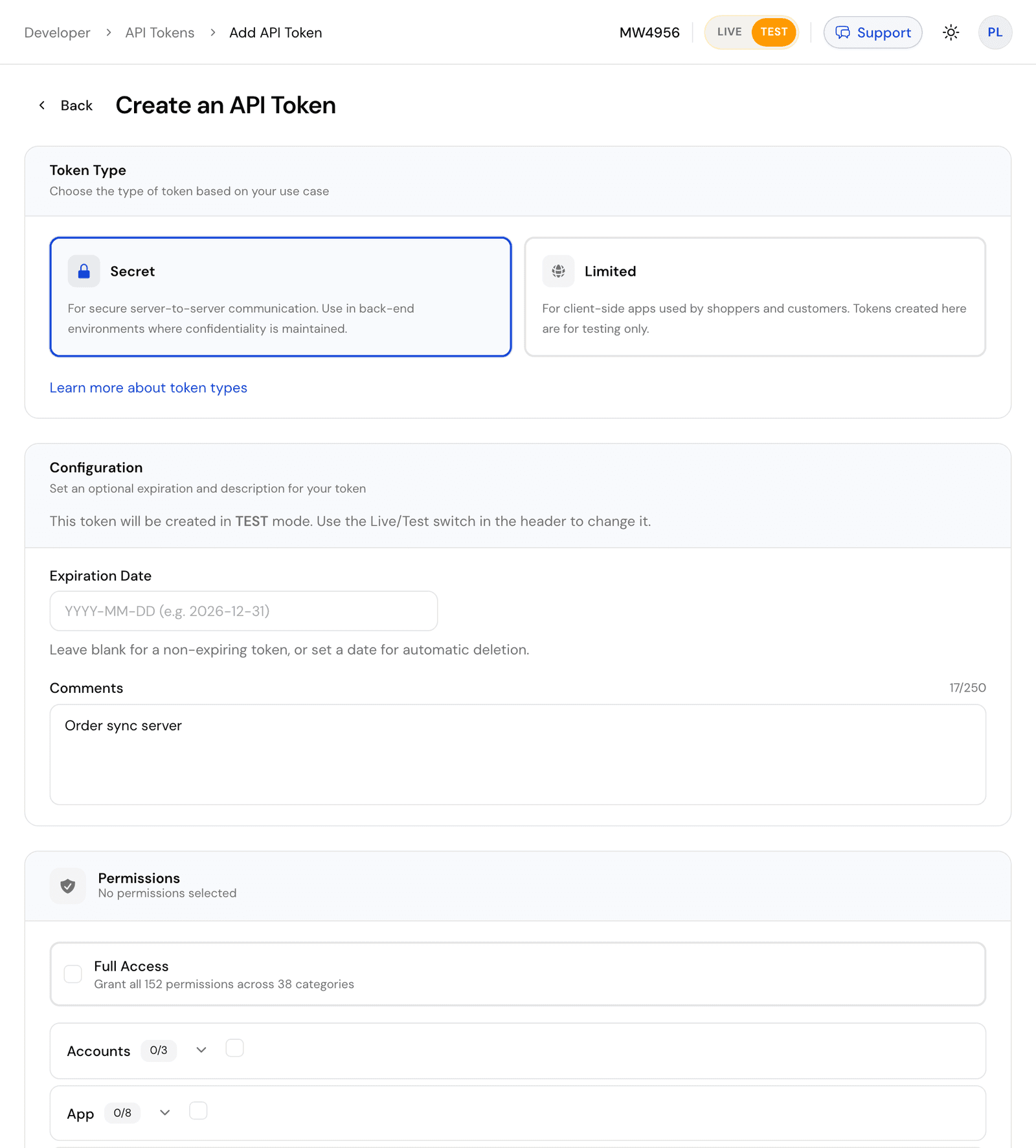
Save it in your shell so the next commands can use it:
export COMECERO_TEST_TOKEN="secret.test.your-token-here"A secret token belongs on your server. Never put one in a web page or an app.
Create a product
A cart can only hold products, so start with one. name, type and at least one price in prices are required. A new product is inactive, so send active: true to put it on sale.
curl https://api.comecero.com/api/v1/products \
  -H "Authorization: Bearer $COMECERO_TEST_TOKEN" \
  -H "Content-Type: application/json" \
  -d '{
    "product_id": "hello-ebook",
    "name": "Hello e-book",
    "type": "digital",
    "active": true,
    "prices": [{ "price": 9.99, "currency": "USD" }]
  }'
The response is the new product (trimmed here). In test mode, .test is added to the id you chose. A product_id can be used only once, so pick another one, or leave it out, if you run this again.
{
  "object": "product",
  "product_id": "hello-ebook.test",
  "test": true,
  "name": "Hello e-book",
  "type": "digital",
  "price": 9.99,
  "currency": "USD",
  "active": true
}
All fields: Create a product.
Create a cart
Put the product in a cart with a customer. Use the product_id from the last response.
curl https://api.comecero.com/api/v1/carts \
  -H "Authorization: Bearer $COMECERO_TEST_TOKEN" \
  -H "Content-Type: application/json" \
  -d '{
    "currency": "USD",
    "items": [{ "product_id": "hello-ebook.test", "quantity": 1 }],
    "customer": {
      "name": "John Doe",
      "email": "john@example.com",
      "billing_address": { "country": "US", "postal_code": "94101" }
    }
  }'
Comecero works out the subtotal, tax and total. Note the cart_id and the order_id the cart will get when it is paid:
{
  "object": "cart",
  "cart_id": "0091307952465CafhFSTa1",
  "order_id": "8352-CSGYX-348",
  "test": true,
  "open": true,
  "currency": "USD",
  "subtotal": 9.99,
  "tax": 0,
  "total": 9.99
}
Your tax may differ, depending on your tax settings. All fields: Create a cart.
Pay for the cart
Send a card to the cart's payments. The amount and currency come from the cart, so you send only the payment method. 4444555566661111 is a test card that always succeeds.
curl https://api.comecero.com/api/v1/carts/0091307952465CafhFSTa1/payments \
  -H "Authorization: Bearer $COMECERO_TEST_TOKEN" \
  -H "Content-Type: application/json" \
  -d '{
    "payment_method": {
      "type": "credit_card",
      "data": {
        "number": "4444555566661111",
        "exp_month": 12,
        "exp_year": 2030,
        "cvv": "123"
      }
    }
  }'
The payment comes back with status 201. The cart is now closed and the order exists:
{
  "object": "payment",
  "payment_id": "0090460891496PyrYzd9DC",
  "success": true,
  "status": "completed",
  "test": true,
  "currency": "USD",
  "total": 9.99,
  "order": "https://api.comecero.com/api/v1/orders/8352-CSGYX-348"
}
status is pending instead of completed when your fulfillment settings only authorize payments. A declined card returns 402 with the failed payment in error.meta.payment. All fields: Pay for a cart.
Fetch the order
Read the order with the order_id from the cart:
curl https://api.comecero.com/api/v1/orders/8352-CSGYX-348 \
-H "Authorization: Bearer $COMECERO_TEST_TOKEN"{
"object": "order",
"order_id": "8352-CSGYX-348",
"test": true,
"payment_status": "completed",
"currency": "USD",
"total": 9.99,
"items": [
{
"object": "order_item",
"product_id": "hello-ebook.test",
"name": "Hello e-book",
"quantity": 1
}
]
}All fields: Get an order. You can also see the order in the dashboard under Sales > Orders, with test mode on.
What happened
- The cart turned into an order when the payment succeeded. There is no call that creates an order directly.
- Comecero sent a receipt email to the customer and fired events such as
order:created. Subscribe to them with webhooks to update your own systems. - Everything you made is test data. A live token cannot see it, and it never reaches a real bank.
Next steps
Overview
What Comecero gives a developer, how the API, dashboard and hosted storefront fit together, and how test and live mode keep your data apart.
Account and test mode
Sign up for Comecero, keep test and live tokens and data apart, test payments with test cards for success and decline, and get ready to go live.