

Webhooks
Get events such as order created or payment completed sent to your server, check the signature, answer fast, skip repeats and resend failed events.
This guide shows you how to have Comecero tell your server when something happens, such as a new order or a completed payment. You create a webhook subscription, check that each delivery really comes from Comecero, answer it fast, and resend any delivery your server missed.
In the API a webhook subscription is called an event subscription, and each delivery is an event.
Create a webhook subscription
A subscription sends one event type to one destination. Make one subscription for each event type you need.
In the dashboard
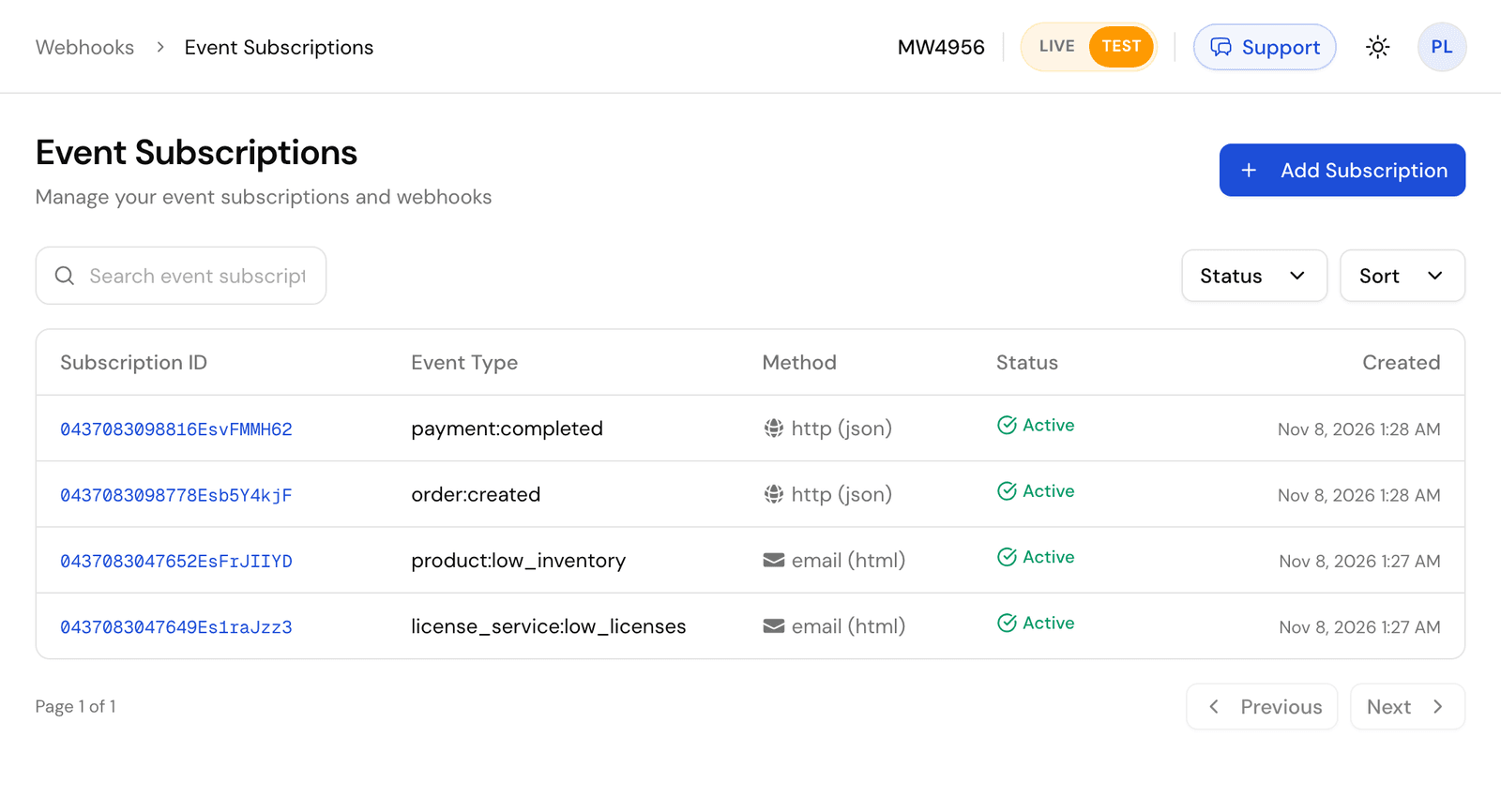
Go to Webhooks > Event Subscriptions and click Add Subscription.
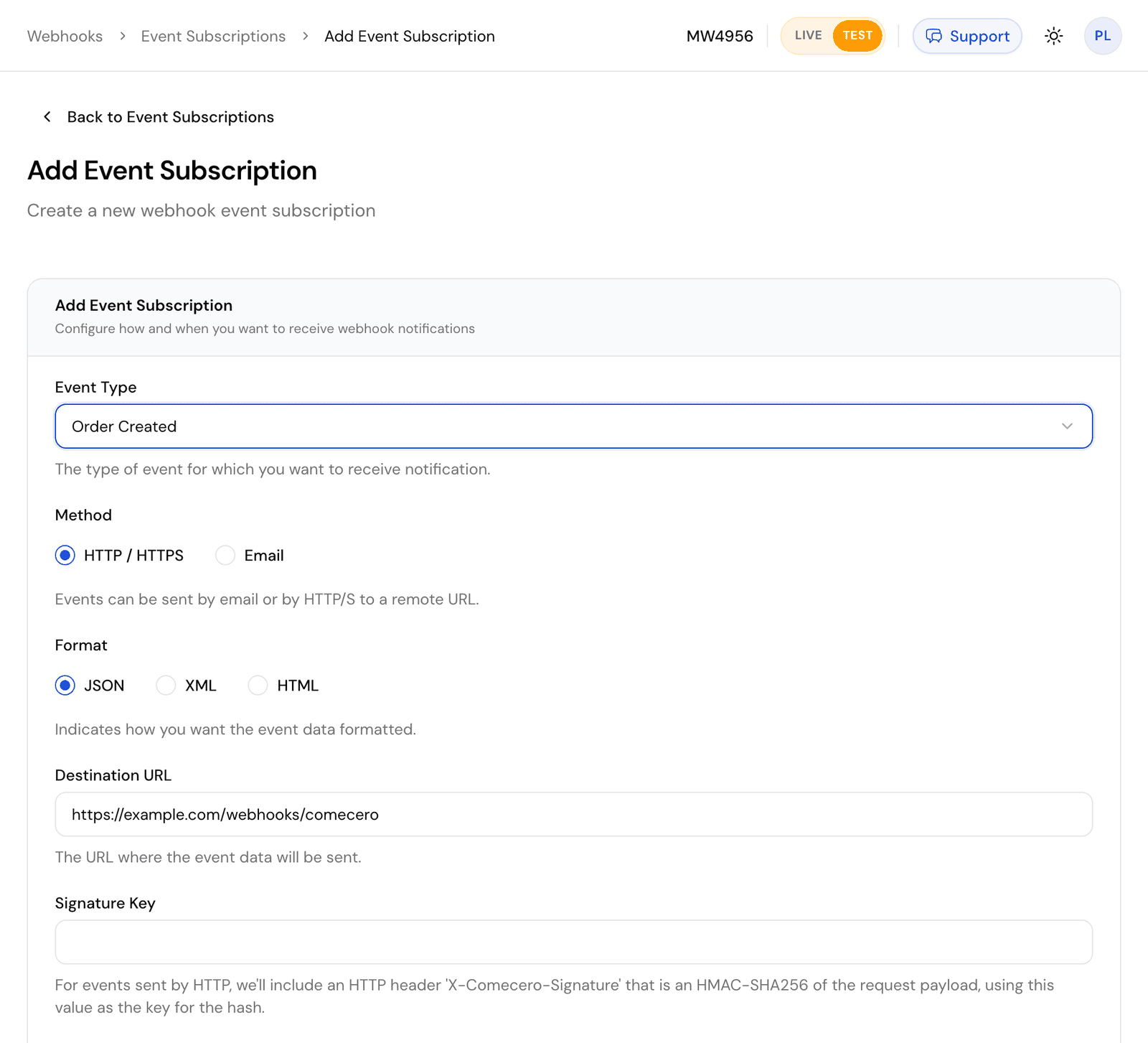
Pick the Event Type, choose HTTP / HTTPS and JSON, enter your Destination URL and set Set Active? to Yes. Leave Signature Key empty to sign with your account's key.
With the API
Call Create an event subscription with a secret or trusted token.
curl https://api.comecero.com/api/v1/event_subscriptions \
  -H "Authorization: Bearer $COMECERO_TEST_TOKEN" \
  -H "Content-Type: application/json" \
  -d '{
    "event_type": "order:created",
    "active": true,
    "method": "http",
    "format": "json",
    "destination": "https://example.com/webhooks/comecero",
    "expand": "customer"
  }'
Send "active": true. A new subscription is inactive by default and sends nothing until you turn it on.
A few rules:
- The destination must be a public URL. Comecero does not send to
localhostor a private network, so use a tunnel while you develop. - A subscription receives only events of its own mode. Test subscriptions get test events. Create your subscriptions again in live mode when you go live.
expand,showandhideshape the object indata, the same way they shape a GET. For exampleexpand: "customer"sends the full customer inside the order instead of its URL. See Expanding objects.environment_variablesare name and value pairs that come back in every event, for example to tell your endpoint which store the event is for.- You can also send email (
method: email), to up to 6 addresses. Thehtmlformat sendsdataas a readable table.
What a delivery looks like
Comecero sends an HTTP POST with Content-Type: application/json and the user agent Comecero-Event (+https://comecero.com). The body is an event with the object in data, shaped like a GET of that object at the time of the event.
{
  "object": "event",
  "url": "https://api.comecero.com/api/v1/events/1102611073847EVt7Kq2Za",
  "event_id": "1102611073847EVt7Kq2Za",
  "test": true,
  "account_id": "AB1234",
  "type": "order:created",
  "event_subscription": "https://api.comecero.com/api/v1/event_subscriptions/1102610913420ES4f9QmLp",
  "fingerprint": "k2P9wQ7xR4vT1nY8",
  "status": "queued",
  "date_created": "2026-11-07T14:32:10Z",
  "date_modified": "2026-11-07T14:32:10Z",
  "environment_variables": { "store": "main" },
  "data": {
    "object": "order",
    "order_id": "7393-GMRFY-954",
    "payment_status": "completed",
    "currency": "USD",
    "total": 49.95
  }
}event_idis the id of this delivery. It stays the same when the delivery is retried.fingerprintis the id of the thing that happened. Two subscriptions to the same event get differentevent_ids and the samefingerprint.- Dates use the subscription's
timezone, or your account's time zone.
Download a full sample order:created delivery.
Check the signature
Every delivery carries an X-Comecero-Signature header: the HMAC-SHA256 of the raw request body, keyed with the signature key, as 64 lowercase hex characters. The key is the subscription's signature_key, or your account's key under Settings > Technical when the subscription has none. Every account gets one when it is made.
To check it:
- Read the body as raw bytes, before any JSON parsing.
- Compute the HMAC-SHA256 of those bytes with your signature key.
- Compare it with the header in constant time. Reject the delivery when they differ.
// npm install express
import crypto from 'node:crypto';
import express from 'express';

const app = express();
const signatureKey = process.env.COMECERO_SIGNATURE_KEY;

function isFromComecero(rawBody, signature) {
  const expected = crypto.createHmac('sha256', signatureKey).update(rawBody).digest('hex');
  const received = Buffer.from(signature ?? '', 'utf8');
  return received.length === expected.length && crypto.timingSafeEqual(received, Buffer.from(expected, 'utf8'));
}

// express.raw keeps the body as a Buffer, exactly as it was sent.
app.post('/webhooks/comecero', express.raw({ type: '*/*' }), (req, res) => {
  if (!isFromComecero(req.body, req.get('x-comecero-signature'))) {
    return res.sendStatus(401);
  }
  const event = JSON.parse(req.body.toString('utf8'));
  res.sendStatus(200); // answer first, then do the work
  handleEvent(event).catch(console.error);
});

async function handleEvent(event) {
  // Skip repeats, then act on event.type and event.data.
}

app.listen(3000);
Do not compute the signature over JSON you parsed and wrote back out: the bytes change and the signature no longer matches.
The signature has no timestamp, so a recorded delivery could be sent again. Skipping event_ids you already handled (below) guards against that. If you cannot check signatures at all, treat each event only as a hint: get the object by its id from the API before you act on it.
You can also add HTTP Basic authorization (http_authorization_username and http_authorization_password) or a custom header (custom_header_name and custom_header_value) to each delivery, as a second check.
Answer fast
Answer with any 2xx status within 60 seconds. The body of your answer is ignored. Anything else counts as a failure: another status (redirects are not followed), a timeout or no connection.
Do the slow work after you answer: put the event on a queue, answer 200, then process it.
Retries and the events log
After a failure Comecero retries on a growing schedule: three times 2 minutes apart, then every 15 minutes, every hour, every 2 hours, every 4 hours and every 8 hours. That is 23 attempts over about 56 hours. Then the event is failed and is not tried again by itself.
To find deliveries that did not get through, go to Webhooks > Events in the dashboard, or list events with status=retry or status=failed. With no status, the list shows only delivered events. Add debug=true to see why the last attempt failed.
To send an event again now, open it in the dashboard and click Retry Delivery (or Resend Event for one that was delivered) or call Retry an event. It goes to the subscription's current destination with the same event_id and data. Events are kept for 30 days after their last change, and for 7 days once delivered or in test mode.
Skip repeats
A delivery can arrive more than once, and events can arrive out of order. Store each event_id you handle and skip one you have seen. Before you overwrite your own data, compare date_created, or get the object fresh from the API, so an older event does not undo a newer one.
Send a test event
Open a subscription in the dashboard and click Send Test. Pick a test template and Comecero sends one sample event to the destination at once and shows whether it got through. Templates are under Webhooks > Event Test Templates.
With the API, call Send a test event with the subscription id and a template id. The answer says whether the attempt worked:
{
  "success": false,
  "error": "There was a problem contacting the remote server: HTTP Status Code: 404, Response Content (preview of first 500 characters): Not Found",
  "event_id": "1102611204410EVn3Rk8Wd",
  "event_type": "order:created"
}
The test event is signed and shaped like a real one, and it is sent even when the subscription is inactive. It is not saved, so it is not in the events log and is never retried.
The events
Each event has its own page with the exact data it sends.
Orders and carts
order:created: a cart or invoice was paid and its order made. The usual event for starting fulfillment. Checkpayment_status: an authorized payment also makes an order.order:payment_completed: no payment on the order is pending any more, so the money is taken.order:fulfilled: every item on the order is fulfilled.order:licenses_assigned: every item that needs a license key has one.cart:payment_completed: the completed payments on the order made from a cart cover its total and none is pending.
Payments and refunds
payment:created_successandpayment:created_failure: a payment attempt succeeded or failed.payment:completed: a payment was captured, at once or later.payment:captured_success,payment:captured_failureandpayment:voided: an authorization was captured, failed to capture, or was voided.refund:created_success,refund:created_failureandrefund:deleted.
Invoices
Subscriptions
subscription:created,subscription:modified,subscription:convertedandsubscription:completed.subscription:renewal_successandsubscription:renewal_failure.subscription:cancellation_scheduled,subscription:cancellation_unscheduledandsubscription:cancelled.subscription_item:added,subscription_item:modified,subscription_item:cancellation_scheduled,subscription_item:cancellation_unscheduledandsubscription_item:cancelled.
Shipments
Catalog and account
product:created,product:modified,product:deletedandproduct:low_inventory.license_service:low_licenses.gateway:createdandgateway:modified.event_subscription:created,event_subscription:modifiedandevent_subscription:deleted. The first two carry the signature key, so treat them as secret.account:modified(live mode only),user:createdanduser:modified.
Accept payments
Build a checkout with the API. Create a cart, take a card, PayPal or Apple Pay payment, handle 3-D Secure and declines, and capture or void later.
Subscriptions
Sell a subscription with a plan and a cart, follow renewals with webhooks, change items with proration, cancel, retry failed payments and handle grace periods.